项目第一天—JSP
一、项目的介绍
第二阶段的目标:培养我们的web思维,能够编写整个的项目(增删改查)
行情来了 —> 一些客户进行虚拟货币/炒股需要一些参考,我们每一天都根据行情,给其推送不同的行情,让其进行选择性交易。
每天获取不同的行情,给我平台的用户,推送我们的邮件。
整个项目的一个具体的需求:
1、做一个后台管理系统,在后台可以整理我们的客户:新增,修改,客户的续费,客户删除;还需要做个邮箱管理【每个邮箱每天发送的邮件数量是一定的,如果给多个人发送,可能出现邮箱发不出邮件的问题,解决方案:多申请几个邮箱】,如果客户群体很大,可以申请微信公众号,做推送。
2、通过定时抓包获取某个网站的炒股或者虚拟货币的信息,群发邮件。
定时任务,群发邮件。
我们写的项目一定要符合商业逻辑。
举个例子:电商项目
1、商丘宁陵县 管理大概14个小区的物业。物业公司收物业费,很多人选择不交。—解决方案:做个社区电商项目,引导业主来消费:业主线下来我们指定的店进行消费,平价。每消费多少元就积分,等一年的时候根据积分情况,免除物业费。1.2元/平100平=120元12=1440元。
选择线上购物,满多少元,可以给你送。 O2O模式。
可以给业主充值天然气,这家公司经营天然气充值POS机。在某些区域内选择最有诚意的便利店,把机器放到此处。便利店需要给这家公司一定得费用,因为我帮你引流了。
2、在我们电商平台消费,可以挖矿。
fil矿机经营者,直接卖矿机,不太好卖,价格比较高。为了卖出矿机,创建一个商城:日常消费用品,只卖利润高的产品:四件套,珠宝首饰,卖卫生纸。将一部分利润买成矿机,用户只要在这里消费,就给一定的算力,不仅得到为了东西,将来分币—分钱。
二、Bootstrap写项目的页面
常用的web项目前端框架:Bootstap,LayUI,妹子UI(Amaze UI),Easy UI, Ext JS ,使用方法:熟悉整个网站的各种组件,进行页面的编写。
Html/CSS/JS web三剑客,没有UI设计师,又想做出来比较好看的页面,框架本身还考虑到了兼容性的问题,就需要上面的组件。
<!doctype html><html lang="zh-CN"><head><meta charset="utf-8"><meta http-equiv="X-UA-Compatible" content="IE=edge"><meta name="viewport" content="width=device-width, initial-scale=1"><!-- 上述3个meta标签*必须*放在最前面,任何其他内容都*必须*跟随其后! --><title>行情来了客户管理</title><!-- Bootstrap --><link rel="stylesheet" href="css/bootstrap.min.css" ><!-- HTML5 shim 和 Respond.js 是为了让 IE8 支持 HTML5 元素和媒体查询(media queries)功能 --><!-- 警告:通过 file:// 协议(就是直接将 html 页面拖拽到浏览器中)访问页面时 Respond.js 不起作用 --><!--[if lt IE 9]><script src="https://cdn.jsdelivr.net/npm/html5shiv@3.7.3/dist/html5shiv.min.js"></script><script src="https://cdn.jsdelivr.net/npm/respond.js@1.4.2/dest/respond.min.js"></script><![endif]--><style type="text/css">th,td{text-align:center}</style></head><body><nav class="navbar navbar-inverse" style="border-radius:0px;margin-bottom: 0px"><div class="container"><!-- Brand and toggle get grouped for better mobile display --><div class="navbar-header"><a class="navbar-brand" href="#">行情来了后台管理系统</a></div><!-- Collect the nav links, forms, and other content for toggling --><div class="collapse navbar-collapse" id="bs-example-navbar-collapse-9"><ul class="nav navbar-nav"><li class="active"><a href="#">客户管理</a></li><li><a href="#">邮箱管理</a></li></ul><ul class="nav navbar-nav navbar-right"><li><a href="#">admin</a></li><li><a href="#"> <span class="glyphicon glyphicon-log-in"></span></a></li><li><a href="#">退出</a></li></ul></div><!-- /.navbar-collapse --></div><!-- /.container-fluid --></nav><div class="jumbotron" style="padding-top: 20px;padding-bottom: 20px"><div class="container"><h2>客户管理系统</h2></div></div><div class="container"><div class="row"><div class="col-md-6"><button type="button" class="btn btn-primary">添加</button><button type="button" class="btn btn-danger">批量删除<span class="badge">0</span></button></div><div class="col-md-6" style="text-align:right;padding-right:30px;"><form class="form-inline"><div class="form-group"><input type="email" class="form-control" id="exampleInputEmail3" placeholder="客户邮箱"></div><!-- Single button --><div class="btn-group"><button type="button" class="btn btn-success dropdown-toggle" data-toggle="dropdown" aria-haspopup="true" aria-expanded="false">--客户类型-- <span class="caret"></span></button><ul class="dropdown-menu"><li><a href="#">试用客户</a></li><li><a href="#">月卡用户</a></li><li><a href="#">年卡用户</a></li></ul></div><button type="submit" class="btn btn-info">查询</button></form></div></div></div><div class="container" style="margin-top:20px;text-align:center"><div class="row"><table class="table table-bordered table-hover"><thead><tr><th><input type="checkbox"/></th><th>序号</th><th>客户邮箱</th><th>客户登记</th><th>过期时间</th><th>编辑</th><th>删除</th></tr></thead><tbody><tr><td scope="row"><input type="checkbox"/></td><td>1</td><td>838700991@qq.com</td><td>年卡会员</td><td>2022-08-31</td><td><a href="#"> <span class="glyphicon glyphicon-edit"></span></a></td><td><a href="#"> <span class="glyphicon glyphicon-trash"></span></a></td></tr><tr><td scope="row"><input type="checkbox"/></td><td>2</td><td>838700991@qq.com</td><td>年卡会员</td><td>2022-08-31</td><td><a href="#"> <span class="glyphicon glyphicon-edit"></span></a></td><td><a href="#"> <span class="glyphicon glyphicon-trash"></span></a></td></tr><tr><td scope="row"><input type="checkbox"/></td><td>3</td><td>838700991@qq.com</td><td>年卡会员</td><td>2022-08-31</td><td><a href="#"> <span class="glyphicon glyphicon-edit"></span></a></td><td><a href="#"> <span class="glyphicon glyphicon-trash"></span></a></td></tr><tr><td scope="row"><input type="checkbox"/></td><td>4</td><td>838700991@qq.com</td><td>年卡会员</td><td>2022-08-31</td><td><a href="#"> <span class="glyphicon glyphicon-edit"></span></a></td><td><a href="#"> <span class="glyphicon glyphicon-trash"></span></a></td></tr><tr><td scope="row"><input type="checkbox"/></td><td>5</td><td>838700991@qq.com</td><td>年卡会员</td><td>2022-08-31</td><td><a href="#"> <span class="glyphicon glyphicon-edit"></span></a></td><td><a href="#"> <span class="glyphicon glyphicon-trash"></span></a></td></tr></tbody></table></div></div><div class="container"><nav aria-label="..." class="navbar-right"><ul class="pagination"><li class="disabled"><a href="#" aria-label="Previous"><span aria-hidden="true">«</span></a></li><li class="active"><a href="#">1 <span class="sr-only">(current)</span></a></li><li><a href="#">2</a></li><li><a href="#">3</a></li><li><a href="#">4</a></li><li><a href="#">5</a></li><li><a href="#" aria-label="Next"><span aria-hidden="true">»</span></a></li></ul></nav></div><!-- jQuery (Bootstrap 的所有 JavaScript 插件都依赖 jQuery,所以必须放在前边) --><script src="js/jquery-3.2.1.min.js" ></script><!-- 加载 Bootstrap 的所有 JavaScript 插件。你也可以根据需要只加载单个插件。 --><script src="js/bootstrap.min.js" ></script></body></html>
三、学习JSP
1、JSP就是Servlet
jsp,虽然长得跟html一样,但是,jsp页面不许运行在tomcat中,通过浏览器打开一个jsp页面是无法显示的,但是html可以正常显示。
a.jsp —> ajsp.java —> 发现其实是一个servlet
为什么这么干? 因为我们在servlet中编写页面效率非常的低,如果可以编写jsp像编写html一样简单就可以了—> jsp—>擅长写html页面
业务逻辑部分—>Servlet
页面展示 —> Jsp
2、jsp的指令
_jsp的指令:
作用:用于配置jsp页面,导入资源文件
分类:
1、page 用于配置jsp页面的
contentType: 等同于response.setContentType(“text/html;charset=UTF-8”)
language: java 目前只支持java
import : 导入java的package
errorPage: 当当前页面发送错误时,会自动跳转到错误页面
isErrorPage: true 表示当前页面是否是错误页面
如果错误页面isErrorPage=true,可以使用jsp的内置对象exception
jsp中有9个内置对象,所谓的内置对象就是直接拿过来就能使用的对象。
2、include : 导入页面的资源文件
3、tablib : 导入资源
<%@ taglib prefix=”p” uri=”http://java.sun.com/jsp/jstl/core“ %>
3、jsp代码的注释
只能注释html,无法注释掉jsp
<%—jsp的注释—%> 可以注释所有内容,html/jsp
4、jsp的九大内置对象 Student stu;
| 变量名 | 真实类型 | 解释 |
|---|---|---|
| pageContext | PageContext | 可以获取其他八个内置对象,当前页面的数据共享 |
| request | HttpServletRequest | 域对象 |
| session | HttpSession | 表示一次会话,包含多次请求与响应 |
|---|---|---|
| application | ServletContext | 所有用户间数据共享(域对象) |
| response | HttpServletResponse |
| page | Object | 当前的Servlet对象 this |
|---|---|---|
| out | JspWriter | 输出对象,输出到页面上 |
| config | ServletConfig | |
| exception | Throwable | 异常对象 |
EL & JSTL(重点) —> 简化页面中的java代码
1、EL
表达式语言,用于简化和替换我们的jsp中的java代码。
语法:${表达式} —> <%java 代码%>
三个作用:
1) 表达式运算
${10/2}<br/>
${10 div 2}<br/>
${10 == 10}<br/>
${ 10 > 5 }<br/>
2) 判断 ${empty list} ${not empty list}
3) 取值— EL表达式主要是从域中取值的 pageContext request session application 取值
必须将值塞入四个域对象中我才可以获取值,否则取不出来
pageContext (当前的页面) < request (本次请求) < session(本次会话) < application (当前项目)
一般主要用 request/session ,其他两个基本不用。
${name} —> 从四个域中获取叫name名字的值,先从最小的域开始查找,一直查找到最大的域中。
${requestScope.name} —> 从request域中获取name值
2、JSTL —-> 作用是用于展示和判断java的数据 (if foreach choose)
1) 引入两个jar 包 standard.jar jstl.jar
2) 在需要引入jstl的页面,需要写表头
<%@ taglib prefix=”c“ uri=”http://java.sun.com/jsp/jstl/core“%>
3)
4)
items: 存放需要循环的集合 var 表示一个变量名,从集合中获取一个值,赋值给该变量名
varStatus :里面有两个属性 count代表该循环指定到第几次了,从1开始,index 代表每次循环的下标,从0开始
<c:forEach items="${customerList}" var="cus" varStatus="vvv"><tr><td scope="row"><input type="checkbox"/></td><td>${vvv.count}</td><td>${cus.address}</td><td>${cus.levelName}</td><td>${cus.overTime}</td><td><a href="#"> <span class="glyphicon glyphicon-edit"></span></a></td><td><a href="#"> <span class="glyphicon glyphicon-trash"></span></a></td></tr></c:forEach>
取值的时候使用的是EL表达式,EL表达式为什么能获取到值?其实调用的是某个类的get方法。cus.overTime 其实调用的Customer中的getOverTime方法。 getOverTimeStr()—>OverTimeStr—>overTimeStr
四、使用JSP进行页面的改造
<%@ page contentType="text/html;charset=UTF-8" language="java" %><%@ taglib prefix="c" uri="http://java.sun.com/jsp/jstl/core"%><!doctype html><html lang="zh-CN"><head><meta charset="utf-8"><meta http-equiv="X-UA-Compatible" content="IE=edge"><meta name="viewport" content="width=device-width, initial-scale=1"><!-- 上述3个meta标签*必须*放在最前面,任何其他内容都*必须*跟随其后! --><title>行情来了客户管理</title><!-- Bootstrap --><link rel="stylesheet" href="css/bootstrap.min.css" ><!-- HTML5 shim 和 Respond.js 是为了让 IE8 支持 HTML5 元素和媒体查询(media queries)功能 --><!-- 警告:通过 file:// 协议(就是直接将 html 页面拖拽到浏览器中)访问页面时 Respond.js 不起作用 --><!--[if lt IE 9]><script src="https://cdn.jsdelivr.net/npm/html5shiv@3.7.3/dist/html5shiv.min.js"></script><script src="https://cdn.jsdelivr.net/npm/respond.js@1.4.2/dest/respond.min.js"></script><![endif]--><style type="text/css">th,td{text-align:center}</style></head><body><nav class="navbar navbar-inverse" style="border-radius:0px;margin-bottom: 0px"><div class="container"><!-- Brand and toggle get grouped for better mobile display --><div class="navbar-header"><a class="navbar-brand" href="#">行情来了后台管理系统</a></div><!-- Collect the nav links, forms, and other content for toggling --><div class="collapse navbar-collapse" id="bs-example-navbar-collapse-9"><ul class="nav navbar-nav"><li class="active"><a href="#">客户管理</a></li><li><a href="#">邮箱管理</a></li></ul><ul class="nav navbar-nav navbar-right"><li><a href="#">admin</a></li><li><a href="#"> <span class="glyphicon glyphicon-log-in"></span></a></li><li><a href="#">退出</a></li></ul></div><!-- /.navbar-collapse --></div><!-- /.container-fluid --></nav><div class="jumbotron" style="padding-top: 20px;padding-bottom: 20px"><div class="container"><h2>客户管理系统</h2></div></div><div class="container"><div class="row"><div class="col-md-6"><button type="button" class="btn btn-primary">添加</button><button type="button" class="btn btn-danger">批量删除<span class="badge">0</span></button></div><div class="col-md-6" style="text-align:right;padding-right:30px;"><form class="form-inline"><div class="form-group"><input type="email" class="form-control" id="exampleInputEmail3" placeholder="客户邮箱"></div><!-- Single button --><div class="btn-group"><button type="button" class="btn btn-success dropdown-toggle" data-toggle="dropdown" aria-haspopup="true" aria-expanded="false">--客户类型-- <span class="caret"></span></button><ul class="dropdown-menu"><li><a href="#">试用客户</a></li><li><a href="#">月卡用户</a></li><li><a href="#">年卡用户</a></li></ul></div><button type="submit" class="btn btn-info">查询</button></form></div></div></div><div class="container" style="margin-top:20px;text-align:center"><div class="row"><table class="table table-bordered table-hover"><thead><tr><th><input type="checkbox"/></th><th>序号</th><th>客户邮箱</th><th>客户登记</th><th>过期时间</th><th>编辑</th><th>删除</th></tr></thead><tbody><c:if test="${not empty customerList}"><c:forEach items="${customerList}" var="cus" varStatus="vvv"><tr><td scope="row"><input type="checkbox"/></td><td>${vvv.count}</td><td>${cus.address}</td><td>${cus.levelName}</td><td>${cus.overTimeStr}</td><td><a href="#"> <span class="glyphicon glyphicon-edit"></span></a></td><td><a href="#"> <span class="glyphicon glyphicon-trash"></span></a></td></tr></c:forEach></c:if></tbody></table></div></div><div class="container"><nav aria-label="..." class="navbar-right"><ul class="pagination"><li class="disabled"><a href="#" aria-label="Previous"><span aria-hidden="true">«</span></a></li><li class="active"><a href="#">1 <span class="sr-only">(current)</span></a></li><li><a href="#">2</a></li><li><a href="#">3</a></li><li><a href="#">4</a></li><li><a href="#">5</a></li><li><a href="#" aria-label="Next"><span aria-hidden="true">»</span></a></li></ul></nav></div><!-- jQuery (Bootstrap 的所有 JavaScript 插件都依赖 jQuery,所以必须放在前边) --><script src="js/jquery-3.2.1.min.js" ></script><!-- 加载 Bootstrap 的所有 JavaScript 插件。你也可以根据需要只加载单个插件。 --><script src="js/bootstrap.min.js" ></script></body></html>
五、项目流程图
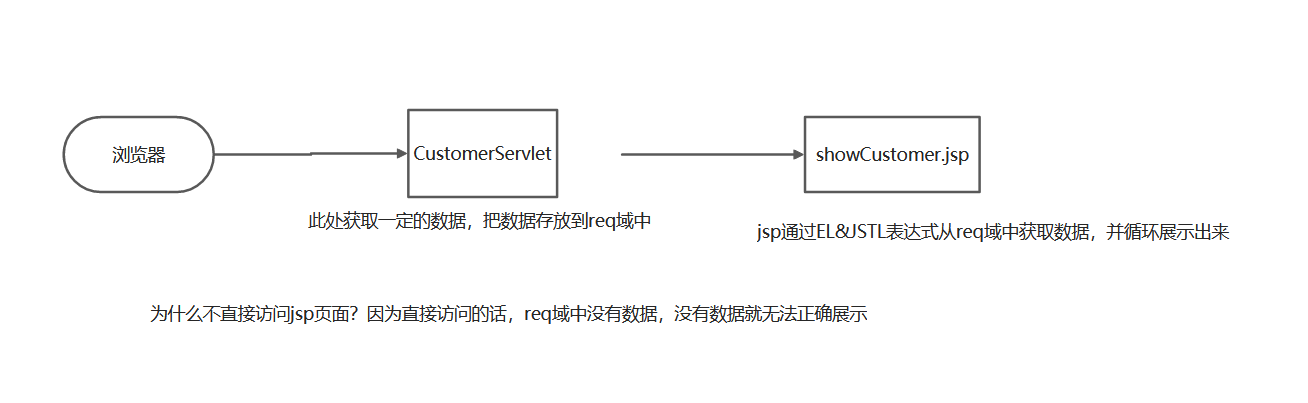
六、作业
1、完成今天的随堂代码
2、编写项目中的登录功能,要求页面美观,功能完善,登录成功后跳转到今天的页面中即可。
3、将今天代码中的模拟数据,变为真实数据

若有收获,就点个赞吧
0 人点赞


