项目第8天—分页&爬虫
一、分页
1、在WEB-INF下放一个自定义commonts.tld 文件,一定要放在WEB-INF下
2、将NavigationTag.java Page.java 拷贝到项目中,记得目录不能随便选
3、检查tld中的标签中的类路径和真实的类所在的路径是否一样,必须保持一致
—————————————实战———————————————-
4、在需要展示分页的jsp中导入 tld
<%@ taglib prefix=”p“ uri=”http://yanzhenwei.com/common/“ %>
在需要展示分页组件的地方,删除掉写死的样式,更换为如下:
<p:page url=”${pageContext.request.contextPath}/customer/list”></p:page>
5、编写Servlet 用于展示第一页的数据以及封装一个分页数据
第一版:
List<Customer> list = customerSerivce.showList();Page<Customer> page = new Page<Customer>();page.setPage(1); // 当前是第几页page.setRows(list);//当前页展示的数据page.setSize(5);// 每页展示的条数page.setTotal(50); // 总共有多少条数据// 名字page不能变req.setAttribute("page",page);req.getRequestDispatcher("/showCustomer.jsp").forward(req,resp);
需要修改showCustomer.jsp
<c:if test="${not empty page.rows}"><c:forEach items="${page.rows}" var="cus" varStatus="vvv"><tr><td scope="row"><input type="checkbox" name="ids" value="${cus.id}"/></td><td>${vvv.count}</td><td>${cus.name}</td><td>${cus.phone}</td><td>${cus.address}</td><td>${cus.levelName}</td><td>${cus.overTimeStr}</td><td><a href="${pageContext.request.contextPath}/customer/edit?id=${cus.id}"> <span class="glyphicon glyphicon-edit"></span></a></td><td><a onclick="delConfirm(${cus.id})"> <span class="glyphicon glyphicon-trash"></span></a></td></tr></c:forEach></c:if>
遇到的问题:
1、数据都是写死的
2、发现点击分页插件,多了两个参数 page rows
3、说好的每页展示多少条,实则没有进行分页查询
编写第二版:
public void list(HttpServletRequest req, HttpServletResponse resp) throws ServletException, IOException {// 根据访问分页插件的效果,我们发现url一直有两个参数// http://localhost/HqComing/customer/list?page=2&rows=5int pageNum = 1,rowsNum = 5;String p = req.getParameter("page"); // 当前页String rows = req.getParameter("rows");// 每页要展示的条数if(p!=null && !p.equals("")){pageNum = Integer.valueOf(p);rowsNum = Integer.valueOf(rows);}// 因为页面上有分页插件,所以我们需要给页面传递一个Page对象// 以下就不能查询所有了,而应该按照分页查询进行查找 limit begin,rows/*** 页数 开始位置 每页条数* 1 0 5* 2 5 5* 3 10 5* 。。。。。* 如果知道页数和每页的条数,如何计算开始位置* begin = (页数-1)*每页条数 分页必备公式*/int begin = (pageNum-1)*rowsNum;List<Customer> list = customerSerivce.showListByPage(begin,rowsNum);Page<Customer> page = new Page<Customer>();page.setPage(pageNum); // 当前是第几页page.setRows(list);//当前页展示的数据page.setSize(rowsNum);// 每页展示的条数page.setTotal(customerSerivce.countNum()); // 总共有多少条数据// 名字page不能变req.setAttribute("page",page);req.getRequestDispatcher("/showCustomer.jsp").forward(req,resp);}
总结:
为什么要导入tld,导入一些工具类?
如果让我们去编写一个带有多功能的分页插件是很困难。
比如:
1、当前是哪一页,哪一页就有选中的效果
2、第一页和最后一页,效果变灰,不可点击。
3、如果真有1000页数据的话,人家编写的效果只展示几页,其他页会随着你访问的情况不断展示和消失。
4、当前的工具显示的效果是Bootstrap效果
如果我们使用了别人写好的效果,这些都不用写了。
常见错误:
1、tld导入路径有问题,或者没有编译
Caused by: org.apache.jasper.JasperException: The absolute uri: [http://yanzhenwei.com/common/] cannot be resolved in either web.xml or the jar files deployed with this applicationat org.apache.jasper.compiler.DefaultErrorHandler.jspError(DefaultErrorHandler.java:55)at org.apache.jasper.compiler.ErrorDispatcher.dispatch(ErrorDispatcher.java:293)at org.apache.jasper.compiler.ErrorDispatcher.jspError(ErrorDispatcher.java:80)at org.apache.jasper.compiler.TagLibraryInfoImpl.generateTldResourcePath(TagLibraryInfoImpl.java:251)at org.apache.jasper.compiler.TagLibraryInfoImpl.<init>(TagLibraryInfoImp
继续完善项目:
1、之前我们的show方法,直接废弃了,被list方法替换,登录成功,新增成功,修改,删除,批量删除都需要跳转到list页面中
2、查询出来的数据,要不要进行分页?—答案是肯定的。
列表展示+分页查询+条件查询 公用的都是一个页面,公用的都是一个servlet方法。
废弃掉search方法,完善我们的list方法。
完善的代码:
public void list(HttpServletRequest req, HttpServletResponse resp) throws ServletException, IOException {// 根据访问分页插件的效果,我们发现url一直有两个参数// http://localhost/HqComing/customer/list?page=2&rows=5int pageNum = 1,rowsNum = 5;String p = req.getParameter("page"); // 当前页String rows = req.getParameter("rows");// 每页要展示的条数if(p!=null && !p.equals("")){pageNum = Integer.valueOf(p);rowsNum = Integer.valueOf(rows);}String address = req.getParameter("address");String levelName= req.getParameter("levelName");// 为了方便以后拓展查询条件,我使用customer对象进行参数传递CustomerVo customerVo = new CustomerVo();customerVo.setAddress(address);customerVo.setLevelName(levelName);int begin = (pageNum-1)*rowsNum;customerVo.setBegin(begin);customerVo.setRowsNum(rowsNum);List<Customer> list = customerSerivce.showListByPage(customerVo);Page<Customer> page = new Page<Customer>();page.setPage(pageNum); // 当前是第几页page.setRows(list);//当前页展示的数据page.setSize(rowsNum);// 每页展示的条数page.setTotal(customerSerivce.countNum(customerVo)); // 总共有多少条数据// 名字page不能变req.setAttribute("page",page);req.getRequestDispatcher("/showCustomer.jsp").forward(req,resp);}
将分页数据和我们的查询数据封装在了一个对象中CustomerVo
package com.qfedu.pojo;/*** 为什么要拓展一个CustomerVo 呢?* 因为传递参数的时候原始的Customer 缺少两个字段。*/public class CustomerVo extends Customer {private int begin;private int rowsNum;public int getBegin() {return begin;}public void setBegin(int begin) {this.begin = begin;}public int getRowsNum() {return rowsNum;}public void setRowsNum(int rowsNum) {this.rowsNum = rowsNum;}}
注意的点:
获取总数的时候也需要带有条件的进行查询,不能再获取数据库中的总条数了。
刚进入list页面的时候,任何数据都没有,没有分页数据(展示第一页数据),没有查询条件(只展示分页即可),所以展示的是所有数据
记得这个公式:
如果知道页数和每页的条数,如何计算开始位置
begin = (页数 - 1)*每页条数 分页必备公式
二、爬虫
Python搞爬虫比较专业一些,Java也可以搞。
行情来了— 为我们的客户提供比较精准的炒股,炒币等信息。
网站:https://www.abuquant.com/rankDetail/final_score_rank/coin/day#selectExchange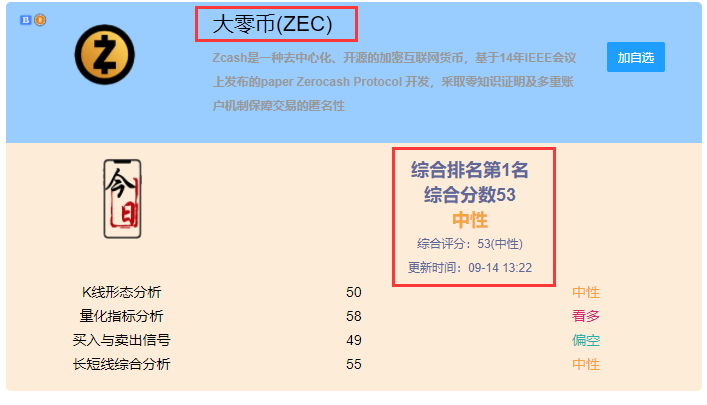
爬到数据之后,以邮件的方式发送给我的订阅客户!
Java如何爬取想要的数据呢?—> Jsoup 工具。官网—https://jsoup.org/
JSoup 是java 开发的一款html解析器,可以直接解析某个url,html文本,提供了一整套非常省力的API.
参考网站:https://blog.csdn.net/justLym/article/details/105715516
该工具类:
先通过网址获取到一个Document对象
然后通过各种API获取Element 或者 Elements 元素

若有收获,就点个赞吧
0 人点赞


