文件上传和下载
回顾
一、EL表达式Expression Lanauage 表达式语言替代JSP页面中小脚本的<%=request.getAttribute("name")%> ===${name}语法${名称}---->从小到大。pageContext——-->request-->session-->application指定作用域查找${requestScope.name}${1+1}算术运算、逻辑运算、三目运算、关系运算empty null "" 是否为空字符串隐式对象:pageContext、requestScope、SessionScope、ApllicationScope、pageScope、param、paramValues、header、headerValues、cookie、Config二、JSTLjstl standard<%@ taglib prefix = "c" uri="http://java.sun.com/jsp/jstl/core" %><c:set var="" value="" scope></c:set><c:out var="${}" ></c:out><c:remove var=""></c:remove><c:out var="${}" default="默认值" ></c:out><c:if test="条件"></c:if><c:choose><c:when test=""></c:when><c:when test=""></c:when><c:when test=""></c:when><c:otherwise>等价于else</c:otherwise></c:choose><c:forEach var="i" begin="1" end="100" step="1">变量为 i 初始为1 到100 每次增加1</c:forEach><c:forEach items="${集合}" var="dept" varStatus="">${dept.dname}</c:forEach><select name="deptno"><c:forEach items="${allDept}" var="dept"><option value="${dept.deptno}"<c:if test="${emp.deptno==dept.deptno}">selected</c:if>>${dept.dname}</option></c:forEach></select>三、MVCMODEL 实体类VIEW jspCONTROLLER servletweb、 dao、service 、entity 、filter四、分页limit
今日内容
1、文件上传2、文件下载
教学目标
1、掌握文件上传2、掌握文件下载
第一节 文件上传
1.1 文件上传三要素
- 提供form表单,method必须是post!
- form表单的enctype必须是multipart/form-data
- 提供 input type=”file” 类型输入
1.2 实现文件上传
1.2.2 编写上传页面
<%@ page language="java" pageEncoding="UTF-8"%><!DOCTYPE HTML><html><head><title>文件上传</title></head><body><form action="${pageContext.request.contextPath}/servlet/UploadHandleServlet" enctype="multipart/form-data" method="post">上传用户:<input type="text" name="username"><br/>上传文件1:<input type="file" name="file1"><br/>上传文件2:<input type="file" name="file2"><br/><input type="submit" value="提交"></form></body></html>
1.2.3 配置
<servlet><servlet-name>UploadHandleServlet</servlet-name><servlet-class>me.gacl.web.controller.UploadHandleServlet</servlet-class></servlet><servlet-mapping><servlet-name>UploadHandleServlet</servlet-name><url-pattern>/servlet/UploadHandleServlet</url-pattern></servlet-mapping>
1.3 文件上传细节注意
上述的代码虽然可以成功将文件上传到服务器上面的指定目录当中,但是文件上传功能有许多需要注意的小细节问题,以下列出的几点需要特别注意的
1、为保证服务器安全,上传文件应该放在外界无法直接访问的目录下,比如放于WEB-INF目录下。
String filepath = request.getServletContext().getRealPath("/WEB-INF/upload");
2、为防止文件覆盖的现象发生,要为上传文件产生一个唯一的文件名。
public class UploadUtils{//使用UUID生成唯一标识码,拼接上图片的名称。public static String NewFileName(String filename){return UUID.randomUUID().toString().replaceAll("-","")+"_"+filename;}}
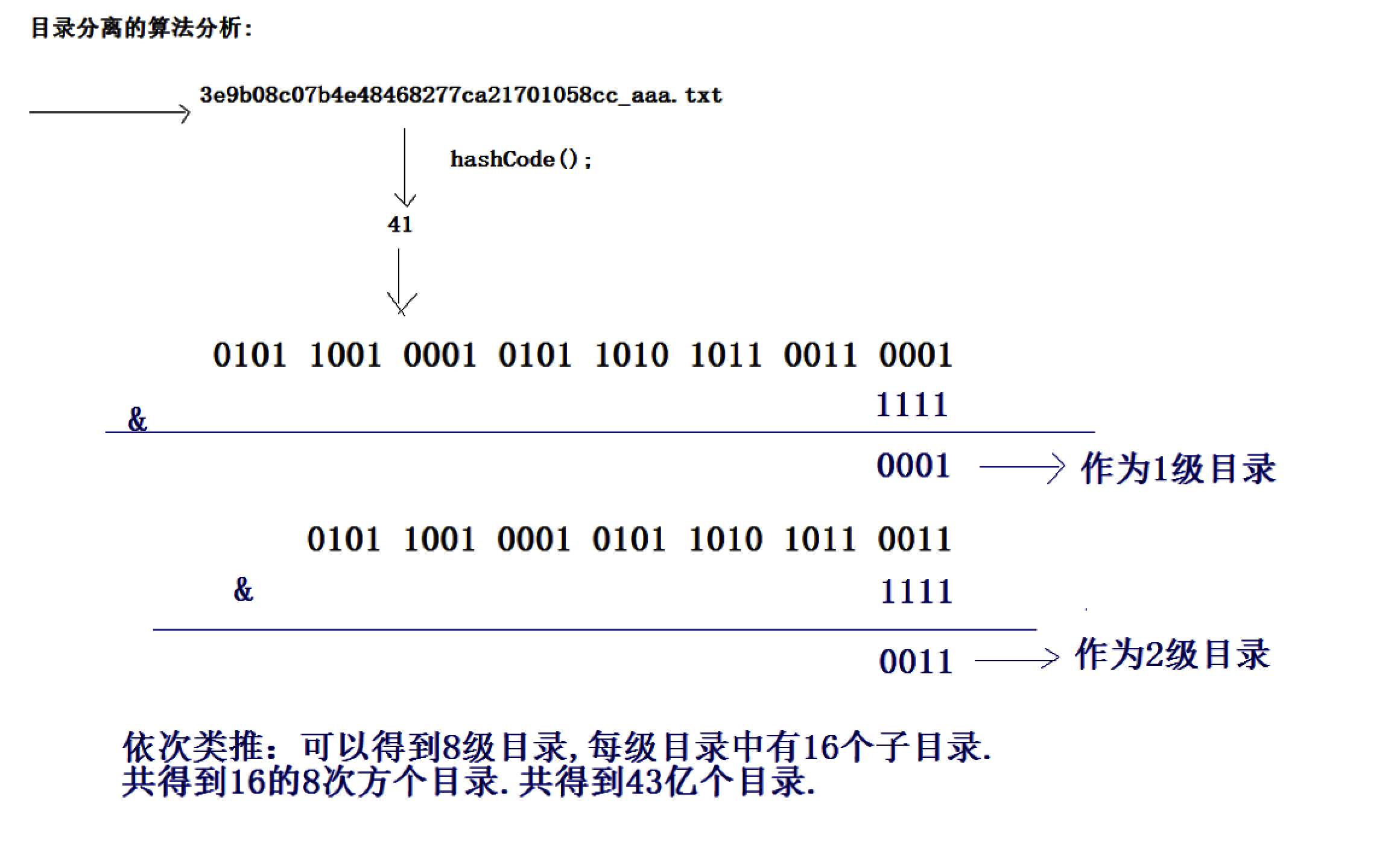
3、为防止一个目录下面出现太多文件,要使用hash算法打散存储。
public static String NewFilePath(String basePath,String filename){int hashcode = filename.hashCode();int path1 = hashcode&15;//与运算 0~15 二级int path2 = (hashcode>>4)&15;//与运算 0~15 三级String dir = basePath+"\\"+path1+"\\"+path2;//与一级目录拼接一起File file = new File(dir);if(!file.exists()){file.mkdirs();}return dir;}
4、要限制上传文件的类型,在收到上传文件名时,判断后缀名是否合法。**
//创建一个集合存放允许上传的文件的类型(后缀名)//判断所上传的文件在当前集合当中是否包含。List<String> nameList = new ArrayList<String>();nameList.add(".jpg");nameList.add(".bmp");nameList.add(".png");String extName = filename.substring(filename.lastIndexOf("."));if(!nameList.contains(extName)){System.out.println("上传失败");return;}
最终处理代码改进为:
package com.qf.servlet;import java.io.IOException;import java.util.Collection;import javax.servlet.ServletException;import javax.servlet.annotation.MultipartConfig;import javax.servlet.annotation.WebServlet;import javax.servlet.http.HttpServlet;import javax.servlet.http.HttpServletRequest;import javax.servlet.http.HttpServletResponse;import javax.servlet.http.Part;import org.apache.commons.io.IOUtils;import com.qf.utils.FileUploadUtils;@WebServlet(value = "/upLoadfile2")@MultipartConfig(fileSizeThreshold=1024*100,maxFileSize=1024*1024*2,maxRequestSize=1024*1024*20)public class UploadFileServlet2 extends HttpServlet {private static final long serialVersionUID = 1L;public UploadFileServlet2() {super();}protected void doGet(HttpServletRequest request, HttpServletResponse response) throws ServletException, IOException {request.setCharacterEncoding("utf-8");response.setContentType("text/html;charset=utf-8");//得到上传文件的保存目录,将上传的文件存放于WEB-INF目录下,不允许外界直接访问,保证上传文件的安全String basepath=request.getServletContext().getRealPath("/WEB-INF/upload");File dir=new File(savepath);if(!dir.exists()){dir.mkdirs();}Collection<Part> parts = request.getParts();if(parts!=null) {for (Part part : parts) {//获取文件提交的名字String filename=part.getSubmittedFileName();if(filename!=null) {//文件if(filename.trim().equals("")) {continue;}System.out.println(filename);//获得包含UUID的文件名String newFilename=FileUploadUtils.getNewFileName(filename);//获取分散后的路径String newpath=FileUploadUtils.getNewPath(basepath, filename);//存储part.write(newpath+"\\"+newFilename);System.out.println(filename+"上传成功");response.getWriter().write(filename+"上传成功");part.delete();//删除缓存文件}else {//不是文件String name=part.getName();String value=request.getParameter(name);System.out.println(name+"...."+value);}}}}/*** @see HttpServlet#doPost(HttpServletRequest request, HttpServletResponse response)*/protected void doPost(HttpServletRequest request, HttpServletResponse response) throws ServletException, IOException {// TODO Auto-generated method stubdoGet(request, response);}}
第二节 文件下载
我们要将Web应用系统中的文件资源提供给用户进行下载,首先我们要有一个页面列出上传文件目录下的所有文件,当用户点击文件下载超链接时就进行下载操作,编写一个ListFileServlet,用于列出Web应用系统中所有下载文件
2.1 获取文件列表
工具类遍历目录方法
public static void getFileList(File file, HashMap<String,String> filenames){//获取当前文件对象下的所有内容(文件、文件夹)File[] files = file.listFiles();//如果数组不为空,证明有文件、文件夹if(files!=null){//每次拿到文件对象(文件、文件夹 )for (File file1 : files) {if(file1.isDirectory()){getFileList(file1,filenames );}else{//获得文件的名称String filename = file1.getName();//获取第一个_的下标int i = filename.indexOf("_");//获取源文件名称(可能包含_)String realName= filename.substring(i + 1);//UUID键 源文件名 值filenames.put(filename, realName);}}}}
package com.qf.web.servlet;import com.qf.utils.UpLoadUtils;import javax.servlet.ServletException;import javax.servlet.annotation.WebServlet;import javax.servlet.http.HttpServlet;import javax.servlet.http.HttpServletRequest;import javax.servlet.http.HttpServletResponse;import java.io.File;import java.io.IOException;import java.util.HashMap;@WebServlet(name = "FileListServlet",value = "/filelist")public class FileListServlet extends HttpServlet {protected void doPost(HttpServletRequest request, HttpServletResponse response) throws ServletException, IOException {doGet(request, response);}protected void doGet(HttpServletRequest request, HttpServletResponse response) throws ServletException, IOException {//0乱码request.setCharacterEncoding("utf-8");//用户名的乱码response.setContentType("text/html;charset=utf-8");//1获取文件列表HashMap<String, String> filemap=new HashMap<>();String savepath=request.getServletContext().getRealPath("/WEB-INF/upload");UpLoadUtils.fileList(new File(savepath), filemap);//2转发request.setAttribute("map", filemap);request.getRequestDispatcher("/list.jsp").forward(request, response);}}
2.2 配置
在Web.xml文件中配置ListFileServlet
<servlet><servlet-name>ListFileServlet</servlet-name><servlet-class>me.gacl.web.controller.ListFileServlet</servlet-class></servlet><servlet-mapping><servlet-name>ListFileServlet</servlet-name><url-pattern>/servlet/ListFileServlet</url-pattern></servlet-mapping>
2.3 下载页面
展示下载文件的listfile.jsp页面如下:
<%@ page contentType="text/html;charset=UTF-8" language="java" %><%@taglib prefix="c" uri="http://java.sun.com/jsp/jstl/core" %><html><head><title>下载文件列表</title></head><body><h2>下载文件列表</h2><table><tr><th>文件名</th><th>操作</th></tr><c:forEach items="${map}" var="entry"><tr><td>${entry.value}</td><td><a href="${pageContext.request.contextPath}/down?filename=${entry.key}">下载</a></td></tr></c:forEach></table></body></html>
2.4 实现文件下载
编写一个用于处理文件下载的Servlet,DownLoadServlet的代码如下:
package com.qf.web.servlet;import com.qf.utils.UpLoadUtils;import javax.servlet.ServletException;import javax.servlet.ServletOutputStream;import javax.servlet.annotation.WebServlet;import javax.servlet.http.HttpServlet;import javax.servlet.http.HttpServletRequest;import javax.servlet.http.HttpServletResponse;import java.io.FileInputStream;import java.io.IOException;import java.net.URLEncoder;@WebServlet(name = "DownServlet",value ="/down")public class DownServlet extends HttpServlet {protected void doPost(HttpServletRequest request, HttpServletResponse response) throws ServletException, IOException {doGet(request, response);}protected void doGet(HttpServletRequest request, HttpServletResponse response) throws ServletException, IOException {request.setCharacterEncoding("utf-8");//用户名的乱码response.setContentType("text/html;charset=utf-8");//设置响应头String savepath=request.getServletContext().getRealPath("/WEB-INF/upload");//1获取文件名String uuidfilename = request.getParameter("filename");//拿到UUID的名字拆分。_之后的是原文件名String filename=uuidfilename.split("_")[1];//通过原文件名得到分散后的路径就是要下载的路径String realpath=UpLoadUtils.createNewPath(savepath, filename);//告诉浏览器如何处理流,当成文件保存response.setHeader("content-disposition", "attachment;filename="+ URLEncoder.encode(filename,"utf-8" ));//2使用流读取FileInputStream fis=new FileInputStream(realpath+"/"+uuidfilename);ServletOutputStream os = response.getOutputStream();byte[] buf=new byte[1024*4];int len=0;while((len=fis.read(buf))!=-1){os.write(buf,0,len);}//3关闭os.close();fis.close();}}
总结
文件上传步骤:
文件下载步骤:
作业题
1、完善图书图片的上传和下载功能
面试题
1、文件上传的页面表单必须要设置那些属性

若有收获,就点个赞吧
0 人点赞


