为什么要学shell数组

所谓数组,就是由一组数据,不再是单个数据
# 普通变量name="yuchao"echo $name# 数组变量[root@chaogelinux shell_program]# names=(yu chao 666)[root@chaogelinux shell_program]# echo ${names[*]}yu chao 666
数组就是多个元素的集合,把多个元素,用一个变量名存储,然后再挨个给元素标记序号。
因此数组包含了
数组内的变量
每一个变量的下标
[root@chaogelinux tmp]# heros=([1]=程咬金 [0]=鲁班 [2]=后裔 )
[root@chaogelinux tmp]# echo ${heros[*]}
鲁班 程咬金 后裔
再看数组定义
方式1:小括号将变量值括起来,赋值给数组变量,注意变量之间空格分隔。
最常用的写法,注意语法一致
[root@chaogelinux tmp]# students=(zhangsan lisi erdan)
[root@chaogelinux tmp]#
[root@chaogelinux tmp]# echo ${students[*]}
zhangsan lisi erdan
方法2:键值对赋值,根据下标位置添加
[root@chaogelinux tmp]# students=([0]=erdan [1]=sanpang [2]=sansha)
[root@chaogelinux tmp]#
[root@chaogelinux tmp]# echo ${students[*]}
erdan sanpang sansha

# 根据下标获取值
[root@chaogelinux tmp]# echo ${students[*]}
erdan sanpang sansha
[root@chaogelinux tmp]# echo ${students[3]}

[root@chaogelinux tmp]# echo ${students[2]}
sansha
[root@chaogelinux tmp]# echo ${students[1]}
sanpang
[root@chaogelinux tmp]# echo ${students[0]}
erdan
方法3:通过下标,挨个添加
[root@chaogelinux tmp]# teachers[0]=wupeiqi
[root@chaogelinux tmp]# teachers[1]=alex
[root@chaogelinux tmp]# teachers[2]=yuchao
[root@chaogelinux tmp]# echo ${teachers[*]}
wupeiqi alex yuchao
方法4:动态定义数组变量的值
如,存储所有txt文件的数组
[root@chaogelinux shell_test]# ls *.txt
chaoge10.txt  chaoge2.txt  chaoge4.txt  chaoge6.txt  chaoge8.txt
chaoge1.txt   chaoge3.txt  chaoge5.txt  chaoge7.txt  chaoge9.txt
[root@chaogelinux shell_test]#
[root@chaogelinux shell_test]# txt_files=($(ls *.txt))
# 默认显示第一个
[root@chaogelinux shell_test]# echo ${txt_files}
chaoge10.txt
[root@chaogelinux shell_test]# echo ${txt_files[*]}
chaoge10.txt chaoge1.txt chaoge2.txt chaoge3.txt chaoge4.txt chaoge5.txt chaoge6.txt chaoge7.txt chaoge8.txt chaoge9.txt
[root@chaogelinux shell_test]#
方法5:采用declare -a array,创建数组变量
用的很少,无须关注了
看看shell是如何存储数组的
# 导出所有变量
[root@chaogelinux shell_test]# set > all_vars.txt

# 过滤出变量

88 heros=([0]="鲁班" [1]="程咬金" [2]="后裔")
89 students=([0]="erdan" [1]="sanpang" [2]="sansha")
90 teachers=([0]="wupeiqi" [1]="alex" [2]="yuchao")
91 txt_files=([0]="chaoge10.txt" [1]="chaoge1.txt" [2]="chaoge2.txt" [3]="chaoge3.txt" [4]="chaoge4.txt" [5]="ch     aoge5.txt" [6]="chaoge6.txt" [7]="chaoge7.txt" [8]="chaoge8.txt" [9]="chaoge9.txt")
数组的输出
多种取值方式
[root@chaogelinux shell_test]# heros=(程咬金 后裔 鲁班 大鱼)
[root@chaogelinux shell_test]#
[root@chaogelinux shell_test]# echo ${heros[0]}
程咬金
[root@chaogelinux shell_test]# echo ${heros[1]}
后裔
[root@chaogelinux shell_test]# echo ${heros[2]}
鲁班
[root@chaogelinux shell_test]# echo ${heros[3]}
大鱼
[root@chaogelinux shell_test]# echo ${heros[*]}
程咬金 后裔 鲁班 大鱼
[root@chaogelinux shell_test]# echo ${heros[@]}
程咬金 后裔 鲁班 大鱼
获取数组元素个数
和变量子串一样玩法,也就是获取数组的长度
数组也是变量,只不过有点特殊
[root@chaogelinux shell_test]# addrs="shahe"
[root@chaogelinux shell_test]# echo ${#addrs}
5
[root@chaogelinux shell_test]#
# 展示元素个数
[root@chaogelinux shell_test]# echo ${#heros[*]}
4
数组单独赋值
修改数组的值
[root@chaogelinux shell_test]# set |grep heros
heros=([0]="程咬金" [1]="后裔" [2]="鲁班" [3]="大鱼")
[root@chaogelinux shell_test]#
[root@chaogelinux shell_test]# heros[0]="项羽"
[root@chaogelinux shell_test]# set |grep heros
heros=([0]="项羽" [1]="后裔" [2]="鲁班" [3]="大鱼")

# 数组再赋值
[root@chaogelinux shell_test]# heros[5]="蔡文姬"
[root@chaogelinux shell_test]# set |grep heros
heros=([0]="项羽" [1]="后裔" [2]="鲁班" [3]="大鱼" [5]="蔡文姬")

# 下标存在则取值,不存在就为空
数组清除与删除
用法和清除变量是一样的,可以单独清除下标的值,也可以清除所有数组的值
[root@chaogelinux shell_test]# # 单独清除下标的值
[root@chaogelinux shell_test]# unset heros[5]
[root@chaogelinux shell_test]# set |grep heros
heros=([0]="项羽" [1]="后裔" [2]="鲁班" [3]="大鱼")
[root@chaogelinux shell_test]#
[root@chaogelinux shell_test]#
[root@chaogelinux shell_test]#
# 删除数组变量
[root@chaogelinux shell_test]# unset heros
[root@chaogelinux shell_test]# set |grep heros
数组的截取,替换(切片)
语法
echo ${heros[*]:m:n}
m是起点,n是元素个数
[root@chaogelinux shell_test]# heros=(程咬金 后裔 鲁班 大鱼 凯 小明)
[root@chaogelinux shell_test]#
[root@chaogelinux shell_test]# set |grep heros
heros=([0]="程咬金" [1]="后裔" [2]="鲁班" [3]="大鱼" [4]="凯" [5]="小明")
截取1~3号的元素,从1开始,取3个
[root@chaogelinux shell_test]# heros=(程咬金 后裔 鲁班 大鱼 凯 小明)
[root@chaogelinux shell_test]# set |grep heros
heros=([0]="程咬金" [1]="后裔" [2]="鲁班" [3]="大鱼" [4]="凯" [5]="小明")
[root@chaogelinux shell_test]#
[root@chaogelinux shell_test]# echo ${heros[*]:1:3}
后裔 鲁班 大鱼
替换元素
类似于sed语法
语法,但是不会修改原有数据
${数组名[*]/查找字符/替换字符}
[root@chaogelinux shell_test]# set |grep heros
heros=([0]="程咬金" [1]="后裔" [2]="鲁班" [3]="大鱼" [4]="凯" [5]="小明")
[root@chaogelinux shell_test]# echo ${heros[*]/大鱼/瑶}
程咬金 后裔 鲁班 瑶 凯 小明
数组特殊玩法
可以检索和打印在索引或关联数组中使用的键(而不是它们各自的值)。
可以通过添加!来执行。数组名称前的运算符如下:
${!ARRAY_NAME[index]}

[root@chaogelinux shell_test]# echo ${!heros[*]}
0 1 2 3 4 5
查找数组长度
[root@chaogelinux shell_test]# echo ${#heros[*]}
6
数组遍历,基于for遍历,基于所有的索引,获取值
这里就要注意,@ 和 的区别
带有的循环将产生单个结果,将数组的所有元素都保存为一个单词。
使用@时,数组需要使用双引号引起来,(使用@时),扩展为数组的每个元素提供了一个单词的结果
# 查看案例
heros=(程咬金 后裔 鲁班 大鱼)

# 如此可以看出区别
[root@chaogelinux shell_test]# for i in "${heros[@]}";do echo "$i";done
程咬金
后裔
鲁班
大鱼
凯
小明


[root@chaogelinux shell_test]# for i in "${heros[*]}";do echo "$i";done
程咬金 后裔 鲁班 大鱼 凯 小明
遍历数组
[root@chaogelinux shell_test]# cat for_array.sh
#!/bin/bash

heros=(程咬金 后裔 鲁班 大鱼)

for i in "${!heros[@]}"
do
    echo -e  数组元素,挨个是"${heros[$i]}\t\t" is "$i"
done
结果
[root@chaogelinux shell_test]# bash for_array.sh
数组元素,挨个是程咬金         is 0
数组元素,挨个是后裔         is 1
数组元素,挨个是鲁班         is 2
数组元素,挨个是大鱼         is 3
for遍历数组方式2
注意:此方案只能获取,连续key的数组
[root@chaogelinux shell_test]# cat for_array2.sh
#!/bin/bash


heros=(程咬金 后裔 鲁班 大鱼 孙悟空 李白)
length=${#heros[@]}

# Array loop
for ((i=0;i<${length};i++))
do
    echo $i ${heros[$i]}
done


[root@chaogelinux shell_test]# bash for_array2.sh
0 程咬金
1 后裔
2 鲁班
3 大鱼
4 孙悟空
5 李白
实际脚本开发
找出如下作文中,长度大于6的单词
数据
As the New Year has passed away, I think the cold weather will pass away and gets warm soon, but I am wrong. This morning, it snows again and I have to wear a lot of clothes. I guess this is the last snow and the summer is coming soon. I miss summer. I can swim and play with my friends in summer.
新年已经过去了,我觉得寒冷的天气很快就会过去,转而变暖,但是我错了。今天早上就下起了雪,我不得不穿很多衣服。我想这是最后一场雪了,夏天快要到了。我想念夏天。我可以在夏天游泳,和我的朋友们一起玩耍。
[root@chaogelinux shell_test]# cat word_array.sh
#!/bin/bash
words=(As the New Year has passed away, I think the cold weather will pass away and gets warm soon, but I am wrong. This morning, it snows again and I have to wear a lot of clothes. I guess this is the last snow and the summer is coming soon. I miss summer. I can swim and play with my friends in summer.)

for ((i=0;i<${#words[*]};i++))
do
    if [ ${#words[$i]} -gt 6  ]
        then
            echo "${words[$i]}"
    fi
done
echo "----------方案2"
for word in ${words[*]}
do
    if [ `expr length $word` -gt 6  ];then
        echo $word
    fi
done
[root@chaogelinux shell_test]#
[root@chaogelinux shell_test]#
执行
[root@chaogelinux shell_test]#
[root@chaogelinux shell_test]# bash word_array.sh
Hello
to
my
linux
class
----------方案2
Hello
to
my
linux
class
批量检查网站
1.采用shell数组,检测策略模拟用户访问
2.每隔10秒检测一次,无效站点报警
检测的网站,同学们可以自己准备
http://pythonav.cn
http://pythonav.com
http://127.0.0.1
脚本内容
#
# Use LSB init script functions for printing messages, if possible
#
lsb_functions="/lib/lsb/init-functions"
if test -f $lsb_functions ; then
  . $lsb_functions
else
  # Include non-LSB RedHat init functions to make systemctl redirect work
  init_functions="/etc/init.d/functions"
  if test -f $init_functions; then
    . $init_functions
  fi
  log_success_msg()
  {
    echo " SUCCESS! $@"
  }
  log_failure_msg()
  {
    echo " ERROR! $@"
  }
fi


check_count=0
  url_list=(
  http://pythonav.cn
  http://pythonav.com
  http://127.0.0.1
)

function wait(){
    echo -n "3秒后,执行URL检查"
    for ((i=0;i<3;i++))
    do
        echo -n ".";
        sleep 1;
    done
    echo
}


function check_url(){
    wait
    for ((i=0;i<`echo ${#url_list[*]}`;i++))
    do
        wget -o /dev/null -T 3 --tries=1 --spider ${url_list[$i]} >/dev/null 2>&1
        if [ $? -eq 0 ]
            then
                log_success_msg "${url_list[$i]}"
        else
              log_failure_msg "${url_list[$i]}"
        fi
    done
    ((check_count++)) # 每次检查次数+1
}

main(){
    while true
    do
        check_url
        echo "--------check count:${check_count}--------"
        sleep 10
    done
}
main
执行结果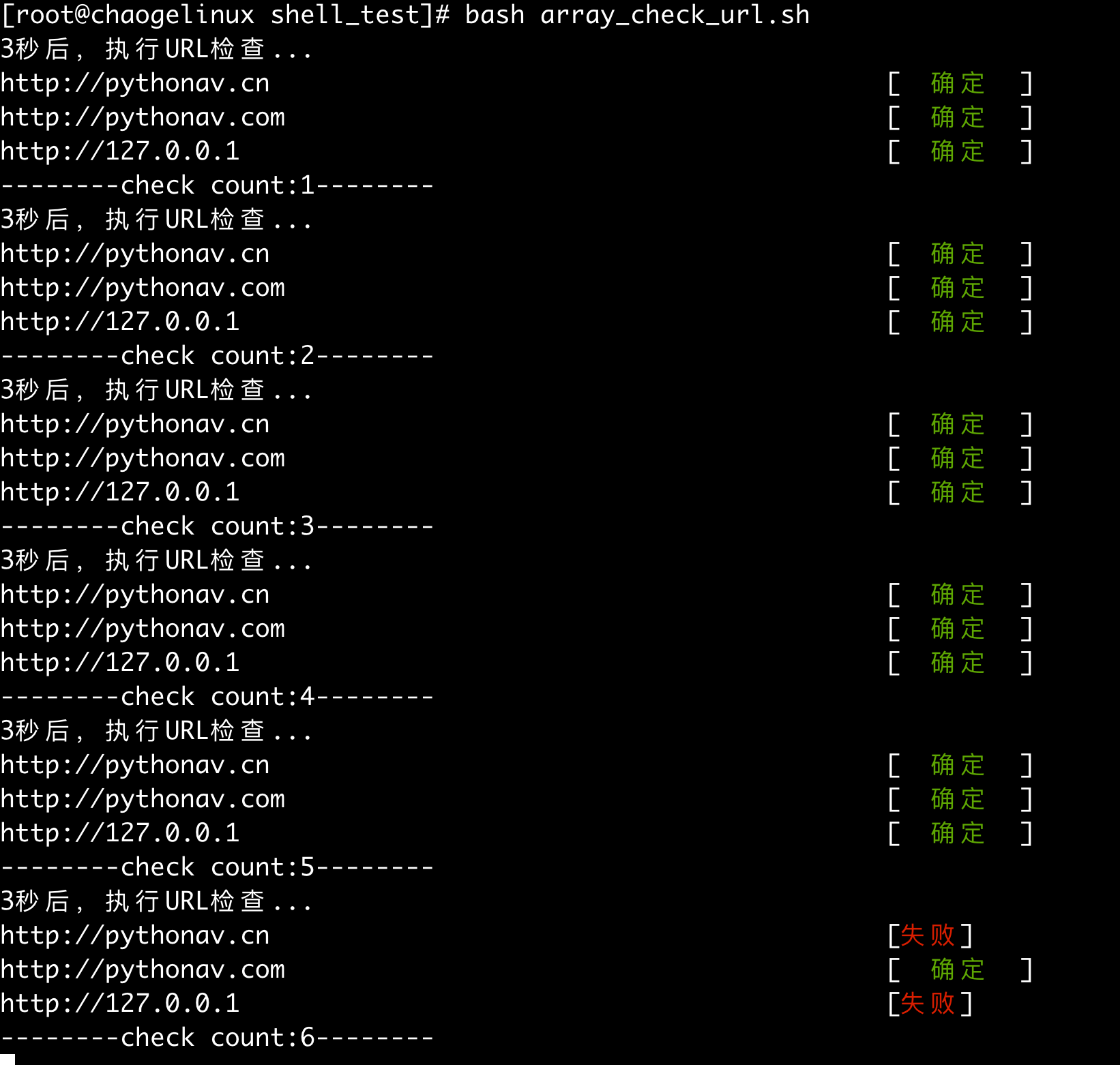

若有收获,就点个赞吧
0 人点赞


