Shell条件测试
注意bash执行脚本是开启子shell
source在当前shell执行
exit是退出shell环境
从shell变量学到现在,我们发现bash的脚本开发,需要结合if语句,进行条件判断,根据不同的结果,执行不同的操作。
说到条件判断,也就是生活里的,真,假。
在这一节,超哥给大家讲讲,条件测试
能够提供条件测试的语法,有如下
test命令
[ ] 中括号
test条件测试
test 命令最短的定义可能是评估一个表达式;
- 如果条件为真,则返回一个 0 值。
- 如果表达式不为真,则返回一个大于 0 的值 — 也可以将其称为假值。检查最后所执行命令的状态的最简便方法是使用 $? 值。
语法
```shell 语法 . 关于某个文件名的『类型』侦测(存在与否),如 test -e filename
-e 该『文件名』是否存在?(常用) -f 该『文件名』是否为文件(file)?(常用) -d 该『文件名』是否为目录(directory)?(常用) -b 该『文件名』是否为一个 block device 装置? -c 该『文件名』是否为一个 character device 装置? -S 该『文件名』是否为一个 Socket 文件? -p 该『文件名』是否为一个 FIFO (pipe) 文件? -L 该『文件名』是否为一个连结档?
- 关于文件的权限侦测,如 test -r filename
-r 侦测该文件名是否具有『可读』的属性? -w 侦测该文件名是否具有『可写』的属性? -x 侦测该文件名是否具有『可执行』的属性? -u 侦测该文件名是否具有『SUID』的属性? -g 侦测该文件名是否具有『SGID』的属性? -k 侦测该文件名是否具有『Sticky bit』的属性? -s 侦测该文件名是否为『非空白文件』?
- 两个文件之间的比较,如: test file1 -nt file2
-nt (newer than)判断 file1 是否比 file2 新 -ot (older than)判断 file1 是否比 file2 旧 -ef 判断 file2 与 file2 是否为同一文件,可用在判断 hard link 的判定上。 主要意义在判定,两个文件是否均指向同一个 inode 哩!
- 关于两个整数之间的判定,例如 test n1 -eq n2
-eq 两数值相等 (equal) -ne 两数值不等 (not equal) -gt n1 大于 n2 (greater than) -lt n1 小于 n2 (less than) -ge n1 大于等于 n2 (greater than or equal) -le n1 小于等于 n2 (less than or equal)
- 判定字符串的数据
test -z string 判定字符串是否为 0 ?若 string 为空字符串,则为 true test -n string 判定字符串是否非为 0 ?若 string 为空字符串,则为 false。 注: -n 亦可省略 test str1 = str2 判定 str1 是否等于 str2 ,若相等,则回传 true test str1 != str2 判定 str1 是否不等于 str2 ,若相等,则回传 false
- 多重条件判定,例如: test -r filename -a -x filename
-a (and)两状况同时成立!例如 test -r file -a -x file,则 file 同时具有 r 与 x 权限时,才回传 true。 -o (or)两状况任何一个成立!例如 test -r file -o -x file,则 file 具有 r 或 x 权限时,就可回传 true。 ! 反相状态,如 test ! -x file ,当 file 不具有 x 时,回传 true
<a name="Bgehf"></a>## 案例# && 并且,|| 否则1. A&&B:当A条件成立,并且执行B条件1. A||B:当A条件不成立,才会执行B条件-f 是否是普通文件类型```shell[root@chaogelinux shell_program]# test -f str1[root@chaogelinux shell_program]# echo $?1# && 并且,|| 否则# -f 是否是普通文件类型[root@chaogelinux shell_program]# test -f hello.txt && echo ok || echo nono[root@chaogelinux shell_program]# test -f t1.sh && echo ok || echo nook
-d 判断是否是目录类型
[xh@ls lesson_3]$ lsdir_1 xuhan_1.txt[xh@ls lesson_3]$ test -d dir_1 && echo yes || echo noyes
-z 字符串长度是否为0
[root@chaogelinux shell_program]# test -z "" && echo ok || echo no
ok
[root@chaogelinux shell_program]# test -z "超哥带你学Shell" && echo ok || echo no
no
中括号测试[ ]
脚本常用[ ] 中括号语法,进行条件测试,用的人是最多的
test和[ ] 作用是一样的,用哪个都可以
注意,中括号,前后的空格!!
如果想用变量,得用双引号
[xh@ls lesson_3]$ file1=hello
[xh@ls lesson_3]$ [ -f "${file1}" ] && echo ok || echo no
ok
[xh@ls lesson_3]$
[root@chaogelinux shell_program]# [ -f hello ] && echo ok || echo no
no
[root@chaogelinux shell_program]# [ -f hello.py ] && echo ok || echo no
ok
利用-f严谨点创建文件
[root@chaogelinux shell_program]# [ -f happy.txt ] && echo "已存在" || touch happy.txt
[root@chaogelinux shell_program]#
[root@chaogelinux shell_program]# [ -f happy.txt ] && echo "已存在" || touch happy.txt
已存在
-d 测试目录
[root@chaogelinux shell_program]# ls
2                      del_data.sh   expr1.sh         hello.py     length_word.sh  str1       test_date.sh    鸡你太美.jppg
Calculation2.sh        different.sh  file_houzhui.sh  hello.sh     make_var.sh     sub_str    test.txt        吴亦凡.jpg
Calculation.sh         echo_test.sh  happy.txt        jisuan.sh    nohup.out       t1.sh      word_length.sh
check_nginx_status.sh  echo_var.sh   hello            learn_if.sh  special_var.sh  test1.txt  蔡徐坤.jpg
[root@chaogelinux shell_program]# [ -d hello ] || echo "该目录不存在"
双中括号 [[ ]]
语法
[[ 条件表达式 ]]


[root@chaogelinux shell_program]# [[ -f hello.shh ]] || echo "条件不成立"
条件不成立

[root@chaogelinux shell_program]# [[ -f hello.sh ]] && echo "该文件已存在"
该文件已存在
文件测试表达式
为什么要测试?就是为了严谨,如果王者荣耀游戏不测试,上线一堆bug,用户那肯定得骂街,我们运维写脚本,为了更高的严谨性,需要对文件操作测试。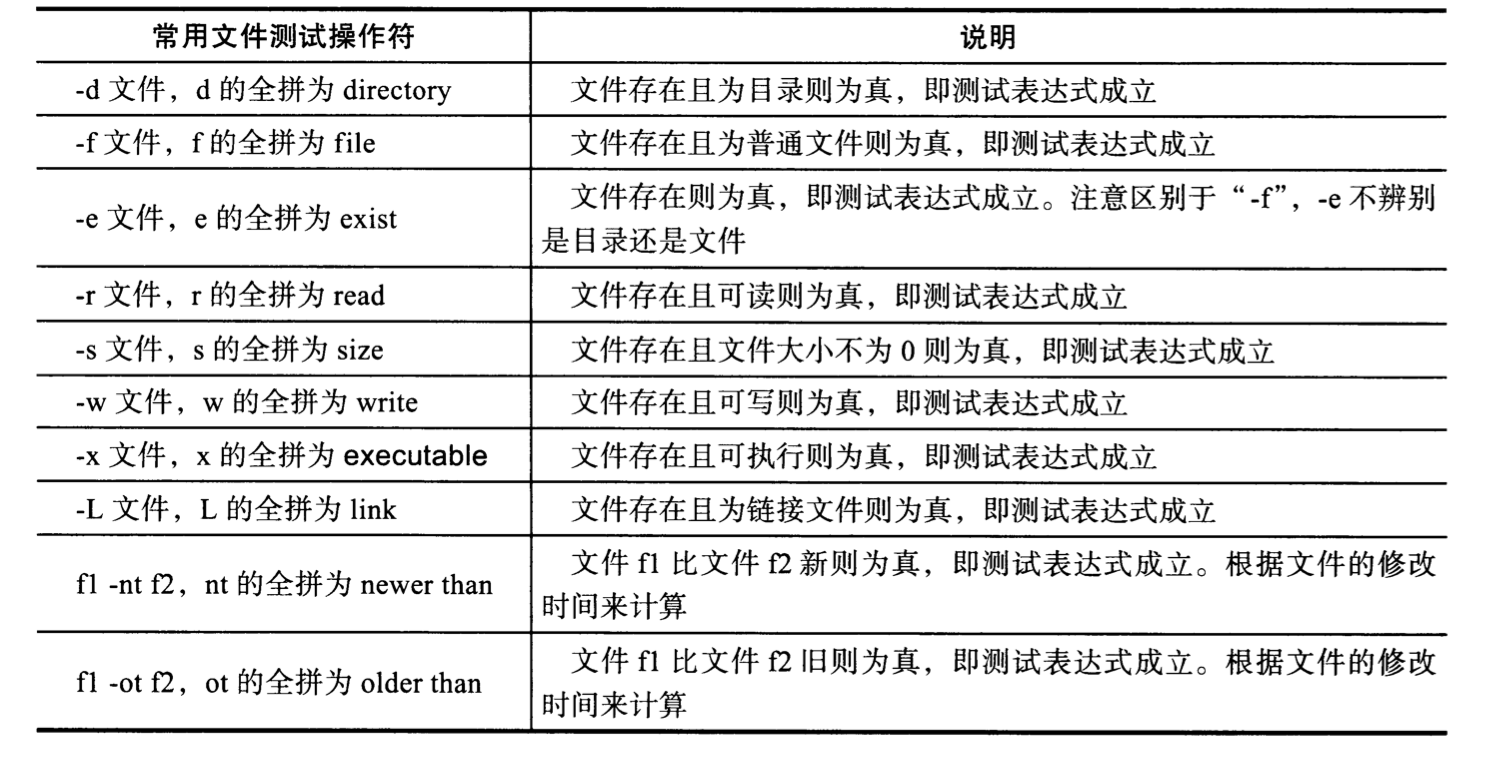
-e 无论是文件,目录,是否存在
[root@chaogelinux shell_program]# [ -e apple ] && echo "已存在" || echo "不存在"
不存在
[root@chaogelinux shell_program]#
[root@chaogelinux shell_program]#
[root@chaogelinux shell_program]# mkdir apple
[root@chaogelinux shell_program]# [ -e apple ] && echo "已存在" || echo "不存在"
已存在
-d 目录测试
[root@chaogelinux shell_program]# [ -d apple ] && echo "已存在" || echo "不存在"
已存在
[root@chaogelinux shell_program]# rm -rf apple
[root@chaogelinux shell_program]#
[root@chaogelinux shell_program]# [ -d apple ] && echo "已存在" || echo "不存在"
不存在
-r 文件可读属性测试(注意别用root,特殊)
[root@chaogelinux shell_program]# [ -r hello.sh ] && echo "可读" || echo "没阅读权限"
可读
[root@chaogelinux shell_program]#
[root@chaogelinux shell_program]# chmod 0 hello.sh
[root@chaogelinux shell_program]# [ -r hello.sh ] && echo "可读" || echo "没阅读权限"
可读


# 用户yuchao用户
[root@chaogelinux shell_program]# su - yuchao
上一次登录:四 3月  4 16:25:40 CST 2021pts/0 上
[yuchao@chaogelinux ~]$
[yuchao@chaogelinux ~]$
[yuchao@chaogelinux ~]$ ls
[yuchao@chaogelinux ~]$ touch hello.sh
[yuchao@chaogelinux ~]$ chmod 0 hello.sh
[yuchao@chaogelinux ~]$
[yuchao@chaogelinux ~]$ [ -r hello.sh ] && echo "可读" || echo "权限不够"
权限不够
[yuchao@chaogelinux ~]$ chmod 777 hello.sh
[yuchao@chaogelinux ~]$ [ -r hello.sh ] && echo "可读" || echo "权限不够"
可读
变量测试
所谓变量测试,在这里就是变量存储着文件名,效果还是一样的
[root@chaogelinux shell_program]# [ -f $file1 ] && echo ok || echo no
ok
[root@chaogelinux shell_program]#
[root@chaogelinux shell_program]# [ -f $file1 ] && echo ok || echo no^C
[root@chaogelinux shell_program]# mv t1.sh t1.sh.bak
[root@chaogelinux shell_program]# [ -f $file1 ] && echo ok || echo no
no
测试变量的特殊写法
对变量测试,必须加上双引号
[root@chaogelinux shell_program]# echo $pyyu

[root@chaogelinux shell_program]#
[root@chaogelinux shell_program]#
[root@chaogelinux shell_program]# [ -f $pyyu ] && echo ok || echo no
ok
[root@chaogelinux shell_program]#
[root@chaogelinux shell_program]# # 你看上面的结果,就是有问题的
[root@chaogelinux shell_program]#
[root@chaogelinux shell_program]#
[root@chaogelinux shell_program]# [ -f "$pyyu" ] && echo ok || echo no
no
看系统自带的脚本模板
很多linux自带的shell脚本,都是大佬给你写好的参考模板,非常值得学习
/etc/init.d/network
 16 # Source function library.
 17 . /etc/init.d/functions
 18
 19 if [ ! -f /etc/sysconfig/network ]; then
 20     exit 6
 21 fi
 22
 23 . /etc/sysconfig/network
 24
 25 if [ -f /etc/sysconfig/pcmcia ]; then
 26     . /etc/sysconfig/pcmcia
 27 fi
 28
/etc/init.d/mysql
su_kill() {
  if test "$USER" = "$user"; then
    kill $* >/dev/null 2>&1
  else
    su - $user -s /bin/sh -c "kill $*" >/dev/null 2>&1
  fi
}
字符串测试
字符串是运维日常操作的数据类型,在脚本开发里用的也很多,例如判断两个字符串是否相等,字符串是否为空等
上面超哥列出来的mysql脚本,正式用的该条件,对用户测试。
注意官方的mysql脚本如何写的
su_kill() {
  if test "$USER" = "$user"; then
    kill $* >/dev/null 2>&1
  else
    su - $user -s /bin/sh -c "kill $*" >/dev/null 2>&1
  fi
}
- if test “$USER” = “$user”; then
- 字符串的测试,一定要添加双引号
- 比较符号的两端,一定得有空格
- != 和 =用于比较两个字符串是否相同
实践
-n 判断字符串长度,有内容就真,没内容就假 ```shell [root@chaogelinux ~]# [ -n “yuchao” ] && echo ok || echo no ok注意空格,也有东西,长度就为1
[root@chaogelinux ~]# [ -n “ “ ] && echo ok || echo no ok [root@chaogelinux ~]# [ -n “” ] && echo ok || echo no no
求长度
[root@chaogelinux ~]# expr length “ “ 1 [root@chaogelinux ~]# expr length “” 0
-z 和-n反过来的,只要为空,就为真,反之为假
```shell
[root@chaogelinux ~]# name="chaoge666"
[root@chaogelinux ~]# [ -z "$name" ] && echo ok || echo no
no
[root@chaogelinux ~]# unset name
[root@chaogelinux ~]# [ -z "$name" ] && echo ok || echo no
ok
求变量是否相等
[root@chaogelinux ~]# [ "yuchao" = "yucha" ] && echo ok || echo no
no
[root@chaogelinux ~]# [ "yuchao" = "yuchao" ] && echo ok || echo no
ok

[root@chaogelinux ~]# # 变量值判断
[root@chaogelinux ~]#
[root@chaogelinux ~]# name="yuchao"
[root@chaogelinux ~]#
[root@chaogelinux ~]# [ "$name" = "yuchao" ] && echo ok || echo no
ok
[root@chaogelinux ~]# [ "$name" = "yuchaoo" ] && echo ok || echo no
no
判断不相等
[root@chaogelinux ~]# [ "pyyu" != "py" ] && echo ok || echo no
ok
[root@chaogelinux ~]# [ "pyyu" != "pyyu" ] && echo ok || echo no
no
结果取反
[ ! -f "hello.txt" ] && echo "ok" || echo no
超哥提示
条件测试中
- 变量必须有双引号
- 等于号两边得有空格
语法不对,结果必然有误。
错误示范,-n 参数判断字符串必须有值
[root@chaogelinux ~]# unset hometown
[root@chaogelinux ~]# [ -n "$hometown" ] && echo ok || echo no
no
[root@chaogelinux ~]#
[root@chaogelinux ~]#
# 这里就出错了
[root@chaogelinux ~]# [ -n $hometown ] && echo ok || echo no
ok
查看大神开发的mysql脚本
这里就是判断,当该crash_protection变量非空时,将其置空
这里的逻辑我们不用过多关注,从注释可以得知
该代码作用是,当mysql的pid-file存在,但是mysql进程不存在,这就证明mysql异常挂掉了,mysql应该重启。
233       # pid-file exists, the server process doesn't.
234       # it must've crashed, and mysqld_safe will restart it
235       if test -n "$crash_protection"; then
236         crash_protection=""
237         sleep 5
238         continue  # Check again.
239       fi
整数比较符测试
我们在脚本开发中,会用到对数值的比较判断,也就是常见的大于,小于,等于之类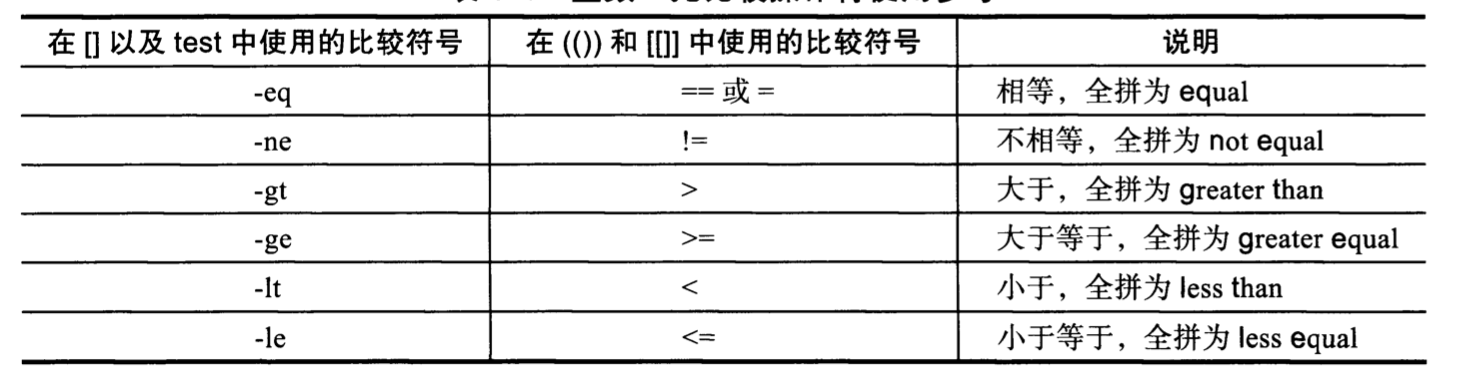
语法注意:在中括号里,数值条件测试,大于,小于号,需要用转义符号
1.在中括号,以及test的用法
中括号
[root@chaogelinux ~]# # 中括号
[root@chaogelinux ~]# # 正确用法
[root@chaogelinux ~]# [ 2 \> 1 ] && echo yes || echo no
yes
[root@chaogelinux ~]# [ 2 > 1 ] && echo yes || echo no
yes
# 错误用法,可见,必须加上转义符
[root@chaogelinux ~]# [ 2 < 1 ] && echo yes || echo no
yes
[root@chaogelinux ~]# [ 2 \< 1 ] && echo yes || echo no
no

# 数值比较
[root@chaogelinux ~]# [ 2 = 2 ] && echo yes || echo no
yes
[root@chaogelinux ~]# [ 2 != 2 ] && echo yes || echo no
no

# 比较符号
[root@chaogelinux ~]#
[root@chaogelinux ~]# [ 2 -gt 1 ] && echo yes || echo no
yes
[root@chaogelinux ~]# [ 2 -ge 1 ] && echo yes || echo no
yes
[root@chaogelinux ~]# [ 2 -le 1 ] && echo yes || echo no
no
[root@chaogelinux ~]# [ 2 -lt 1 ] && echo yes || echo no
no

# 变量比较大小
[root@chaogelinux ~]# n1=98;n2=99
[root@chaogelinux ~]#
[root@chaogelinux ~]# [ $n1 -eq $n2 ] && echo yes || echo no
no
[root@chaogelinux ~]# [ $n1 -gt $n2 ] && echo yes || echo no
no
[root@chaogelinux ~]# [ $n1 -lt $n2 ] && echo yes || echo no
yes
[root@chaogelinux ~]# [ $n1 != $n2 ] && echo yes || echo no
yes
[root@chaogelinux ~]# [ $n1 = $n2 ] && echo yes || echo no
no
双中括号
在双中括号中,不需要使用转义符
[root@chaogelinux ~]# [[ 5 > 6  ]] && echo yes || echo no
no
[root@chaogelinux ~]# [[ 5 < 6  ]] && echo yes || echo no
yes
[root@chaogelinux ~]# [[ 5 != 6  ]] && echo yes || echo no
yes
[root@chaogelinux ~]# [[ 5 = 6  ]] && echo yes || echo no
no
[root@chaogelinux ~]# [[ 5 -gt  6  ]] && echo yes || echo no
no
[root@chaogelinux ~]# [[ 5 -lt  6  ]] && echo yes || echo no
yes
工作中用的最多的是中括号进行条件测试[],双中括号属于扩展特殊用法,知道其存在就好
双小括号
[root@chaogelinux ~]#
[root@chaogelinux ~]# ((3>2)) && echo yes || echo no
yes
[root@chaogelinux ~]#
[root@chaogelinux ~]#
[root@chaogelinux ~]# ((3<2)) && echo yes || echo no
no

# 比较等于,不等于,注意,只能使用2个等于号

[root@chaogelinux ~]# (( 3 == 2 )) && echo yes || echo no
no

[root@chaogelinux ~]# (( 3 != 2 )) && echo yes || echo no
yes
总结
- 注意语法,[]和test为一类,可以用-gt -lt 以及< > !=等符号
- 而 [[ ]] (())属于一类,不能用 -gt -lt这样的符号
系统自带的network脚本案例参考
112         if [ "$TYPE" = "IPSEC" ] || [ "$TYPE" = "IPIP" ] || [ "$TYPE" = "GRE" ]; then
113             vpninterfaces="$vpninterfaces $i"
114             continue
115         fi
116
117         if [ "${DEVICE%%.*}" != "$DEVICE"  -o  "${DEVICE##vlan}" != "$DEVICE" ] ; then
118             vlaninterfaces="$vlaninterfaces $i"
119             continue
120         fi
121
122         if LANG=C grep -EL "^ONBOOT=['\"]?[Nn][Oo]['\"]?" ifcfg-$i > /dev/null ; then
123             # this loads the module, to preserve ordering
124             is_available $i
125             continue
126         fi
127         action $"Bringing up interface $i: " ./ifup $i boot
128         [ $? -ne 0 ] && rc=1
129     done
逻辑操作符
逻辑运算,也就是生活里的 真,假概念
- ! 取反,也就是结果相反的值
- -a 是“与”的意思(等同 && 和and),要求,左右两个逻辑值都为真,结果才为真,否则为假
- -o 是或者的意思,(or 和 ||),左右两个逻辑,只要有一个真,结果就为真
结果为真,对应计算机数字是1
结果为假,计算机数字为0
注意:选用不同的语法,对应的测试符号不一样!!!
逻辑操作案例
中括号
[root@chaogelinux ~]# file1=/etc/init.d/network
[root@chaogelinux ~]# file2=/etc/hostname

[root@chaogelinux ~]# echo "$file1" $file2
/etc/init.d/network /etc/hostname

# 条件测试
# 并且
[root@chaogelinux ~]# [ -f "$file1" -a -f "$file2"  ] && echo "都是普通文件,条件成立" || echo "不成 立"
都是普通文件,条件成立

# 或者
[root@chaogelinux ~]# [ -f "$file1" -o -f "$file2"  ] && echo "都是普通文件,条件成立" || echo "不成  立"
都是普通文件,条件成立


# 两边条件都不成立
[root@chaogelinux ~]# [ -f "$file11"  -o -f "$file22"  ] && echo "都是普通文件,条件成立" || echo "不成立"
不成立
[root@chaogelinux ~]# [ -f "$file11"  -a -f "$file22"  ] && echo "都是普通文件,条件成立" || echo "不成立"
不成立


# 只有一个成立条件
[root@chaogelinux ~]# [ -f "$file1"  -a -f "$file22"  ] && echo "都是普通文件,条件成立" || echo "不成立"
不成立
[root@chaogelinux ~]#
[root@chaogelinux ~]# [ -f "$file1"  -o -f "$file22"  ] && echo "都是普通文件,条件成立" || echo "不成立"
都是普通文件,条件成立
注意,test,和[]是不支持 && 和||的
[root@chaogelinux ~]# [ -f "$file1"  &&  -f "$file22"  ] && echo "都是普通文件,条件成立" || echo "不成立"
-bash: [: 缺少 `]'
不成立
[root@chaogelinux ~]# [ -f "$file1"  ||  -f "$file22"  ] && echo "都是普通文件,条件成立" || echo "不成立"
-bash: [: 缺少 `]'
-bash: -f: 未找到命令
不成立
双中括号
-n 判断字符串是否为空,有内容则真
# 条件,a不为空,且a等于b
[root@chaogelinux ~]# [[ -n "$a" && "$a" = "$b"  ]] && echo yes || echo no
no

# a不为空,且a不等于b
[root@chaogelinux ~]# [[ -n "$a" && "$a" != "$b"  ]] && echo yes || echo no
yes

# 结果取反
# 该条件,本身是为真的,被感叹号,取反,改为了假
[root@chaogelinux ~]# [[ ! -n "$a" && "$a" != "$b"  ]] && echo yes || echo no
no
混合练习
# n1 小于20,且n2大于30

[root@chaogelinux ~]# n1=18
[root@chaogelinux ~]# n2=30
[root@chaogelinux ~]# [ $n1 -lt 20 -a $n2  -ge 30  ]  && echo yes || echo no
yes

# n1大于20,n2小于30
[root@chaogelinux ~]# [ $n1 -gt 20 ] || [ $n2 -lt 30 ] && echo yes || echo no
no
# 条件改一下
[root@chaogelinux ~]# n1=23
[root@chaogelinux ~]# n2=19
[root@chaogelinux ~]# [ $n1 -gt 20 ] || [ $n2 -lt 30 ] && echo yes || echo no
yes
逻辑操作脚本开发
输入判断
[root@chaogelinux shell_program]# cat and_or_test.sh
#!/bin/bash
read -p "pls input a char: " var1

[ "$var1" -eq "1"  ] && {
    echo $var1
    exit 0
}

[ "$var1" = "2" ] && {
    echo $var1
    exit 0
}

[ "$var1" != "2" -a "$var1" != "1"  ] && {
    echo "script error!!"
    exit 1
}
执行
[root@chaogelinux shell_program]# bash and_or_test.sh
pls input a char: 3
script error!!
[root@chaogelinux shell_program]# echo $?
1

[root@chaogelinux shell_program]# bash and_or_test.sh
pls input a char: 2
2
[root@chaogelinux shell_program]# echo $?
0

[root@chaogelinux shell_program]# bash and_or_test.sh
pls input a char: 1
1
[root@chaogelinux shell_program]# echo $?
0
安装脚本开发
1.模拟创建lnmp,lamp脚本创建
[root@chaogelinux ~]# cd /shell_program/
[root@chaogelinux shell_program]# mkdir scripts
[root@chaogelinux shell_program]# cd scripts/
[root@chaogelinux scripts]# echo "echo LAMP is installed" > lamp.sh
[root@chaogelinux scripts]# echo "echo LNMP is installed" > lnmp.sh
[root@chaogelinux scripts]#
[root@chaogelinux scripts]# chmod +x lnmp.sh lamp.sh
[root@chaogelinux scripts]# ls
lamp.sh  lnmp.sh


2.逻辑判断脚本开发
[root@chaogelinux shell_program]# cat lnmp_or_lamp.sh
#!/bin/bash
path=/shell_program/scripts
# 条件判断,如果该目录不存在,则创建,尽量减少脚本可能出现的bug
[ ! -d "$path" ] && mkdir $path -p

# start script
# 利用cat命令打印菜单
cat << END
    1.[install lanmp]
    2.[install lnmp]
    3.[exit]
    pls input the num you want:
END
read num
# 根据命令执行结果判断是否正确,得知是否是数字
expr $num + 1 &> /dev/null

# 上条命令正确则继续,判断返回值
# -ne 两数值不等 (not equal)
[ $? -ne 0 ] && {
    echo "The num you input must be {1|2|3}"
    exit 1
}

[ $num -eq 1  ] && {
    echo "start installing lamp...waiting..."
    sleep 2;
    # 如果该脚本没权限
    [ -x "$path/lamp.sh" ] || {
        echo "The file does not exist or can't be exec."
        exit 1
    }
    # 安装脚本
    source $path/lamp.sh
    exit $?
}

# 如果选择lnmp
[ $num -eq 2 ] && {
    echo "start installing LNMP.."
    sleep 2;
    [ -x "$path/lnmp.sh" ] || {
        echo "The file does not exist or can't be exec."
        exit 1
    }
    source $path/lnmp.sh
    exit $?

}
# 如果要退出
[ $num -eq 3 ] && {
    echo byebye.
    exit 3
}
# 上述只限制了输入的是数字
# 限制必须是1,2,3
# =~ 正则表达式匹配运算符,用于匹配正则表达式的,配合[[]]使用
# 如果用户输入的数字,不在1,2,3中
[[ ! $num =~ [1-3]  ]] && {
    echo "The num you input must be {1|2|3}"
    echo "Input ERROR!"
    exit 4
}
执行脚本安装结果
[root@chaogelinux shell_program]# bash lnmp_or_lamp.sh
    1.[install lanmp]
    2.[install lnmp]
    3.[exit]
    pls input the num you want:
1
start installing lamp...waiting...
LAMP is installed
[root@chaogelinux shell_program]# bash lnmp_or_lamp.sh
    1.[install lanmp]
    2.[install lnmp]
    3.[exit]
    pls input the num you want:
2
start installing LNMP..
LNMP is installed
[root@chaogelinux shell_program]# bash lnmp_or_lamp.sh
    1.[install lanmp]
    2.[install lnmp]
    3.[exit]
    pls input the num you want:
3
byebye.
[root@chaogelinux shell_program]# bash lnmp_or_lamp.sh
    1.[install lanmp]
    2.[install lnmp]
    3.[exit]
    pls input the num you want:
4
The num you input must be {1|2|3}
Input ERROR!
[root@chaogelinux shell_program]# bash lnmp_or_lamp.sh
    1.[install lanmp]
    2.[install lnmp]
    3.[exit]
    pls input the num you want:
q
The num you input must be {1|2|3}
总结
记住,最常用的就是,中括号,搭配 -gt -lt 如此用法即可
[ $a -gt $b ]
表参考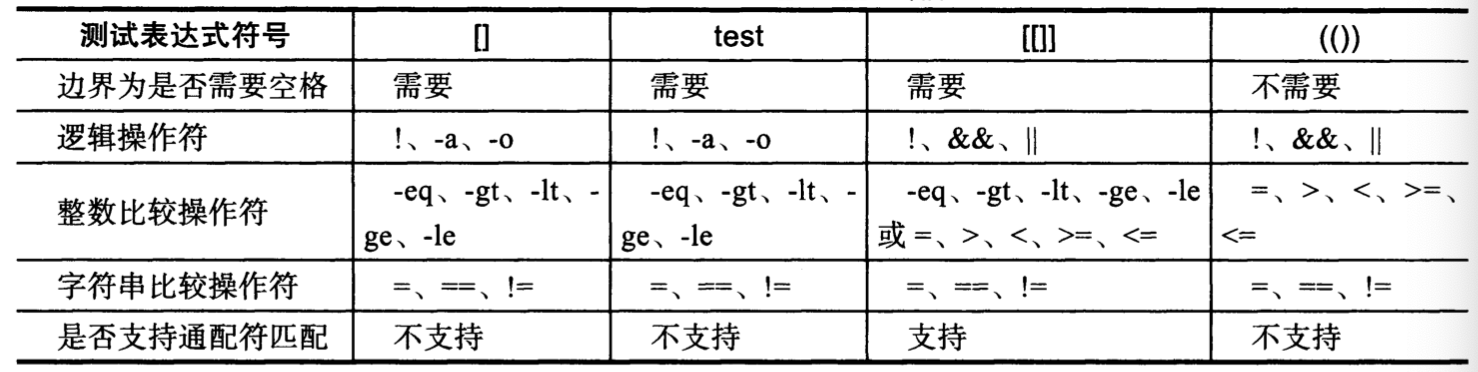

若有收获,就点个赞吧
0 人点赞


