函数是什么

先看linux的别名
[root@chaogelinux ~]# aliasalias cls='clear'alias cp='cp -i'alias egrep='egrep --color=auto'alias fgrep='fgrep --color=auto'alias grep='grep --color=auto'alias l.='ls -d .* --color=auto'alias ll='ls -l --color=auto'alias ls='ls --color=auto'alias mv='mv -i'alias rm='rm -i'alias which='alias | /usr/bin/which --tty-only --read-alias --show-dot --show-tilde'
别名的功能是简化命令操作,这个大家都知道,让命令更易读,易用。
函数,就是将shell脚本里需要多次被调用的相同代码,组合起来,称之为函数体。
并且我们要给这个函数体,起个别名,就叫做,函数名。
以后想要用这个函数体时,使用这个函数名,就可以了。
使用函数好处
- 相同的程序定义为函数,减少整个程序的代码数量,提高开发效率,让你少写点代码,有时间早点下班回家休息
- 增加程序可读性,易读性,容易管理
定义函数
通过function系统关键字定义函数 ```shell标准shell语法
function 函数名(){ 代码。。。 return 返回值 }
简写,省去括号,不建议这么用
function 函数名{ 代码。。。 return 返回值 }
更简化的写法,
函数名(){ 代码。。。 return 返回值 }
<a name="aiq1v"></a>
## 执行函数
有关函数执行的基础概念

- 执行shell函数,直接写函数名字即可,无需添加其他内容
- 函数必须先定义,再执行,shell脚本自上而下加载
- 函数体内定义的变量,称之为局部变量
- 函数体内需要添加return语句,作用是退出函数,且赋予返回值给调用该函数的程序,也就是shell脚本
- return语句和exit不同
   - return是结束函数的执行,返回一个(退出值、返回值)
   - exit是结束shell环境,返回一个(退出值、返回值)给当前的shell
- 函数如果单独写入一个文件里,需要用source读取
- 函数内,使用local关键字,定义局部变量。
<a name="XqOmo"></a>
# 函数基础实践
先定义函数、再执行函数<br />场景1.<br />函数体,和调用函数,写在同一个脚本
```shell
[root@chaogelinux shell_program]# cat func1.sh
#!/bin/bash

pyyu(){
    echo "超哥你好,你的linux讲的蛮有意思的"
}


function chaochao(){
    echo "努力学好shell编程自动化,奥力给"
}

# 执行函数
pyyu
chaochao
执行
[root@chaogelinux shell_program]# bash func1.sh
超哥你好,你的linux讲的蛮有意思的
努力学好shell编程自动化,奥力给
场景2:
函数定义,执行不在一个脚本,更为专业的操作
从文件中读取函数,加载
1.自定义函数,函数体写入文件中
[root@chaogelinux shell_program]# cat my_func.sh
#!/bin/bash

pyyu(){
    echo "Hello~pyyu"
}

2.开发一个脚本,调用该函数
[root@chaogelinux shell_program]# cat func2.sh
#!/bin/bash
# 判断该文件是否存在,在则加载,否则退出
[ -f /shell_program/my_func.sh ] && . /shell_program/my_func.sh || exit

# 读取该文件后,该文件中定义的函数,会被加载到当前shell环境
# 可以执行自定义的函数
pyyu

[root@chaogelinux shell_program]#
[root@chaogelinux shell_program]#
[root@chaogelinux shell_program]# bash func2.sh
Hello~pyyu
加载该函数到当前的shell环境
[root@chaogelinux shell_program]# pyyu
-bash: pyyu: 未找到命令
# 加载该函数到当前的shell环境
[root@chaogelinux shell_program]# source /shell_program/my_func.sh
[root@chaogelinux shell_program]# pyyu
Hello~pyyu
[root@chaogelinux shell_program]# set |grep pyyu
_=pyyu
pyyu ()
    echo "Hello~pyyu"
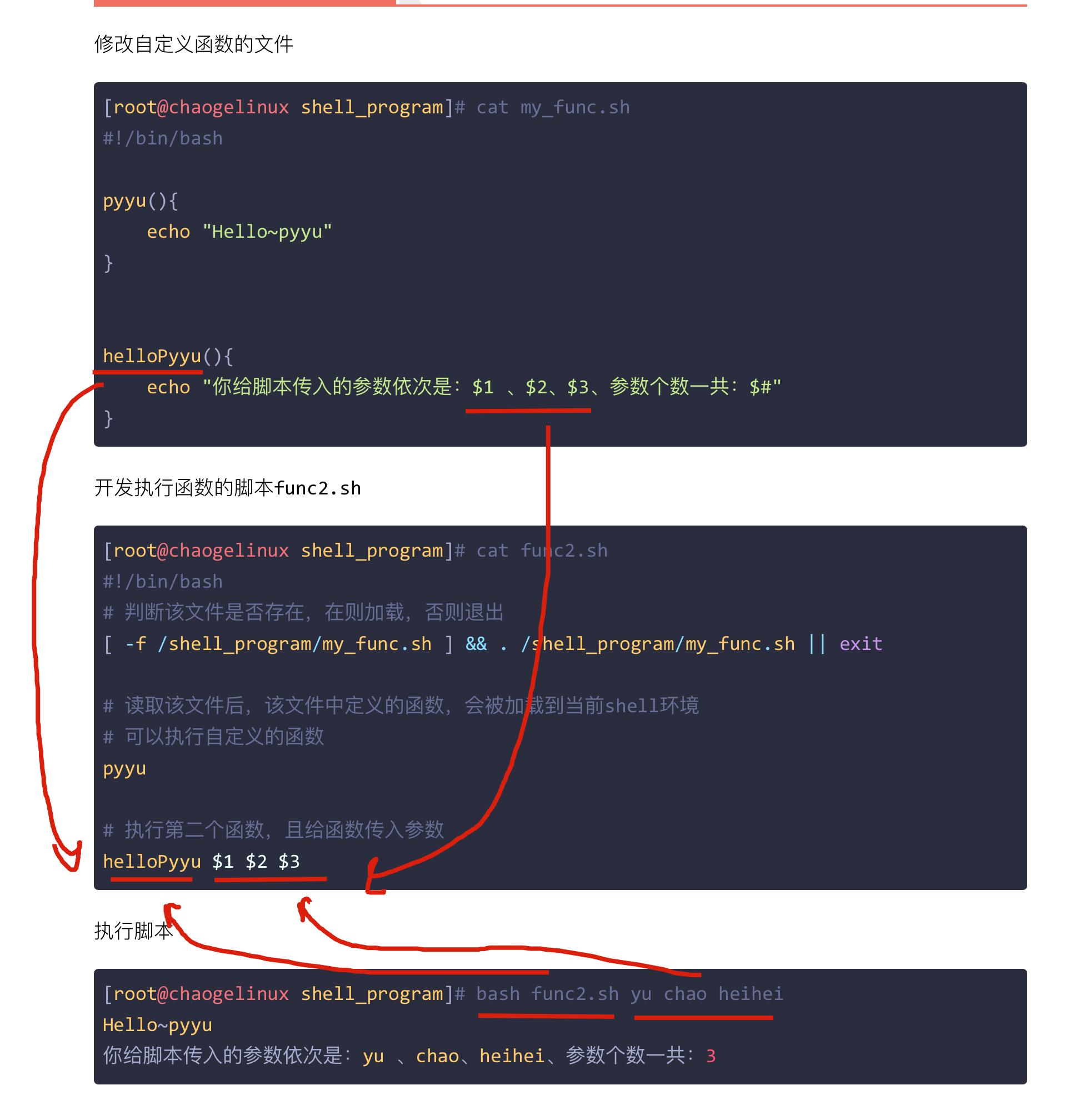
给脚本传入参数
修改自定义函数的文件
[root@chaogelinux shell_program]# cat my_func.sh
#!/bin/bash

pyyu(){
    echo "Hello~pyyu"
}


helloPyyu(){
    echo "你给脚本传入的参数依次是:$1 、$2、$3、参数个数一共:$#"
}
开发执行函数的脚本func2.sh
[root@chaogelinux shell_program]# cat func2.sh
#!/bin/bash
# 判断该文件是否存在,在则加载,否则退出
[ -f /shell_program/my_func.sh ] && . /shell_program/my_func.sh || exit

# 读取该文件后,该文件中定义的函数,会被加载到当前shell环境
# 可以执行自定义的函数
pyyu

# 执行第二个函数,且给函数传入参数
helloPyyu $1 $2 $3
执行脚本
[root@chaogelinux shell_program]# bash func2.sh yu chao heihei
Hello~pyyu
你给脚本传入的参数依次是:yu 、chao、heihei、参数个数一共:3
开发URL检测脚本
功能:给脚本传入参数,检测url是否正常
#!/bin/bash
if  [ "$#" -ne 1 ]
    then
        echo "Usage: $0 url"
        exit 1
fi

# 利用wget命令测试访问
wget --spider -q -o /dev/null --tries=1 -T 5 $1

if [ "$?" -eq 0 ]
    then
        echo "$1 is yes."
else
    echo "$1 is no."
fi
现在超哥希望大家能给该脚本,改造为函数执行
思考,函数是干什么的?封装功能的
函数版本shell脚本
check_url_func3.sh
#!/bin/bash

# 帮助函数
function usage(){
    echo "Usage: $0 url"
    exit 1
}

# 检测url的函数
check_url_func(){

  # 利用wget命令测试访问
  wget --spider -q -o /dev/null --tries=1 -T 5 $1

  if [ "$?" -eq 0 ]
    then
      echo "$1 is yes."
  else
    echo "$1 is no."
  fi
}

# 程序开发的习惯,设置一个入口函数,对需要执行的函数统一管理
# 我们可以在脚本中定义很多函数,到底执行哪一个,进行管理
main(){
    # 如果用户传入的参数数量不等于1,表示用法有误
    if [ $# -ne 1 ]
        then
            usage # 执行该帮助函数
    fi
    # 否则就执行正确的函数,以及传入的参数
    check_url_func $1
}

# 这里的特殊变量$*,是将所有传入进来的参数,当作一个整体,是常见用法
main $*
执行脚本
# 正确执行
[root@chaogelinux shell_program]# bash check_url_func3.sh www.pythonav.cn
www.pythonav.cn is yes.

# 参数传入个数不正确的情况
[root@chaogelinux shell_program]# bash check_url_func3.sh www.pythonav.cn 123
Usage: check_url_func3.sh url
[root@chaogelinux shell_program]# bash check_url_func3.sh www.pythonav.cn 123 qweqwe
Usage: check_url_func3.sh url

# 演示网站挂了
[root@chaogelinux shell_program]# nginx -s stop
[root@chaogelinux shell_program]#
[root@chaogelinux shell_program]# bash check_url_func3.sh www.pythonav.cn
www.pythonav.cn is no.
[root@chaogelinux shell_program]# nginx
[root@chaogelinux shell_program]# bash check_url_func3.sh www.pythonav.cn
www.pythonav.cn is yes.
添加功能,让结果显示的更专业
#!/bin/bash
# Use LSB init script functions for printing messages, if possible
#
lsb_functions="/lib/lsb/init-functions"
if test -f $lsb_functions ; then
  . $lsb_functions
else
  # Include non-LSB RedHat init functions to make systemctl redirect work
  init_functions="/etc/init.d/functions"
  if test -f $init_functions; then
    . $init_functions
  fi
  log_success_msg()
  {
    echo " SUCCESS! $@"
  }
  log_failure_msg()
  {
    echo " ERROR! $@"
  }
fi


# 帮助函数
function usage(){
    echo "Usage: $0 url"
    exit 1
}

# 检测url的函数
check_url_func(){

  # 利用wget命令测试访问
  wget --spider -q -o /dev/null --tries=1 -T 5 $1

  if [ "$?" -eq 0 ]
    then
    log_success_msg   "$1 is yes."
  else
    log_failure_msg "$1 is no."
  fi
}

# 程序开发的习惯,设置一个入口函数,对需要执行的函数统一管理
# 我们可以在脚本中定义很多函数,到底执行哪一个,进行管理
main(){
    # 如果用户传入的参数数量不等于1,表示用法有误
    if [ $# -ne 1 ]
        then
            usage # 执行该帮助函数
    fi
    # 否则就执行正确的函数,以及传入的参数
    check_url_func $1
}

# 这里的特殊变量$*,是将所有传入进来的参数,当作一个整体,是常见用法
main $*
执行结果
[root@chaogelinux shell_program]# bash check_url_func3.sh www.pythonav.cn
www.pythonav.cn is yes.                                    [  确定  ]

[root@chaogelinux shell_program]# bash check_url_func3.sh www.pythonav.cnw
www.pythonav.cnw is no.                                    [失败]

开发rsync起停脚本
当然超哥这里讲的是函数版本
[root@chaogelinux shell_program]# touch /etc/init.d/cc_rsyncd

#!/bin/bash
# Use LSB init script functions for printing messages, if possible
#
lsb_functions="/lib/lsb/init-functions"
if test -f $lsb_functions ; then
  . $lsb_functions
else
  # Include non-LSB RedHat init functions to make systemctl redirect work
  init_functions="/etc/init.d/functions"
  if test -f $init_functions; then
    . $init_functions
  fi
  log_success_msg()
  {
    echo " SUCCESS! $@"
  }
  log_failure_msg()
  {
    echo " ERROR! $@"
  }
fi

function usage(){
    echo "Usage: $0 {start|stop|restart}"
    exit 1
}

function start(){
        /usr/bin/rsync --daemon
        sleep 1
        if [ `netstat -tunlp|grep rsync|wc -l` -ge "1" ]
            then
                log_success_msg "rsyncd is started."
        else
              log_failure_msg "Rsyncd isn't started. "
        fi
}

function stop(){
    killall rsync &>/dev/null
    sleep 2
    if [ `netstat -tunlp|grep rsync|wc -l` -eq "0" ]
        then
            log_success_msg "Rsyncd is stopped"
    else
            log_failure_msg "Rsyncd isn't stopped. "
    fi
    }

function main(){
    if [ "$#" -ne "1" ]
        then
            usage
    fi

    if [ "$1" = "start" ]
        then
            start
    elif [ "$1" = "stop" ]
        then
            stop
    elif [ "$1" = "restart" ]
        then
            stop
            sleep 1
            start
    else
        usage
    fi
}

# 程序入口  把多个参数当作一个整体传给main
main $*
执行脚本
[root@chaogelinux shell_program]# /etc/init.d/cc_rsyncd stop
Rsyncd is stopped                                          [  确定  ]
[root@chaogelinux shell_program]# /etc/init.d/cc_rsyncd start
rsyncd is started.                                         [  确定  ]
[root@chaogelinux shell_program]# /etc/init.d/cc_rsyncd restart
Rsyncd is stopped                                          [  确定  ]
rsyncd is started.                                         [  确定  ]
希望大家学习超哥开发脚本的习惯,实现高度的模块化,对功能封装,这样观看美观,且专业规范。

若有收获,就点个赞吧
0 人点赞


