循环控制
前面超哥讲了for、while循环,目前已知for循环可以设置一个边界的条件,用于结束循环。
循环固然很重要,学会中断循环、设置条件也很重要,可以进行复杂的逻辑控制。
来学这几个特殊命令
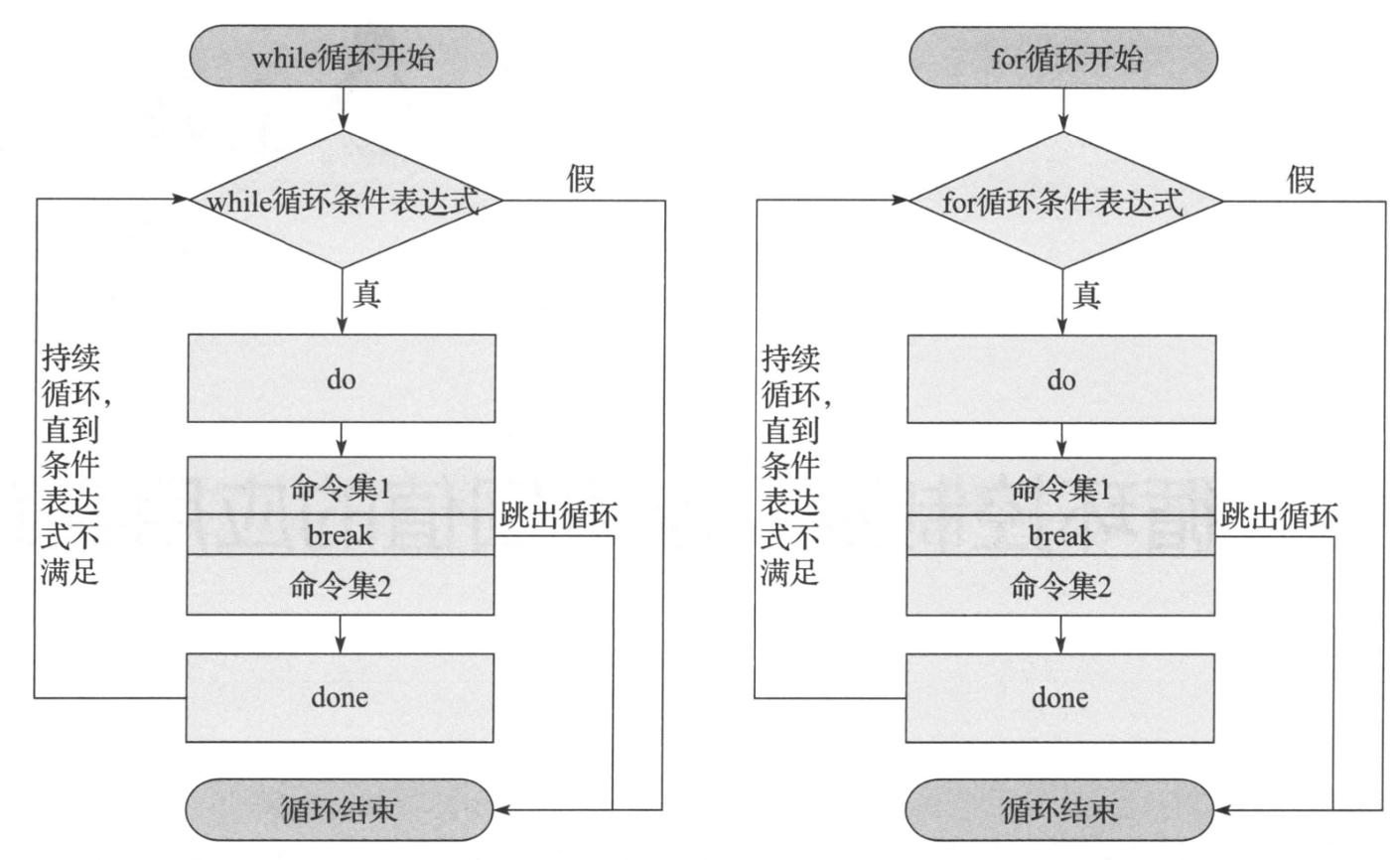
- break,中断循环
- continue,跳过本次循环
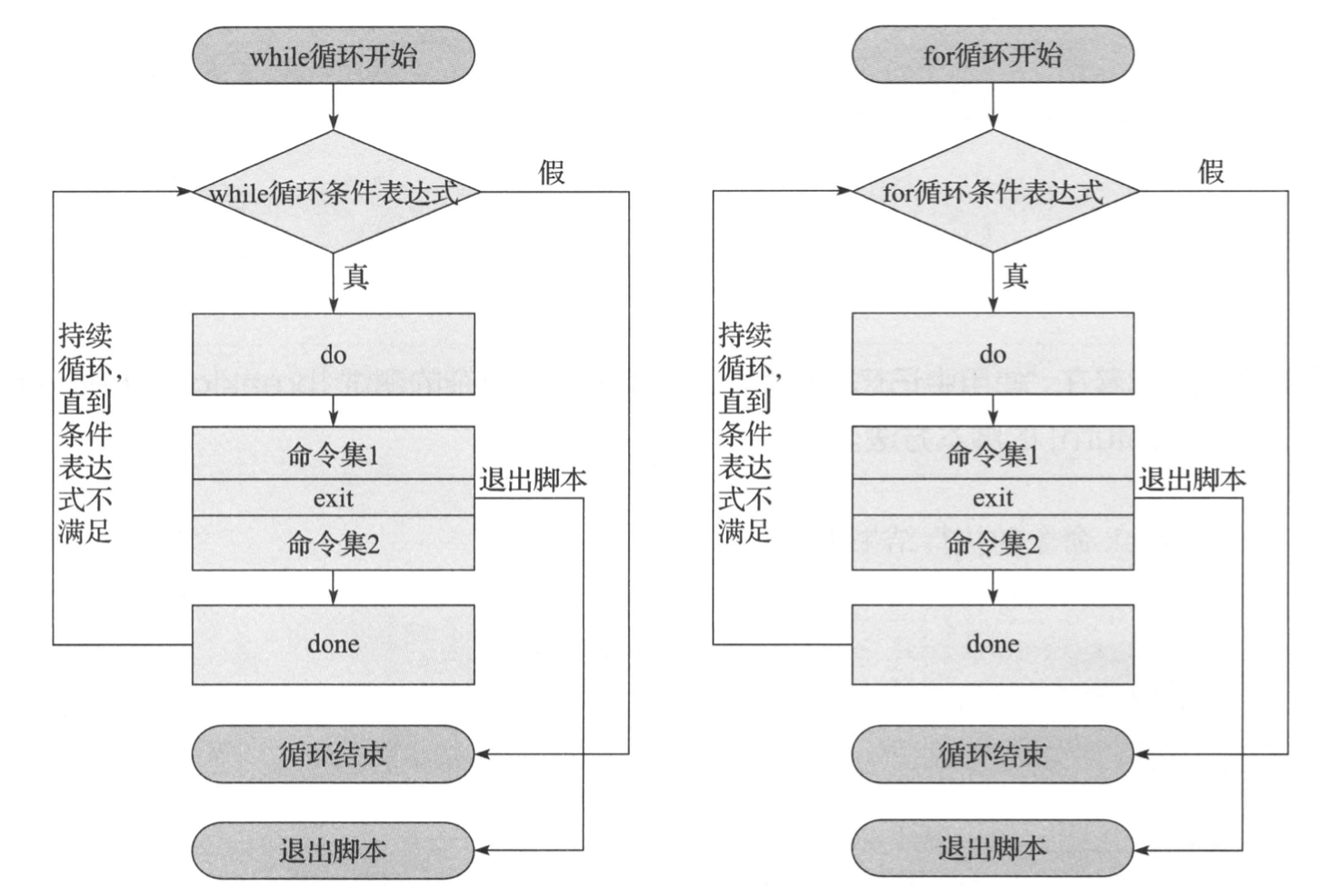
- Exit,退出脚本
- return,退出函数
break、continue主要用于for、while、if控制程序的走向、
exit用于终止所有语句,退出当前脚本,以及给当前shell返回状态值
return只用在函数内,返回函数执行的状态值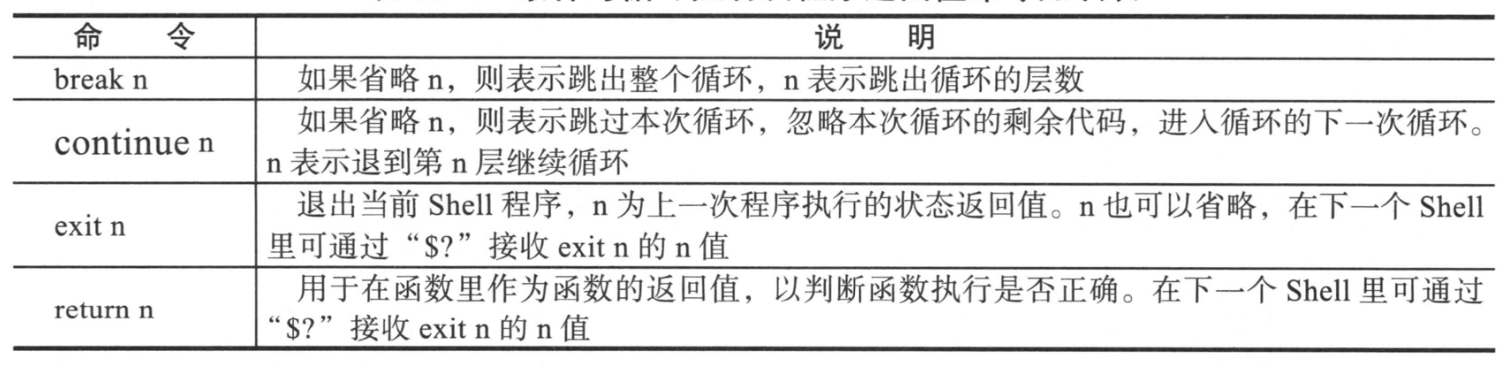
图解循环控制

实践
用于测试 break,continue、exit,return的脚本
[root@chaogelinux shell_program]# cat break_1.shif [ $# -ne 1 ];thenecho "Usage:$0 {break|continue|exit|return}"exit 1fitest(){for ((i=0;i<=5;i++))do# 当循环变量i,等于3的时候,执行脚本接收的参数if [ $i -eq 3 ];then$*; # 这里可能是break,continue,exit,return,看不同的结果fiecho $idoneecho "我是超哥写的函数,我被执行了"}# 执行函数,传入参数test $*func_ret=$?# 如果传入的参数是return,执行下属代码if [ `echo $*|grep return|wc -l` -eq 1 ]thenecho "return's exit status:$func_ret"fiecho "script done."
不同的执行结果
什么都不加
[root@chaogelinux shell_program]# bash break_1.sh
Usage:break_1.sh {break|continue|exit|return}
break,到3循环结束
[root@chaogelinux shell_program]# bash break_1.sh break
0
1
2
我是超哥写的函数,我被执行了
script done.
continue,循环跳过了3
[root@chaogelinux shell_program]# bash break_1.sh continue
0
1
2
4
5
我是超哥写的函数,我被执行了
script done.
exit,退出脚本,不再执行后续代码
[root@chaogelinux shell_program]# bash break_1.sh exit
0
1
2
指定exit 状态码
[root@chaogelinux shell_program]# bash break_1.sh "exit 2"
0
1
2
[root@chaogelinux shell_program]# echo $?
2
Return,结束当前函数执行
[root@chaogelinux shell_program]# bash break_1.sh return
0
1
2
return's exit status:0
script done.
分析nginx日志
分析access.log日志,把每一条访问的记录对应的数据大小统计,计算总和。
1.while循环,结合exec,expr命令
[root@chaogelinux shell_program]# cat while_nginx.sh
#!/bin/bash
sum=0
exec <$1 # 传入文件数据
while read line
do
    size=`echo $line|awk '{print $10}'`
    expr $size + 1 &>/dev/null
    if [ $? -ne 0  ];then
        continue
    fi
    ((sum=sum+size))
done
echo "$1 总共处理的字节数是:`echo $(($sum/1024/1024))`KB"
[root@chaogelinux shell_program]#
执行
[root@chaogelinux shell_program]# ls
break_1.sh  ngx.log  while_nginx.sh

[root@chaogelinux shell_program]# bash while_nginx.sh ngx.log
ngx.log 总共处理的字节数是:10096KB

[root@chaogelinux shell_program]# bash while_nginx.sh ngx.log
ngx.log 总共处理的字节数是:9MB
while循环,结合bash exec,变量子串
[root@chaogelinux shell_program]# cat while_nginx2.sh
#!/bin/bash
exec <$1
sum=0
while read line
do
    num=`echo $line|awk '{print $10}'`
    [ -n "$num" -a "$num" = "${num//[^0-9]}"  ] || continue
    ((sum=sum+num))
done
echo "$1 总共处理的字节数:`echo $((${sum}/1024/1024))`MB"
执行
[root@chaogelinux shell_program]# bash while_nginx2.sh ngx.log
ngx.log 总共处理的字节数:9MB
破解md5sum
例如如下的字符串,是RANDOM随机数结合md5sum加密后得出的连续10位结果,想要破解,如何实现?
4fe8bf20ed
提示:
RANDOM范围0~32767,将其所有的数字,通过md5sum加密,得到一个结果数据库,然后进行数据比对。
1.生成RANDOM所有数字的md5sum结果
[root@chaogelinux shell_program]# cat random_md5sum.sh
#!/bin/bash
for n in {0..32767}
do
    echo "`echo $n|md5sum` $n" >> /tmp/random_md5sum.db
done

# 执行
[root@chaogelinux shell_program]# bash random_md5sum.sh
# 查看
[root@chaogelinux shell_program]# ls -lh /tmp/random_md5sum.db
-rw-r--r-- 1 root root 1.4M 3月  25 17:20 /tmp/random_md5sum.db

[root@chaogelinux shell_program]# tail /tmp/random_md5sum.db
dd63f11786fc184c90f2ec5e0c4e50e7  - 32758
f8650e27447828dbed4ef1022fc34a54  - 32759
687028853d14e1493cefc48e4f4466a4  - 32760
0b3906ec27507e2fd86d5fcde7a1ab91  - 32761
7faf9205b42eb316cdf34f7f41a0abcd  - 32762
a192ee21829ee00faf2fb95708b5b18f  - 32763
a7bc9db1c5d7d3a5bb85ea9abbe65f57  - 32764
21d4a02fdd7c330fbc27e79ade953f2d  - 32765
de50e2ca2c30a982d886b19f6198cc69  - 32766
63fceb28a8c4c72fd3b2f5d71950ee08  - 32767
此时将字符串和数据库比对,过滤
[root@chaogelinux shell_program]# cat check_random.sh
#!/bin/bash

md5char="4fe8bf20ed"
while read line
do
    if [ `echo $line|grep "$md5char"|wc -l` -eq 1  ]
        then
            echo $line
            # 找到后立即结束循环
            break
    fi
done </tmp/random_md5sum.db
执行结果
[root@chaogelinux shell_program]# bash check_random.sh
1dcca23355272056f04fe8bf20edfce0 - 5

若有收获,就点个赞吧
0 人点赞


