创建用户
adduser与useradd命令一样
[root@kedacom ~]# which adduser/usr/sbin/adduser[root@kedacom ~]# ll /usr/sbin/adduserlrwxrwxrwx. 1 root root 7 10月 30 2020 /usr/sbin/adduser -> useradd
常用选项:
-u 指定用户的UID,大于500,并且不能和现有用户UID重复
-g 指定用户的基本组
-G 为用户指定多个附加组,用逗号隔开多个附加组
-c 为用户添加注释信息
-d 为用户指定home目录
-s 指定shell的路径,最好是/etc下的shells(安全shell)
-m 如果home目录不存在,强制创建,默认是创建目录的,可不指定
-M 不给用户创建home目录
-r 创建系统账户,没有home目录,id号在1-499之间
例1:创建用户zhangsan,UID指定为5001,基本组为students,附加组为monitor、partmember,注释信息为The 2022 new student,指定的home目录为/home/zhangsan,指定的shell为bash
[root@kedacom ~]# groupadd students[root@kedacom ~]# groupadd monitor[root@kedacom ~]# groupadd partmember#创建用户[root@kedacom ~]# useradd -u 5001 -g students -G monitor,partmember -c "The 2022 new student" -d /home/zhangsan01 -s /bin/bash zhangsan#查看用户文件,已有创建的用户,信息正确[root@kedacom ~]# tail -1 /etc/passwdzhangsan:x:5001:1008:The 2022 new student:/home/zhangsan01:/bin/bash#home目录中存在zhangsan01[root@kedacom ~]# ll /home/ | grep zhangsandrwx------ 2 zhangsan students 62 3月 5 16:54 zhangsan01创建的用户不指定home目录[root@kedacom ~]# useradd -M lisi[root@kedacom ~]# su lisibash-4.2$#创建系统用户[root@kedacom home]# useradd -r server1#查看到lisi和server1都有home目录信息,不明白为什么不是空[root@kedacom home]# tail -2 /etc/passwdlisi:x:5002:5002::/home/lisi:/bin/bashserver1:x:991:989::/home/server1:/bin/bash#lisi和server1用户都是没有home目录的[root@kedacom home]# ll /home/总用量 4692-rw-r--r-- 1 root root 5606 4月 20 2021 dameng-csd.sqldrwx------ 4 dmdba dinstall 112 3月 15 2021 dmdbadrwx------. 3 es es 87 11月 20 2020 esdrwx------. 4 kedacom root 112 2月 25 2021 kedacom-rw-r--r-- 1 root root 604006 10月 15 14:09 moduleconf_dm-nochinese.sql-rw-r--r-- 1 root root 597512 9月 16 10:44 moduleconf_dm-nochinese.sql.1-rw-r--r-- 1 root root 603041 9月 18 14:47 moduleconf_dm-nochinese.sql.2-rw-r--r-- 1 root root 603574 9月 18 19:30 moduleconf_dm-nochinese.sql.3-rw-r--r-- 1 root root 603313 9月 18 19:43 moduleconf_dm-nochinese.sql.4-rw-r--r-- 1 root root 604006 10月 15 13:54 moduleconf_dm-nochinese.sql.5-rw-r--r-- 1 root root 597974 9月 18 11:03 moduleconf_dm-nochinese.sql_bak-rw-r--r-- 1 root root 565896 9月 18 14:28 moduleconf_dm-nochinese.sql_prevdrwx------ 4 willow willow 112 3月 5 15:01 willowdrwx------ 2 zhangsan students 62 3月 5 16:54 zhangsan01
注意:
不需要加-m参数,是因为/etc/login.defs 配置文件中已经指定了必须创建home目录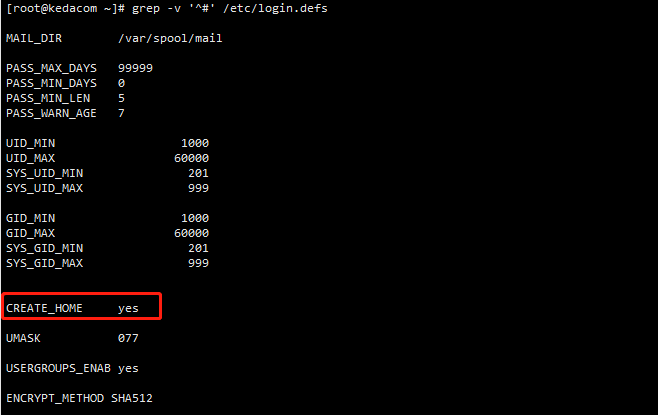
用户home目录
创建用户后,用户的home目录中会带有3各隐藏文件,分别为.bash_logout .bash_profile .bashrc
[root@kedacom ~]# ll -a /home/zhangsan01/总用量 16drwx------ 2 zhangsan students 62 3月 5 16:54 .drwxr-xr-x. 7 root root 4096 3月 5 16:54 ..-rw-r--r-- 1 zhangsan students 18 8月 8 2019 .bash_logout-rw-r--r-- 1 zhangsan students 193 8月 8 2019 .bash_profile-rw-r--r-- 1 zhangsan students 231 8月 8 2019 .bashrc
创建用户后,会从/etc/skel/拷贝隐藏文件到用户home目录下。所以,若想让所有新用户拥有同一行为,可以通过更改/etc/skel/下的隐藏文件实现。
[root@kedacom ~]# ll -a /etc/skel/总用量 24drwxr-xr-x. 2 root root 62 10月 30 2020 .drwxr-xr-x. 100 root root 8192 3月 5 17:03 ..-rw-r--r--. 1 root root 18 8月 8 2019 .bash_logout-rw-r--r--. 1 root root 193 8月 8 2019 .bash_profile-rw-r--r--. 1 root root 231 8月 8 2019 .bashrc

若有收获,就点个赞吧
0 人点赞


