标准输入输出
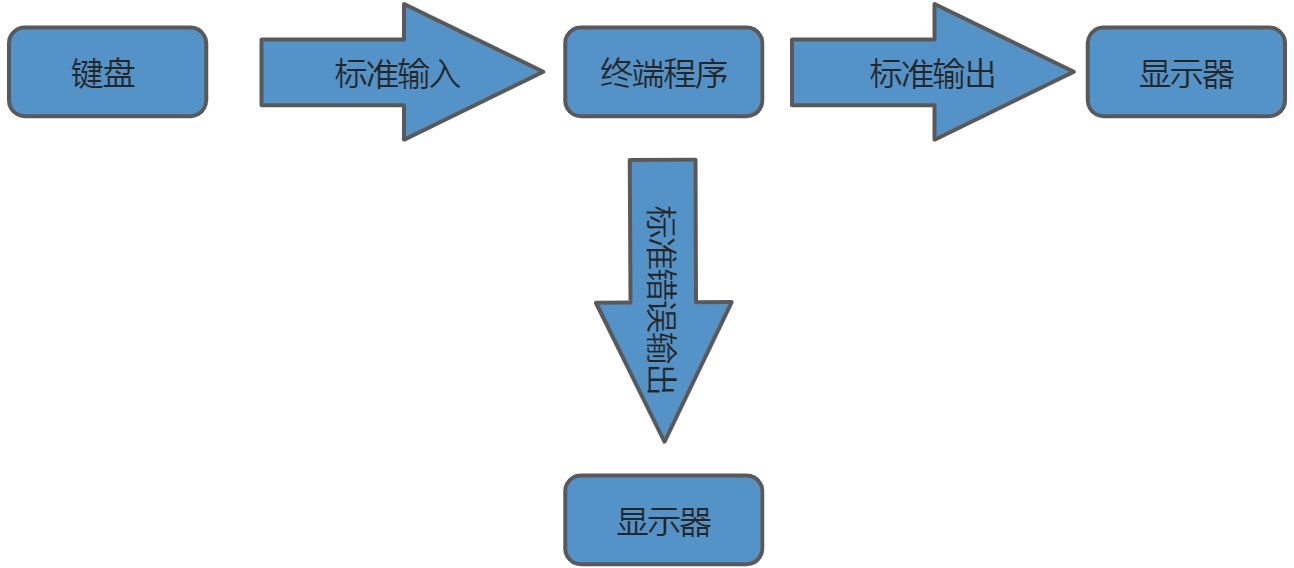
标准输入(stdin)
标准输出(stdout)
标准错误输出(stderr)
在linux中,每个进程会有对应的进程号,假如:tail -2 /etc/passwd命令对应的进程号为1788,则会存在目录/proc/1788,/proc/1788/fd目录存在0,1,2……等文件,其中/etc/passwd是一个输入文件,使用一个编号表示。
上图中,键盘、显示器在linux中都表示为一个设备文件,每个设备文件都用一个编号表示。
#查看当前进程[root@kedacom fd]# psPID TTY TIME CMD206459 pts/1 00:00:00 su206465 pts/1 00:00:00 bash221644 pts/1 00:00:00 ps#执行命令后,ctrl+z在后台运行[root@kedacom fd]# tail -f /etc/passwdtcpdump:x:72:72::/:/sbin/nologintss:x:59:59:Account used by the trousers package to sandbox the tcsd daemon:/dev/null:/sbin/nologinuuidd:x:996:995:UUID generator helper daemon:/var/lib/libuuid:/sbin/nologinntp:x:38:38::/etc/ntp:/sbin/nologintomcat:x:995:994::/home/tomcat:/bin/falsenginx:x:994:993:nginx user:/var/cache/nginx:/sbin/nologines:x:1002:1002::/home/es:/bin/bashmysql:x:993:1003::/home/mysql:/bin/bashkedacom:x:1004:0::/home/kedacom:/bin/bashdevupdate:x:1005:50::/var/nms/devversion:/bin/bash^Z[1]+ 已停止 tail -f /etc/passwd#再次查看当前进程,存在一个tail的进程,进程号为221735[root@kedacom fd]# psPID TTY TIME CMD206459 pts/1 00:00:00 su206465 pts/1 00:00:00 bash221735 pts/1 00:00:00 tail221756 pts/1 00:00:00 ps#查看tail进程相关的文件[root@kedacom fd]# ls -l /proc/221735/fd总用量 0lrwx------ 1 root root 64 1月 31 17:32 0 -> /dev/pts/1lrwx------ 1 root root 64 1月 31 17:32 1 -> /dev/pts/1lrwx------ 1 root root 64 1月 31 17:31 2 -> /dev/pts/1lr-x------ 1 root root 64 1月 31 17:32 3 -> /etc/passwdlr-x------ 1 root root 64 1月 31 17:32 4 -> anon_inode:inotify
进程相关文件说明:
0 - 标准输入,键盘
1 - 标准输出,显示器
2 - 标准错误输出,显示器
3 - tail命令操作的文件/etc/passwd
其中0/1/2/3是文件描述符
#tail -f 带两个参数[root@kedacom fd]# tail -f /etc/passwd /etc/shadow==> /etc/passwd <==tcpdump:x:72:72::/:/sbin/nologintss:x:59:59:Account used by the trousers package to sandbox the tcsd daemon:/dev/null:/sbin/nologinuuidd:x:996:995:UUID generator helper daemon:/var/lib/libuuid:/sbin/nologinntp:x:38:38::/etc/ntp:/sbin/nologintomcat:x:995:994::/home/tomcat:/bin/falsenginx:x:994:993:nginx user:/var/cache/nginx:/sbin/nologines:x:1002:1002::/home/es:/bin/bashmysql:x:993:1003::/home/mysql:/bin/bashkedacom:x:1004:0::/home/kedacom:/bin/bashdevupdate:x:1005:50::/var/nms/devversion:/bin/bash==> /etc/shadow <==tcpdump:!!:18711::::::tss:!!:18711::::::uuidd:!!:18711::::::ntp:!!:18711::::::tomcat:!!:18711::::::nginx:!!:18711::::::es:!!:18711:0:99999:7:::mysql:!!:18717::::::kedacom:$6$0QI3gjLR$l9YAEizlY5WZ4mIW.minjbxiqDgFqjoJu425fVsYbvsK0YK/ils4yE6uXrS1N9MGhxgheJEmw7inp8Oj88Ms/1:18732:0:99999:7:::devupdate:$6$zHS/b2ra$7utpkEVqsSwU/3UR5EwPHalKo63QeTZYCGUvGHegeAa9IO5zMv1uaPOHs8UmeE62rh4.d4vqMU1/bdUQOM.wB.:18954:0:99999:7:::^Z[2]+ 已停止 tail -f /etc/passwd /etc/shadow[root@kedacom fd]# psPID TTY TIME CMD206459 pts/1 00:00:00 su206465 pts/1 00:00:00 bash221735 pts/1 00:00:00 tail222697 pts/1 00:00:00 tail222714 pts/1 00:00:00 ps#此时多了1个文件/etc/shadow[root@kedacom fd]# ll /proc/222697/fd总用量 0lrwx------ 1 root root 64 1月 31 17:40 0 -> /dev/pts/1lrwx------ 1 root root 64 1月 31 17:40 1 -> /dev/pts/1lrwx------ 1 root root 64 1月 31 17:39 2 -> /dev/pts/1lr-x------ 1 root root 64 1月 31 17:40 3 -> /etc/passwdlr-x------ 1 root root 64 1月 31 17:40 4 -> /etc/shadowlr-x------ 1 root root 64 1月 31 17:40 5 -> anon_inode:inotify
进程相关文件说明:
0 - 标准输入,键盘
1 - 标准输出,显示器
2 - 标准错误输出,显示器
3 - tail命令操作的文件/etc/passwd
4 - tail命令操作的文件/etc/shadow
linux中所有设备都在/dev目录下,一个设备就是一个文件,例如:光驱、网卡等设备。虚拟设备也在此目录下。
[root@kedacom fd]# ll /dev/std*lrwxrwxrwx 1 root root 15 1月 25 16:25 /dev/stderr -> /proc/self/fd/2lrwxrwxrwx 1 root root 15 1月 25 16:25 /dev/stdin -> /proc/self/fd/0lrwxrwxrwx 1 root root 15 1月 25 16:25 /dev/stdout -> /proc/self/fd/1
标准输入输出可通过ll /dev/std*查看,/dev/stderr /dev/stdin /dev/stdout都是逻辑设备,指向不同进程文件,其中self就是各进程的进程号。
重定向
定义:将标准输入、标注输出、标注错误输出通过别的方式替代,就是所谓的重定向
| 类型 | 操作符 | 用途 |
|---|---|---|
| 重定向标准输出 | > | 将命令的执行结果输出到指定的文件中,而不是直接显示在屏幕上 |
| >> | 将命令执行的结果追加输出到执行的文件中 | |
| 重定向标准输入 | < | 将命令中接收输入的途径由默认的键盘更改为指定的文件 |
| Here document | << | 指定输入结束符 |
标准输出重定向
ifconfig eth0内容默认是输出到屏幕中,可重定向到文件out中
[root@kedacom test]# ifconfig eth0 1>out
[root@kedacom test]# cat out
eth0: flags=4163<UP,BROADCAST,RUNNING,MULTICAST>  mtu 1500
        inet 172.16.248.63  netmask 255.255.248.0  broadcast 172.16.255.255
        ether 00:14:10:29:9a:4b  txqueuelen 1000  (Ethernet)
        RX packets 15909392  bytes 2033875289 (1.8 GiB)
        RX errors 0  dropped 215542  overruns 0  frame 0
        TX packets 13396155  bytes 1955902801 (1.8 GiB)
        TX errors 0  dropped 0 overruns 0  carrier 0  collisions 0
        device memory 0x9d400000-9d41ffff
上面命令中,1可以不填写,ifconfig eth0 >out实现相同的功能
[root@kedacom test]# ifconfig eth0 > out1
[root@kedacom test]# cat out1
eth0: flags=4163<UP,BROADCAST,RUNNING,MULTICAST>  mtu 1500
        inet 172.16.248.63  netmask 255.255.248.0  broadcast 172.16.255.255
        ether 00:14:10:29:9a:4b  txqueuelen 1000  (Ethernet)
        RX packets 15915873  bytes 2034524614 (1.8 GiB)
        RX errors 0  dropped 215652  overruns 0  frame 0
        TX packets 13401214  bytes 1956469071 (1.8 GiB)
        TX errors 0  dropped 0 overruns 0  carrier 0  collisions 0
        device memory 0x9d400000-9d41ffff
标准错误输出重定向
[root@kedacom test]# ifconfig eth9
eth9: error fetching interface information: Device not found
ifconfig eth9输出的是错误内容,可将错误输出重定向到error文件中。
注意:命令中的2必须填写,与标准输出重定向不同
[root@kedacom test]# ifconfig eth9 2>error
[root@kedacom test]# cat error
eth9: error fetching interface information: Device not found
标准输出和错误输出重定向
场景1:执行的命令输出存在正确输出、错误输出时,可分别将正确输出到一个文件,错误输出到另一个文件中
例如:普通用户执行命令find /etc -name “*.conf”后,会有部分文件没有权限,打印错误信息,可将正确输出到out文件,错误输出到error文件
[kedacom@kedacom ~]$ find /etc -name "*.conf" 1>out 2>error
[kedacom@kedacom ~]$ cat out
/etc/resolv.conf
/etc/logrotate.conf
/etc/asound.conf
/etc/openldap/ldap.conf
/etc/libuser.conf
/etc/sudo-ldap.conf
/etc/sudo.conf
/etc/host.conf
/etc/yum/pluginconf.d/nkucplugin.conf
......
[kedacom@kedacom ~]$ cat error
find: ‘/etc/grub.d’: 权限不够
find: ‘/etc/selinux/targeted/active’: 权限不够
find: ‘/etc/selinux/final’: 权限不够
find: ‘/etc/pki/CA/private’: 权限不够
find: ‘/etc/pki/rsyslog’: 权限不够
find: ‘/etc/lvm/archive’: 权限不够
find: ‘/etc/lvm/backup’: 权限不够
find: ‘/etc/lvm/cache’: 权限不够
find: ‘/etc/polkit-1/rules.d’: 权限不够
find: ‘/etc/polkit-1/localauthority’: 权限不够
find: ‘/etc/ntp/crypto’: 权限不够
find: ‘/etc/nginx/client_body_temp’: 权限不够
find: ‘/etc/nginx/proxy_temp’: 权限不够
find: ‘/etc/nginx/fastcgi_temp’: 权限不够
find: ‘/etc/nginx/uwsgi_temp’: 权限不够
find: ‘/etc/nginx/scgi_temp’: 权限不够
场景2:将正确输出和错误输出都重定向到同一个文件
例如:find /etc -name “*.conf”将正确、错误输出都重定向到all文件
[kedacom@kedacom ~]$ find /etc -name "*.conf" &>all
[kedacom@kedacom ~]$ cat all
/etc/resolv.conf
find: ‘/etc/grub.d’: 权限不够
/etc/logrotate.conf
/etc/asound.conf
/etc/openldap/ldap.conf
/etc/libuser.conf
/etc/sudo-ldap.conf
/etc/sudo.conf
/etc/host.conf
/etc/yum/pluginconf.d/nkucplugin.conf
/etc/yum/pluginconf.d/langpacks.conf
/etc/yum/protected.d/systemd.conf
/etc/yum/version-groups.conf
/etc/selinux/semanage.conf
find: ‘/etc/selinux/targeted/active’: 权限不够
/etc/selinux/targeted/setrans.conf
find: ‘/etc/selinux/final’: 权限不够
......
区别>与>>
filename 如果filename不存在,则创建该文件;若存在,则覆盖文件中的内容
>>filename 将内容追加到filename文件中#没有testfile文件则创建 [root@kedacom test]# echo "123456" > testfile [root@kedacom test]# cat testfile 123456 #覆盖testfile文件的内容 [root@kedacom test]# echo "222222" > testfile [root@kedacom test]# cat testfile 222222 #追加内容到testfile文件 [root@kedacom test]# echo "abcdefg" >> testfile [root@kedacom test]# cat testfile 222222 abcdefg说明:>>命令可用于观察某个命令的执行结果,用于记录每次执行的情况。例如:内存、cpu情况等。
使用重定向合并文件
[root@kedacom test]# echo "123456" > a
[root@kedacom test]# echo "abcdef" > b
[root@kedacom test]# cat a b > ab
[root@kedacom test]# cat ab
123456
abcdef
重定向的本质
重定向是将对应的输出制定重定向文件
#输入命令,ctrl+z
[root@kedacom test]# tail -f /etc/passwd 1>test.txt
^Z
[1]+  已停止               tail -f /etc/passwd > test.txt
#查看tail -f的进程号
[root@kedacom test]# ps
   PID TTY          TIME CMD
 24110 pts/1    00:00:00 su
 24111 pts/1    00:00:00 bash
 24145 pts/1    00:00:00 su
 25787 pts/1    00:00:00 su
 25792 pts/1    00:00:00 bash
 27075 pts/1    00:00:00 tail
 27087 pts/1    00:00:00 ps
206459 pts/1    00:00:00 su
206465 pts/1    00:00:00 bash
#查看tail -f进程文件设备指向的文件
[root@kedacom test]# ll /proc/27075/fd
总用量 0
lrwx------ 1 root root 64 1月  31 22:13 0 -> /dev/pts/1
l-wx------ 1 root root 64 1月  31 22:13 1 -> /opt/test/test.txt
lrwx------ 1 root root 64 1月  31 22:13 2 -> /dev/pts/1
lr-x------ 1 root root 64 1月  31 22:13 3 -> /etc/passwd
lr-x------ 1 root root 64 1月  31 22:13 4 -> anon_inode:inotify
标准输入重定向

若有收获,就点个赞吧
0 人点赞


