7.1 CDC简介
7.1.1 什么是CDC
CDC 是 Change Data Capture(变更数据获取)的简称。核心思想是,监测并捕获数据库的变动(包括数据或数据表的插入、更新以及删除等),将这些变更按发生的顺序完整记录下来,写入到消息中间件中以供其他服务进行订阅及消费。
7.1.2 CDC的种类
CDC 主要分为基于查询和基于 Binlog 两种方式,我们主要了解一下这两种之间的区别:
| 基于查询的CDC | 基于Binlog的CDC | |
|---|---|---|
| 开源产品 | Sqoop、Kafka JDBC Source | Canal、Maxwell、Debezium |
| 执行模式 | Batch | Streaming |
| 是否可以捕获所有数据变化 | 否 | 是 |
| 延迟性 | 高延迟 | 低延迟 |
| 是否增加数据库压力 | 是 | 否 |
7.1.3 Flink-CDC
Flink 社区开发了 flink-cdc-connectors 组件,这是一个可以直接从 MySQL、PostgreSQL等数据库直接读取全量数据和增量变更数据的 source 组件。目前也已开源,开源地址:
https://github.com/ververica/flink-cdc-connectors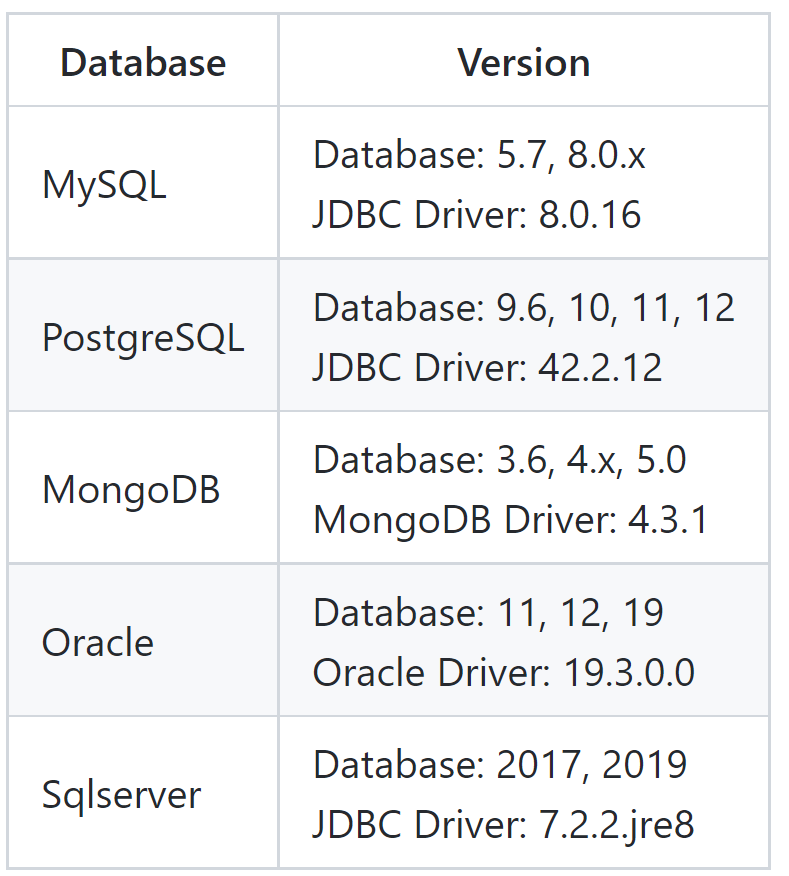
7.1.4 示例版本
hadoop:3.3.1
flink:1.13.2
flink-CDC:1.4.0
7.1.5 踩坑记录
7.2 FlinkCDC-DataStream案例
7.2.1 创建maven项目并导入依赖
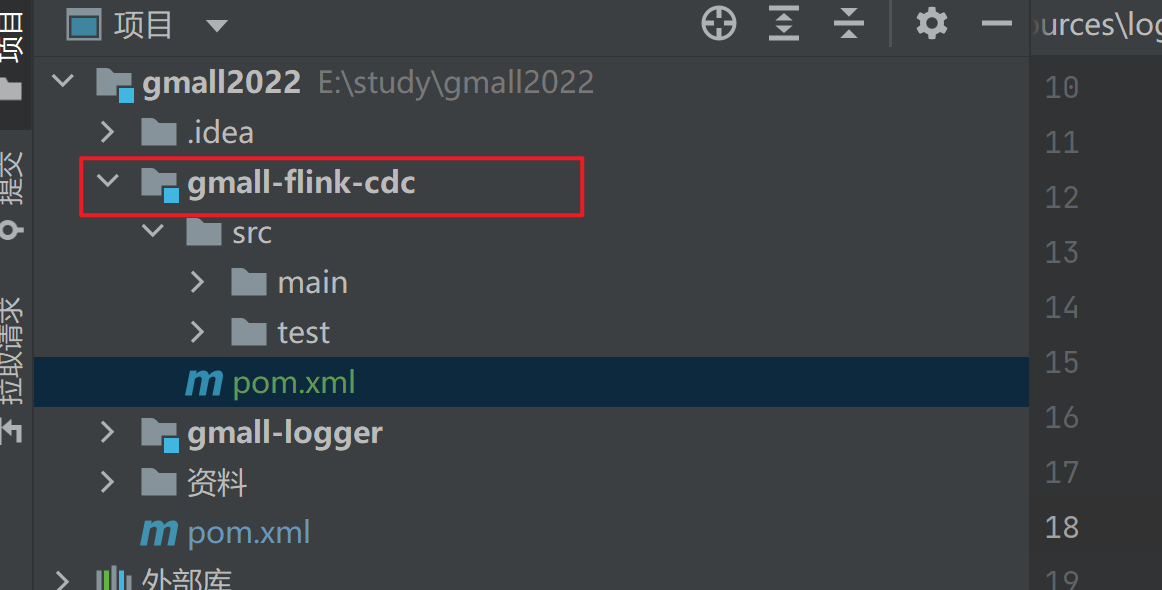
添加如下依赖,https://search.maven.org/,从maven中央仓库查找到flink CDC最新的版本为2.1.1
<?xml version="1.0" encoding="UTF-8"?><project xmlns="http://maven.apache.org/POM/4.0.0"xmlns:xsi="http://www.w3.org/2001/XMLSchema-instance"xsi:schemaLocation="http://maven.apache.org/POM/4.0.0 http://maven.apache.org/xsd/maven-4.0.0.xsd"><parent><artifactId>gmall2022</artifactId><groupId>org.example</groupId><version>1.0</version></parent><modelVersion>4.0.0</modelVersion><artifactId>gmall-flink-cdc</artifactId><properties><maven.compiler.source>8</maven.compiler.source><maven.compiler.target>8</maven.compiler.target><project.build.sourceEncoding>UTF-8</project.build.sourceEncoding></properties><dependencies><dependency><groupId>org.apache.flink</groupId><artifactId>flink-java</artifactId><version>1.13.2</version></dependency><dependency><groupId>org.apache.flink</groupId><artifactId>flink-streaming-java_2.12</artifactId><version>1.13.2</version></dependency><dependency><groupId>org.apache.flink</groupId><artifactId>flink-clients_2.12</artifactId><version>1.13.2</version></dependency><dependency><groupId>org.apache.flink</groupId><artifactId>flink-table-api-scala-bridge_2.12</artifactId><version>1.13.2</version></dependency><dependency><groupId>org.apache.flink</groupId><artifactId>flink-table-planner_2.12</artifactId><version>1.13.2</version></dependency><dependency><groupId>org.apache.hadoop</groupId><artifactId>hadoop-client</artifactId><version>3.3.1</version></dependency><dependency><groupId>mysql</groupId><artifactId>mysql-connector-java</artifactId><version>8.0.25</version></dependency><dependency><groupId>com.alibaba.ververica</groupId><!-- add the dependency matching your database --><artifactId>flink-connector-mysql-cdc</artifactId><!-- the dependency is available only for stable releases. --><version>1.4.0</version></dependency><dependency><groupId>com.alibaba</groupId><artifactId>fastjson</artifactId><version>1.2.79</version></dependency></dependencies><build><plugins><plugin><groupId>org.apache.maven.plugins</groupId><artifactId>maven-assembly-plugin</artifactId><version>3.0.0</version><configuration><descriptorRefs><descriptorRef>jar-with-dependencies</descriptorRef></descriptorRefs></configuration><executions><execution><id>make-assembly</id><phase>package</phase><goals><goal>single</goal></goals></execution></executions></plugin></plugins></build></project>
7.2.2 FlinkCDC-DataStream代码
package com.djin.flinkcdc;


import com.alibaba.ververica.cdc.connectors.mysql.MySQLSource;
import com.alibaba.ververica.cdc.connectors.mysql.table.StartupOptions;
import com.alibaba.ververica.cdc.debezium.DebeziumSourceFunction;
import com.alibaba.ververica.cdc.debezium.StringDebeziumDeserializationSchema;
import org.apache.flink.api.common.eventtime.WatermarkStrategy;
import org.apache.flink.api.common.restartstrategy.RestartStrategies;
import org.apache.flink.runtime.state.filesystem.FsStateBackend;
import org.apache.flink.runtime.state.hashmap.HashMapStateBackend;
import org.apache.flink.streaming.api.CheckpointingMode;
import org.apache.flink.streaming.api.datastream.DataStreamSource;
import org.apache.flink.streaming.api.environment.CheckpointConfig;
import org.apache.flink.streaming.api.environment.StreamExecutionEnvironment;

public class FlinkMySQLCDC {
    public static void main(String[] args) throws Exception {
        // 1 创建mySqlSource
        DebeziumSourceFunction<String> mySqlSource = MySQLSource.<String>builder()
                .hostname("node001")
                .port(3306)
                .databaseList("gmall2022")
                .tableList()  //可选配置项,如果不指定该参数,则会
                //读取上一个配置下的所有表的数据,注意:指定的时候需要使用"db.table"的方式
                .username("root")
                .password("123456")
                .deserializer(new StringDebeziumDeserializationSchema())
                .startupOptions(StartupOptions.initial())
                .build();
        // 2 配置执行环境,Flink-CDC将读取binlog的位置信息以状态的方式保存再CK,如果想要做断点续传,需要从Checkpoint或者Savepoint启动程序
        // 2.1 创建执行环境
        StreamExecutionEnvironment env = StreamExecutionEnvironment.getExecutionEnvironment();
        // 2.2 开启Checkpoint,每隔5秒钟做一次CK
        env.enableCheckpointing(5000L);
        // 2.3 指定CK的一致性语义
//        env.getCheckpointConfig().setCheckpointingMode(CheckpointingMode.EXACTLY_ONCE);
        // 2.4 设置任务关闭的时候保留最后一次CK数据
        env.getCheckpointConfig().enableExternalizedCheckpoints(CheckpointConfig.
                ExternalizedCheckpointCleanup.RETAIN_ON_CANCELLATION);
        // 2.5 指定从CK自动重启策略
        env.setRestartStrategy(RestartStrategies.fixedDelayRestart(3,2000L));
        // 2.6 设置状态后端
        env.setStateBackend(new HashMapStateBackend());
        env.getCheckpointConfig().setCheckpointStorage("hdfs://node001:8020/flinkCDC");
        //env.setStateBackend(new FsStateBackend("hdfs://node001:8082/flinkCDC"));
        // 2.7 设置访问HDFS的用户名
        System.setProperty("HADOOP_USER_NAME", "djin");
        // 3 创建Flink-MySQL-CDC的Source
        DataStreamSource<String> mySQL_source = env.addSource(mySqlSource);
        mySQL_source.setParallelism(1);
        // 4 打印数据
        mySQL_source.print().setParallelism(1);
        // 5 启动任务
        env.execute("FlinkCDC");

    }
}
7.2.3 FlinkCDC-DataStream运行测试
1)打包并上传至 Linux
2)开启 MySQL Binlog 并重启 MySQL
3)启动 Flink 集群
4)启动hdfs集群
5)启动程序
[djin@node001 target]$ flink run -c com.djin.flinkcdc.FlinkMySQLCDC gmall-flink-cdc-1.0-jar-with-dependencies.jar

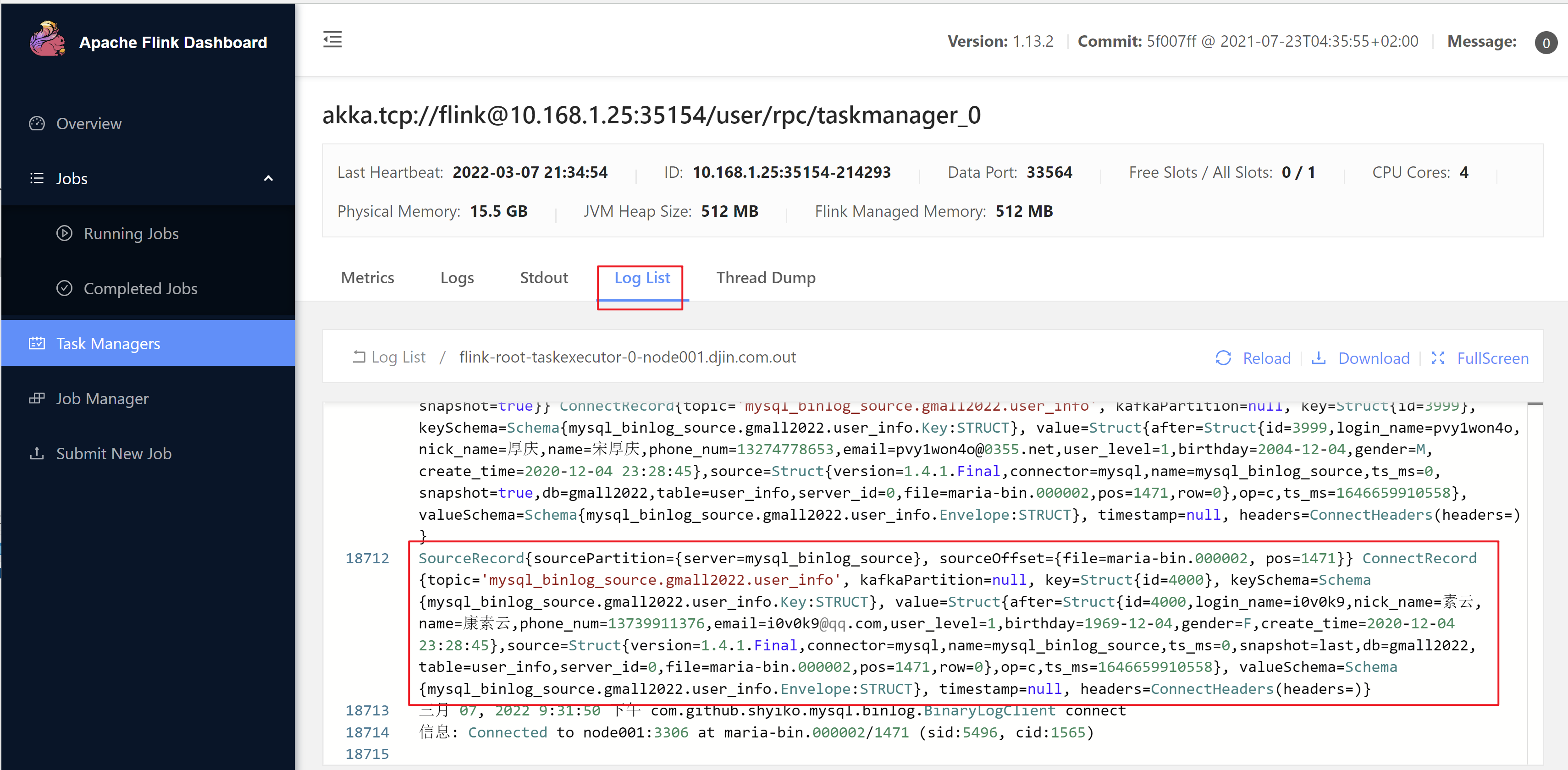
查看检查点
6)在 MySQL 的 base_attr_info 表中添加、修改或者删除数据 
7)给当前的 Flink 程序创建 Savepoint
32ff78f8c89a92aae2e3fa09eb432a52 为启动时看到的jobID
8)从Savepoint启动
7.3 FlinkCDC-Sql案例
7.3.1 添加依赖
<dependency>
 <groupId>org.apache.flink</groupId>
 <artifactId>flink-table-planner-blink_2.12</artifactId>
 <version>1.13.2</version>
</dependency>
7.3.2 FlinkCDC-Sql示例代码
package com.djin.flinkcdc;

import org.apache.flink.streaming.api.environment.StreamExecutionEnvironment;
import org.apache.flink.table.api.TableResult;
import org.apache.flink.table.api.bridge.java.StreamTableEnvironment;

public class FlinkSqlCDC {
    public static void main(String[] args) throws Exception {

        //1.创建执行环境
        StreamExecutionEnvironment env = StreamExecutionEnvironment.getExecutionEnvironment();
        env.setParallelism(1);
        StreamTableEnvironment tableEnv = StreamTableEnvironment.create(env);

        //1.创建FlinkSql-MySql-CDC的source
        tableEnv.executeSql("create table user_info(" +
                "id int," +
                "name string," +
                "phone_num string" +
                ")with(" +
                "'connector'='mysql-cdc'," +
                "'hostname'='node001'," +
                "'port'='3306'," +
                "'username'='root'," +
                "'password'='123456'," +
                "'database-name'='gmall2022'," +
                "'table-name'='user_info')");
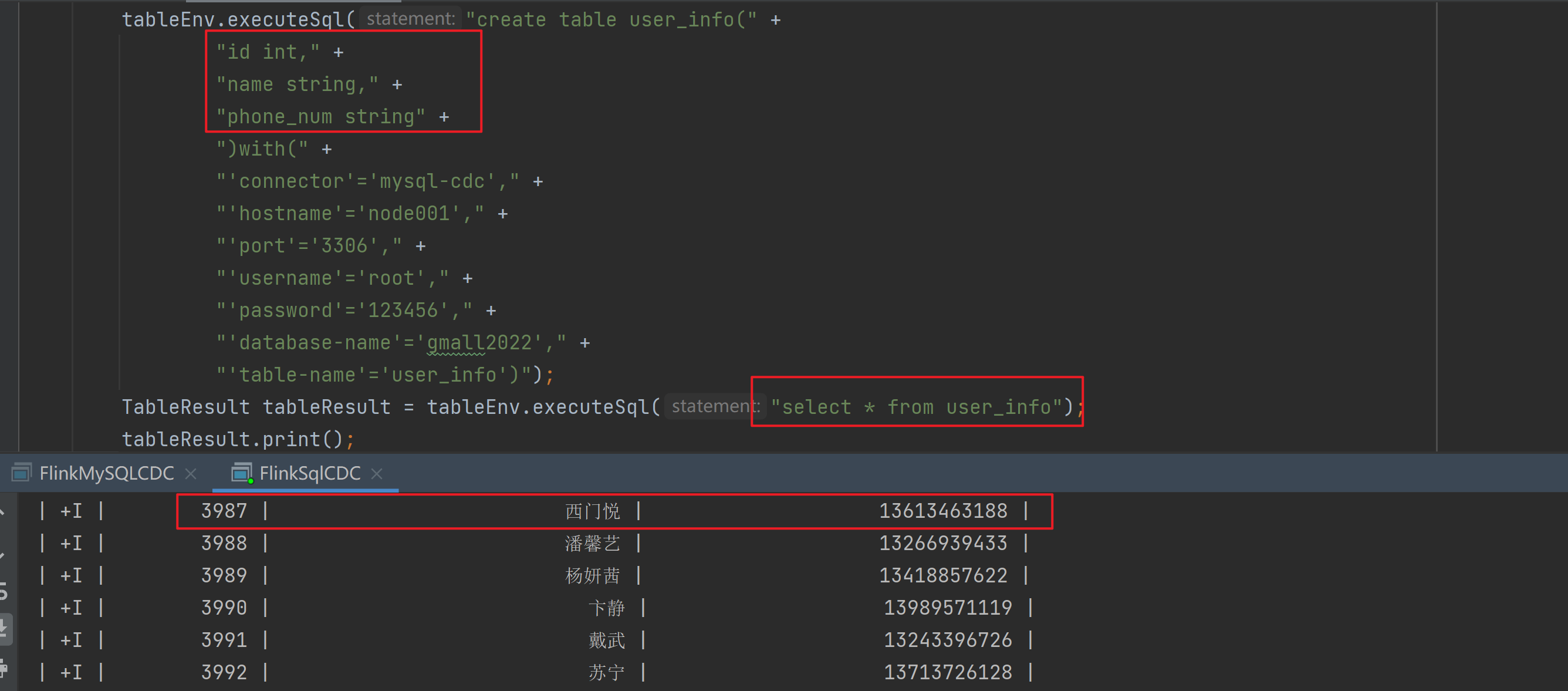
        TableResult tableResult = tableEnv.executeSql("select * from user_info");
        tableResult.print();
        env.execute("FlinkSql-CDC");


    }
}
7.3.3 FlinkCDC-Sql运行结果
7.4 自定义反序列化器案例
7.4.1 自定义反序列化器代码
继承DebeziumDeserializationSchema自定义反序列化器:
package com.djin.flinkcdc.base;

import com.alibaba.fastjson.JSONObject;
import com.alibaba.ververica.cdc.debezium.DebeziumDeserializationSchema;
import io.debezium.data.Envelope;
import org.apache.flink.api.common.typeinfo.TypeInformation;
import org.apache.flink.util.Collector;

import org.apache.kafka.connect.data.Field;
import org.apache.kafka.connect.data.Struct;
import org.apache.kafka.connect.source.SourceRecord;

public class MyJsonDeserializationSchema implements DebeziumDeserializationSchema {
    // 自定义数据解析器
    @Override
    public TypeInformation getProducedType() {
        return TypeInformation.of(String.class);
    }

    @Override
    public void deserialize(SourceRecord sourceRecord, Collector collector) throws Exception {
        //获取主题信息,包含数据库和表名:mysql_binlog_source.gmall2022.user_info
        String topic = sourceRecord.topic();
        String[] arr = topic.split("\\.");
        String db = arr[1];
        String tableName = arr[2];
        //获取操作类型 READ DELETE UPDATE CREATE
        String operation = Envelope.operationFor(sourceRecord).toString().toLowerCase();
        //获取值信息并转换为Struct类型
        Struct value = (Struct) sourceRecord.value();
        //获取转换后的数据
        Struct after = value.getStruct("after");
        //创建JSON对象用于存储数据信息
        JSONObject data = new JSONObject();
        for (Field field : after.schema().fields()) {
            Object o = after.get(field);
            data.put(field.name(), o);
        }
        //创建JSON对象用于封装最终返回值数据信息
        JSONObject result = new JSONObject();
        result.put("operation", operation);
        result.put("data", data);
        result.put("database", db);
        result.put("table", tableName);

        //发送数据至下游
        collector.collect(result.toJSONString());
    }
}
7.4.2 自定义反序列化器运行
将DataStream案例中的反序列化器替换为自定义反序列化器并执行: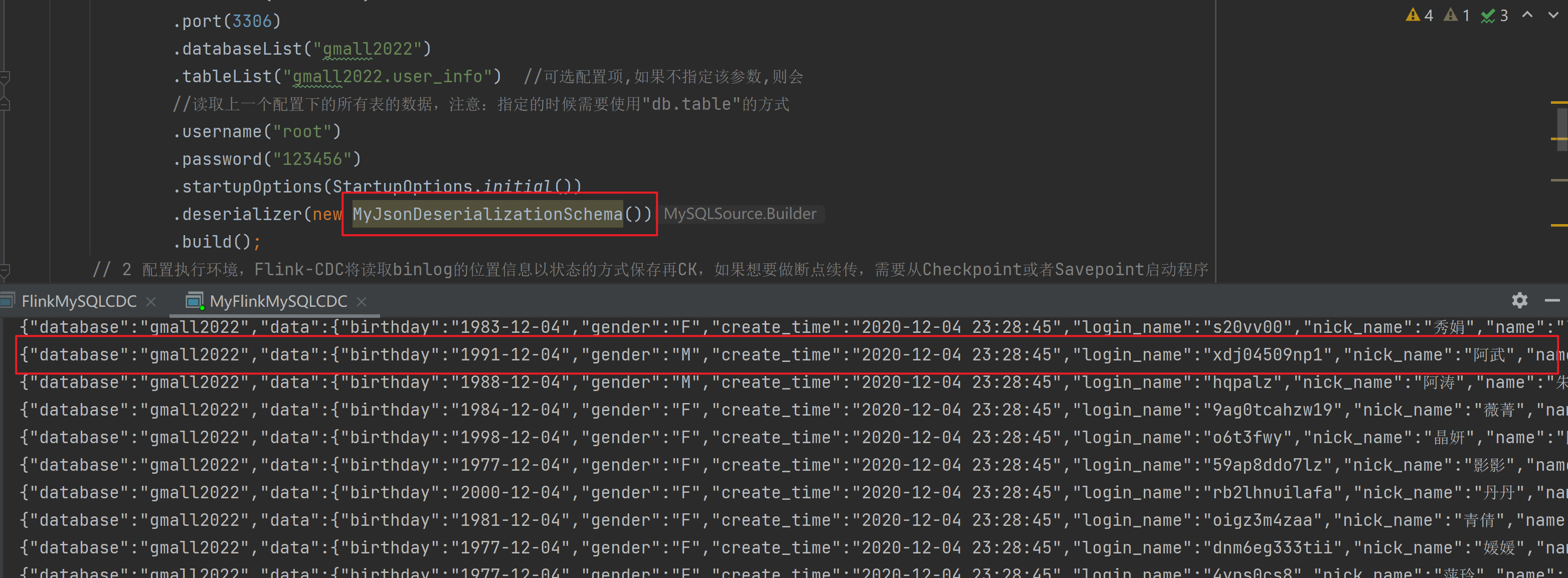
示例代码:
package com.djin.flinkcdc;

import com.alibaba.ververica.cdc.connectors.mysql.MySQLSource;
import com.alibaba.ververica.cdc.connectors.mysql.table.StartupOptions;
import com.alibaba.ververica.cdc.debezium.DebeziumSourceFunction;
import com.djin.flinkcdc.base.MyJsonDeserializationSchema;
import org.apache.flink.api.common.restartstrategy.RestartStrategies;
import org.apache.flink.runtime.state.hashmap.HashMapStateBackend;
import org.apache.flink.streaming.api.CheckpointingMode;
import org.apache.flink.streaming.api.datastream.DataStreamSource;
import org.apache.flink.streaming.api.environment.CheckpointConfig;
import org.apache.flink.streaming.api.environment.StreamExecutionEnvironment;


public class MyFlinkMySQLCDC {
    public static void main(String[] args) throws Exception {
// 1 创建mySqlSource
        DebeziumSourceFunction mySqlSource = MySQLSource.<String>builder()
                .hostname("node001")
                .port(3306)
                .databaseList("gmall2022")
                .tableList("gmall2022.user_info")  //可选配置项,如果不指定该参数,则会
                //读取上一个配置下的所有表的数据,注意:指定的时候需要使用"db.table"的方式
                .username("root")
                .password("123456")
                .startupOptions(StartupOptions.initial())
                .deserializer(new MyJsonDeserializationSchema())
                .build();
        // 2 配置执行环境,Flink-CDC将读取binlog的位置信息以状态的方式保存再CK,如果想要做断点续传,需要从Checkpoint或者Savepoint启动程序
        // 2.1 创建执行环境
        StreamExecutionEnvironment env = StreamExecutionEnvironment.getExecutionEnvironment();
        // 2.2 开启Checkpoint,每隔5秒钟做一次CK
        env.enableCheckpointing(5000L);
        // 2.3 指定CK的一致性语义
        env.getCheckpointConfig().setCheckpointingMode(CheckpointingMode.EXACTLY_ONCE);
        // 2.4 设置任务关闭的时候保留最后一次CK数据
        env.getCheckpointConfig().enableExternalizedCheckpoints(CheckpointConfig.
                ExternalizedCheckpointCleanup.RETAIN_ON_CANCELLATION);
        // 2.5 指定从CK自动重启策略
        env.setRestartStrategy(RestartStrategies.fixedDelayRestart(3, 2000L));
        // 2.6 设置状态后端
        env.setStateBackend(new HashMapStateBackend());
        env.getCheckpointConfig().setCheckpointStorage("hdfs://node001:8020/flinkCDC");
        //env.setStateBackend(new FsStateBackend("hdfs://node001:8082/flinkCDC"));过期
        // 2.7 设置访问HDFS的用户名
        System.setProperty("HADOOP_USER_NAME", "djin");
        // 3 创建Flink-MySQL-CDC的Source
        DataStreamSource<String> mySQL_source = env.addSource(mySqlSource);
        mySQL_source.setParallelism(1);
        // 4 打印数据
        mySQL_source.print().setParallelism(1);
        // 5 启动任务
        env.execute("MyFlinkCDC");
    }
}

若有收获,就点个赞吧
0 人点赞


