DHCP:动态主机设置协议(Dynamic Host Configuration Protocol)是一个局域网的网络协议,使用
UDP协议 工作,主要有两个用途:用于内部网或网络服务供应商自动分配IP地址;给用户用于内部网管
理员作为对所有计算 机作中央管理的手段。

DHCP实验

DHCP配置

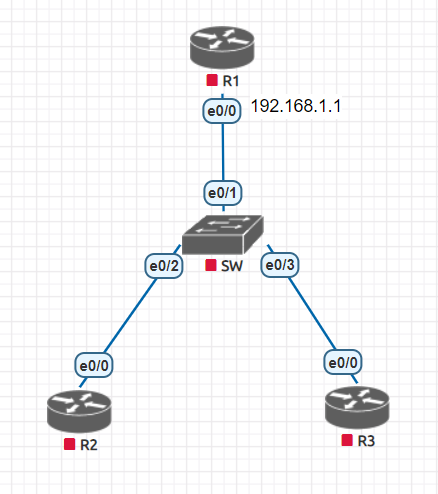
拓扑
LCXRRQV8QN4AZI`E30EI_QA.png

路由器配置

  1. ================R1 配置dhcp服务端==============
  2. R1#conf t
  3. R1(config)#int e0/0
  4. R1(config-if)#ip add 192.168.1.1 255.255.255.0
  5. R1(config-if)#no sh
  6. R1(config-if)#ip dhcp pool cisco # 创建一个地址池
  7. R1(dhcp-config)#network 192.168.1.0 /24 # 在地址池中放一个网段
  8. R1(dhcp-config)#default-router 192.168.1.1 # 设置默认网关
  9. R1(dhcp-config)#dns-server 114.114.114.114 114.114.115.115 # 设置主备DNS
  10. R1(dhcp-config)#lease 1 # 租约时间改为1天
  11. R1(dhcp-config)#exit
  12. R1(config)#ip dhcp excluded-address 192.168.1.1 # 设置排除地址
  13. ================R2 R3 配置dhcp客户端==============
  14. R3#conf t
  15. Enter configuration commands, one per line. End with CNTL/Z.
  16. R3(config)#int e0/0
  17. R3(config-if)#ip add dhcp
  18. R3(config-if)#no sh
  19. R2#conf t
  20. Enter configuration commands, one per line. End with CNTL/Z.
  21. R2(config)#int e0/0
  22. R2(config-if)#ip add dhcp
  23. R2(config-if)#no sh

检查IP分配情况

  1. R1#sh ip dhcp binding
  2. Bindings from all pools not associated with VRF:
  3. IP address Client-ID/ Lease expiration Type
  4. Hardware address/
  5. User name
  6. 192.168.1.2 0063.6973.636f.2d61. Feb 02 2021 04:01 PM Automatic
  7. 6162.622e.6363.3030.
  8. 2e32.3030.302d.4574.
  9. 302f.30
  10. 192.168.1.3 0063.6973.636f.2d61. Feb 02 2021 04:01 PM Automatic
  11. 6162.622e.6363.3030.
  12. 2e33.3030.302d.4574.
  13. 302f.30

DHCP工作过程

![54WC{CTHQ0E6`}BEYG~PWQ.png
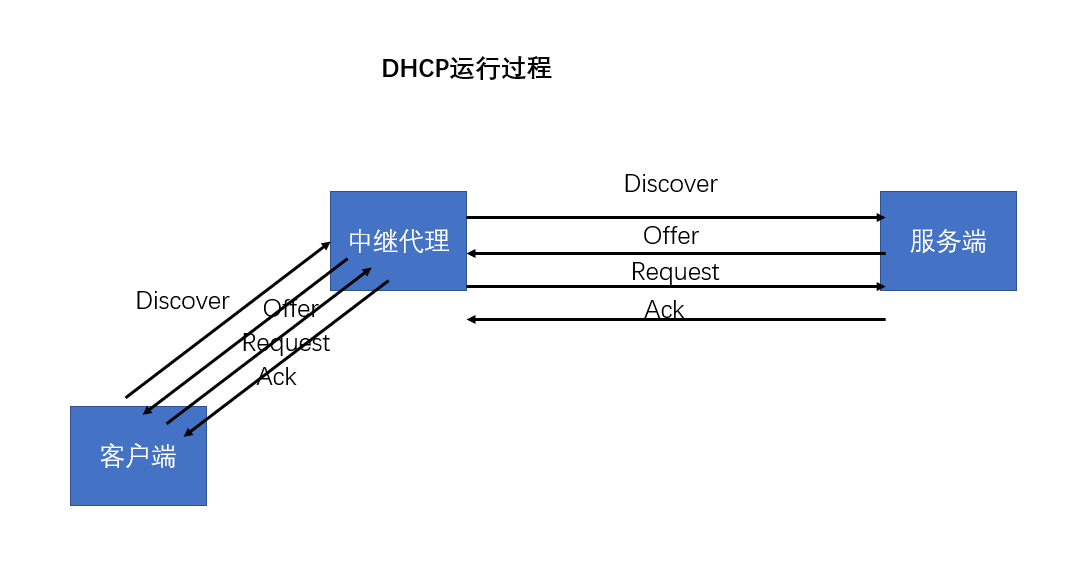
1.Discover 消息是用于客户端向整个内网发送广播,期待DHCP服务器进行回应
这个数据包中的重要内容就是:消息类型,客户端ID,主机名,请求获得的信息

  1. Offer 消息是DHCP服务器对客户的回应
    这个消息中会回复对方所需要的所有信息

  2. Request 这个是客户端确认DHCP服务器的消息
    这个消息和第一个消息差不多,但是消息类别变为 Request ,并且会携带请求的IP地址

  3. ACK DHCP服务器给客户端的最终确认
    这个消息和第二个消息差不多,但是消息类型变为 ACK

DHCP续租

  • DHCP租约更新
    • 自动更新租约
      • 当约期 >= 50% ,自动尝试更新租约
      • 当约期 >= 87.5%,发出广播再次更新租约
      • 当约期 >= 100%,客户机停止使用当前IP地址,只能重新DHCP租约的过程。
    • 手动更新租约
      • Windows:ipconfig /renew 和 /release
      • Linux:dhclient -r

DHCP地址绑定

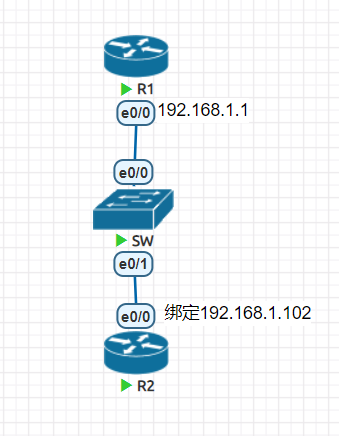
设备必须提供自己的身份信息才能在dhcp服务端获取地址信息,那么想要给设备绑定固定的IP地址,就必须知道设备的身份信息。

拓扑

![NV4{0BPNRFZ78P9HQ67ZEU.png

路由器R1配置(DHCP服务器)

  1. R1#conf t
  2. R1(config)#int e0/0
  3. R1(config-if)#ip add 192.168.1.1 255.255.255.0
  4. R1(config-if)#no sh
  5. R1(config-if)#ip dhcp pool cisco
  6. R1(dhcp-config)#netw 192.168.1.0 /24
  7. R1(dhcp-config)#def 192.168.1.1
  8. R1(dhcp-config)#dns 114.114.114.114 114.114.115.115
  9. R1(dhcp-config)#exit
  10. R1(config)#ip dhcp ex 192.168.1.1

路由器绑定

cisco设备是使用的 Client-ID 来获取DHCP信息的。
第1步:获取DHCP信息

  1. R2(config)#int e0/0
  2. R2(config-if)#ip add dhcp
  3. R2(config-if)#no sh

第2步:dhcp服务端查看dhcp绑定信息

  1. R1#sh ip dhcp bind
  2. Bindings from all pools not associated with VRF:
  3. IP address Client-ID/ Lease expiration Type
  4. Hardware address/
  5. User name
  6. 192.168.1.2 0063.6973.636f.2d61. Feb 02 2021 04:35 PM Automatic
  7. 6162.622e.6363.3030.
  8. 2e32.3030.302d.4574.
  9. 302f.30

第3步:获取client-id,整理成一行
0063.6973.636f.2d61.6162.622e.6363.3030.2e32.3030.302d.4574.302f.30
第4步:绑定地址

  1. R1#clear ip dhcp binding *
  2. R1#conf t
  3. Enter configuration commands, one per line. End with CNTL/Z.
  4. R1(config)#ip dhcp pool router
  5. R1(dhcp-config)#host 192.168.1.102
  6. R1(dhcp-config)#client-identifier 0063.6973.636f.2d61.6162.622e.6363.3030.2e32.3030.302d.4574.302f.30

第5步:dhcp客户端重新获取IP地址

  1. R2(config)#int e0/0
  2. R2(config-if)#sh
  3. R2(config-if)#no sh
  4. R2(config-if)#do sh ip int br
  5. Interface IP-Address OK? Method Status
  6. Protocol
  7. Ethernet0/0 192.168.1.102 YES DHCP up up