重定向
每打开文件都会有一个文件描述符fd
- 输入输出
- 1 代表标准正确输出
- 2 代表标准错误输出
输入一条正确的命令,然后通过[root@localhost ~]# echo hello worldhello world[root@localhost ~]# echo $?0[root@localhost ~]# hahaha-bash: hahaha: 未找到命令[root@localhost ~]# echo $?127
echo $?查看上一条命令的输出码,为0则正确输出,不为0错误输出。
重定向的定义:把一条命令的输出结果不是打印到屏幕,而是打印到一个文件里,这就是一个重定向。
输出重定向
- 输出重定向
:覆盖重定向
:追加重定向
- 2>:覆盖重定向错误输出数据流
- 2>>:追加重定向错误输出数据流 ```bash [root@localhost ~]# echo hello > right.file [root@localhost ~]# cat right.file hello [root@localhost ~]# echo world > right.file [root@localhost ~]# cat right.file world
[root@localhost ~]# echo hello >> right.file [root@localhost ~]# cat right.file world hello
[root@localhost ~]# hahaha > right.file 2> wrong.file [root@localhost ~]# cat right.file [root@localhost ~]# cat wrong.file -bash: hahaha: 未找到命令
[root@localhost ~]# 123123 >> right.file 2>> wrong.file [root@localhost ~]# cat right.file [root@localhost ~]# cat wrong.file -bash: hahaha: 未找到命令 -bash: 123123: 未找到命令
标准正确输出和错误输出到不同文件:<br />`command > right.file 2> wrong.file /dev/null:垃圾桶`- 合并标准输出和错误输出为同一个数据流进行重定向- &>:覆盖重定向- &&>:追加重定向- 2>&1:将错误流重定向到标准输出文件中- 1>&2:将正确流重定向到错误输出文件中```bash[root@localhost ~]# echo hello > all.file[root@localhost ~]# hahaha &>> all.file[root@localhost ~]# cat all.filehello-bash: hahaha: 未找到命令[root@localhost ~]# echo hello 2>> wrong.file 1>&2[root@localhost ~]# cat wrong.file-bash: hahaha: 未找到命令-bash: 123123: 未找到命令hello
输入重定向
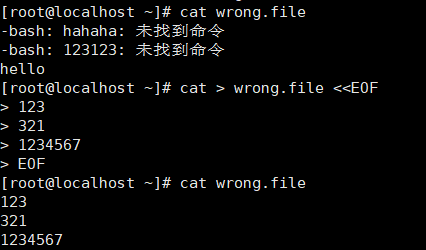
<<EOF 指定结束符
覆盖:cat > /path/to/somefile <<EOF....EOF追加:cat >> /path/to/somefile <<EOF....EOF
管道
command1 | command2 | command3
前一个命令的输出结果会作为后一个命令的参数
Note:最后一个命令会在当前shell进程的子shell进程中执行
小工具
tr命令
tr [option] [set1] [set2]
常用选项:
-d:删除
案例1:
将/etc/passwd文件中的前5行内容转换为大写后保存至/tmp/passwd.out文件中
[root@node1 ~]# head -n 5 /etc/passwd | tr 'a-z' 'A-Z' > /tmp/passwd.output
案例2:
将登陆至当前系统上用户信息中的最后1行的信息转换为大写后保存至/tmp/who.out文件中
[root@node1 ~]# who | tail -n 1 | tr 'a-z' 'A-Z' >/tmp/who.out
wc命令
统计行数、单词数和字符数。
常用选项:
- -l:行数
- -w:单词数
- -c:字符数
vim test1![]6@XEF{S0(7W4R0H~$S787R.png](/uploads/projects/u427629@ge071f/b6d9d6b8f0e87e495c0e2d214ac1625b.png)
[root@localhost ~]# wc test14 16 96 test1[root@localhost ~]# wc -l test14 test1[root@localhost ~]# wc -w test116 test1[root@localhost ~]# wc -c test196 test1
cut 命令
分割
常用选项
- -d:指定分隔符
-f:指定第几列
[root@localhost ~]# cut -d" " -f1,4 test1hello chinahello chinahello chinahello china[root@localhost ~]# cut -d" " -f1-3 test1hello world hellohello world hellohello world hellohello world hello
指定分隔符为“ ”空格,取test1中的第一列和第四列,再取第一列到第三列
sort 命令
排序(默认为升序)
常用选项-f:忽略大小写
- -r:逆序
- -t:字段分隔符
- -k #:以指定字段为标准排序
- -n:以数值进行排序
- -u:排序后去重
[root@localhost ~]# vim test2[root@localhost ~]# cat test21234567786543221[root@localhost ~]# sort test21122233445566778[root@localhost ~]# sort -r test28776655443322211[root@localhost ~]# sort -u test212345678
uniq工具
删除重复的项
文件testfile中第 2、3、5、6、7、9行为相同的行,使用 uniq 命令删除重复的行,可使用以下命令:uniq testfile
常用选项:
-c:显示每行重复出现的次数
-d:仅显示重复过的行
-u:仅显示不曾重复的行
案例1:
以:为分割,取出/etc/passwd文件的第6列至第10列,并将这些信息按照第3个字段的数值大小进行排序,最
后仅显示一个字段
[root@localhost ~]# cut -d: -f6-10 /etc/passwd |cut -f3 | sort -n |uniq -c
      1 /bin:/sbin/nologin
      1 /root:/bin/bash
      1 /root:/sbin/nologin
      1 /sbin:/bin/sync
      4 /:/sbin/nologin
      1 /sbin:/sbin/halt
      1 /sbin:/sbin/nologin
      1 /sbin:/sbin/shutdown
      1 /usr/games:/sbin/nologin
      1 /var/adm:/sbin/nologin
      1 /var/empty/sshd:/sbin/nologin
      1 /var/ftp:/sbin/nologin
      1 /var/lib/chrony:/sbin/nologin
      1 /var/spool/lpd:/sbin/nologin
      1 /var/spool/mail:/sbin/nologin
      1 /var/spool/postfix:/sbin/nologin

若有收获,就点个赞吧
0 人点赞