1.要求:
目前大夫主要以听诊器倾听病人的气管、肺部区域的声音,对病人的疾病进行判断;请设计一个听诊的软件,要求如下:
1) 可记录病人的姓名、年龄、性别、病史、不同疾病部位等状况;
2) 对病人的气管、肺部等区域的声音进行采集、分析、存储(前端听诊
部分不用考虑,只考虑数据采集部分)。
3) 可分析不同声音分量的大小,给出频谱图,以及主要频率的幅度,便
于大夫分析和验证;
4) 由于采集到的信号经常存在某些干扰信号,比如心脏的震动,请设计
低通、带通、带阻滤波器对信号处理,滤波器参数在用户界面中可以进行设
置,方便医生进行使用;
5) 编制 GUI 用户界面,实现上述所有功能。
2.实现
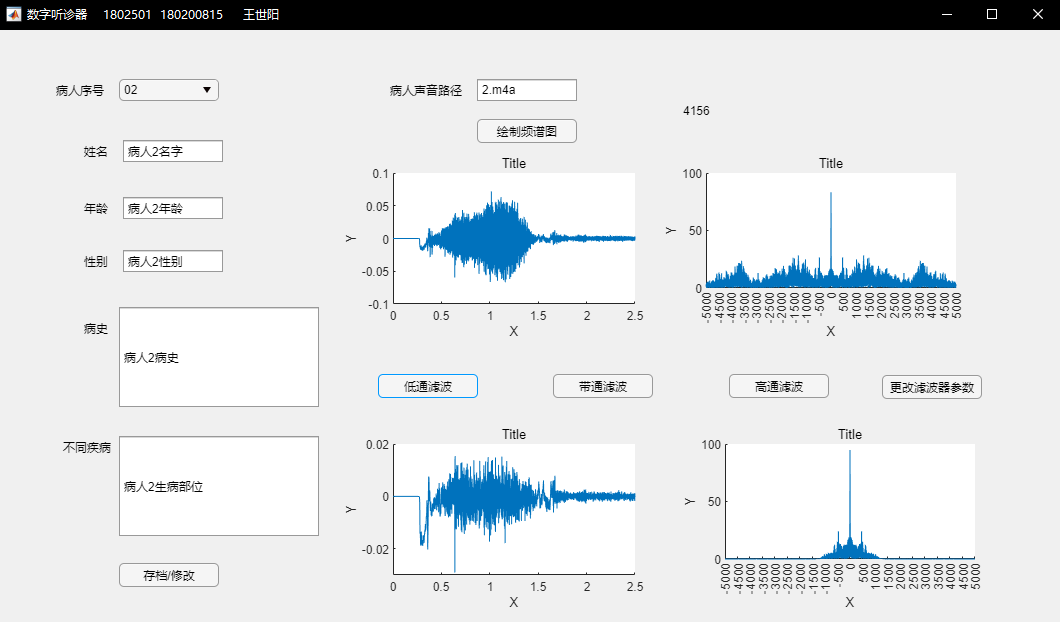
classdef app1 < matlab.apps.AppBase% Properties that correspond to app componentsproperties (Access = public)UIFigure matlab.ui.FigureLabel_6 matlab.ui.control.LabelButton_6 matlab.ui.control.ButtonButton_5 matlab.ui.control.ButtonButton_4 matlab.ui.control.ButtonButton_3 matlab.ui.control.ButtonButton_2 matlab.ui.control.ButtonEditField_6 matlab.ui.control.EditFieldLabel_5 matlab.ui.control.LabelButton matlab.ui.control.ButtonEditField_5 matlab.ui.control.EditFieldEditField_5Label matlab.ui.control.LabelEditField_4 matlab.ui.control.EditFieldLabel_4 matlab.ui.control.LabelEditField_3 matlab.ui.control.EditFieldEditField_3Label matlab.ui.control.LabelEditField_2 matlab.ui.control.EditFieldLabel_3 matlab.ui.control.LabelEditField matlab.ui.control.EditFieldEditFieldLabel matlab.ui.control.LabelDropDown matlab.ui.control.DropDownLabel matlab.ui.control.LabelUIAxes4 matlab.ui.control.UIAxesUIAxes3 matlab.ui.control.UIAxesUIAxes2 matlab.ui.control.UIAxesUIAxes matlab.ui.control.UIAxesend% Callbacks that handle component eventsmethods (Access = private)% Code that executes after component creationfunction startupFcn(app)app.Label_6.Text = '4156';global strname;global strage;global strsex;global strmedical;global strdds;global strpath;strname = ["病人1名字","病人2名字","病人3名字","病人4名字","病人5名字","病人6名字","病人7名字","病人8名字","病人9名字","病人10名字"];strage = ["病人1年龄","病人2年龄","病人3年龄","病人4年龄","病人5年龄","病人6年龄","病人7年龄","病人8年龄","病人9年龄","病人10年龄"];strsex = ["病人1性别","病人2性别","病人3性别","病人4性别","病人5性别","病人6性别","病人7性别","病人8性别","病人9性别","病人10性别"];strmedical = ["病人1病史","病人2病史","病人3病史","病人4病史","病人5病史","病人6病史","病人7病史","病人8病史","病人9病史","病人10病史"];strdds = [ "病人1生病部位","病人2生病部位","病人3生病部位","病人4生病部位","病人5生病部位","病人6生病部位","病人7生病部位","病人8生病部位","病人9生病部位","病人10生病部位"];strpath = ["1.m4a","2.m4a","3.m4a","4.m4a","5.m4a","6.m4a","7.m4a","8.m4a","9.m4a","10.m4a"];end% Value changed function: DropDownfunction DropDownValueChanged(app, event)% app.Label_2.Text = app.DropDown.Value;%global strname;global strage;global strsex;global strmedical;global strdds;global strpath;sequence = int8(str2double(app.DropDown.Value));app.EditField.Value = strname(sequence);app.EditField_2.Value = strage(sequence);app.EditField_3.Value = strsex(sequence);app.EditField_4.Value = strmedical(sequence);app.EditField_5.Value = strdds(sequence);app.EditField_6.Value = strpath(sequence);end% Drop down opening function: DropDownfunction DropDownOpening(app, event)end% Button pushed function: Button_2function Button_2Pushed(app, event)% filterDesigner;anpath = strcat(app.EditField_6.Value);[y1,fs]=audioread(anpath);y1=y1(:,1);%取单列global global_y1 global_fs;global_y1 = y1;global_fs = fs;N1=length(y1); %求信号长度n=0:N1-1; %所有元素t1=n/fs; %时间f1=-24000:fs/N1:fs*(N1-1)/N1-24000; %频率Y1=fftshift(fft(y1,N1)); %傅里叶变换ratio = app.EditField.Value;sound(y1,fs);plot(app.UIAxes,t1,y1);app.UIAxes.XLim = [0 2.5];app.UIAxes.XTick = 0:0.5:2.5;plot(app.UIAxes2,f1,abs(Y1));app.UIAxes2.XLim = [-5000 5000];app.UIAxes2.XTick = -5000:500:5000;end% Button pushed function: Buttonfunction ButtonPushed(app, event)global strname;global strage;global strsex;global strmedical;global strdds;sequence = int8(str2double(app.DropDown.Value));strname(sequence) = app.EditField.Value;strage(sequence) = app.EditField_2.Value;strsex(sequence) = app.EditField_3.Value;strmedical(sequence) = app.EditField_4.Value;strdds(sequence) = app.EditField_5.Value;strpath(sequence) = app.EditField_6.Value;end% Window scroll wheel function: UIFigurefunction UIFigureWindowScrollWheel(app, event)verticalScrollAmount = event.VerticalScrollAmount;verticalScrollCount = event.VerticalScrollCount;end% Close request function: UIFigurefunction UIFigureCloseRequest(app, event)delete(app)end% Button pushed function: Button_3function Button_3Pushed(app, event)global global_y1 global_fs;fs = global_fs;LPF_Coe = load('lpf.mat'); %低通滤波y2 = filter(LPF_Coe.Num,1,global_y1);N2=length(y2);k=0:1:N2-1;t2=k/fs;f2=-24000:fs/N2:fs*(N2-1)/N2-24000;Y2=fftshift(fft(y2,N2));plot(app.UIAxes3,t2,y2);app.UIAxes3.XLim = [0 2.5];app.UIAxes3.XTick = 0:0.5:2.5;plot(app.UIAxes4,f2,abs(Y2));app.UIAxes4.XLim = [-5000 5000];app.UIAxes4.XTick = -5000:500:5000;end% Button pushed function: Button_6function Button_6Pushed(app, event)filterDesigner;end% Button pushed function: Button_4function Button_4Pushed(app, event)global global_y1 global_fs;fs = global_fs;BPF_Coe = load('bpf.mat'); %带通滤波y2 = filter(BPF_Coe.Num,1,global_y1);N2=length(y2);k=0:1:N2-1;t2=k/fs;f2=-24000:fs/N2:fs*(N2-1)/N2-24000;Y2=fftshift(fft(y2,N2));plot(app.UIAxes3,t2,y2);app.UIAxes3.XLim = [0 2.5];app.UIAxes3.XTick = 0:0.5:2.5;plot(app.UIAxes4,f2,abs(Y2));app.UIAxes4.XLim = [-5000 5000];app.UIAxes4.XTick = -5000:500:5000;end% Button down function: UIAxes4function UIAxes4ButtonDown(app, event)end% Button pushed function: Button_5function Button_5Pushed(app, event)global global_y1 global_fs;fs = global_fs;HPF_Coe = load('hpf.mat'); %高通滤波y2 = filter(HPF_Coe.Num,1,global_y1);N2=length(y2);k=0:1:N2-1;t2=k/fs;f2=-24000:fs/N2:fs*(N2-1)/N2-24000;Y2=fftshift(fft(y2,N2));plot(app.UIAxes3,t2,y2);app.UIAxes3.XLim = [0 2.5];app.UIAxes3.XTick = 0:0.5:2.5;plot(app.UIAxes4,f2,abs(Y2));app.UIAxes4.XLim = [-5000 5000];app.UIAxes4.XTick = -5000:500:5000;endend% Component initializationmethods (Access = private)% Create UIFigure and componentsfunction createComponents(app)% Create UIFigure and hide until all components are createdapp.UIFigure = uifigure('Visible', 'off');app.UIFigure.AutoResizeChildren = 'off';app.UIFigure.Color = [0.9412 0.9412 0.9412];app.UIFigure.Position = [200 200 1063 592];app.UIFigure.Name = '数字听诊器 1802501 180200815 王世阳';app.UIFigure.CloseRequestFcn = createCallbackFcn(app, @UIFigureCloseRequest, true);app.UIFigure.WindowScrollWheelFcn = createCallbackFcn(app, @UIFigureWindowScrollWheel, true);app.UIFigure.WindowStyle = 'modal';% Create UIAxesapp.UIAxes = uiaxes(app.UIFigure);title(app.UIAxes, 'Title')xlabel(app.UIAxes, 'X')ylabel(app.UIAxes, 'Y')zlabel(app.UIAxes, 'Z')app.UIAxes.Position = [346 284 300 185];% Create UIAxes2app.UIAxes2 = uiaxes(app.UIFigure);title(app.UIAxes2, 'Title')xlabel(app.UIAxes2, 'X')ylabel(app.UIAxes2, 'Y')zlabel(app.UIAxes2, 'Z')app.UIAxes2.Position = [666 284 300 185];% Create UIAxes3app.UIAxes3 = uiaxes(app.UIFigure);title(app.UIAxes3, 'Title')xlabel(app.UIAxes3, 'X')ylabel(app.UIAxes3, 'Y')zlabel(app.UIAxes3, 'Z')app.UIAxes3.Position = [346 13 300 185];% Create UIAxes4app.UIAxes4 = uiaxes(app.UIFigure);title(app.UIAxes4, 'Title')xlabel(app.UIAxes4, 'X')ylabel(app.UIAxes4, 'Y')zlabel(app.UIAxes4, 'Z')app.UIAxes4.ButtonDownFcn = createCallbackFcn(app, @UIAxes4ButtonDown, true);app.UIAxes4.Position = [685 13 300 185];% Create Labelapp.Label = uilabel(app.UIFigure);app.Label.HorizontalAlignment = 'right';app.Label.Position = [54 522 53 22];app.Label.Text = '病人序号';% Create DropDownapp.DropDown = uidropdown(app.UIFigure);app.DropDown.Items = {'01', '02', '03', '04', '05', '06', '07', '08', '09', '10'};app.DropDown.DropDownOpeningFcn = createCallbackFcn(app, @DropDownOpening, true);app.DropDown.ValueChangedFcn = createCallbackFcn(app, @DropDownValueChanged, true);app.DropDown.Position = [122 522 100 22];app.DropDown.Value = '01';% Create EditFieldLabelapp.EditFieldLabel = uilabel(app.UIFigure);app.EditFieldLabel.HorizontalAlignment = 'right';app.EditFieldLabel.Position = [82 461 29 22];app.EditFieldLabel.Text = '姓名';% Create EditFieldapp.EditField = uieditfield(app.UIFigure, 'text');app.EditField.Position = [126 461 100 22];% Create Label_3app.Label_3 = uilabel(app.UIFigure);app.Label_3.HorizontalAlignment = 'right';app.Label_3.Position = [82 404 29 22];app.Label_3.Text = '年龄';% Create EditField_2app.EditField_2 = uieditfield(app.UIFigure, 'text');app.EditField_2.Position = [126 404 100 22];% Create EditField_3Labelapp.EditField_3Label = uilabel(app.UIFigure);app.EditField_3Label.HorizontalAlignment = 'right';app.EditField_3Label.Position = [82 351 29 22];app.EditField_3Label.Text = '性别';% Create EditField_3app.EditField_3 = uieditfield(app.UIFigure, 'text');app.EditField_3.Position = [126 351 100 22];% Create Label_4app.Label_4 = uilabel(app.UIFigure);app.Label_4.HorizontalAlignment = 'right';app.Label_4.Position = [82 284 29 22];app.Label_4.Text = '病史';% Create EditField_4app.EditField_4 = uieditfield(app.UIFigure, 'text');app.EditField_4.Position = [122 216 200 100];% Create EditField_5Labelapp.EditField_5Label = uilabel(app.UIFigure);app.EditField_5Label.HorizontalAlignment = 'right';app.EditField_5Label.Position = [61 165 53 22];app.EditField_5Label.Text = '不同疾病';% Create EditField_5app.EditField_5 = uieditfield(app.UIFigure, 'text');app.EditField_5.Position = [122 87 200 100];% Create Buttonapp.Button = uibutton(app.UIFigure, 'push');app.Button.ButtonPushedFcn = createCallbackFcn(app, @ButtonPushed, true);app.Button.Position = [122 36 100 24];app.Button.Text = '存档/修改';% Create Label_5app.Label_5 = uilabel(app.UIFigure);app.Label_5.HorizontalAlignment = 'right';app.Label_5.Position = [388 522 77 22];app.Label_5.Text = '病人声音路径';% Create EditField_6app.EditField_6 = uieditfield(app.UIFigure, 'text');app.EditField_6.Position = [480 522 100 22];app.EditField_6.Value = '1.m4a';% Create Button_2app.Button_2 = uibutton(app.UIFigure, 'push');app.Button_2.ButtonPushedFcn = createCallbackFcn(app, @Button_2Pushed, true);app.Button_2.Position = [480 480 100 24];app.Button_2.Text = '绘制频谱图';% Create Button_3app.Button_3 = uibutton(app.UIFigure, 'push');app.Button_3.ButtonPushedFcn = createCallbackFcn(app, @Button_3Pushed, true);app.Button_3.Position = [381 225 100 24];app.Button_3.Text = '低通滤波';% Create Button_4app.Button_4 = uibutton(app.UIFigure, 'push');app.Button_4.ButtonPushedFcn = createCallbackFcn(app, @Button_4Pushed, true);app.Button_4.Position = [556 225 100 24];app.Button_4.Text = '带通滤波';% Create Button_5app.Button_5 = uibutton(app.UIFigure, 'push');app.Button_5.ButtonPushedFcn = createCallbackFcn(app, @Button_5Pushed, true);app.Button_5.Position = [732 225 100 24];app.Button_5.Text = '高通滤波';% Create Button_6app.Button_6 = uibutton(app.UIFigure, 'push');app.Button_6.ButtonPushedFcn = createCallbackFcn(app, @Button_6Pushed, true);app.Button_6.Position = [885 224 100 24];app.Button_6.Text = '更改滤波器参数';% Create Label_6app.Label_6 = uilabel(app.UIFigure);app.Label_6.Position = [686 501 35 22];% Show the figure after all components are createdapp.UIFigure.Visible = 'on';endend% App creation and deletionmethods (Access = public)% Construct appfunction app = app1% Create UIFigure and componentscreateComponents(app)% Register the app with App DesignerregisterApp(app, app.UIFigure)% Execute the startup functionrunStartupFcn(app, @startupFcn)if nargout == 0clear appendend% Code that executes before app deletionfunction delete(app)% Delete UIFigure when app is deleteddelete(app.UIFigure)endendend
3.路径读取
anpath = strcat(app.EditField_6.Value);
[y1,fs]=audioread(anpath);
4.读取到的字符串转成数组
            ratio = app.EditField.Value;
            ratio = 1000*str2double(ratio);

若有收获,就点个赞吧
0 人点赞


