- 1 MySQL环境准备
- 2 Kafka环境准备
- 3 Kafka-Eagle安装
- multi zookeeper & kafka cluster list
- Settings prefixed with ‘kafka.eagle.’ will be deprecated, use ‘efak.’ instead
- zookeeper enable acl
- broker size online list
- zk client thread limit
- EFAK webui port
- kafka jmx acl and ssl authenticate
- kafka offset storage
- kafka jmx uri
- kafka metrics, 15 days by default
- kafka sql topic records max
- delete kafka topic token
- kafka sasl authenticate
- kafka ssl authenticate
- kafka sqlite jdbc driver address
- kafka mysql jdbc driver address
- efak.driver=com.mysql.cj.jdbc.Driver
- efak.url=jdbc:mysql://127.0.0.1:3306/ke?useUnicode=true&characterEncoding=UTF-8&zeroDateTimeBehavior=convertToNull
- efak.username=root
- efak.password=123456
- 4 Kafka-Eagle页面操作
1 MySQL环境准备
- 将安装包和JDBC驱动上传到/opt/software
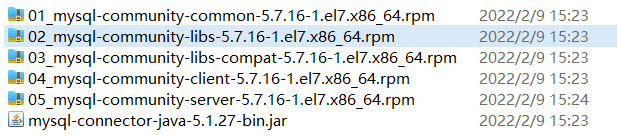
卸载自带的Mysql-libs
[qtbhy@hadoop102 software]$ rpm -qa | grep -i -E mysql\|mariadb | xargs -n1 sudo rpm -e --nodeps
安装MySQL依赖
[qtbhy@hadoop102 software]$ sudo rpm -ivh 01_mysql-community-common-5.7.16-1.el7.x86_64.rpm[qtbhy@hadoop102 software]$ sudo rpm -ivh 01_mysql-community-common-5.7.16-1.el7.x86_64.rpm[qtbhy@hadoop102 software]$ sudo rpm -ivh 03_mysql-community-libs-compat-5.7.16-1.el7.x86_64.rpm
安装mysql-client
[qtbhy@hadoop102 software]$ sudo rpm -ivh 04_mysql-community-client-5.7.16-1.el7.x86_64.rpm
安装mysql-server
[qtbhy@hadoop102 software]$ sudo rpm -ivh 05_mysql-community-server-5.7.16-1.el7.x86_64.rpm
启动MySQL
[qtbhy@hadoop102 software]$ sudo systemctl start mysqld
查看MySQL密码
[qtbhy@hadoop102 software]$ sudo cat /var/log/mysqld.log | grep password2022-07-08T08:10:45.891402Z 1 [Note] A temporary password is generated for root@localhost: BD%rDqU9q8vt
用第7步查到的密码进入MySQL
[qtbhy@hadoop102 software]$ mysql -uroot -p'BD%rDqU9q8vt'
设置复杂的密码
mysql> set password=password("Chakan78.");
更改MySQL密码策略 ```shell mysql> set global validate_password_length=4; Query OK, 0 rows affected (0.01 sec)
mysql> set global validate_password_policy=0; Query OK, 0 rows affected (0.00 sec)
11. 设置简单好记得密码```shellmysql> set password=password("123456");Query OK, 0 rows affected, 1 warning (0.00 sec)
进入MySQL库
mysql> use mysql
查询user表
mysql> select user,host from user;+-----------+-----------+| user | host |+-----------+-----------+| mysql.sys | localhost || root | localhost |+-----------+-----------+2 rows in set (0.01 sec)
修改user表,把Host表内容修改为%
mysql> update user set host="%" where user="root";Query OK, 1 row affected (0.00 sec)Rows matched: 1 Changed: 1 Warnings: 0
刷新
mysql> flush privileges;Query OK, 0 rows affected (0.01 sec)
退出
mysql> quit;
2 Kafka环境准备
关闭Kafka集群
[qtbhy@hadoop102 kafka]$ kf.sh stop
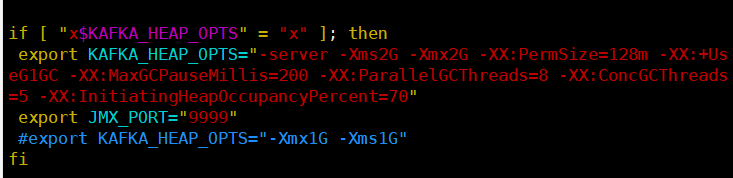
修改/opt/module/kafka/bin/kafka-server-start.sh命令中
[qtbhy@hadoop102 kafka]$ vim bin/kafka-server-start.sh
if [ "x$KAFKA_HEAP_OPTS" = "x" ]; thenexport KAFKA_HEAP_OPTS="-server -Xms2G -Xmx2G -XX:PermSize=128m -XX:+UseG1GC -XX:MaxGCPauseMillis=200 -XX:ParallelGCThreads=8 -XX:ConcGCThreads=5 -XX:InitiatingHeapOccupancyPercent=70"export JMX_PORT="9999"#export KAFKA_HEAP_OPTS="-Xmx1G -Xms1G"fi
分发到其他节点
[qtbhy@hadoop102 bin]$ xsync kafka-server-start.sh
3 Kafka-Eagle安装
上传压缩包 kafka-eagle-bin-2.0.8.tar.gz 到集群/opt/software 目录
解压到本地
[qtbhy@hadoop102 software]$ tar -zxvf kafka-eagle-bin-2.0.8.tar.gzkafka-eagle-bin-2.0.8/kafka-eagle-bin-2.0.8/efak-web-2.0.8-bin.tar.gz
进入解压的目录
[qtbhy@hadoop102 kafka-eagle-bin-2.0.8]$ ll总用量 79164-rw-rw-r--. 1 qtbhy qtbhy 81062577 10月 13 2021 efak-web-2.0.8-bin.tar.gz
将 efak-web-2.0.8-bin.tar.gz 解压至/opt/module
[qtbhy@hadoop102 kafka-eagle-bin-2.0.8]$ tar -zxvf efak-web-2.0.8-bin.tar.gz -C /opt/module/
修改名称
[qtbhy@hadoop102 module]$ mv efak-web-2.0.8/ efak
修改配置文件 /opt/module/efak/conf/system-config.properties ```shell
#
multi zookeeper & kafka cluster list
Settings prefixed with ‘kafka.eagle.’ will be deprecated, use ‘efak.’ instead
#
efak.zk.cluster.alias=cluster1 cluster1.zk.list=hadoop102:2181,hadoop103:2181,hadoop104:2181/kafka
#
zookeeper enable acl
#
cluster1.zk.acl.enable=false cluster1.zk.acl.schema=digest cluster1.zk.acl.username=test cluster1.zk.acl.password=test123
#
broker size online list
#
cluster1.efak.broker.size=20
#
zk client thread limit
#
kafka.zk.limit.size=32
#
EFAK webui port
#
efak.webui.port=8048
#
kafka jmx acl and ssl authenticate
#
cluster1.efak.jmx.acl=false cluster1.efak.jmx.user=keadmin cluster1.efak.jmx.password=keadmin123 cluster1.efak.jmx.ssl=false cluster1.efak.jmx.truststore.location=/data/ssl/certificates/kafka.truststore cluster1.efak.jmx.truststore.password=ke123456
#
kafka offset storage
#
cluster1.efak.offset.storage=kafka
#
kafka jmx uri
#
cluster1.efak.jmx.uri=service:jmx:rmi:///jndi/rmi://%s/jmxrmi
#
kafka metrics, 15 days by default
#
efak.metrics.charts=true efak.metrics.retain=15
#
kafka sql topic records max
#
efak.sql.topic.records.max=5000 efak.sql.topic.preview.records.max=10
#
delete kafka topic token
#
efak.topic.token=keadmin
#
kafka sasl authenticate
#
cluster1.efak.sasl.enable=false cluster1.efak.sasl.protocol=SASL_PLAINTEXT cluster1.efak.sasl.mechanism=SCRAM-SHA-256 cluster1.efak.sasl.jaas.config=org.apache.kafka.common.security.scram.ScramLoginModule required username=”kafka” password=”kafka-eagle”; cluster1.efak.sasl.client.id= cluster1.efak.blacklist.topics= cluster1.efak.sasl.cgroup.enable=false cluster1.efak.sasl.cgroup.topics= cluster2.efak.sasl.enable=false cluster2.efak.sasl.protocol=SASL_PLAINTEXT cluster2.efak.sasl.mechanism=PLAIN cluster2.efak.sasl.jaas.config=org.apache.kafka.common.security.plain.PlainLoginModule required username=”kafka” password=”kafka-eagle”; cluster2.efak.sasl.client.id= cluster2.efak.blacklist.topics= cluster2.efak.sasl.cgroup.enable=false cluster2.efak.sasl.cgroup.topics=
#
kafka ssl authenticate
#
cluster3.efak.ssl.enable=false cluster3.efak.ssl.protocol=SSL cluster3.efak.ssl.truststore.location= cluster3.efak.ssl.truststore.password= cluster3.efak.ssl.keystore.location= cluster3.efak.ssl.keystore.password= cluster3.efak.ssl.key.password= cluster3.efak.ssl.endpoint.identification.algorithm=https cluster3.efak.blacklist.topics= cluster3.efak.ssl.cgroup.enable=false cluster3.efak.ssl.cgroup.topics=
#
kafka sqlite jdbc driver address
#
efak.driver=com.mysql.jdbc.Driver efak.url=jdbc:mysql://hadoop102:3306/ke?useUnicode=true&characterEncoding=UTF-8&zeroDateTimeBehavior=convertToNull efak.username=root efak.password=123456
#
kafka mysql jdbc driver address
#
efak.driver=com.mysql.cj.jdbc.Driver
efak.url=jdbc:mysql://127.0.0.1:3306/ke?useUnicode=true&characterEncoding=UTF-8&zeroDateTimeBehavior=convertToNull
efak.username=root
efak.password=123456
7. 添加环境变量```shell[qtbhy@hadoop102 conf]$ sudo vim /etc/profile.d/my_env.sh
# kafkaEFAKexport KE_HOME=/opt/module/efakexport PATH=$PATH:$KE_HOME/bin
[qtbhy@hadoop102 conf]$ source /etc/profile
- 启动
```shell
[qtbhy@hadoop102 kafka]$ kf.sh start
[qtbhy@hadoop102 zookeeper-3.5.7]$ bin/zkServer.sh start
[qtbhy@hadoop103 zookeeper-3.5.7]$ bin/zkServer.sh start
[qtbhy@hadoop104 zookeeper-3.5.7]$ bin/zkServer.sh start
[qtbhy@hadoop102 efak]$ bin/ke.sh start
[2022-07-08 17:16:17] INFO: [Job done!]
Welcome to
/ / / / / | / /// / __/ / / / /| | / ,<
/ /_ / / / | / /| |
/__/ // // ||// |_|
( Eagle For Apache Kafka® )
Version 2.0.8 — Copyright 2016-2021
- EFAK Service has started success.
- Welcome, Now you can visit ‘http://192.168.10.102:8048‘
- Account:admin ,Password:123456
ke.sh [start|status|stop|restart|stats] https://www.kafka-eagle.org/
```shell[qtbhy@hadoop102 efak]$ bin/ke.sh stop
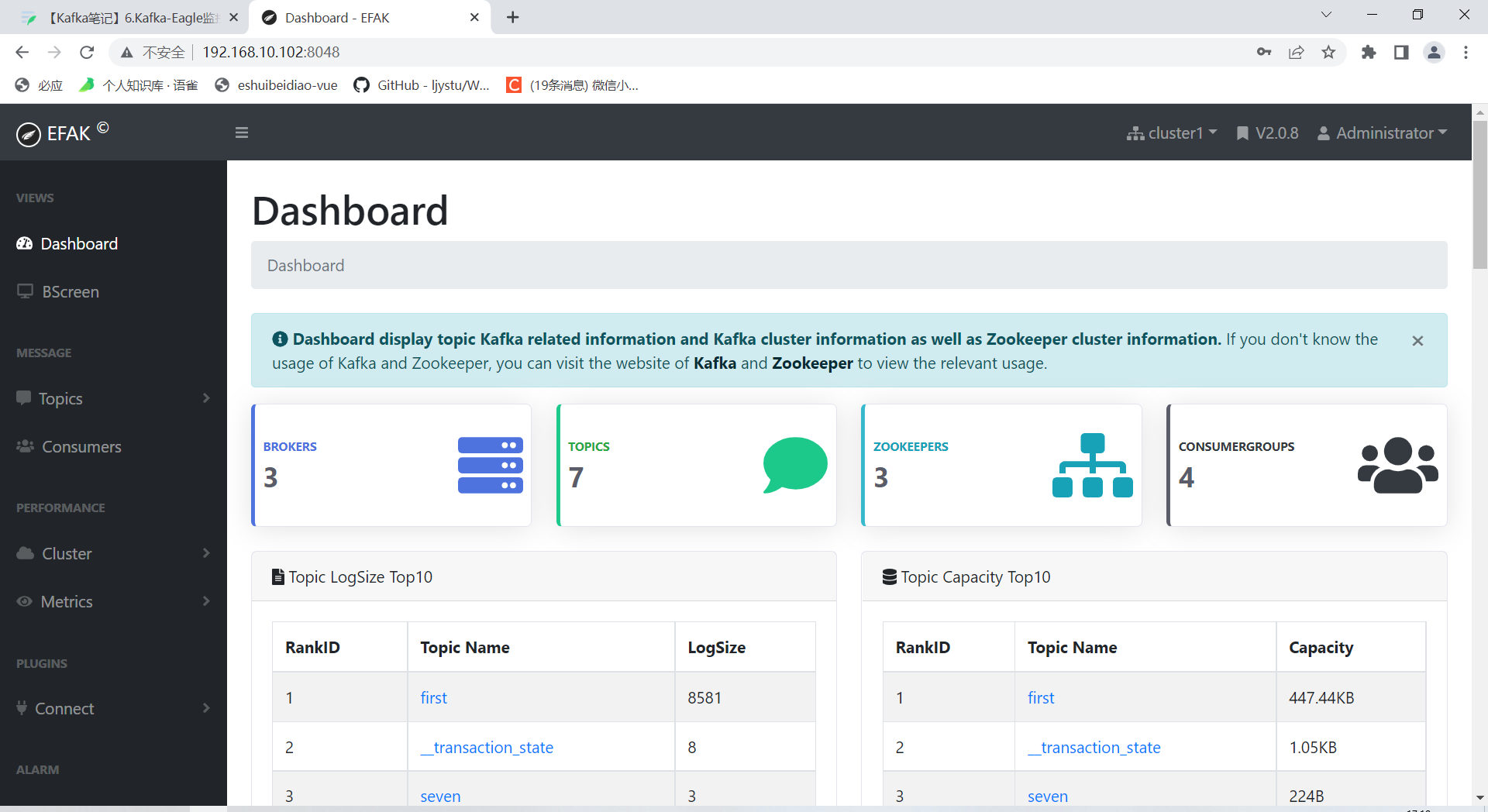
4 Kafka-Eagle页面操作


若有收获,就点个赞吧
0 人点赞


