学习链接:https://www.bilibili.com/video/BV1Qp4y1n7EN?p=125&spm_id_from=pageDriver
Yarn资源调度器
Yarn是一个资源调度平台,负责为运算程序提供服务器运算资源,相当于一个分布式的操作平台,MapReduce等运算程序相当于运行于操作系统之上的应用程序。
Yarn基础架构
YARN主要由ResourceManager、NodeManager、ApplicationMaster和Container等组件构成。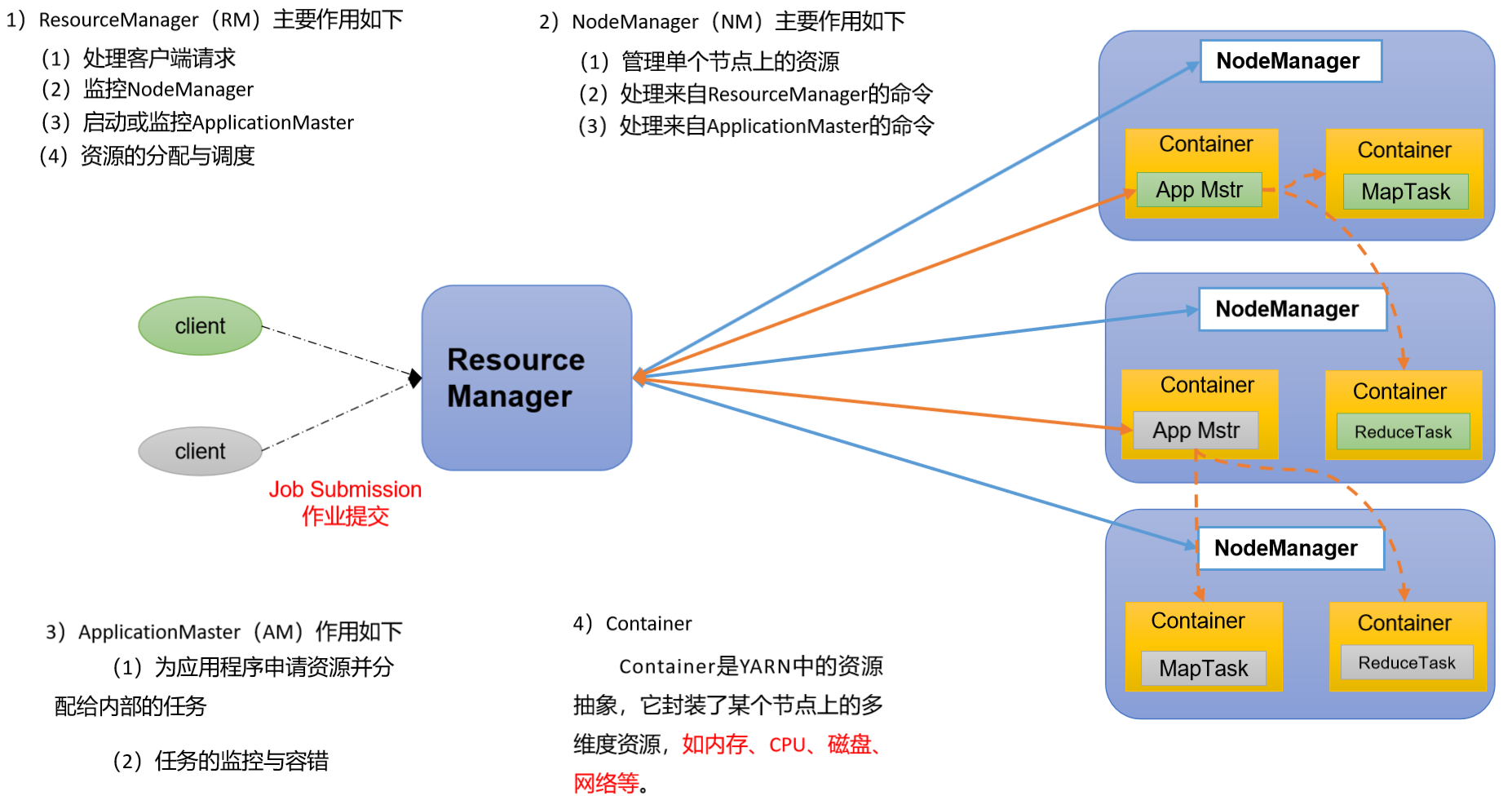
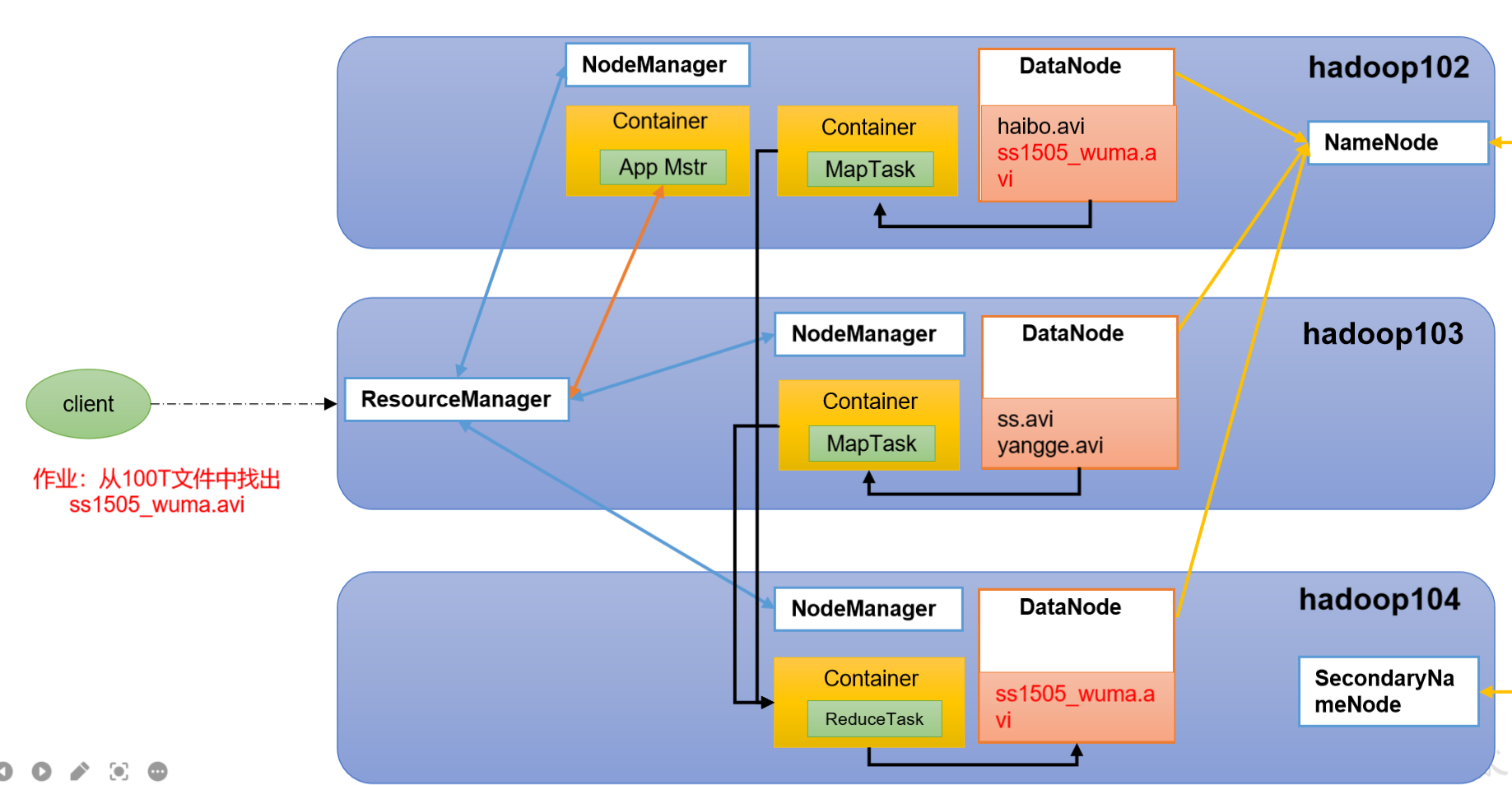
Yarn工作机制
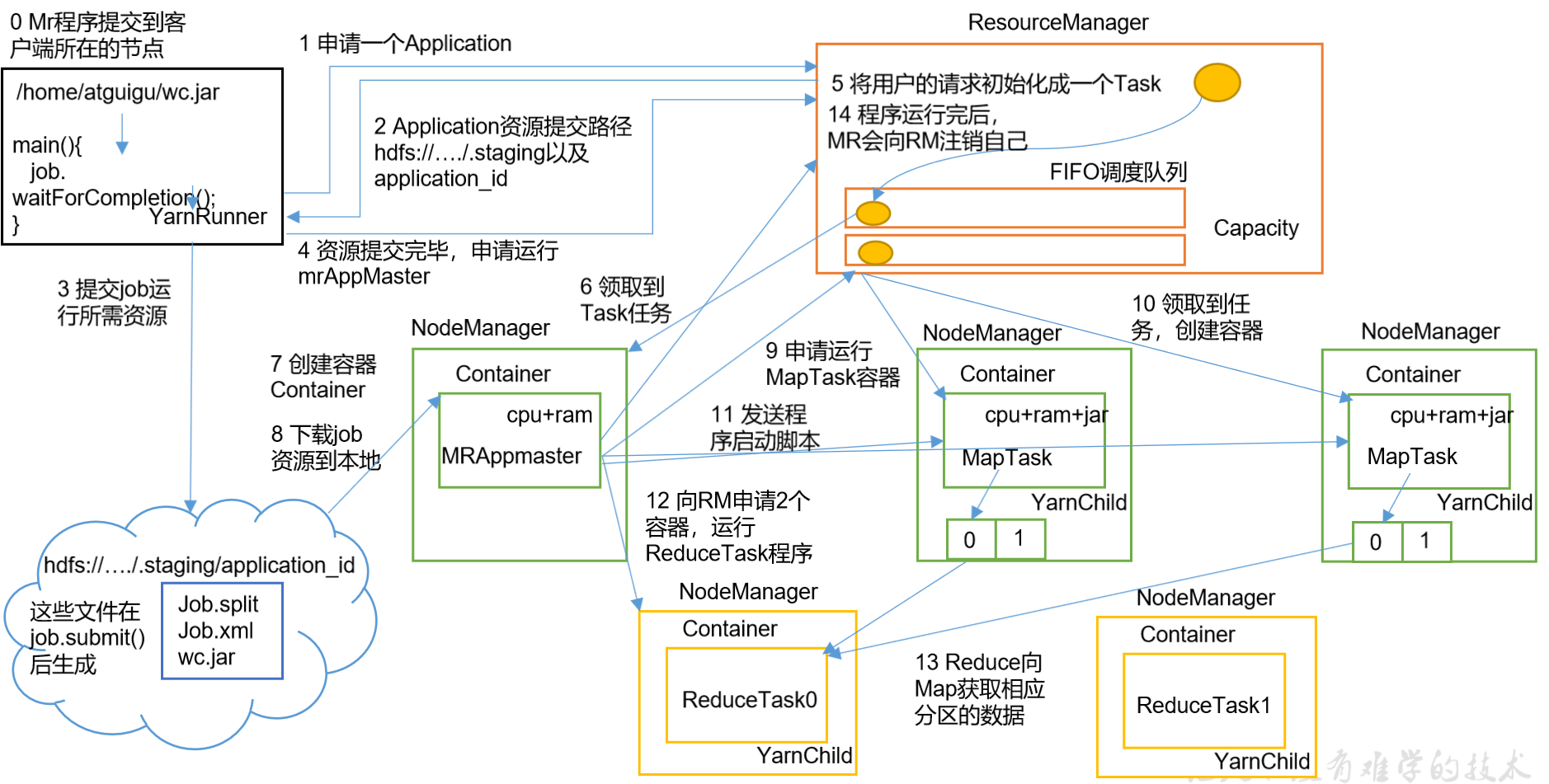
- MR程序提交到客户端所在的节点
- YarnRunner向ResourceManager申请一个Application
- RM将该应用程序的资源路径返回给YarnRunner
- 该程序将运行所需资源提交到HDFS上
- 程序资源提交完毕后,申请运行mrAppMaster
- RM将用户的请求初始化成一个Task
- 其中一个NodeManager领取到Task任务
- 该NodeManager创建容器Container,并产生MRAppmaster
- Container从HDFS上拷贝资源到本地
- MRAppmaster向RM 申请运行MapTask资源
- RM将运行MapTask任务分配给另外两个NodeManager,另两个NodeManager分别领取任务并创建容器
- MR向两个接收到任务的NodeManager发送程序启动脚本,这两个NodeManager分别启动MapTask,MapTask对数据分区排序
- MrAppMaster等待所有MapTask运行完毕后,向RM申请容器,运行ReduceTask
- ReduceTask向MapTask获取相应分区的数据。
-
作业提交全过程
1. 作业提交
- Client调用job.waitForCompletion方法,向整个集群提交MapReduce作业
- Client向RM申请一个作业id
- RM给Client返回该job资源的提交路径和作业id
- Client提交jar包、切片信息和配置文件到指定的资源提交路径
Client提交完资源后,向RM申请运行MrAppMaster。
2. 作业初始化
当RM收到Client的请求后,将该job添加到容量调度器中
- 某一个空闲的NM领取到该Job
- 该NM创建Container,并产生MRAppmaster
-
3. 任务分配
MrAppMaster向RM申请运行多个MapTask任务资源
RM将运行MapTask任务分配给另外两个NodeManager,另两个NodeManager分别领取任务并创建容器
4. 任务运行
MR向两个接收到任务的NodeManager发送程序启动脚本,这两个NodeManager分别启动MapTask,MapTask对数据分区排序
- MrAppMaster等待所有MapTask运行完毕后,向RM申请容器,运行ReduceTask
- ReduceTask向MapTask获取相应分区的数据
- 程序运行完毕后,MR会向RM申请注销自己。
5. 进度和状态更新
YARN中的任务将其进度和状态(包括counter)返回给应用管理器, 客户端每秒(通过mapreduce.client.progressmonitor.pollinterval设置)向应用管理器请求进度更新, 展示给用户。6. 作业完成
除了向应用管理器请求作业进度外, 客户端每5秒都会通过调用waitForCompletion()来检查作业是否完成。时间间隔可以通过mapreduce.client.completion.pollinterval来设置。作业完成之后, 应用管理器和Container会清理工作状态。作业的信息会被作业历史服务器存储以备之后用户核查。Yarn调度器和调度算法
1. 先进先出调度器(FIFO)
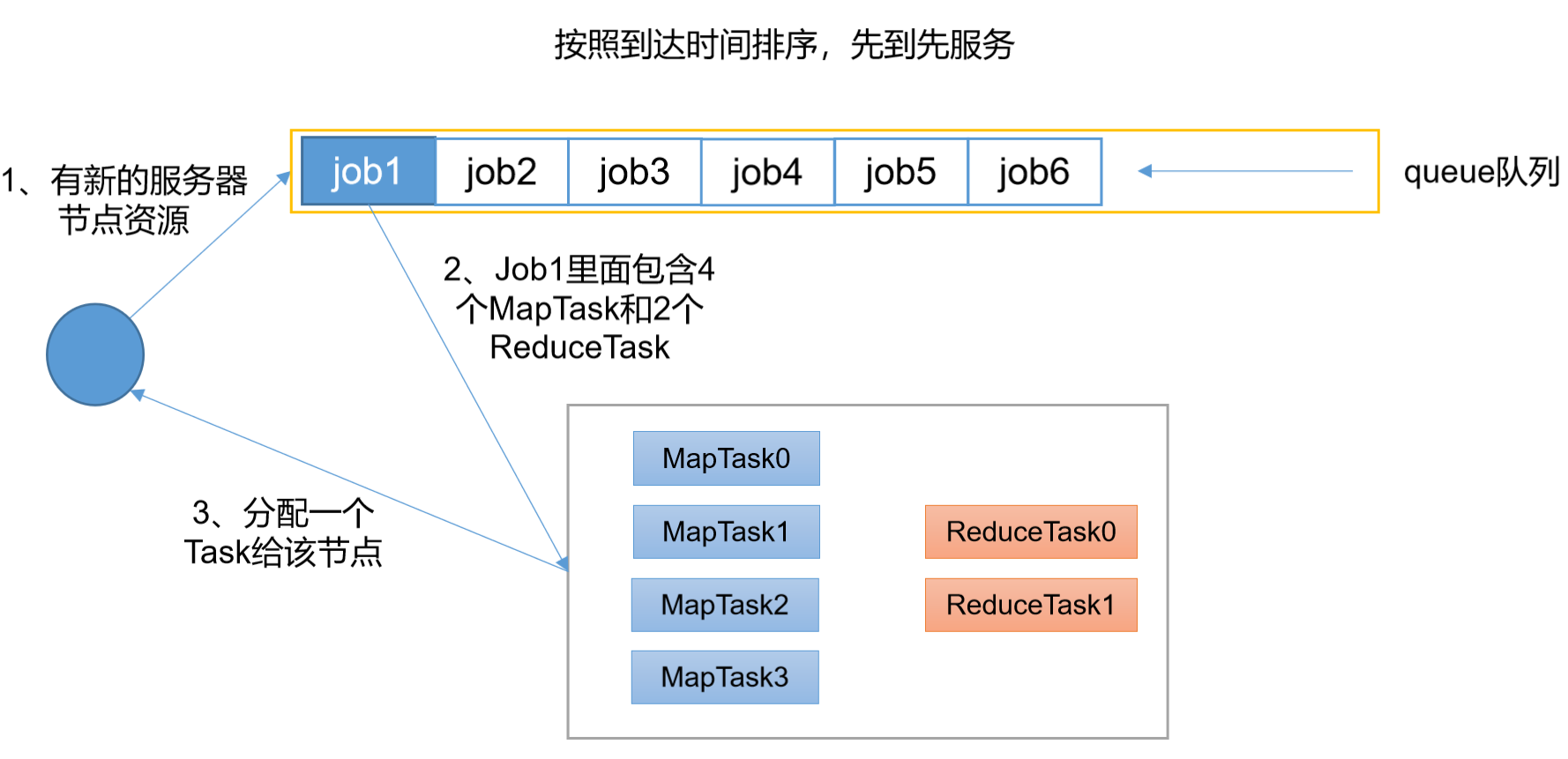
单队列,根据提交作业的先后顺序,先来先服务
优点:简单易懂
缺点:不支持多队列,生产环境很少用2. 容量调度器(Capacity Scheduler)
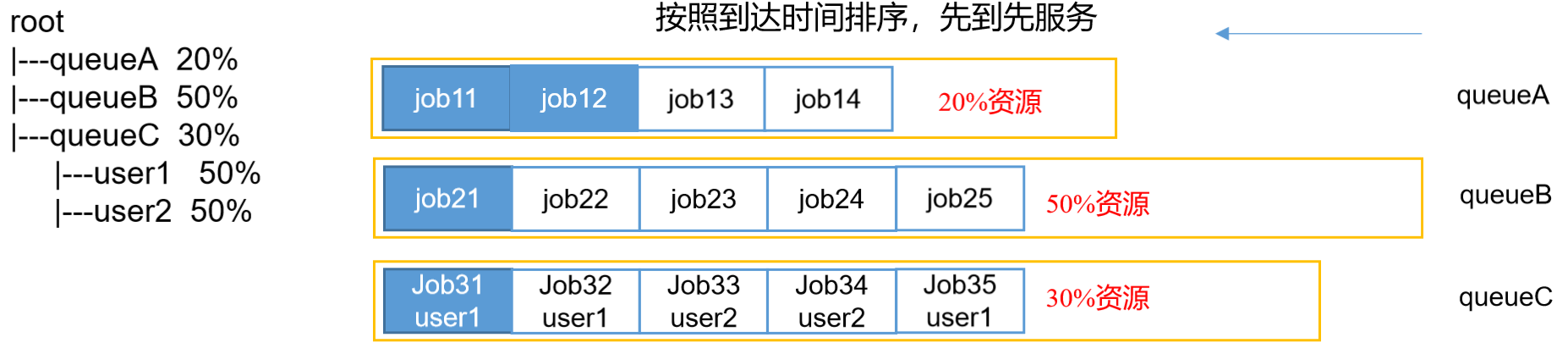
Apache Hadoop3.1.3默认的资源调度器,多用户调度器
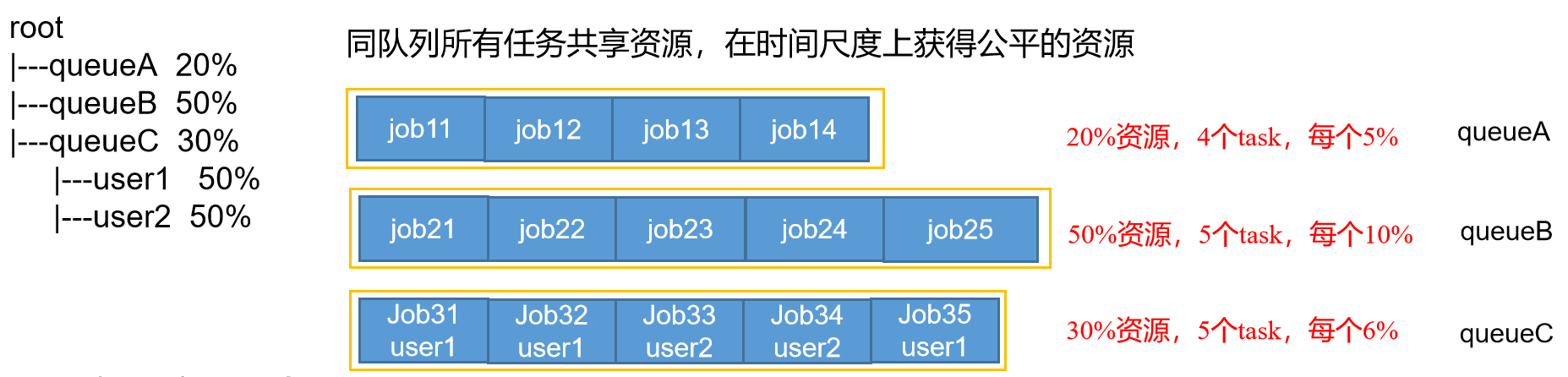
- 多队列:每个队列可配置一定的资源量,每个队列采用FIFO调度策略
- 容量保证:管理员可为每个队列设置资源最低保证和资源使用上限
- 灵活性:如果一个队列中的资源有剩余,可以暂时共享给那些需要资源的队列,而一旦该队列有新的应用程序提交,则其他队列借调的资源会归还给该队列
多租户:支持多用户共享集群和多应用程序同时运行,为了防止同一个用户的作业独占队列中的资源,该调度器会对同一用户提交的作业所占资源量进行限定
容量调度器资源分配算法

root
|—-queueA 20%
|—-queueB 50%
|—-queueC 30%
|—-user1 50%
|—-user2 50%
(1)队列资源分配:从root开始,使用深度优先算法,优先选择资源占用率最低的队列分配资源
(2)作业资源分配:默认按照提交作业的优先级和提交时间顺序分配资源
(3)容器资源分配:按照容器的优先级分配资源;如果优先级相同,按照数据本地性原则:
3.1 任务和数据在同一节点
3.2 任务和数据在同一机架
3.3 任务和数据不在同一节点也不在同一机架3. 公平调度器(Fair Scheduler)
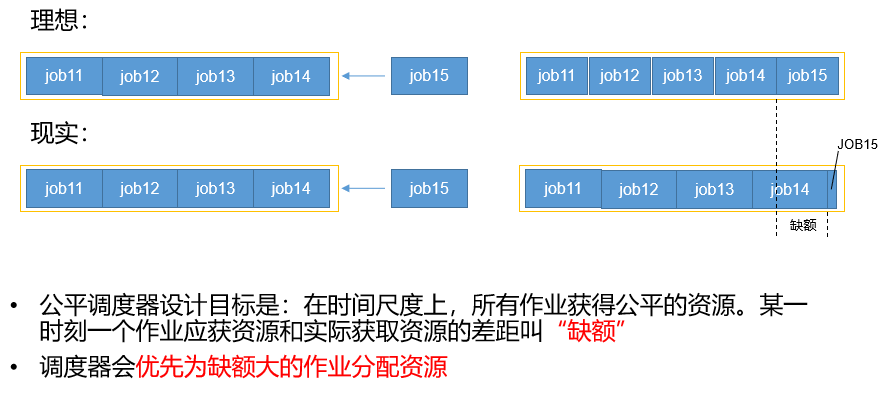
Fair Schedulere是Facebook开发的多用户调度器,CDH框架默认调度器。

缺额
公平调度器队列资源分配方式
FIFO策略,公平调度器每个队列资源分配策略如果选择FIFO的话,此时公平调度器相当于上面讲过的容量调度器。
- Fair策略,Fair 策略(默认)是一种基于最大最小公平算法实现的资源多路复用方式,默认情况下,每个队列内部采用该方式分配资源。这意味着,如果一个队列中有两个应用程序同时运行,则每个应用程序可得到1/2的资源;如果三个应用程序同时运行,则每个应用程序可得到1/3的资源。
具体资源分配流程和容量调度器一致
(1)选择队列(2)选择作业(3)选择容器以上三步,每一步都是按照公平策略分配资源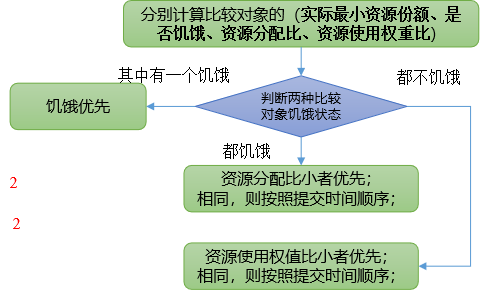

DRF策略(Dominant Resource Fairness),资源有很多种,例如内存,CPU,网络带宽等,很难衡量两个应用应该分配的资源比例。在YARN中,用DRF来决定如何调度:假设集群一共有100 CPU和10T 内存,而应用A需要(2 CPU, 300GB),应用B需要(6 CPU,100GB)。则两个应用分别需要A(2%CPU, 3%内存)和B(6%CPU, 1%内存)的资源,这就意味着A是内存主导的, B是CPU主导的,针对这种情况,可以选择DRF策略对不同应用进行不同资源(CPU和内存)的一个不同比例的限制。
公平调度器资源分配算法
(1)队列资源分配
需求
集群总资源100,有3个队列,对资源的需求是:- queueA->20
- queueB->50
- queueC->30
第一次算:100/3=33.33
- queueA:分33.33->多13.33
- queueB:分33.33->少16.67
- queueC:分33.33->多3.33
第二次算:(13.33+3.33)/1 = 16.66
- queueA:分20
- queueB:分33.33+16.67
- queueC:分30
(2)作业资源分配
- 不加权
需求
有一条队列总资源12个,有4个job,对资源的需求分别是 :
- job1->1- job2->2- job3->6- job4->5
- 第一次算 12/4=3
- job1:分3 ->多2个
- job2:分3 ->多1个
- job3:分3 ->差3个
- job4:分3 ->差2个
- 第二次算 3/2=1.5
- job1:分1
- job2:分2
- job3:分3 ->差3个 -> 分1.5 ->最终4.5
- job4:分3 ->差2个 -> 分1.5 ->最终4.5
- 第n次算:一直到没有空闲资源
- 加权
需求
有一条队列总资源16个,有4个job,对资源的需求分别是 :
- job1->4- job2->2- job3->10- job4->4
每个job的权重为:
- job1->5- job2->8- job3->1- job4->2
- 第一次算:16/(5+8+1+2)=1
- job1:分5 -> 多1
- job2:分8 -> 多6
- job3:分1 -> 少9
- job4:分2 -> 少2
- 第二次算:7/(1+2)=7/3
- job1:分4
- job2:分2
- job3:分1 -> 分7/3 -> 少6.67
- job4:分2 -> 分14/3 -> 多2.66
- 第三次算:2.66/1=2.66
- job1:分4
- job2:分2
- job3:分1 -> 分2.66/1 -> 分2.66
- job4:分4
- 第n次算:一直到没有空闲资源
Yarn常用命令
Yarn状态查询:(1)在hadoop103:8088 (2)命令操作
执行WordCount案例,用Yarn命令查看运行情况[qtbhy@hadoop102 hadoop-3.1.3]$ hadoop jar share/hadoop/mapreduce/hadoop-mapreduce-examples-3.1.3.jar wordcount /input /output1
yarn application查看任务
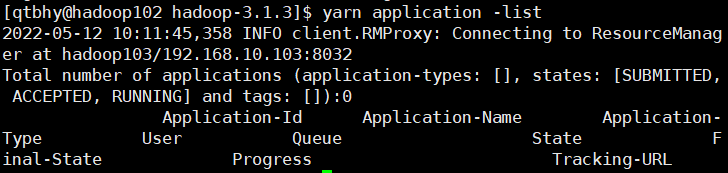
列出所有Application
[qtbhy@hadoop102 hadoop-3.1.3]$ yarn application -list
根据Application状态过滤
yarn application -list -appStates <状态>
所有状态:ALL、NEW、NEW_SAVING、SUBMITTED、ACCEPTED、RUNNING、FINISHED、FAILED、KILLED
[qtbhy@hadoop102 hadoop-3.1.3]$ yarn application -list -appStates FINISHED

kill掉Application
[qtbhy@hadoop102 hadoop-3.1.3]$ yarn application -kill application_1651747672583_0001
yarn logs查看日志
查询Application日志:yarn logs -applicationId
[qtbhy@hadoop102 hadoop-3.1.3]$ yarn logs -applicationId application_1651747672583_0001
查询Container日志

yarn logs -applicationId
[qtbhy@hadoop102 hadoop-3.1.3]$ yarn logs -applicationId application_1651747672583_0002 -containerId container_1651747672583_0002_01_000001
yarn applicationattempt 查看尝试运行的任务
- 列出所有Application尝试的列表
yarn applicationattempt -list
[qtbhy@hadoop102 hadoop-3.1.3]$ yarn applicationattempt -list application_1651747672583_00022022-05-12 10:58:01,778 INFO client.RMProxy: Connecting to ResourceManager at hadoop103/192.168.10.103:8032Total number of application attempts :1ApplicationAttempt-Id State AM-Container-Id Tracking-URLappattempt_1651747672583_0002_000001 FINISHED container_1651747672583_0002_01_000001 http://hadoop103:8088/proxy/application_1651747672583_0002/
- 打印ApplicationAttempt状态
yarn applicationattempt -status
[qtbhy@hadoop102 hadoop-3.1.3]$ yarn applicationattempt -status appattempt_1651747672583_0002_0000012022-05-12 11:00:34,201 INFO client.RMProxy: Connecting to ResourceManager at hadoop103/192.168.10.103:8032Application Attempt Report :ApplicationAttempt-Id : appattempt_1651747672583_0002_000001State : FINISHEDAMContainer : container_1651747672583_0002_01_000001Tracking-URL : http://hadoop103:8088/proxy/application_1651747672583_0002/RPC Port : 42469AM Host : hadoop104Diagnostics :
yarn container查看容器
- 列出所有Container
yarn container -list
[qtbhy@hadoop102 hadoop-3.1.3]$ yarn container -list appattempt_1651747672583_0002_0000012022-05-12 11:47:27,477 INFO client.RMProxy: Connecting to ResourceManager at hadoop103/192.168.10.103:8032Total number of containers :0Container-Id Start Time Finish Time State Host Node Http Address LOG-URL
- 打印Container状态
yarn container -status
只有在任务跑的途中才能看到container的状态
[qtbhy@hadoop102 hadoop-3.1.3]$ yarn container -status container_1651747672583_0002_01_000001
yarn node查看节点状态
列出所有节点 yarn node -list -all
[qtbhy@hadoop102 hadoop-3.1.3]$ yarn node -list -all2022-05-12 11:05:46,513 INFO client.RMProxy: Connecting to ResourceManager at hadoop103/192.168.10.103:8032Total Nodes:3Node-Id Node-State Node-Http-Address Number-of-Running-Containershadoop102:37310 RUNNING hadoop102:8042 0hadoop103:44485 RUNNING hadoop103:8042 0hadoop104:34452 RUNNING hadoop104:8042 0
yarn rmadmin更新配置
加载队列配置:yarn rmadmin -refreshQueues
[qtbhy@hadoop102 hadoop-3.1.3]$ yarn rmadmin -refreshQueues2022-05-12 11:07:40,602 INFO client.RMProxy: Connecting to ResourceManager at hadoop103/192.168.10.103:8033
yarn queue查看队列
打印队列信息:yarn queue -status
[qtbhy@hadoop102 hadoop-3.1.3]$ yarn queue -status default2022-05-12 11:09:32,156 INFO client.RMProxy: Connecting to ResourceManager at hadoop103/192.168.10.103:8032Queue Information :Queue Name : defaultState : RUNNINGCapacity : 100.0%Current Capacity : .0%Maximum Capacity : 100.0%Default Node Label expression : <DEFAULT_PARTITION>Accessible Node Labels : *Preemption : disabledIntra-queue Preemption : disabled
YARN生产环境核心配置参数

- ResourceManager相关
yarn.resourcemanager.scheduler.class 配置调度器,apache默认的时容量调度器
yarn.resourcemanager.scheduler.client.thread-count ResourceManager处理调度器请求的线程数量,默认50
- NodeManager相关
yarn.nodemanager.resource.detect-hardware-capabilities 是否让yarn自己检测硬件进行配置,默认false
yarn.nodemanager.resource.count-logical-processors-as-cores 是否将虚拟核数当作CPU核数,默认false
yarn.nodemanager.resource.pcores-vcores-multiplier 虚拟核数和物理核数乘数,例如:4核8线程,该参数就应设为2,默认1.0
yarn.nodemanager.resource.memory-mb NodeManager使用内存,默认8G
yarn.nodemanager.resource.system-reserved-memory-mb NodeManager为系统保留多少内存
以上二个参数配置一个即可
yarn.nodemanager.resource.cpu-vcores NodeManager使用CPU核数,默认8个
yarn.nodemanager.pmem-check-enabled 是否开启物理内存检查限制container,默认打开
yarn.nodemanager.vmem-check-enabled 是否开启虚拟内存检查限制container,默认打开
yarn.nodemanager.vmem-pmem-ratio 虚拟内存物理内存比例,默认2.1
- Container相关
yarn.scheduler.minimum-allocation-mb 容器最最小内存,默认1G
yarn.scheduler.maximum-allocation-mb 容器最最大内存,默认8G
yarn.scheduler.minimum-allocation-vcores 容器最小CPU核数,默认1个yarn.scheduler.maximum-allocation-vcores 容器最大CPU核数,默认4个
Yarn实例

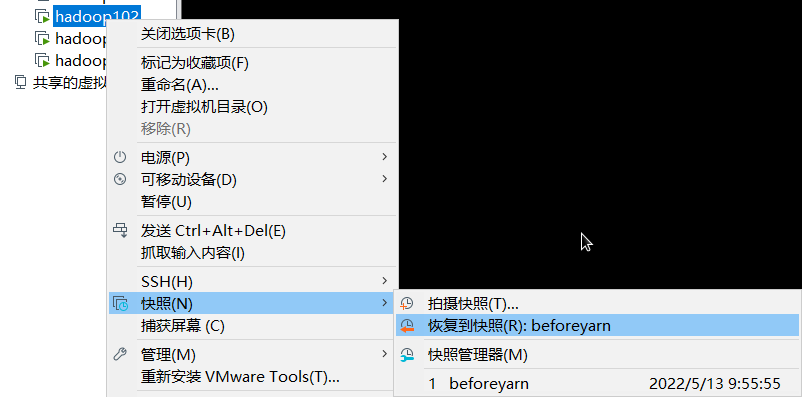
Yarn生产环境核心参数配置
需求
从1G数据中,统计每个单词出现次数。服务器3台,每台配置4G内存,4核CPU,4线程
1G/128m=8个MapTask;1个ReduceTask;1个mrAppMaster
平均每个节点运行10个/3台≈3个任务
修改yarn-site.xml配置参数如下
<!-- 选择调度器,默认容量 --><property><description>The class to use as the resource scheduler.</description><name>yarn.resourcemanager.scheduler.class</name><value>org.apache.hadoop.yarn.server.resourcemanager.scheduler.capacity.CapacityScheduler</value></property><!-- ResourceManager处理调度器请求的线程数量,默认50;如果提交的任务数大于50,可以增加该值,但是不能超过3台 * 4线程 = 12线程(去除其他应用程序实际不能超过8) --><property><description>Number of threads to handle scheduler interface.</description><name>yarn.resourcemanager.scheduler.client.thread-count</name><value>8</value></property><!-- 是否让yarn自动检测硬件进行配置,默认是false,如果该节点有很多其他应用程序,建议手动配置。如果该节点没有其他应用程序,可以采用自动 --><property><description>Enable auto-detection of node capabilities such asmemory and CPU.</description><name>yarn.nodemanager.resource.detect-hardware-capabilities</name><value>false</value></property><!-- 是否将虚拟核数当作CPU核数,默认是false,采用物理CPU核数 --><property><description>Flag to determine if logical processors(such ashyperthreads) should be counted as cores. Only applicable on Linuxwhen yarn.nodemanager.resource.cpu-vcores is set to -1 andyarn.nodemanager.resource.detect-hardware-capabilities is true.</description><name>yarn.nodemanager.resource.count-logical-processors-as-cores</name><value>false</value></property><!-- 虚拟核数和物理核数乘数,默认是1.0 --><property><description>Multiplier to determine how to convert phyiscal cores tovcores. This value is used if yarn.nodemanager.resource.cpu-vcoresis set to -1(which implies auto-calculate vcores) andyarn.nodemanager.resource.detect-hardware-capabilities is set to true. The number of vcores will be calculated as number of CPUs * multiplier.</description><name>yarn.nodemanager.resource.pcores-vcores-multiplier</name><value>1.0</value></property><!-- NodeManager使用内存数,默认8G,修改为4G内存 --><property><description>Amount of physical memory, in MB, that can be allocatedfor containers. If set to -1 andyarn.nodemanager.resource.detect-hardware-capabilities is true, it isautomatically calculated(in case of Windows and Linux).In other cases, the default is 8192MB.</description><name>yarn.nodemanager.resource.memory-mb</name><value>4096</value></property><!-- nodemanager的CPU核数,不按照硬件环境自动设定时默认是8个,修改为4个 --><property><description>Number of vcores that can be allocatedfor containers. This is used by the RM scheduler when allocatingresources for containers. This is not used to limit the number ofCPUs used by YARN containers. If it is set to -1 andyarn.nodemanager.resource.detect-hardware-capabilities is true, it isautomatically determined from the hardware in case of Windows and Linux.In other cases, number of vcores is 8 by default.</description><name>yarn.nodemanager.resource.cpu-vcores</name><value>4</value></property><!-- 容器最小内存,默认1G --><property><description>The minimum allocation for every container request at the RM in MBs. Memory requests lower than this will be set to the value of this property. Additionally, a node manager that is configured to have less memory than this value will be shut down by the resource manager.</description><name>yarn.scheduler.minimum-allocation-mb</name><value>1024</value></property><!-- 容器最大内存,默认8G,修改为2G --><property><description>The maximum allocation for every container request at the RM in MBs. Memory requests higher than this will throw an InvalidResourceRequestException.</description><name>yarn.scheduler.maximum-allocation-mb</name><value>2048</value></property><!-- 容器最小CPU核数,默认1个 --><property><description>The minimum allocation for every container request at the RM in terms of virtual CPU cores. Requests lower than this will be set to the value of this property. Additionally, a node manager that is configured to have fewer virtual cores than this value will be shut down by the resource manager.</description><name>yarn.scheduler.minimum-allocation-vcores</name><value>1</value></property><!-- 容器最大CPU核数,默认4个,修改为2个 --><property><description>The maximum allocation for every container request at the RM in terms of virtual CPU cores. Requests higher than this will throw anInvalidResourceRequestException.</description><name>yarn.scheduler.maximum-allocation-vcores</name><value>2</value></property><!-- 虚拟内存检查,默认打开,修改为关闭 --><property><description>Whether virtual memory limits will be enforced forcontainers.</description><name>yarn.nodemanager.vmem-check-enabled</name><value>false</value></property><!-- 虚拟内存和物理内存设置比例,默认2.1 --><property><description>Ratio between virtual memory to physical memory when setting memory limits for containers. Container allocations are expressed in terms of physical memory, and virtual memory usage is allowed to exceed this allocation by this ratio.</description><name>yarn.nodemanager.vmem-pmem-ratio</name><value>2.1</value></property>
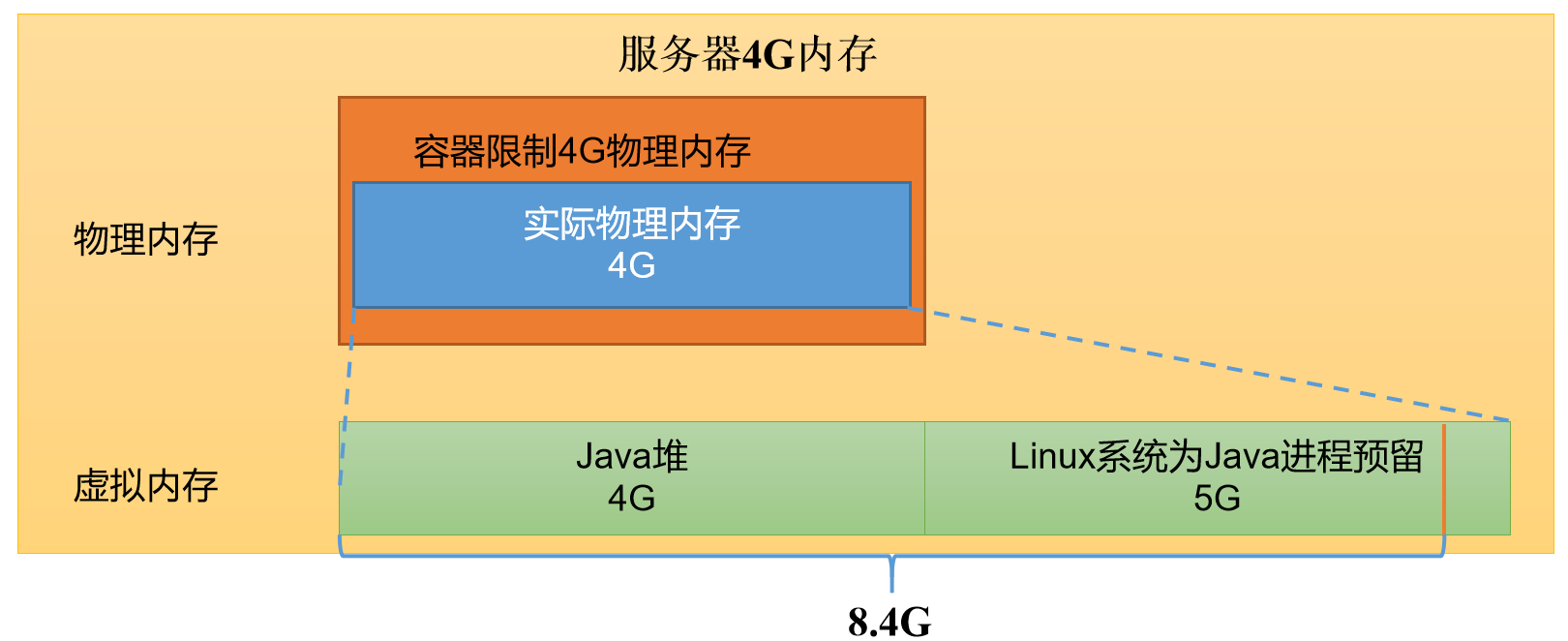
- 关闭虚拟内存检查原因
Ratio between virtual memory to physical memory when setting memory limits for containers. Container allocations are expressed in terms of physical memory, and virtual memory usage is allowed to exceed this allocation by this ratio. yarn.nodemanager.vmem-pmem-ratio 2.1
分发配置
[qtbhy@hadoop102 hadoop]$ xsync yarn-site.xml
重启集群
[qtbhy@hadoop102 hadoop-3.1.3]$ sbin/stop-yarn.shStopping nodemanagersStopping resourcemanager[qtbhy@hadoop102 hadoop-3.1.3]$ sbin/start-yarn.shStarting resourcemanagerStarting nodemanagers
执行WordCount程序
[qtbhy@hadoop102 hadoop-3.1.3]$ hadoop jar share/hadoop/mapreduce/hadoop-mapreduce-examples-3.1.3.jar wordcount /input /output
观察Yarn任务执行页面

容量调度器多队列提交
- 在生产环境怎么创建队列?
调度器默认就1个default队列,不能满足生产要求
创建多队列好处
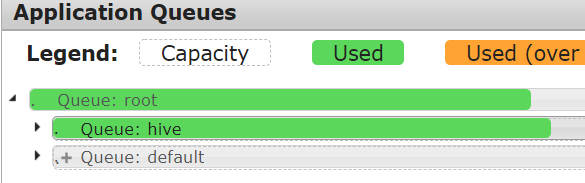
default队列占总内存的40%,最大资源容量占总资源60%,hive队列占总内存的60%,最大资源容量占总资源80%
-
配置多队列的容量调度器
在capacity-scheduler.xml中配置
下载到windows
[qtbhy@hadoop102 hadoop]$ sz capacity-scheduler.xml
修改配置 ```xml
yarn.scheduler.capacity.root.hive.capacity 60
3. 删除原配置文件,上传到hadoop102shell
[qtbhy@hadoop102 hadoop]$ rm -rf capacity-scheduler.xml
2. 分发配置文件shell
[qtbhy@hadoop102 hadoop]$ xsync capacity-scheduler.xml
3. 重启Yarn或yarn rmadmin -refreshQueues刷新队列shell
[qtbhy@hadoop102 hadoop]$ yarn rmadmin -refreshQueues

<a name="bxbEr"></a>
### 向Hive队列提交任务
1. hadoop jar提交任务shell
[qtbhy@hadoop102 hadoop-3.1.3]$ hadoop jar share/hadoop/mapreduce/hadoop-mapreduce-examples-3.1.3.jar wordcount -D mapreduce.job.queuename=hive /input /output8
2. jar包
默认是default,向其他队列提交任务,要在Driver中声明java
Configuration conf = new Configuration();
conf.set(“mapreduce.job.queuename”,”hive”);
<a name="gMFZ8"></a>
### 任务优先级
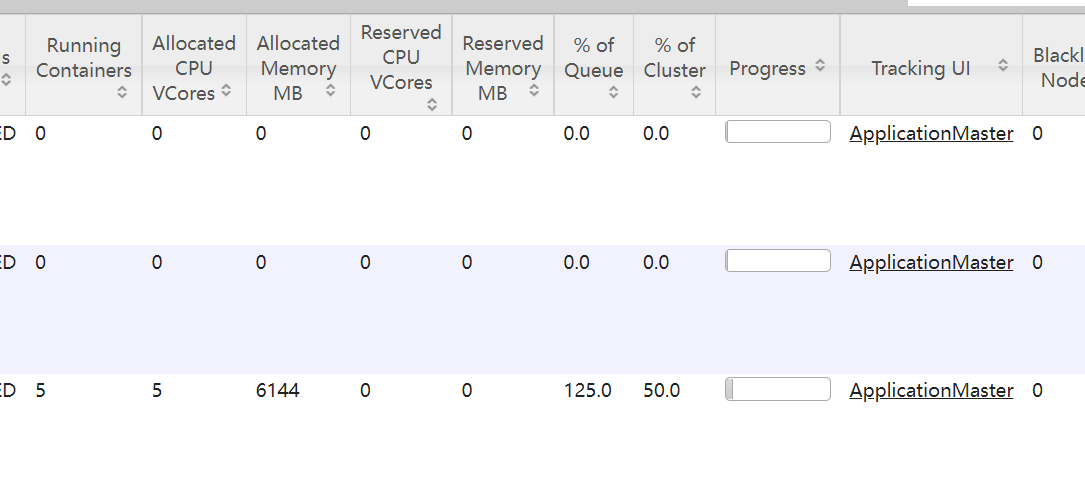
容量调度器,支持任务优先级的配置,在资源紧张时,优先级高的任务将优先获取资源。默认情况,Yarn将所有任务的优先级限制为0,若想使用任务的优先级功能,需开放该限制

1. 修改yarn-site.xml文件,增加参数
xml
2. 分发配置并重启集群shell
[qtbhy@hadoop102 hadoop]$ xsync yarn-site.xml
[qtbhy@hadoop102 hadoop-3.1.3]$ sbin/stop-yarn.sh
Stopping nodemanagers
Stopping resourcemanager
[qtbhy@hadoop102 hadoop-3.1.3]$ sbin/start-yarn.sh
Starting resourcemanager
Starting nodemanagers
3. 模拟资源紧张,连续提交任务shell
[qtbhy@hadoop102 hadoop-3.1.3]$ hadoop jar /opt/module/hadoop-3.1.3/share/hadoop/mapreduce/hadoop-mapreduce-examples-3.1.3.jar pi 5 2000000
<a name="fWAu8"></a>
## 公平调度器
<a name="WLMmY"></a>
### 需求
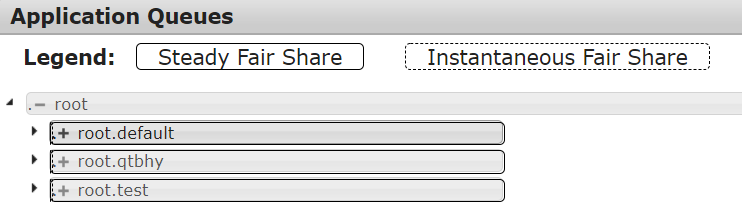
创建两个队列,test和qtbhy。
- 若用户提交任务时指定队列,则任务提交到指定队列运行
- 若未指定队列,test用户提交的任务到root.group.test队列运行,qtbhy提交的任务到root.group.qtbhy队列运行
公平调度器的配置涉及到两个文件:yarn-site.xml,另一个时公平调度器队列分配文件fair-scheduler.xml
<a name="BqHRT"></a>
### 配置多队列的公平调度器
1. 修改yarn-site.xml文件,加入以下参数xml
2. 配置fair-scheduler.xml```xml<?xml version="1.0"?><allocations><!-- 单个队列中Application Master占用资源的最大比例,取值0-1 ,企业一般配置0.1 --><queueMaxAMShareDefault>0.5</queueMaxAMShareDefault><!-- 单个队列最大资源的默认值 test qtbhydefault --><queueMaxResourcesDefault>4096mb,4vcores</queueMaxResourcesDefault><!-- 增加一个队列test --><queue name="test"><!-- 队列最小资源 --><minResources>2048mb,2vcores</minResources><!-- 队列最大资源 --><maxResources>4096mb,4vcores</maxResources><!-- 队列中最多同时运行的应用数,默认50,根据线程数配置 --><maxRunningApps>4</maxRunningApps><!-- 队列中Application Master占用资源的最大比例 --><maxAMShare>0.5</maxAMShare><!-- 该队列资源权重,默认值为1.0 --><weight>1.0</weight><!-- 队列内部的资源分配策略 --><schedulingPolicy>fair</schedulingPolicy></queue><!-- 增加一个队列qtbhy--><queue name="qtbhy" type="parent"><!-- 队列最小资源 --><minResources>2048mb,2vcores</minResources><!-- 队列最大资源 --><maxResources>4096mb,4vcores</maxResources><!-- 队列中最多同时运行的应用数,默认50,根据线程数配置 --><maxRunningApps>4</maxRunningApps><!-- 队列中Application Master占用资源的最大比例 --><maxAMShare>0.5</maxAMShare><!-- 该队列资源权重,默认值为1.0 --><weight>1.0</weight><!-- 队列内部的资源分配策略 --><schedulingPolicy>fair</schedulingPolicy></queue><!-- 任务队列分配策略,可配置多层规则,从第一个规则开始匹配,直到匹配成功 --><queuePlacementPolicy><!-- 提交任务时指定队列,如未指定提交队列,则继续匹配下一个规则; false表示:如果指定队列不存在,不允许自动创建--><rule name="specified" create="false"/><!-- 提交到root.group.username队列,若root.group不存在,不允许自动创建;若root.group.user不存在,允许自动创建 --><rule name="nestedUserQueue" create="true"><rule name="primaryGroup" create="false"/></rule><!-- 最后一个规则必须为reject或者default。Reject表示拒绝创建提交失败,default表示把任务提交到default队列 --><rule name="reject" /></queuePlacementPolicy></allocations>
- 分发配置并重启Yarn ```shell [qtbhy@hadoop102 hadoop]$ xsync yarn-site.xml [qtbhy@hadoop102 hadoop]$ xsync fair-scheduler.xml
[qtbhy@hadoop102 hadoop]$ sbin/stop-yarn.sh [qtbhy@hadoop102 hadoop]$ sbin/start-yarn.sh
<a name="rrHRN"></a>### 测试1. 提交任务时指定队列,按照配置规则,任务会到指定的root.test队列```shell[qtbhy@hadoop102 hadoop-3.1.3]$ hadoop jar /opt/module/hadoop-3.1.3/share/hadoop/mapreduce/hadoop-mapreduce-examples-3.1.3.jar pi -Dmapreduce.job.queuename=root.test 1 1

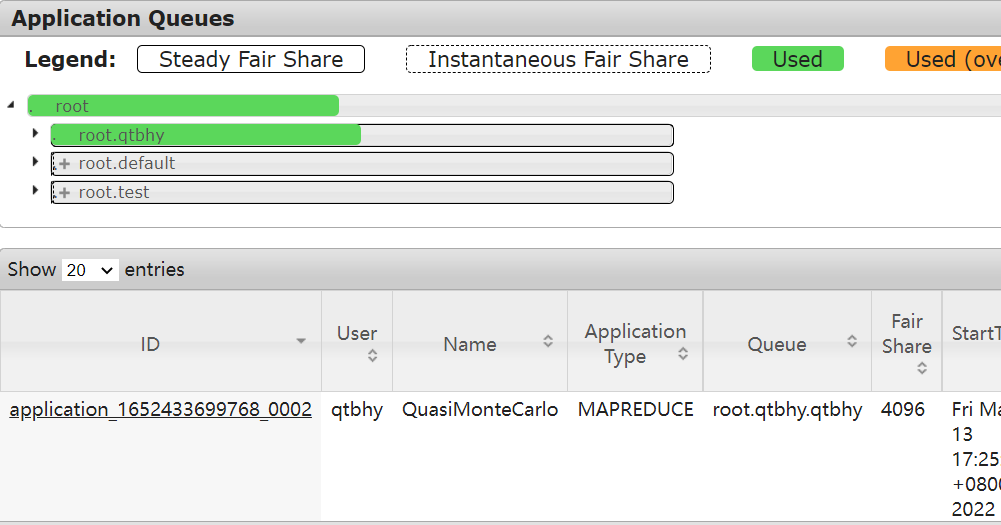
提交任务时不指定队列,任务回到root.root.qtbhy队列
[qtbhy@hadoop102 hadoop-3.1.3]$ hadoop jar /opt/module/hadoop-3.1.3/share/hadoop/mapreduce/hadoop-mapreduce-examples-3.1.3.jar pi 1 1
Yarn的Tool接口
[qtbhy@hadoop102 hadoop-3.1.3]$ hadoop jar wc.jar com.example.mapreduce.wordcount.WordCountDriver -Dmapreduce.job.queuename=root.test /input /output1

需求:动态修改参数,编写Yarn的Tool接口
步骤:新建Maven项目
<dependencies><dependency><groupId>org.apache.hadoop</groupId><artifactId>hadoop-client</artifactId><version>3.1.3</version></dependency></dependencies>
新建com.example.yarn包
创建WordCount并实现Tool接口
public class WordCount implements Tool {private Configuration conf;// 核心驱动@Overridepublic int run(String[] strings) throws Exception {Job job = Job.getInstance(conf);job.setJarByClass(WordCountDriver.class);job.setMapperClass(WordCountMapper.class);job.setReducerClass(WordCountReducer.class);job.setMapOutputKeyClass(Text.class);job.setMapOutputValueClass(IntWritable.class);job.setOutputKeyClass(Text.class);job.setOutputValueClass(IntWritable.class);FileInputFormat.setInputPaths(job, new Path(strings[0]));FileOutputFormat.setOutputPath(job, new Path(strings[1]));return job.waitForCompletion(true) ? 0 : 1;}@Overridepublic void setConf(Configuration configuration) {this.conf = configuration;}@Overridepublic Configuration getConf() {return conf;}// mapperpublic static class WordCountMapper extends Mapper<LongWritable, Text, Text, IntWritable> {private Text outK = new Text();private IntWritable outV = new IntWritable(1);@Overrideprotected void map(LongWritable key, Text value, Mapper<LongWritable, Text, Text, IntWritable>.Context context) throws IOException, InterruptedException {// 获取一行String line = value.toString();// 切割String[] words = line.split(" ");// 循环遍历写出for (String word : words) {outK.set(word);context.write(outK, outV);}}}// reducerpublic static class WordCountReducer extends Reducer<Text, IntWritable, Text, IntWritable> {private IntWritable outV = new IntWritable();@Overrideprotected void reduce(Text key, Iterable<IntWritable> values, Reducer<Text, IntWritable, Text, IntWritable>.Context context) throws IOException, InterruptedException {int sum = 0;for (IntWritable value : values) {sum += value.get();}outV.set(sum);context.write(key, outV);}}}
新建WordCountDriver
public class WordCountDriver {private static Tool tool;public static void main(String[] args) throws Exception {// 创建配置Configuration conf = new Configuration();switch (args[0]) {case "wordcount":tool = new WordCount();break;default:throw new RuntimeException("no such tool " + args[0]);}// 执行程序int run = ToolRunner.run(conf, tool, Arrays.copyOfRange(args, 1, args.length));System.exit(run);}}
打包,上传到Hadoop102
[qtbhy@hadoop102 hadoop-3.1.3]$ yarn jar yarn_test.jar com.example.yarn.WordCountDriver wordcount -Dmapreduce.job.queuename=root.test /input /output2

若有收获,就点个赞吧
0 人点赞


