日志作用
日志级别
# 默认的日志输出级别是warning级别的日志logging.debug('this is debug log') #调试级别的,详细的信息,通常只出现在诊断问题上logging.info('this is info log') # 信息级别的,确认一切按预期运行logging.warning('this is warning log') # 错误级别的,这个软件还能按预期工作。默认是:warninglogging.error('this is debug error') # 更严重的问题,软件没能执行一些功能logging.critical('this is debug critical') # 一个严重的错误,这表明程序本身可能无法继续运行# 输出:因为默认等级为warning所以从warning开始输出# 日志级别-记录器-日志内容# WARNING:root:this is warning log# ERROR:root:this is debug error# CRITICAL:root:this is debug critical
日志组件
| 组件 | 作用 |
|---|---|
| Loggers | 记录器,提供应用程序代码能直接使用的接口```python |
通过名字决定使用
logger=logging.getLogger(name)
是指日志级别
logger.setLevel(level=logging.DEBUG)
|| Handlers | 处理器,日志发送至目的地:文件、终端、email、网络位置等```python# 标准输出到显示器上logging.StreamHandler# 输出到文件中logging.FileHandler# 按照文件大小成多个日志llogging.handlers.RotatingFileHandler# 按照时间生成多个日志logging.hanlders.TimedRotatingFileHandler# 按照get或post请求发送到服务器上logging.handlers.HTTPHandler# 按照邮箱地址发送到邮箱中logging.handlers.SMTPHandler# 忽略error messageslogging.NullHandler
|
| Filters | 过滤器,控制日志输出的内容 |
| Formatters | 格式化器,设置日志内容输出的结构和消息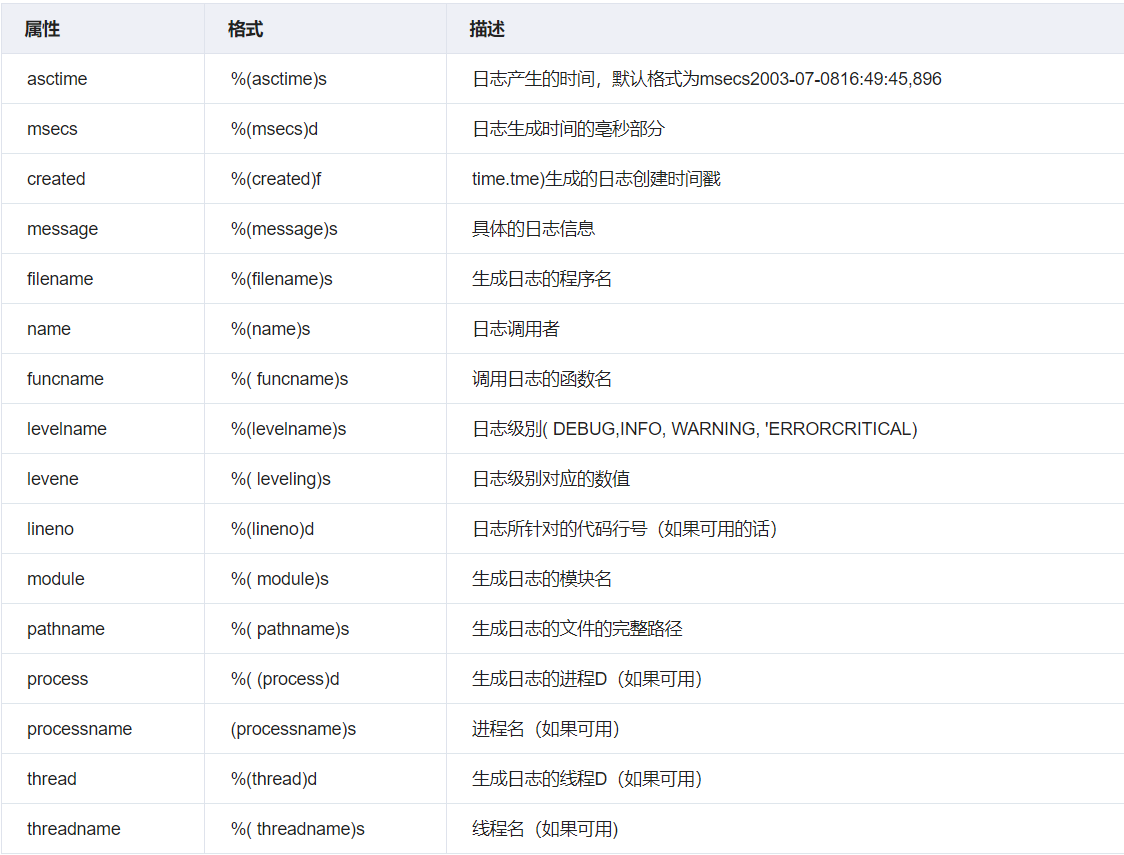 |
运行原理
1.创建logger并设置默认的等级
2.创建对应的handlers,设置日志的级别
3.创建Formatters格式化器:#解释:决定用设么样的格式输出
4.用Formatters渲染Handlers:#解释:将格式化后的日志内容输出到对应的目的地上
5.将所有的Handlerst加入到logger内:#解释:将handlers和logger绑定上
6.其他方法可以调用logger:#解释:因为logger是多线程所以可以创建多种日志,需要哪个调用哪个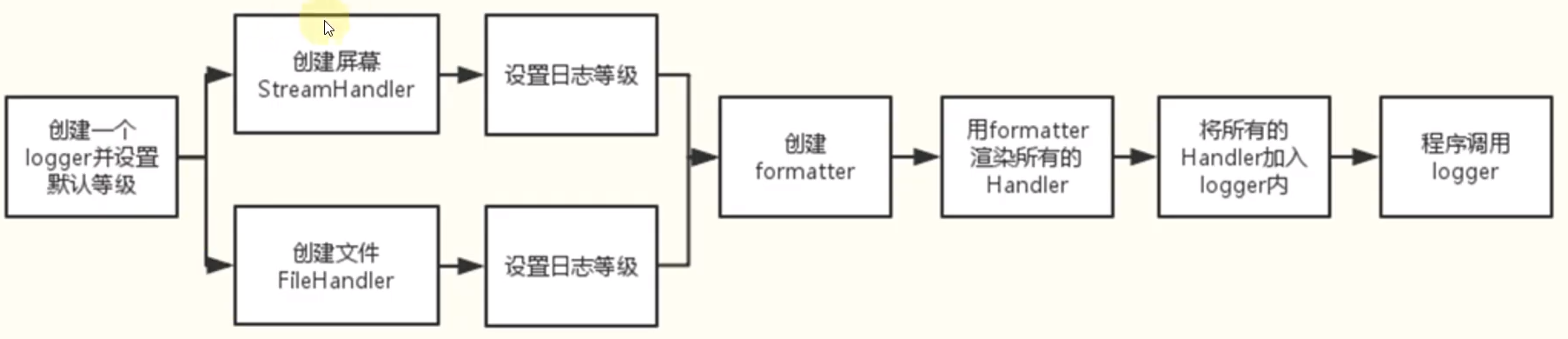
代码展示
import logging# 记录器logger = logging.getLogger('applog')logger.setLevel(logging.DEBUG)# 必须设置为两个handler中级别更低的# 处理器handlerconsoleHandler = logging.StreamHandler()consoleHandler.setLevel(logging.DEBUG)# 没有给handler指定日志级别,将使用logger的级别fileHandler = logging.FileHandler(filename='addDemo.log')consoleHandler.setLevel(logging.DEBUG)# formatter格式formatter = logging.Formatter('[%(lineno)s][%(asctime)s][%(levelname)s][%(filename)s]:::%(message)s')# 里面的8,10实现了占位对齐# 给处理器设置格式consoleHandler.setFormatter(formatter)fileHandler.setFormatter(formatter)# 记录器要设置处理器logger.addHandler(consoleHandler)logger.addHandler(fileHandler)logging.basicConfig(filename='demo.log', filemode='w', level=logging.DEBUG)logger.debug('this is debug log')logger.info('this is info log')logger.warning('this is warning log')logger.error('this is error log')logger.critical('this is critical log')# 输出# [29][2023-02-13 22:28:19,974][DEBUG][test.py]:::this is debug log# [30][2023-02-13 22:28:19,975][INFO][test.py]:::this is info log# [31][2023-02-13 22:28:19,976][WARNING][test.py]:::this is warning log# [32][2023-02-13 22:28:19,976][ERROR][test.py]:::this is error log# [33][2023-02-13 22:28:19,976][CRITICAL][test.py]:::this is critical log
读取配置
#./logging.conf#记录器:提供应用程序代码直接使用的接口#设置记录器名称,root必须存在!!![loggers]keys=root,applog#处理器,将记录器产生的日志发送至目的地#设置处理器类型[handlers]keys=fileHandler,consoleHandler#格式化器,设置日志内容的组成结构和消息字段#设置格式化器的种类[formatters]keys=simpleFormatter#设置记录器root的级别与种类[logger_root]level=DEBUGhandlers=consoleHandler#设置记录器applog的级别与种类[logger_applog]level=DEBUGhandlers=fileHandler,consoleHandler#起个对外的名字qualname=applog#继承关系propagate=0#设置[handler_consoleHandler]class=StreamHandlerargs=(sys.stdout,)level=DEBUGformatter=simpleFormatter[handler_fileHandler]class=handlers.TimedRotatingFileHandler#在午夜1点(3600s)开启下一个log文件,第四个参数0表示保留历史文件args=('applog.log','midnight',3600,0)level=DEBUGformatter=simpleFormatter[formatter_simpleFormatter]format=%(asctime)s|%(levelname)8s|%(filename)s[:%(lineno)d]|%(message)s#设置时间输出格式datefmt=%Y-%m-%d %H:%M:%S
import loggingimport logging.configlogging.config.fileConfig('logging.conf')#使用字典就能从任意格式文件进行配置,字典是一种接口格式# logging.config.dictConfig({"loggers":"root,applog"})rootLogger = logging.getLogger('applog')rootLogger.debug("This is root Logger, debug")logger = logging.getLogger('cn.cccb.applog')logger.debug("This is applog, debug")try:int(a)except Exception as e:logger.exception(e)
import logging# 日志等级logging.basicConfig(level=logging.DEBUG, format='[%(lineno)s][%(asctime)s][%(levelname)s][%(filename)s]:::%(message)s',datefmt='%Y-%m-%d %H:%M:%S')logging.debug('this is %s log', 'DEBUG')logging.info('this is %s log', 'INFO')# 输出# [5][2023-02-11 22:40:06][DEBUG][test.py]:::this is DEBUG lo# [6][2023-02-11 22:40:06][INFO][test.py]:::this is INFO log
学习视频:Python基础之标准库logging

若有收获,就点个赞吧
0 人点赞


