
1.添加依赖包,可以通过properties统一框架版本
<properties><project.build.sourceEncoding>UTF-8</project.build.sourceEncoding><maven.compiler.source>11.0</maven.compiler.source><maven.compiler.target>11.0</maven.compiler.target><springversion>5.0.8.RELEASE</springversion></properties><dependencies><!-- 加入ServletAPI --><dependency><groupId>javax.servlet</groupId><artifactId>javax.servlet-api</artifactId><version>3.1.0</version><scope>provided</scope></dependency><!-- MySQL依赖 start --><dependency><groupId>mysql</groupId><artifactId>mysql-connector-java</artifactId><version>5.1.38</version></dependency><!-- 加入MyBatis 依赖 start --><dependency><groupId>org.mybatis</groupId><artifactId>mybatis</artifactId><version>3.2.8</version></dependency><!-- 引入Spring(包含SpringMVC) 依赖 start --><dependency><groupId>org.springframework</groupId><artifactId>spring-core</artifactId><version>${springversion}</version></dependency><dependency><groupId>org.springframework</groupId><artifactId>spring-web</artifactId><version>${springversion}</version></dependency><dependency><groupId>org.springframework</groupId><artifactId>spring-oxm</artifactId><version>${springversion}</version></dependency><dependency><groupId>org.springframework</groupId><artifactId>spring-tx</artifactId><version>${springversion}</version></dependency><dependency><groupId>org.springframework</groupId><artifactId>spring-jdbc</artifactId><version>${springversion}</version></dependency><dependency><groupId>org.springframework</groupId><artifactId>spring-webmvc</artifactId><version>${springversion}</version></dependency><dependency><groupId>org.springframework</groupId><artifactId>spring-aop</artifactId><version>${springversion}</version></dependency><dependency><groupId>org.springframework</groupId><artifactId>spring-context-support</artifactId><version>${springversion}</version></dependency><dependency><groupId>org.springframework</groupId><artifactId>spring-test</artifactId><version>${springversion}</version></dependency><!-- 引用插件依赖:MyBatis整合Spring,如果mybatis版本在3.4及以上版本mybatis-spring的版本要在1.3以上 --><dependency><groupId>org.mybatis</groupId><artifactId>mybatis-spring</artifactId><version>1.2.2</version></dependency><!-- JSTL --><dependency><groupId>jstl</groupId><artifactId>jstl</artifactId><version>1.2</version></dependency><!-- 德鲁伊数据连接池 --><dependency><groupId>com.alibaba</groupId><artifactId>druid</artifactId><version>1.0.9</version></dependency><!-- pagehelper --><dependency><groupId>com.github.pagehelper</groupId><artifactId>pagehelper</artifactId><version>4.1.6</version></dependency><!--处理json--><dependency><groupId>com.fasterxml.jackson.core</groupId><artifactId>jackson-databind</artifactId><version>2.9.5</version></dependency><!--javaee--><dependency><groupId>javax</groupId><artifactId>javaee-api</artifactId><version>7.0</version><scope>provided</scope></dependency><!--文件上传下载--><dependency><groupId>commons-fileupload</groupId><artifactId>commons-fileupload</artifactId><version>1.3.1</version></dependency><dependency><groupId>commons-io</groupId><artifactId>commons-io</artifactId><version>2.4</version></dependency><!-- 如果遇到声明式事务报错,需要添加下面的依赖包--><dependency><groupId>org.aspectj</groupId><artifactId>aspectjweaver</artifactId><version>1.9.1</version></dependency><dependency><groupId>org.mybatis.generator</groupId><artifactId>mybatis-generator-core</artifactId><version>1.3.5</version></dependency><!-- https://mvnrepository.com/artifact/javax.annotation/javax.annotation-api --><dependency><groupId>javax.annotation</groupId><artifactId>javax.annotation-api</artifactId><version>1.2</version></dependency></dependencies>
2.添加spring配置文件,ssm中可以省略mybatis.xml文件
<?xml version="1.0" encoding="UTF-8"?>
<beans xmlns="http://www.springframework.org/schema/beans"
xmlns:xsi="http://www.w3.org/2001/XMLSchema-instance"
xmlns:p="http://www.springframework.org/schema/p"
xmlns:context="http://www.springframework.org/schema/context"
xmlns:mvc="http://www.springframework.org/schema/mvc"
xmlns:tx="http://www.springframework.org/schema/tx"
xsi:schemaLocation="http://www.springframework.org/schema/beans
http://www.springframework.org/schema/beans/spring-beans.xsd
http://www.springframework.org/schema/context
http://www.springframework.org/schema/context/spring-context.xsd
http://www.springframework.org/schema/mvc
http://www.springframework.org/schema/mvc/spring-mvc.xsd
http://www.springframework.org/schema/tx
http://www.springframework.org/schema/tx/spring-tx.xsd
">
<!-- 1.配置数据源-->
<bean id="db" class="com.alibaba.druid.pool.DruidDataSource">
<property name="driverClassName" value="com.mysql.jdbc.Driver"/>
<property name="url" value="jdbc:mysql://localhost:3306/mvc?useUnicode=true&characterEncoding=utf-8"/>
<property name="username" value="root"/>
<!-- <property name="password" value="123456"></property>-->
</bean>
<!--2.创建sqlSessionFactory-->
<bean id="fac" class="org.mybatis.spring.SqlSessionFactoryBean">
<property name="dataSource" ref="db"/>
<property name="configLocation" value="classpath:mybatis.xml"/> <!--指定mybatis的配置文件路径-->
<property name="mapperLocations" value="classpath:mapper/*.xml"/><!--指定mybatis的mapper文件路径-->
</bean>
<!--3.创建MapperScannerConfigurer,用于省略dao的实现类-->
<bean class="org.mybatis.spring.mapper.MapperScannerConfigurer">
<property name="sqlSessionFactoryBeanName" value="fac"/>
<property name="basePackage" value="com.zh.dao"/><!--接口所在包的路径-->
</bean>
<!--4.配置事务-->
<bean id="mytx" class="org.springframework.jdbc.datasource.DataSourceTransactionManager">
<property name="dataSource" ref="db"/>
</bean>
<tx:annotation-driven transaction-manager="mytx"/>
<!--5.启用springmvc注解-->
<mvc:annotation-driven></mvc:annotation-driven>
<!--6.配置视图解析器-->
<bean class="org.springframework.web.servlet.view.InternalResourceViewResolver">
<property name="prefix" value="/"/>
<property name="suffix" value=".jsp"/>
</bean>
<!--7.扫描注解包-->
<context:component-scan base-package="com.zh"/>
<!--8.配置静态资源访问-->
<mvc:default-servlet-handler/>
</beans>
Mybatis.xml主要是配置分页和起别名
<?xml version="1.0" encoding="UTF-8"?>
<!DOCTYPE configuration PUBLIC "-//mybatis.org//DTD Config 3.0//EN"
        "http://mybatis.org/dtd/mybatis-3-config.dtd">
<configuration>
    <typeAliases>
        <!--<typeAlias type="com.yhp.bean.Student" alias="stu"></typeAlias>-->
        <package name="com.zh.bean"/>
    </typeAliases>

    <plugins>
        <!-- PageHelper4.1.6 -->
        <plugin interceptor="com.github.pagehelper.PageHelper">
            <property name="dialect" value="mysql"/>
        </plugin>
    </plugins>


</configuration>
3.配置web.xml文件,同时加载spring配置文件
<web-app xmlns:xsi="http://www.w3.org/2001/XMLSchema-instance"
         xmlns="http://java.sun.com/xml/ns/javaee"
         xsi:schemaLocation="http://java.sun.com/xml/ns/javaee
http://java.sun.com/xml/ns/javaee/web-app_2_5.xsd" version="2.5">
    <display-name>Archetype Created Web Application</display-name>

    <!--1.配置前端控制器-->
    <servlet>
        <servlet-name>mvc</servlet-name>
        <servlet-class>org.springframework.web.servlet.DispatcherServlet</servlet-class>
        <init-param>
            <param-name>contextConfigLocation</param-name>
            <param-value>classpath:spring.xml</param-value>
        </init-param>
    </servlet>
    <servlet-mapping>
        <servlet-name>mvc</servlet-name>
        <url-pattern>/</url-pattern>
    </servlet-mapping>

    <!--2.处理post乱码-->
    <filter>
        <filter-name>aa</filter-name>
        <filter-class>org.springframework.web.filter.CharacterEncodingFilter</filter-class>
        <init-param>
            <param-name>encoding</param-name>
            <param-value>utf-8</param-value>
        </init-param>
    </filter>
    <filter-mapping>
        <filter-name>aa</filter-name>
        <url-pattern>/*</url-pattern>
    </filter-mapping>

</web-app>
4.创建数据表,添加项目包结构,包括实体类等
给dao,service,web包下使用注解创建对象,给service,web中的属性注入对象,这一步也可以使用上一节的自动生成,然后再加注解,自动生成见后面。
5.配置文件代码
这个是spring.xml的内容模板,这种是从properties文件中读取数据源
<!--1.创建数据源,使用spring连接数据库 -->
<context:property-placeholder location="db.properties" system-properties-mode="FALLBACK"/>
<bean id="db" destroy-method="close" class="com.alibaba.druid.pool.DruidDataSource">
<property name="url" value="${url}"></property>
<property name="username" value="${username}"></property>
<property name="password" value="${password}"></property>
<property name="driverClassName" value="${driver}"></property>
<property name="maxActive" value="10"/>
<property name="minIdle" value="5"/>
</bean>
<!--2.扫描注解包-->
<context:component-scan base-package="com"></context:component-scan>
<!--3.创建视图解析器-->
<bean class="org.springframework.web.servlet.view.InternalResourceViewResolver">
<property name="prefix" value="/"/>
<property name="suffix" value=".jsp"/>
</bean>
<!--4.加载注解驱动-->
<mvc:annotation-driven></mvc:annotation-driven>
<!--5.创建sqlsession工厂-->
<bean id="fac" class="org.mybatis.spring.SqlSessionFactoryBean">
<property name="dataSource" ref="db" ></property>
<property name="mapperLocations" value="classpath:/mapper/*.xml"></property>
<property name="configLocation" value="classpath:mybatis.xml"></property>
</bean>
<!--6.使用dao层实现类的时候,需要得到sqlSessionTemplate对象
<bean id="temp" class="org.mybatis.spring.SqlSessionTemplate">
<constructor-arg index="0" ref="fac"></constructor-arg>
</bean>-->
<!--7.配置事务-->
<bean id="tx" class="org.springframework.jdbc.datasource.DataSourceTransactionManager">
<property name="dataSource" ref="db"></property>
</bean>
<tx:annotation-driven transaction-manager="mytx"></tx:annotation-driven>
<!--8.配置静态资源-->
<mvc:resources mapping="/css/**" location="/css/"></mvc:resources>
<mvc:resources mapping="/dtree/**" location="/dtree/"></mvc:resources>
<mvc:resources mapping="/Images/**" location="/Images/"></mvc:resources>
<mvc:resources mapping="/img/**" location="/img/"></mvc:resources>
<mvc:resources mapping="/Script/**" location="/Script/"></mvc:resources>
<mvc:resources mapping="/Style/**" location="/Style/"></mvc:resources>
或者:
<mvc:default-servlet-handler></mvc:default-servlet-handler>
6.配置controller文件
使用的注解:@Controller,@RequestMapping,@AutoWired,@Resource,@Qualifier(“empBiz”)
7.添加service,dao层
使用的注解:@Service ,@AutoWired,@Resource
(1) dao层省略了实现类
(2) dao 层只定义接口,由spring创建dao层对象以及扫描mapper文件
注:当添加了spring-jdbc的jar包后,会自动提交事务
补充:
分页插件:
<plugins>
<!-- PageHelper4.1.6 -->
<plugin interceptor="com.github.pagehelper.PageHelper">
<property name="dialect" value="mysql"/>
</plugin>
</plugins>
(1) 省略dao层实现类(使用MapperScannerConfigurer替代SqlSessionTemplate):
<!--省略实现类-->
<bean class="org.mybatis.spring.mapper.MapperScannerConfigurer">
<property name="basePackage" value="com.dao"></property>
<property name="sqlSessionFactoryBeanName" value="fac"></property>
</bean>
注意:此时也可以测试使用属性文件的方式来加载数据源(支持属性文件链接数据源)
(2) maven类型的web项目加载mybatis-generator插件,自动生成bean,mapper,dao
先添加依赖:
<dependency>
    <groupId>org.mybatis.generator</groupId>
    <artifactId>mybatis-generator-core</artifactId>
    <version>1.3.5</version>
</dependency>
添加插件:
        <plugin>
        <groupId>org.mybatis.generator</groupId>
        <artifactId>mybatis-generator-maven-plugin</artifactId>
        <version>1.3.5</version>
        <configuration>
          <!--配置文件的路径-->
          <configurationFile>src/main/resources/generatorConfig.xml</configurationFile>
          <overwrite>true</overwrite>
        </configuration>
        <dependencies>
          <dependency>
            <groupId>org.mybatis.generator</groupId>
            <artifactId>mybatis-generator-core</artifactId>
            <version>1.3.5</version>
          </dependency>
        </dependencies>
      </plugin>
添加配置文件:generatorConfig.xml
<?xml version="1.0" encoding="UTF-8"?>
<!DOCTYPE generatorConfiguration
PUBLIC "-//mybatis.org//DTD MyBatis Generator Configuration 1.0//EN"
"http://mybatis.org/dtd/mybatis-generator-config_1_0.dtd">
<!-- 配置生成器 -->
<generatorConfiguration>
<!--数据库驱动jar -->
<classPathEntry
location="E:\Maven\maven_repository\mysql\mysql-connector-java\5.1.46\mysql-connector-java-5.1.46.jar" />
<context id="MyBatis" targetRuntime="MyBatis3">
<!--去除注释 -->
<commentGenerator>
<property name="suppressAllComments" value="true" />
</commentGenerator>
<!--数据库连接 -->
<jdbcConnection driverClass="com.mysql.jdbc.Driver"
connectionURL="jdbc:mysql://localhost:3306/mvc?useUnicode=true&characterEncoding=utf-8"
userId="root">
<!-- password="123456">-->
</jdbcConnection>
<!--生成实体类 指定包名 以及生成的地址 (可以自定义地址,但是路径不存在不会自动创建
使用Maven生成在target目录下,会自动创建) -->
<javaModelGenerator targetPackage="com.zh.bean"
targetProject="F:\IdeaProjects\SSMProject\src\main\java">
<property name="trimStrings" value="true" />
</javaModelGenerator>
<!--生成SQLmapper文件 -->
<sqlMapGenerator targetPackage="mapper"
targetProject="F:\IdeaProjects\SSMProject\src\main\resources">
</sqlMapGenerator>
<!--生成Dao文件,生成接口 -->
<javaClientGenerator type="XMLMAPPER"
targetPackage="com.zh.dao"
targetProject="F:\IdeaProjects\SSMProject\src\main\java">
</javaClientGenerator>
<table tableName="student" enableCountByExample="false"
enableUpdateByExample="false" enableDeleteByExample="false"
enableSelectByExample="false" selectByExampleQueryId="false">
</table>
<table tableName="admins" enableCountByExample="false"
enableUpdateByExample="false" enableDeleteByExample="false"
enableSelectByExample="false" selectByExampleQueryId="false">
</table>
</context>
</generatorConfiguration>
web类型的Maven项目,maven Project选项卡->plugins->找到mybatis-generator-core是找不到的
需要配置:
点击Edit这个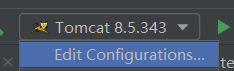
然后添加Maven,注意这里需要先配置好Tomcat,否则没有Name选项
然后Name:mybatis
Command line:mybatis-generator:generate -e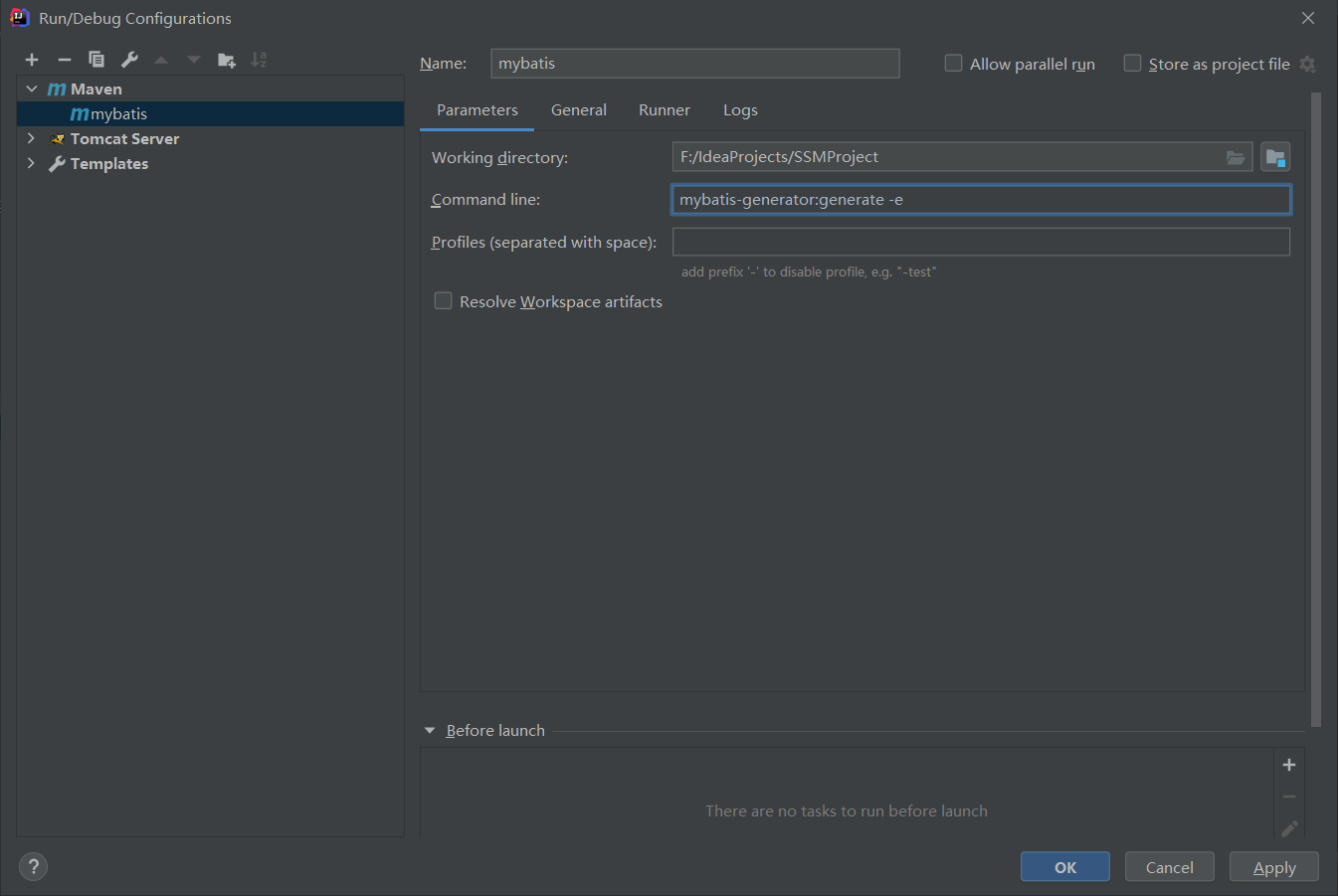
配置完之后,就有:
然后点击运行即可。
注意:反向生成后,最好把该指令删除,否则不小心点了之后,又会生成一遍代码,尤其是mapper.xml文件中sql语句又会生成一遍,运行时会报错。

若有收获,就点个赞吧
0 人点赞


