- Compiling a single source file into an executable">1. Compiling a single source file into an executable
- set minimum cmake version
- project name and language
- 2. Switching generators
- Building and linking static and shared libraries">3. Building and linking static and shared libraries
- set minimum cmake version
- project name and language
- generate a library from sources
- set minimum cmake version
- project name and language
- generate an object library from sources
- this is only needed for older compilers
- but doesn’t hurt either to have it
1. Compiling a single source file into an executable
CMakeLists.txt
cmake_minimum_required: 设置CMake所需的最低版本project: 声明项目名称, 支持的编程语言LANGUAGES选项显示声明项目的语言
- 指示CMake创建一个新目标
project name and language
project(recipe-01 LANGUAGES CXX)
add_executable(hello-world hello-world.cpp)
`hello-world.cpp````cpp#include <cstdlib>#include <iostream>#include <string>std::string say_hello() { return std::string("Hello, CMake world!"); }int main() {std::cout << say_hello() << std::endl;return EXIT_SUCCESS;}

mkdir -p buildcd buildcmake..
与cmake -H. Bbuild等效
尝试命令行执行后失败,.并未生成可执行文件
- 根据提示,未找到编译器
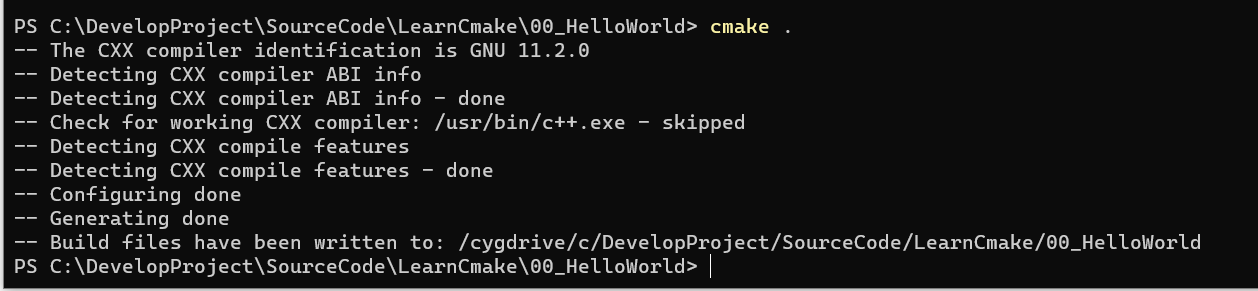
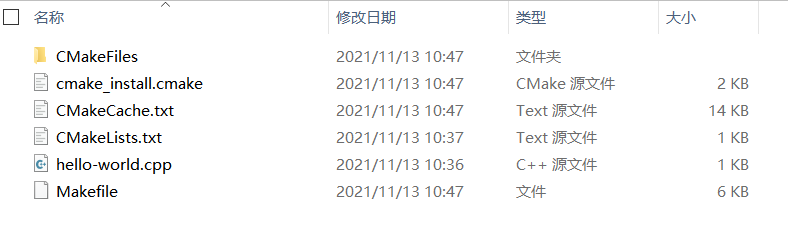
文件
- cmake_install.cmake
- Makefile
- CMakefile
- CMakeCache.txt
Running CMake
PS C:\DevelopProject\SourceCode\LearnCmake\00_HelloWorld\cmake-build-debug> cmake --build . --target helpThe following are some of the valid targets for this Makefile:... all (the default if no target is provided)... clean... depend... edit_cache... rebuild_cache... hello-world... hello-world.o... hello-world.i... hello-world.s
all(或Visual Studio generator中的ALL_BUILD)是默认目标,将在项目中构建所有目标。clean,删除所有生成的文件。rebuild_cache,将调用CMake为源文件生成依赖(如果有的话)。edit_cache,这个目标允许直接编辑缓存。
对于更复杂的项目,通过测试阶段和安装规则,CMake将生成额外的目标:
test(或Visual Studio generator中的RUN_TESTS)将在CTest的帮助下运行测试套件。将在第4章中详细讨论测试和CTest。install,将执行项目安装规则。我们将在第10章中讨论安装规则。package,此目标将调用CPack为项目生成可分发的包。打包和CPack将在第11章中讨论。
2. Switching generators
3. Building and linking static and shared libraries
- 项目中会有单个源文件构建的多个可执行文件的可能
- 项目中有多个源文件,通常分布在不同子目录中
这种实践有助于项目的源代码结构,而且支持模块化、代码重用和关注点分离。同时,这种分离可以简化并加速项目的重新编译。
STATIC
CMakeLists.txt
add_library(message STATIC Message.hpp Message.cpp): 生成静态库- 第二个参数
- STATIC: 用于创建静态库,即编译文件的打包存档,以便在链接其他目标时使用
- SHARED: 用于创建动态库,即可以动态链接,并在运行时加载的库
- OBJECT: 可将给定 add_library 的列表中的源码编译到目标文件,不将它们归档到静态库中,也不能将它们链接到共享对象中。如果需要一次性创建静态库和动态库,那么使用对象库尤其有用。
- MODULE: 又为DSO组。与 SHARED 库不同,它们不链接到项目中的任何目标,不过可以进行动态加载。该参数可以用于构建运行时插件。
- 第二个参数
target_link_libraries: 将目标库链接到可执行目标 ```set minimum cmake version
cmake_minimum_required(VERSION 3.5 FATAL_ERROR)
project name and language
project(BuildLibrary LANGUAGES CXX)
generate a library from sources
add_library(message STATIC Message.h Message.cpp )
add_executable(hello-world hello-world.cpp)
target_link_libraries(hello-world message)
`hello-world.cpp````cpp#include "Message.cpp"#include <cstdlib>#include <iostream>int main() {Message say_hello("Hello, CMake World!");std::cout << say_hello << std::endl;Message say_goodbye("Goodbye, CMake World");std::cout << say_goodbye << std::endl;return EXIT_SUCCESS;}
Message.h
#ifndef HELLO_WORLD_MESSAGE_H#define HELLO_WORLD_MESSAGE_H#include <iosfwd>#include <string>class Message {public:Message(const std::string &m) : message_(m) {}friend std::ostream &operator<<(std::ostream &os, Message &obj) {return obj.printObject(os);}private:std::string message_;std::ostream &printObject(std::ostream &os);};#endif //HELLO_WORLD_MESSAGE_H
Message.cpp
#include "Message.h"#include <iostream>#include <string>std::ostream &Message::printObject(std::ostream &os) {os << "This is my very nice message: " << std::endl;os << message_;return os;}
CMake还能够生成特殊类型的库,这不会在构建系统中产生输出,但是对于组织目标之间的依赖关系,和构建需求非常有用:
- IMPORTED: 此类库目标表示位于项目外部的库。此类库的主要用途是,对现有依赖项进行构建。因此, IMPORTED 库将被视为不可变的。
- INTERFACE: 与 IMPORTED 库类似。不过,该类型库可变,没有位置信息。它主要用于项目之外的目标构建使用。
ALIAS: 顾名思义,这种库为项目中已存在的库目标定义别名。不过,不能为 IMPORTED 库选择别名。
OBJECT
CMakeLists.txtadd_library(Message-objs OBJECT Message.hpp Message.cpp)set_target_properties(message-objs PROPERTIES POSITION_INDEPENDENT_CODE 1):保证编译的目标文件与生成位置无关
project name and language
project(recipe-03 LANGUAGES CXX)
generate an object library from sources
add_library(message-objs OBJECT Message.hpp Message.cpp )
this is only needed for older compilers
but doesn’t hurt either to have it
set_target_properties(message-objs PROPERTIES POSITION_INDEPENDENT_CODE 1 )
add_library(message-shared
SHARED
$
add_library(message-static
STATIC
$
add_executable(hello-world hello-world.cpp)
target_link_libraries(hello-world message-static)
是否可以让CMake生成同名的两个库?换句话说,它们都可以被称为 message ,而不是 message-static 和 message-shared?<br />修改这两个目标的属性
add_library(message-shared
SHARED
$
set_target_properties(message-shared PROPERTIES OUTPUT_NAME “message” )
add_library(message-static
STATIC
$
set_target_properties(message-static PROPERTIES OUTPUT_NAME “message” ) ```

若有收获,就点个赞吧
0 人点赞


