Slurm is an open source, fault-tolerant, and highly scalable cluster management and job scheduling system for large and small Linux clusters.
1. Slurm entities
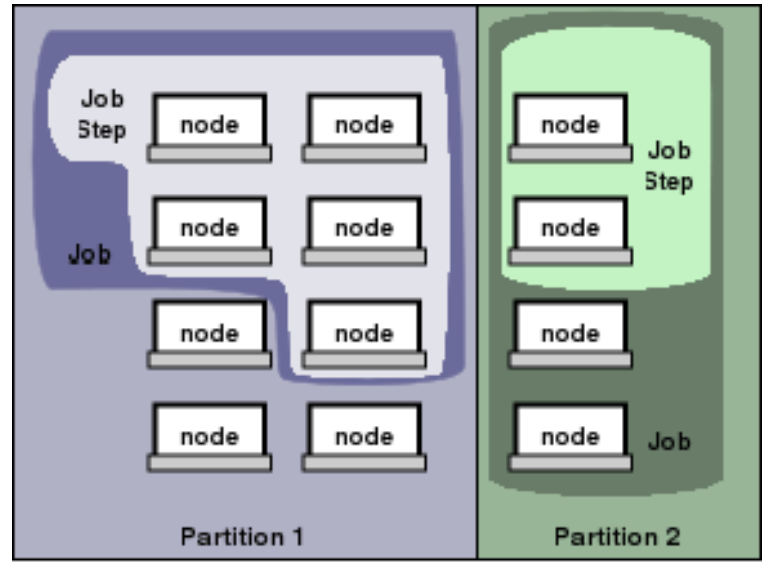
The entities managed by these Slurm daemons, include nodes, the compute resource in Slurm, partitions, which group nodes into logical (possibly overlapping) sets, jobs, or allocations of resources assigned to a user for a specified amount of time, and job steps, which are sets of (possibly parallel) tasks within a job.
2. Commands
2.1 Basic Information
sinfoThe
sinfocommand provided the state of partitions and nodes managed by Slurm.- Example:
In the example above we find there are three partitions: sugon, low and download. The following the name sugon_ _indicates this is the default partition for submitted jobs. The following the state down indicate the nodes are not responding.$ sinfoPARTITION AVAIL TIMELIMIT NODES STATE NODELISTsugon* up infinite 1 mix node1low up infinite 1 mix node1download up infinite 1 down* tc6000
- Example:
scontrolThe
scontrolcommand can be used to report more detailed information about nodes, partitions, jobs, job steps, and configuration. It can also be used by system administrators to make configuration changes.scontrol show partition``` PartitionName=sugon AllowGroups=ALL AllowAccounts=ALL AllowQos=ALL AllocNodes=ALL Default=YES QoS=N/A DefaultTime=100-00:00:00 DisableRootJobs=NO ExclusiveUser=NO GraceTime=0 Hidden=NO MaxNodes=UNLIMITED MaxTime=UNLIMITED MinNodes=0 LLN=NO MaxCPUsPerNode=UNLIMITED Nodes=node1 PriorityJobFactor=1 PriorityTier=11000 RootOnly=NO ReqResv=NO OverSubscribe=NO OverTimeLimit=NONE PreemptMode=OFF State=UP TotalCPUs=144 TotalNodes=1 SelectTypeParameters=NONE JobDefaults=(null) DefMemPerNode=UNLIMITED MaxMemPerNode=UNLIMITED
……
- `scontrol show node $NodeName`
NodeName=node1 Arch=x86_64 CoresPerSocket=18 CPUAlloc=32 CPUTot=144 CPULoad=1.44 AvailableFeatures=(null) ActiveFeatures=(null) Gres=(null) NodeAddr=node1 NodeHostName=node1 Version=18.08 OS=Linux 3.10.0-957.el7.x86_64 #1 SMP Thu Nov 8 23:39:32 UTC 2018 RealMemory=2063597 AllocMem=64000 FreeMem=2050344 Sockets=4 Boards=1 MemSpecLimit=10240 State=MIXED ThreadsPerCore=2 TmpDisk=0 Weight=1 Owner=N/A MCS_label=N/A Partitions=sugon,low BootTime=2021-04-12T13:55:47 SlurmdStartTime=2021-04-12T13:57:10 CfgTRES=cpu=144,mem=2063597M,billing=144 AllocTRES=cpu=32,mem=62.50G CapWatts=n/a CurrentWatts=0 LowestJoules=0 ConsumedJoules=0 ExtSensorsJoules=n/s ExtSensorsWatts=0 ExtSensorsTemp=n/s
<a name="u1N2E"></a>### 2.2 Manage Jobs- **`sbatch`**> Submit a job.```bash$ sbatch name.sh
Options:
--job-name/-J--output/-o--account/-A--partition # Request a specific partition.--nodes/-N # Request that a minimum of minnodes nodes be allocated to this job.--ntasks/-n # The maximum number of tasks to launch.--ntasks-per-node # Request that ntasks be invoked on each node.--cpus-per-task/-c # Require ncpus number of processors per task.--mem # Specify the real memory required per node.--mem-per-cpu # Minimum memory required per allocated CPU.--time # Set a limit on the total run time.
**.sh**Example:#!/bin/bash#SBATCH --job-name=fastp#SBATCH --output=fastp.out#SBATCH --account=ykk#SBATCH --partition=sugon#SBATCH --nodes=1#SBATCH --ntasks-per-node=1#SBATCH --cpus-per-task=8#SBATCH --mem-per-cpu=1000m#SBATCH --time=4:00:00
squeueReport the state of active jobs or job steps.
Options:
--user/-u--format/-o
Simplify commands using command
alias:# Add the command below to ~/.bashrc file.alias sqa='squeue -o "%.18i %.15j %.14u %.2t %.15M %.6D %.6c %.8m %.6P %.8g %.5N"'
$ sqaJOBID NAME USER ST TIME NODES MIN_CP MIN_MEMO PARTIT GROUP NODELIST12693 minhash ykk R 1:54:37 1 1 2000M sugon users node1
scancelCancel a job.
$ scancel 1897427
sacctReport detailed information about active or completed jobs.
Options:
--starttime/-S MMDD--endtime/-E MMDD--format/-o
Simplify commands using command
alias:# Add the command below to ~/.bashrc file.alias sa='sacct --format=jobid,partition,jobname,user,nodelist,alloccpus,elapsed,state,exitcode'
```bash $ sa -S 0409 -E 0409 JobID Partition JobName User NodeList AllocCPUS Elapsed State ExitCode
12667 sugon minhash ykk node1 1 1-08:49:16 COMPLETED 0:0 12667.batch batch node1 1 1-08:49:16 COMPLETED 0:0 ```
3. More information
- Man Pages
https://slurm.schedmd.com/man_index.html
- Other user guide

若有收获,就点个赞吧
0 人点赞


