Any questions about CRM, please feel free to join the DingTalk group (Ding group id:34230365)

Why CRM?
1、Background
① Since launching CRM in July 2020, many functional upgrades to the Private Pool, Service Pool and Customer Details page have taken place to support sales representatives in achieving more efficiency.
② Due to its legacy and old structure, it is not good use of our resources to add updates to Caesar, which can be difficult in the process. So currently only CRM can fulfil business needs through its new features.
2、Affected areas
Role: Sales & 全球拍档
Function: Customers search in Caesar is now offline; so use CRM’s Private Pool, Service Pool, and Customer Details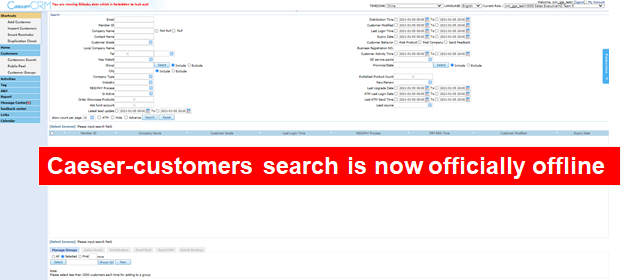
3、Got feedback?
Submit your suggestions onto this Yuque document
https://www.yuque.com/chenshi-h3z1w/mgrf73/ort2fb/edit#Qw2b
CRM key functions overview
1、Searching for leads
Before:
Customer list was incomplete, therefore not intuitive to use.
After:
- “Leads quality” tag has been added to help sales identify high-quality leads()
- You can now filter results by time, country, customer behavior and sales
Customer list can be viewed in two separate formats: Loose and compact
2、Customer follow-up
Sending emails in bulk
Before: Only up to 2,000 emails could be sent at one time, sales may lack permission to send, and actual number of emails sent may not be the same
After: Up to 10,000 emails can be sent at one time, permissions can be applied for, and actual number of emails sent will correspond with the number of leads selected
- Creating memos
Before: Completing a note took a long time as it required entering a lot of information
After: Notes now require less information and most fields can be filled in automatically
- Customer details page
Before: Notes can only be added on pop-up window and doesn’t allow for smooth operation; View History function unavailable
After: Notes can be added directly to the page; View History function now available
- Business Assistant
Before: Sales lacked industry knowledge, and this made converting leads very challenging
After: “Industry Development Analysis” and “Category Opportunity Analysis” help sales teams learn about the market size and growth rate of the industry/category of interest to the customer
**
CRM key functions details
1、CRM key functions – Searching for leads
① “Leads quality” tag added to help sales identify high-quality potential customers
•Prime: Customers with the highest intent (of becoming GGS)- inbound, clicking upgrade, visiting pricing page, etc. and customers’ profile are completed with website, industry, company name and verified phone numbers.
•High: Customers with the 2nd highest intent - filling lead forms, verified by BPO outbound, etc. and customers profile are completed with company name and verified phone numbers.
•Medium: Customers with intent - login in Last 60D, visiting Seller Central, etc. and customers profile are completed with company name and verified phone numbers.
②“Time” filter updates
- Examples:
① To filter leads that have been followed up since December 1, select “Last contact time” and put December 1 as the start date. You may leave the end date empty.
② To filter leads that have not been followed up since December 20, select “Last contact time” and put December 20 as the end date. You may leave the start date empty.
③ To filter leads that were followed up before December 20, select December 20 as the end date and January 1, 1990 as the start date.
④ To filter leads that were followed up between December 1-20, select December 1 as the start date and December 20 as the end date.
- Time filters explained:
①Last upgrade date: Time customer upgraded their membership to GGS (same as Caesar)
②Last contact time : Time the memo was created for the customer (same as Caesar)
③Recent login: Time customer last logged into My Alibaba (same as Caesar)
④Expiry date: Time of GGS membership expiry (same as Caesar)
⑤Recently modified: Time customer’s information was last updated (same as Caesar)
⑥Return to Public Pool : Time customers are due to return to the Public Pool
⑦IFM REG: Time customer joined Alibaba.com on a free membership
③“Customer activities” and “Contract status” filter updates
- Contract status:“First year renewal” and “To be renewed” have been added. “Renew 3 months in advance” and “Renew 6 months in advance” customers can also be viewed under “System labels”.
- Customer activities: Can now filter out customers who have a website, phone number or products listed, or filter by their registration payment or membership status.

④ Customer list
•The compact version is similar to Caesar and we recommend users who are more accustomed to that to choose this version.
•Users with slow loading speeds may prefer this version, as they don’t have to open the customer details page. 
2.CRM key functions - Customer follow-up
① Email Sending
Up to 10,000 emails can be sent at one time and are sent successfully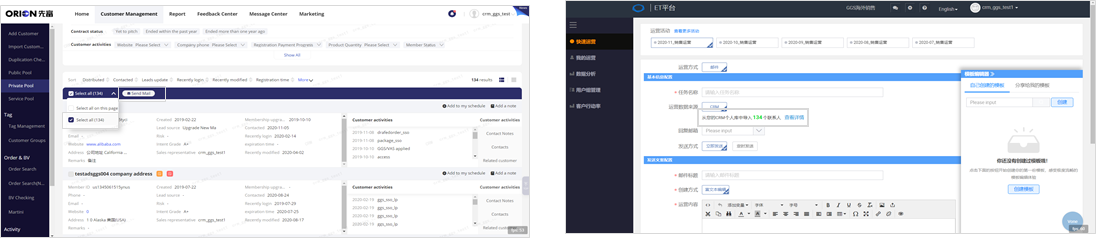
② Notes upgrade
Memos now require less information and most fields will be filled in automatically
③ Customer details page upgrade
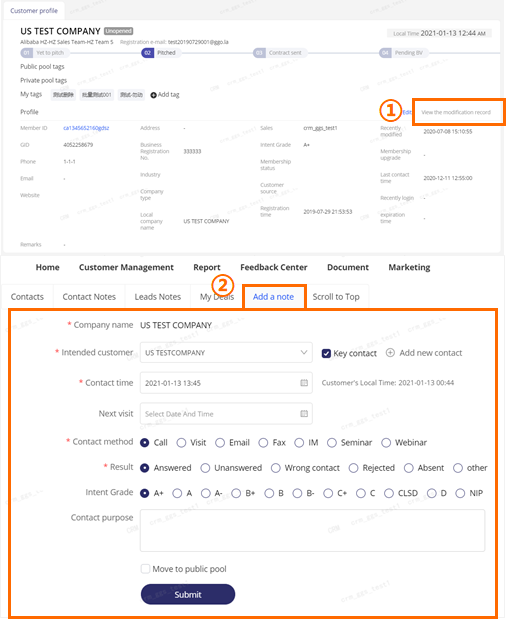
- “View history” option added to see changes made previously
- Notes can now be added directly onto Customer details pages, making it easier to view while on the phone with customers
④ Business Assistant:
“Industry Development Analysis” and “Category Opportunity Analysis” features now online
•Go to: CRM > Private Pool > Customer details > Business Assistant
•View report: Choose the main industry and product category. Then click confirm.
•Data update: Data for the previous month is updated on the second of every month (Bj time)
- Industry Development Analysis-Annual scale and annual growth
Industry growth: If the year-on-year growth of buyers and high-speed machines has increased, it indicates that the market demand for that industry is growing
Supply and demand: The more buyers/opportunities per supplier, the greater the market opportunity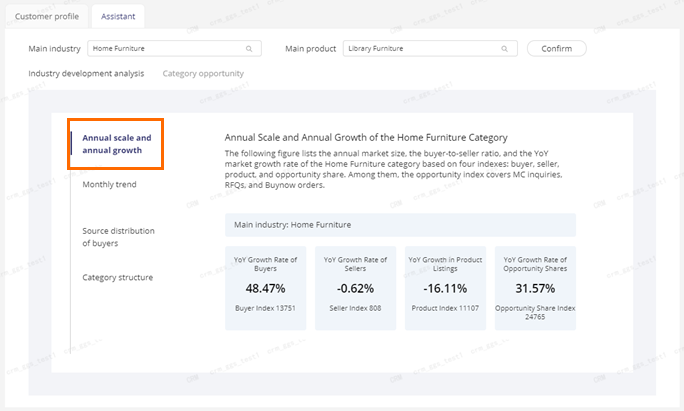
Indexes explained:
Number of buyers: The number of buyers who initiated MC inquiries, RFQ inquiries, and direct orders
Number of sellers: The number of sellers who have received MC inquiries, RFQ inquiries, and directly placed orders
Number of products: The number of products linked to MC inquiries, RFQ inquiries, and direct orders
Number of business opportunities: The number of business opportunities including MC inquiries, RFQ inquiries, and direct orders
(Note: Due to data security purposes, index-related materials are converted year-on-year through algorithms)
- Industry Development Analysis - Monthly trends
Market trends: The higher the visitor index and business opportunity index, the greater the market demand for that industry
Off-peak season: Visitor and business opportunity indexes help identify the off-peak season for that industry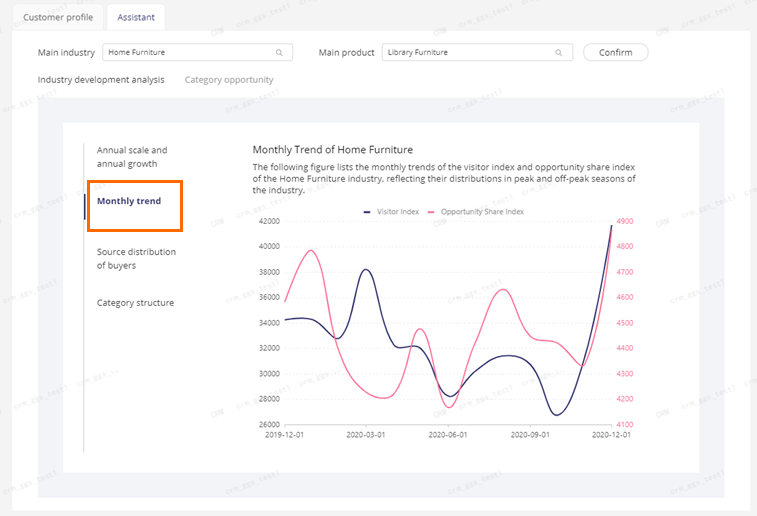
Index explained:
Number of visitors: The number of people who visited the supplier’s product detail page
Number of business opportunities: The number of business opportunities including MC inquiries, RFQ inquiries, and direct orders
(Note: Due to data security purposes, index-related materials are converted year-on-year through algorithms)
**
- Industry Development Analysis - Buyer source analysis
Business opportunity distribution (for industry buyers): Chart shows the share of business opportunities in each country. The higher the share of business opportunities, the greater the demand in that country.
Business opportunity growth rate (for industry buyers): The line shows the year-on-year growth rate of business opportunities in various countries. The higher the growth rate, the more demand in that country.
Note: If the share of business opportunities is high, then the growth rate is more likely to be low.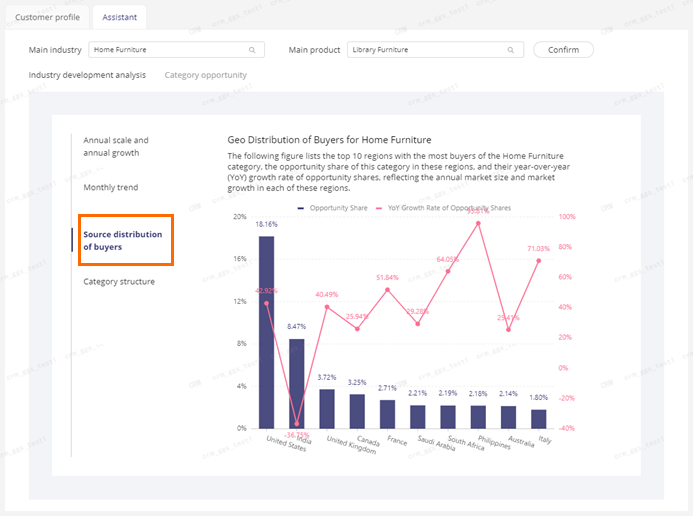
Index explained:
*Business opportunity share: Buyer business opportunities/total business opportunities in countries
- Industry Development Analysis - Category structure
Business opportunity distribution(for the industry category): The greater the share of business opportunities, the higher the market share of that category
Industry: First- or second-level categories selected by suppliers when posting products
Categories: Third- or lower level categories selected by suppliers when posting products
Index explained:
*Business opportunity share: The number of business opportunities obtained by each category selected/the total number of business opportunities in that industry
- Category **Development Analysis - Annual scale and annual growthe**
Categorygrowth: If the year-on-year growth of buyers and high-speed machines have increased, it indicates that the market demand of the industry is growing
Supply and demand: The more buyers/opportunities per supplier, the greater the market opportunity
Indexes explained:
Number of buyers: The number of buyers who initiated MC inquiries, RFQ inquiries, and direct orders
Number of sellers: The number of sellers who have received MC inquiries, RFQ inquiries, and direct orders
Number of products: The number of products linked to MC inquiries, RFQ inquiries, and direct orders
Number of business opportunities: The number of business opportunities including MC inquiries, RFQ inquiries, and direct orders
Note: Due to data security purposes, index-related materials are converted year-on-year through algorithms
- Category Development Analysis - Buyer source analysis
Business opportunity distribution (for category): Chart shows the share of business opportunities in each country. The higher the share of business opportunities, the greater the demand in that country.
Business opportunity growth rate (for category): The line shows the year-on-year growth rate of business opportunities in various countries. The higher the growth rate, the more demand in that country.
Note: If the share of business opportunities is high, then the growth rate is more likely to be low.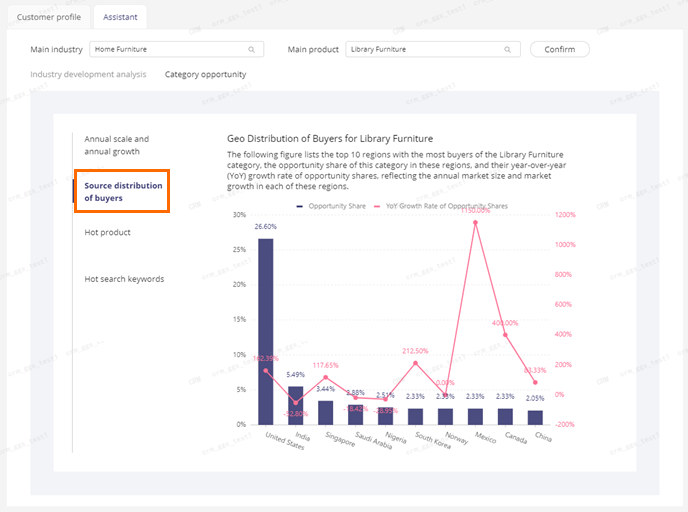
Index explained:
*Business opportunity share: Buyer business opportunities/total business opportunities in countries
- Category Development Analysis - Top products
Top 10 products: Products listed according to their number of inquiries, starting from the highest amount received. Click on the product name to go to the product details page.
Note: The data used by Business Assistant is updated at the end of every month. Therefore, there may be occasions when the updated unit prices and MOQs are not in real time. 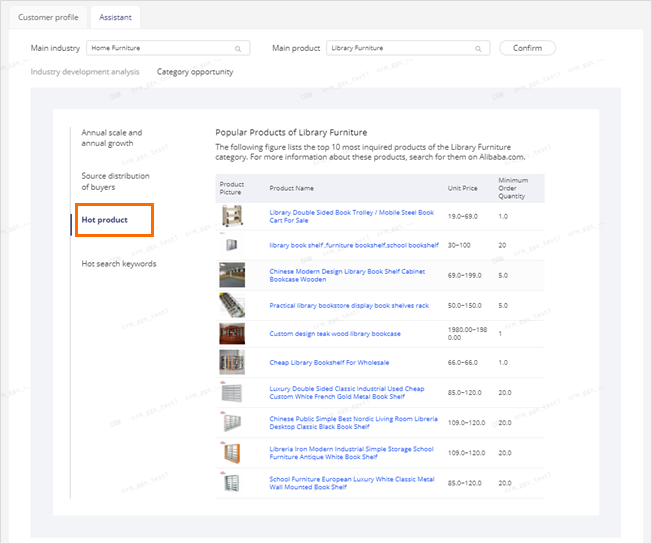
- Category Development Analysis - Top keywords
Top 20 keywords:
The higher the search index, the more buyers there are searching that keyword
The higher the search increase, the more interest that keyword is gaining that month
The higher the seller scale index, the more sellers there are using that keyword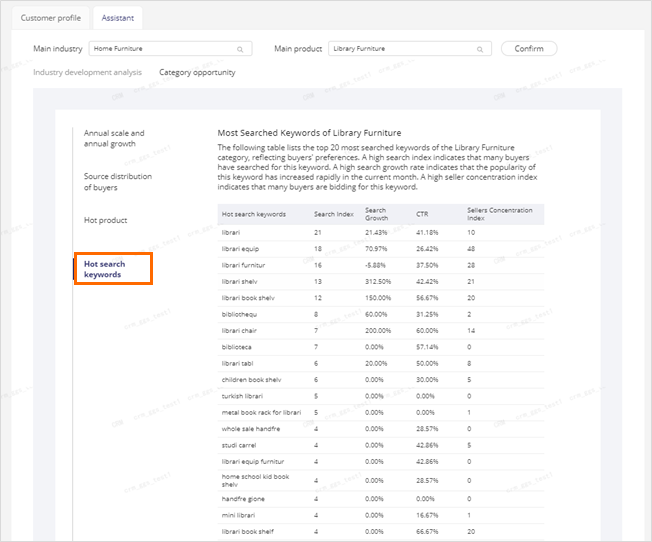
Indexes explained:
Search index: The number of times the keyword has been searched in the past 30 days
Search gains: Month-on-month search index
Click-through-rate:The number of clicks/number of searches for this keyword through the main search field in the past 30 days
Seller size index: The number of sellers who have used the keyword
CRM updates timeline
•January: Caesar goes offline, and only CRM is available to sales roles
•February: Upgrades to Private Pool customer details pages and Business Assistant
•March: Upgrade to Service Pool customer details pages
•April: Mail management system to be launched
FAQ
Q:“https://crm.alibaba-inc.com/caesar/” Can’t open CRM
A:Please save the link of CRM:
Privvate Pool :https://crm.alibaba-inc.com/crmagent/romeo/private-sea.html?spm=a27dj.19484739.0.0.759313e5C5TJRh
Public Pool :https://crm.alibaba-inc.com/crmagent/romeo/public-sea.html?spm=a27dj.19484760.0.0.622549ce5Mgv0K
ServicePool:https://crm.alibaba-inc.com/crmagent/romeo/customer-service/in-service-new.html?spm=a27dj.19484773.0.0.71777ceabKIq9B
Q: Why have I received a notification that the email I’ve sent has been bounced?
A: You do not have permission to send emails. Apply for permission here:https://bpms.alibaba-inc.com/workdesk/instStart?processCode=buc_apply_wbemail_permission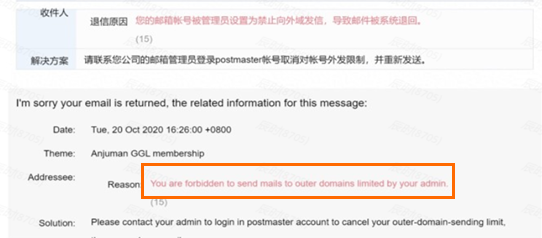
Q: What do I do if I see this error message and cannot log in to my CRM account?
A:
Step 1: Confirm you have permission
Step 2: Click this link to switch to GGS-related roles: https://crm.alibaba-inc.com/aegean/tritons/cgspartnerManage/message#/my-msg?_k=h1ghzn
Step 3: Click this link to visit the Private Pool and try logging in again: https://crm.alibaba-inc.com/crmagent/romeo/private-sea.html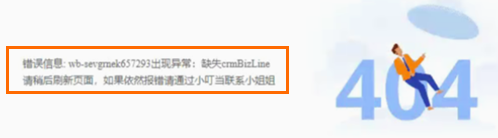
Q: How do I filter for Leads who:
Last logged in after June 1
Haven’t been contacted since November 1
Have no products posted
Aren’t marked as A+ or A- intent?
A: As shown below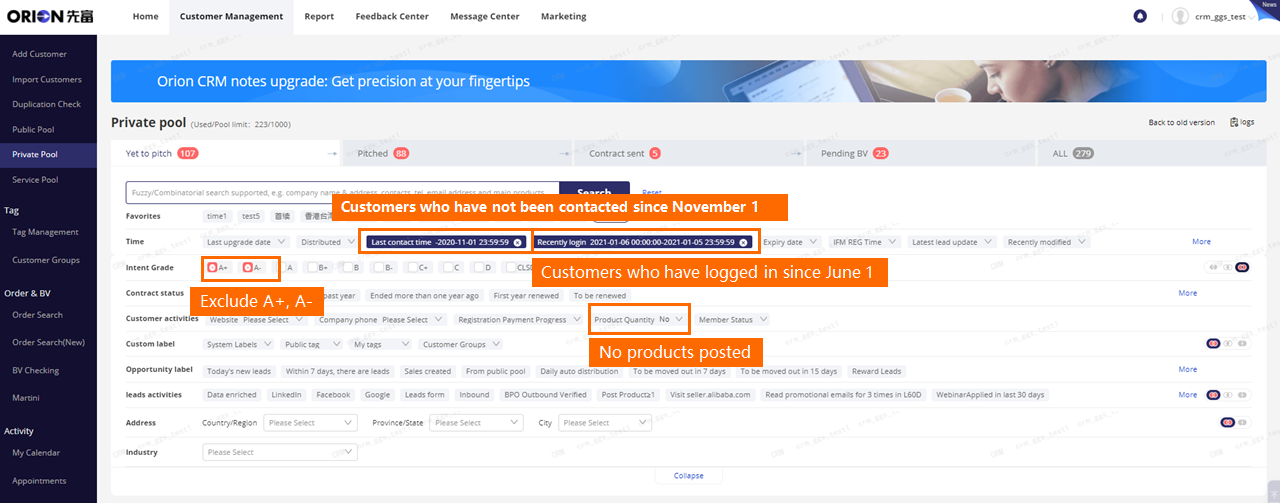
Q: How to define the opportunity share index?
A: For example: (Number of business opportunities for 2020)/(Number of business opportunities for 2019)
note: Number of business opportunities means: (MC inquiries)+(RFQ inquiries)+(direct orders)
Q: Can you further explain the business opportunities high and growth rate is low? Why do you mean by that?
A: For example: For 2020, Business opportunity for USA is 100, India is 50, Canada is 30, Italy is 20; and for 2019, Business opportunity for USA is 80, India is 40, Canada is 15, Italy is 5. Then For 2020, Business opportunity share for USA is 50%, India is 25%, Canada is 15%, Italy is 10%; and Business opportunity growth rate for USA is 25%((100-80)/80), India is 25%((50-40)/40), Canada is 100%((30-15)/15), Italy is 300%((20-5)/5)
Q: This assistant details is for sales and services both?
A: At first it will be available for members with role of sales executive or 全球拍档, please kindly wait for channel manager’s notification once you have been changed to the new CRM
Training materials

若有收获,就点个赞吧
0 人点赞


