Since launching Orion CRM in July 2020, 40+ channel partners and 200+ channel employees from 12 countries have contributed 100+ valuable opinions to us. After 3 months of development, 29 channel vendors’ suggestions have been launched on CRM. At the same time, major Private Pool upgrades will be online at the beginning of November 2020. Let’s look at the changes.
一、Key upgrades
Upgrade 1:”To be renewed”customerinventory
Before: Unable to search first-year renewals and customers due to renew in the coming 3 or 6 months, which is not conducive to timely follow-up
After: Such customers can now be filtered with a single click and marked by an icon which is eye-catching, making the follow-up process much faster
Upgrade 2:Search upgrade
Before: Unable to search for customers who are in service as unsigned customers were the only searchable items within Private Pool, proving inconvenient to operate
After: Includes all customers within your service pool. Just click “Private Pool – All” to search for customer-related information.
Upgrade 3. Improved labels
Before: Many of Caesar’s search fields were missing in Orion and users often found the new labels too confusing
After: Clearer definitions of each label have been added and users can now search for customers easily
Upgrade 4: Customer list and page display
Before: The customer details page slow loading speed greatly affected the follow-up process, and operating the new interface was too different from the old one
After: Alternative page display options are now available. The loose version includes important contact information under the customer name without having to load the customer details page; the compact version is similar to Caesar, so some users may find this version easier to navigate
二、Upgrade details
Part 1:Labels – Organized filtering
Users can filter customers like they did in Caesar, as to whether they had a website, phone number, or products.
①Search bar:Find all customers in your Private Pool here
②Improved labels:
•My preferences: Same as “Favorites” in Caesar
•Quality Leads: Quickly find quality leads (to launch in November 2020)
•Time: Click the downward arrow to select dates
•Customer Activities: Find customer information, such as company website, telephone number and membership status
•Custom label: Select public tags, your tags and customer tags for easy searching
③ Achieve another level of filtering with“and”, “or” and “exclude” functions
Part 2: Customer details - Better page display
1.loose version
The loose version displays vital customer information at first glance —— Users with slow loading speeds may prefer this view, as they wouldn’t have to open the complete customer details page. 
① Choose your preferred page display here
② These additional CTAs are now permanently displayed here so novices don’t have difficulty finding them
③ Company profiles now display various icons and labels to help you quickly understand key information
Note: Upgraded risk indicator algorithm now displays the customer’s risk level, appeal probability and contractability (to launch in November 2020)
④ Easily switch between “Customer activities”, “Contact notes”, “Contacts” and “Related customers”.
1.compact version
The compact version is similar to Caesar, so we recommend users who are more accustomed to that to choose this mode —— Customer list contains similar sorting fields and CTAs as Caesar, with the most important customer information displayed at the front without having to scroll sideways for further details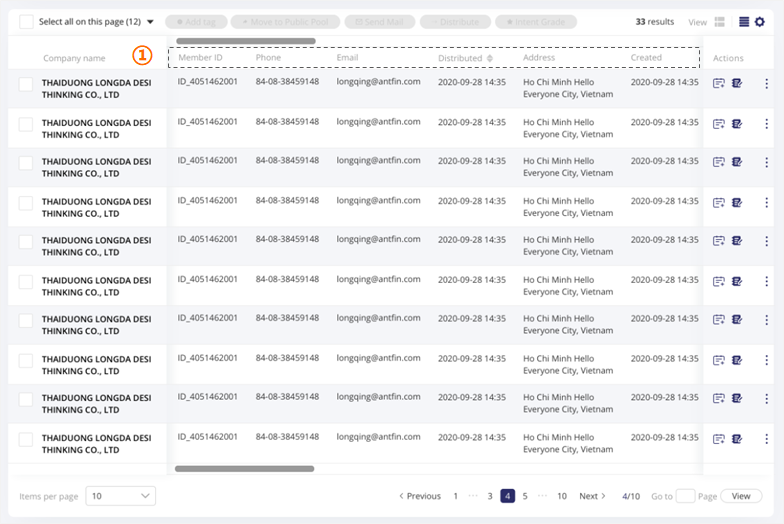
① Customer information: The content and order of fields can be adjusted according to your preference (same as Caesar)
For other optimization options, refer to the loose page display option.
Part 3:Upcoming upgrades
- 【Mid-November 2020*】:Quality leads filtering, risk indicator algorithm upgrade (red and black bomb-shaped icons), increased number of emails sent in bulk, simplified interface of Contact Notes function
- 【End-November 2020*】:Sales materials: Industry reports, sales assistant, data analysis
- 【December 2020*】Customer details/homepage
*
All launch dates may be subject to change
三、Learning Materials
1.Training video

2.Training PPT
【Thailand】Orion CRM Training20201110.pptx
3.News Letter


若有收获,就点个赞吧
0 人点赞


