latex是排版系统tex的宏包,用于创建高质量的打印文档。
规则
LaTeX的指令都是大小写有别的,由\开头,后接由字母组成的字串或单一的非字母字元。其中由[ ]中括号括住的是非必须参数,可以省略,由{ }大括号括住的是必须参数,当然,LaTeX的指令不一定会有参数,但绝大部份都会有参数,只不过把他给省略使用预设值罢了。
LaTeX文稿中,空一个英文空白和空多个英文空白的作用是一样,LaTeX会认作一个英文空白
LaTeX的指令,是从反斜线后第一个字母开始,到第一个非字母符号为止(包括空白、标点符号及数字)
注释符号%
\符号是每一行公式结束后的换行
a \\ b \\ c

环境(Environment)
所有的环境,都是起于\begin{环境名称},止于\end{环境名称},这两个指令之间的文稿都会被作用,而且,环境之内还可以套用其他不同的环境。
LaTeX文稿的内文,其实就是包在一个\begin{document}和\end{document}这个document环境当中
https://latex.wikia.org/wiki/List_of_LaTeX_environments
完整结构
\documentclass[12pt]{article}
这里是preamble-begin区
\begin{document}
这里是文本区
\end{document}
documentclass{article},
这是在告诉LaTeX使用哪一种格式,我们目前使用的是article格式。类型有article、report、book、slides、letter 等,此外还可以设置全局信息,比如字体大小。
不同的文档类别下,有不通过的环境。比如只有article/report 类別才有abstract,book 类別不能使用这个环境。
documentclass 相当于建立全局环境类型及全局参数设定
environments 相当于建立局部环境类型及局部参数设定
preamble(序文)区
添加描述性信息或者元信息。
\documentclass[12pt]{article} %这里是preamble-begin区 \title{My first work of \LaTeX} \author{pony wong\footnote{he is TA}} \date{\today} %这里是preamble-end区 \begin{document} 这里是文本区 \end{document}
引用不同的扩展包
\documentclass[12pt, a4paper, twocolumn]{article} \usepackage{CJK} % preamble using package CJK \begin{document} \begin{CJK}{Bg5}{bsmi} % use BIG5 enc, and bsmi font 酌酒與君君自寬,人情翻覆似波瀾。白首相知猶按劍,朱門先達笑彈冠。\\ 草色全經細雨濕,花枝欲動春風寒。世事浮雲何足問,不如高臥且加餐。 \end{CJK} \end{document}
\documentclass[12pt,a4paper]{article} \usepackage{amsmath} \begin{document} \[ \begin{pmatrix} 7 & -2 & 1 & 2 \\ 2 & 8 & 3 & 1 \\ -1 & 0 & 5 & 2 \\ 0 & 2 & -1 & 4 \end{pmatrix}
引用源文件
\documentclass{book} % the document class ' 'book'' \includeonly{chap1, appen1} % only include chap1 and appen1 \begin{document} \include{chap1} % input chap1.tex \include{chap2} % input chap2.tex \include{chap3} % input chap3.tex \include{appen1} % input appen1.tex \include{appen2} % input appen2.tex \end{document}
本文区
Section command
| \part (in book and report) | Level -1 |
|---|---|
| \part (in article) | Level 0 |
| \chapter (only book and report) | Level 0 |
| \section | Level 1 |
| \subsection | Level 2 |
| \subsubsection | Level 3 |
| \paragraph | Level 4 |
| \subparagraph | Level 5 |
\documentclass{report} \begin{document} This is the first experience of \LaTeX. \chapter{Aesop Fables} \section{The Ant and the Dove}Contents ... \end{document}
Itemize(选项列表)
Math
math显示形式
行内显示
由$符号界定
适合比较短的式子
\documentclass[12pt,a4paper]{article} \begin{document} The equation $x + 2y = 3$ is a linear function, its graph is a line. \\ The equation $y = (x-1)^2 + 2$ is a quadratic function, its graph is a parabola. \\ \end{document}
由\begin{math} \end{math}界定
适合比较长的式子
\documentclass[12pt,a4paper]{article} \begin{document} The equation \begin{math}x + 2y = 3\end{math} is a linear function, its graph is a line. \\ The equation \begin{math}y = (x-1)^2 + 2\end{math} is a quadratic function, its graph is a parabola. \\ \end{document}
块显示
由[ ]界定
适合比较长的式子
\[\sum_{i=1}^{n}{n^2-3n+4} = f(n)\]
由\begin{eqqation} \end{equation}界定
适合比较长的式子,亦会独立成一行,而且会附上编号。equation*则不附编号。
符号/标记(symbol/notation)
乘法
\cdot

省略号
\cdots

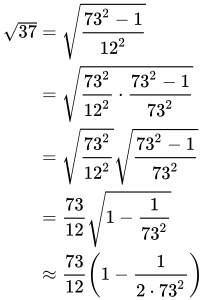
对齐
&符号就是”对齐的位置“,放置在最左边就是多行公式左对齐;
\begin{align} \sqrt{37} & = \sqrt{\frac{73^2-1}{12^2}} \\ & = \sqrt{\frac{73^2}{12^2}\cdot\frac{73^2-1}{73^2}} \\ & = \sqrt{\frac{73^2}{12^2}}\sqrt{\frac{73^2-1}{73^2}} \\ & = \frac{73}{12}\sqrt{1 - \frac{1}{73^2}} \\ & \approx \frac{73}{12}\left(1 - \frac{1}{2\cdot73^2}\right) \end{align}
自定义环境
\newenvironment{
TikZ_PGFManualNotes-3.0.1a-3.pdf
参考
https://www.latexlive.com/
MathJax basic tutorial and quick reference
latex工作室
https://www.learnlatex.org/
https://www.latex-project.org/
https://latex.wikia.org/wiki/Main_page
http://pic.plover.com/MISC/symbols.pdf - shorter listing
https://www.ctan.org/tex-archive/info/symbols/comprehensive/symbols-a4.pdf - exhaustive listing

若有收获,就点个赞吧
0 人点赞


