Linux软件包的分类
inghu
- 源码包
- 二进制包(RPM包)
源码包特点
- 源码包缺点:安装过程麻烦,需要用户手动编译,需要手动解决软件包的依赖关系
- 源码包优点:软件源代码开放,允许用户二次开发,安装灵活,可以自定义安装路径与安装功能,卸载方便
RPM包特点
- RPM包缺点:所有功能用户无法自定义,安装没有源码包灵活,不可以看到软件源代码
- RPM包优点:由于已经提前被编译过,所以安装简单,安装速度快
- RPM包命名规则,如:vsftpd-3.0.2-25.el7.x86_64.rpm
- vsftpd #软件包名称
- 3.0.2 #软件包版本,主版本.次版本.修改版本
- 25 #补丁次数
- el7 #适合的系统(el7表示RHEL7)
- x86_64 #适合的CPU架构
- rpm #rpm包扩展名
RPM管理软件包
- RPM命令管理软件包需要手动解决软件包之间依赖关系
- 树形依赖:a—>b—>c—d
- 环形依赖:a—>b—>c—a
- 模块依赖:需要模块文件支持,模块查询地址:www.rpmfind.net
- 命令格式:rpm 选项… 软件包全名
- 常用选项:
- -q #仅查询软件是否安装
- -qa #列出所有已经安装在系统中的所有软件,可配合grep过滤指定的软件包
- -qi #列出软件包详细信息,包含版本与官网地址
- -qf #后边接文件名,查询配置文件由哪个软件包产生
- -ql #列出与该软件包相关所有文件与目录的存放位置
- -ivh #i安装,v显示详细信息,h显示软件安装进度
- -Uvh #升级安装软件包
- -e #卸载软件包
- —import #导入红帽签名
#挂载iso镜像文件[root@localhost ~]# mkdir /mnt/centos[root@localhost ~]# mount /dev/cdrom /mnt/centos/#实现永久挂载,查看iso镜像文件系统类型[root@localhost ~]# df -hT[root@localhost ~]# vim /etc/fstab.../dev/cdrom /mnt/centos iso9660 defaults 0 0#重新加载[root@localhost ~]# mount -a#查询软件包是否安装[root@localhost centos]# rpm -q vsftpd未安装软件包 vsftpd#安装vsftpd软件包[root@localhost centos]# rpm -i Packages/vsftpd-3.0.2-25.el7.x86_64.rpm#查询系统中以安装的所有软件[root@localhost centos]# rpm -qa[root@localhost centos]# rpm -qa | grep vsftpdvsftpd-3.0.2-25.el7.x86_64#查询软件包详细的信息[root@localhost centos]# rpm -qi vsftpdName : vsftpd #软件包名Version : 3.0.2 #版本Release : 25.el7 #最终稳定版Architecture: x86_64 #适合安装的CPU架构Install Date: 2021年05月04日 星期二 14时47分06秒 #安装时间Group : System Environment/Daemons #软件包属于哪个群组Size : 361335 #软件包大小License : GPLv2 with exceptionsSignature : RSA/SHA256, 2018年11月12日 星期一 22时48分54秒, Key ID 24c6a8a7f4a80eb5Source RPM : vsftpd-3.0.2-25.el7.src.rpmBuild Date : 2018年10月31日 星期三 03时45分10秒Build Host : x86-01.bsys.centos.orgRelocations : (not relocatable)Packager : CentOS BuildSystem <http://bugs.centos.org>Vendor : CentOSURL : https://security.appspot.com/vsftpd.html #软件包官网地址Summary : Very Secure Ftp DaemonDescription : #描述信息vsftpd is a Very Secure FTP daemon. It was written completely fromscratch.[root@localhost centos]# which lsalias ls='ls --color=auto'/usr/sbin/ls#查询文件由哪个软件包产生[root@localhost centos]# rpm -qf /usr/bin/lscoreutils-8.22-23.el7.x86_64[root@localhost centos]# which vim/usr/bin/vim[root@localhost centos]# rpm -qf /usr/bin/vimvim-enhanced-7.4.160-5.el7.x86_64[root@localhost centos]# rpm -qi vim-enhanced#查询软件包自带的文件与目录安装路径[root@localhost centos]# rpm -ql vsftpd[root@localhost centos]# rpm -qf /usr/bin/vimvim-enhanced-7.4.160-5.el7.x86_64[root@localhost centos]# rpm -ql vim-enhanced/etc/profile.d/vim.csh/etc/profile.d/vim.sh/usr/bin/rvim/usr/bin/vim/usr/bin/vimdiff/usr/bin/vimtutor[root@localhost centos]# rpm -q vsftpdvsftpd-3.0.2-25.el7.x86_64#卸载软件包[root@localhost centos]# rpm -e vsftpd[root@localhost centos]# rpm -q vsftpd未安装软件包 vsftpd#安装vsftpd软件包[root@localhost centos]# rpm -ivh Packages/vsftpd-3.0.2-25.el7.x86_64.rpm警告:Packages/vsftpd-3.0.2-25.el7.x86_64.rpm: 头V3 RSA/SHA256 Signature, 密钥 ID f4a80eb5: NOKEY准备中... ################################# [100%]正在升级/安装...1:vsftpd-3.0.2-25.el7 ################################# [100%][root@localhost centos]# rpm -q vsftpdvsftpd-3.0.2-25.el7.x86_64#升级安装软件包[root@localhost centos]# rpm -Uvh Packages/vsftpd-3.0.2-25.el7.x86_64.rpm警告:Packages/vsftpd-3.0.2-25.el7.x86_64.rpm: 头V3 RSA/SHA256 Signature, 密钥 ID f4a80eb5: NOKEY准备中... ################################# [100%]软件包 vsftpd-3.0.2-25.el7.x86_64 已经安装#导入红帽签名文件[root@localhost centos]# rpm --import RPM-GPG-KEY-CentOS-7#安装软件包,查看是否还有警告信息[root@localhost centos]# rpm -q vsftpdvsftpd-3.0.2-25.el7.x86_64[root@localhost centos]# rpm -e vsftpd[root@localhost centos]# rpm -ivh Packages/vsftpd-3.0.2-25.el7.x86_64.rpm准备中... ################################# [100%]正在升级/安装...1:vsftpd-3.0.2-25.el7 ################################# [100%]#安装httpd软件包[root@localhost centos]# rpm -ivh Packages/httpd-(tab键)httpd-2.4.6-88.el7.centos.x86_64.rpm httpd-manual-2.4.6-88.el7.centos.noarch.rpmhttpd-devel-2.4.6-88.el7.centos.x86_64.rpm httpd-tools-2.4.6-88.el7.centos.x86_64.rpm[root@localhost centos]# rpm -ivh Packages/httpd-2.4.6-88.el7.centos.x86_64.rpm错误:依赖检测失败:/etc/mime.types 被 httpd-2.4.6-88.el7.centos.x86_64 需要httpd-tools = 2.4.6-88.el7.centos 被 httpd-2.4.6-88.el7.centos.x86_64 需要libapr-1.so.0()(64bit) 被 httpd-2.4.6-88.el7.centos.x86_64 需要libaprutil-1.so.0()(64bit) 被 httpd-2.4.6-88.el7.centos.x86_64 需要[root@localhost centos]# ls /etc/mime.typesls: 无法访问/etc/mime.types: 没有那个文件或目录#解决依赖关系[root@localhost centos]# rpm -ivh Packages/mailcap-2.1.41-2.el7.noarch.rpm准备中... ################################# [100%]正在升级/安装...1:mailcap-2.1.41-2.el7 ################################# [100%][root@localhost centos]# ls /etc/mime.types/etc/mime.types#解决依赖关系[root@localhost centos]# rpm -ivh Packages/httpd-tools-2.4.6-88.el7.centos.x86_64.rpm错误:依赖检测失败:libapr-1.so.0()(64bit) 被 httpd-tools-2.4.6-88.el7.centos.x86_64 需要libaprutil-1.so.0()(64bit) 被 httpd-tools-2.4.6-88.el7.centos.x86_64 需要#解决依赖关系(www.rpmfind.net官网查询提供libapr-1.so.0模块文件的软件包)[root@localhost centos]# rpm -ivh Packages/apr-(tab键)apr-1.4.8-3.el7_4.1.x86_64.rpm apr-util-1.5.2-6.el7.x86_64.rpmapr-devel-1.4.8-3.el7_4.1.x86_64.rpm apr-util-devel-1.5.2-6.el7.x86_64.rpm[root@localhost centos]# rpm -ivh Packages/apr-1.4.8-3.el7_4.1.x86_64.rpm准备中... ################################# [100%]正在升级/安装...1:apr-1.4.8-3.el7_4.1 ################################# [100%]#解决依赖关系(www.rpmfind.net官网查询提供libaprutil-1.so.0模块文件的软件包)[root@localhost centos]# rpm -ivh Packages/apr-util-(tab键)apr-util-1.5.2-6.el7.x86_64.rpm apr-util-devel-1.5.2-6.el7.x86_64.rpm[root@localhost centos]# rpm -ivh Packages/apr-util-apr-util-1.5.2-6.el7.x86_64.rpm apr-util-devel-1.5.2-6.el7.x86_64.rpm[root@localhost centos]# rpm -ivh Packages/apr-util-1.5.2-6.el7.x86_64.rpm准备中... ################################# [100%]正在升级/安装...1:apr-util-1.5.2-6.el7 ################################# [100%]#安装依赖关系[root@localhost centos]# rpm -ivh Packages/httpd-tools-2.4.6-88.el7.centos.x86_64.rpm准备中... ################################# [100%]正在升级/安装...1:httpd-tools-2.4.6-88.el7.centos ################################# [100%]#安装httpd主包[root@localhost centos]# rpm -ivh Packages/httpd-(tab键)httpd-2.4.6-88.el7.centos.x86_64.rpm httpd-manual-2.4.6-88.el7.centos.noarch.rpmhttpd-devel-2.4.6-88.el7.centos.x86_64.rpm httpd-tools-2.4.6-88.el7.centos.x86_64.rpm[root@localhost centos]# rpm -ivh Packages/httpd-2.4.6-88.el7.centos.x86_64.rpm准备中... ################################# [100%]正在升级/安装...1:httpd-2.4.6-88.el7.centos ################################# [100%]
yum软件包管理
- yum(软件仓库):提供众多软件包的仓库,并自动解决软件包之间复杂依赖关系
- yum常用命令:
- yum repolist #列出仓库可用软件包
- yum list 软件包名 #查看系统中提供的软件包(包含未安装的软件包)
- yum list updates #查看系统中可供本机升级的软件包
- yum install 软件包名 #安装软件包,-y自动回答yes
- yum update 软件包名 #升级软件包版本
- yum remove 软件包名 #卸载软件包
- yum clean all #清除仓库缓存
- yum provides 文件名 #查看文件由哪个软件包产生(主要用于查找程序文件)
- yum search 命令 #查找软件包
- 本地yum源配置(本地软件仓库)
[root@localhost ~]# vim /etc/yum.repos.d/local.repo[local] #仓库名称,名称自定义,但具有唯一性name=local_centos #仓库描述,(类似于仓库解释),描述信息自定义,不具备唯一性baseurl=file:///mnt/centos #指定软件仓库地址,file://用于指定本地软件包存放位置enabled=1 #软件仓库是否启动,1启动,0不启动gpgcheck=0 #是否检测软件包签名,0不检测,1检测#检测仓库可用性[root@localhost centos]# yum repolist已加载插件:fastestmirror, langpacks源标识 源名称 状态local local_centos 4,021repolist: 4,021#查找指定的软件包[root@localhost centos]# yum list gcc#安装软件包[root@localhost centos]# yum install gcc...Is this ok [y/d/N]: y (y安装/d下载到本地不安装/N不安装)[root@localhost centos]# rpm -q gccgcc-4.8.5-36.el7.x86_64[root@localhost centos]# rpm -qi gcc[root@localhost centos]# rpm -ql gcc#安装软件包并自动回答yes[root@localhost centos]# yum -y install gcc-c++[root@localhost centos]# rpm -q gcc[root@localhost centos]# rpm -qi gcc[root@localhost centos]# rpm -ql gcc[root@localhost centos]# rpm -qf /usr/bin/ls[root@localhost centos]# yum provides /usr/bin/ls#下载挂载点[root@localhost ~]# umount /mnt/centos/[root@localhost ~]# ls /mnt/centos/#查看仓库可用性[root@localhost ~]# yum repolist源标识 源名称 状态local local_centos 4,021repolist: 4,021[root@localhost ~]# rpm -e vsftpdroot@localhost ~]# yum -y install vsftpdError downloading packages:vsftpd-3.0.2-25.el7.x86_64: [Errno 256] No more mirrors to try.[root@localhost ~]# yum clean all[root@localhost ~]# yum repolist源标识 源名称 状态local local_centos 0repolist: 0#挂载[root@localhost ~]# mount -amount: /dev/sr0 写保护,将以只读方式挂载
- 网络yum源配置(网络软件仓库,配置阿里开源软件仓库)
- https://developer.aliyun.com/special/mirrors/notice 阿里云官方镜象站(软件仓库)
- https://mirrors.tuna.tsinghua.edu.cn/centos/7/os/x86_64/ 清华大学官方镜象站
#下载wget工具[root@localhost ~]# yum -y install wget#下载阿里Base源(基本软件仓库,解决rpm软件的依赖关系)[root@localhost ~]# wget -O /etc/yum.repos.d/CentOS-Base.repo https://mirrors.aliyun.com/repo/Centos-7.repo#下载阿里epel源(额外软件仓库,包含许多基本软件仓库没有的软件包)[root@localhost ~]# wget -O /etc/yum.repos.d/epel.repo http://mirrors.aliyun.com/repo/epel-7.repo[root@localhost ~]# vim /etc/yum.repos.d/CentOS-Base.repo[base]name=CentOS-$releasever - Base - mirrors.aliyun.comfailovermethod=priority #故障转移方法,默认优先baseurl=http://mirrors.aliyun.com/centos/$releasever/os/$basearch/http://mirrors.aliyuncs.com/centos/$releasever/os/$basearch/http://mirrors.cloud.aliyuncs.com/centos/$releasever/os/$basearch/gpgcheck=1gpgkey=http://mirrors.aliyun.com/centos/RPM-GPG-KEY-CentOS-7#配置清华大学开源镜象站[root@localhost ~]# vim /etc/yum.repos.d/local.repo[local]name=local_centosbaseurl=file:///mnt/centos/enabled=1gpgcheck=0[tuna.tsinghua.edu.cn]name=tuna.tsinghua.edu.cnbaseurl=https://mirrors.tuna.tsinghua.edu.cn/centos/7/os/x86_64/enabled=1gpgcheck=0#生成yum仓库缓存提高软件包下载速度[root@localhost ~]# yum makecache...元数据缓存已建立
设置yum源优先级
#设置本地yum为最高优先级[root@localhost ~]# vim /etc/yum.repos.d/local.repo[local]name=local_centosbaseurl=file:///mnt/centosenabled=1gpgcheck=0priority=1 #优先级为1-99之间,数字越小越优先
源码包安装方式
问题: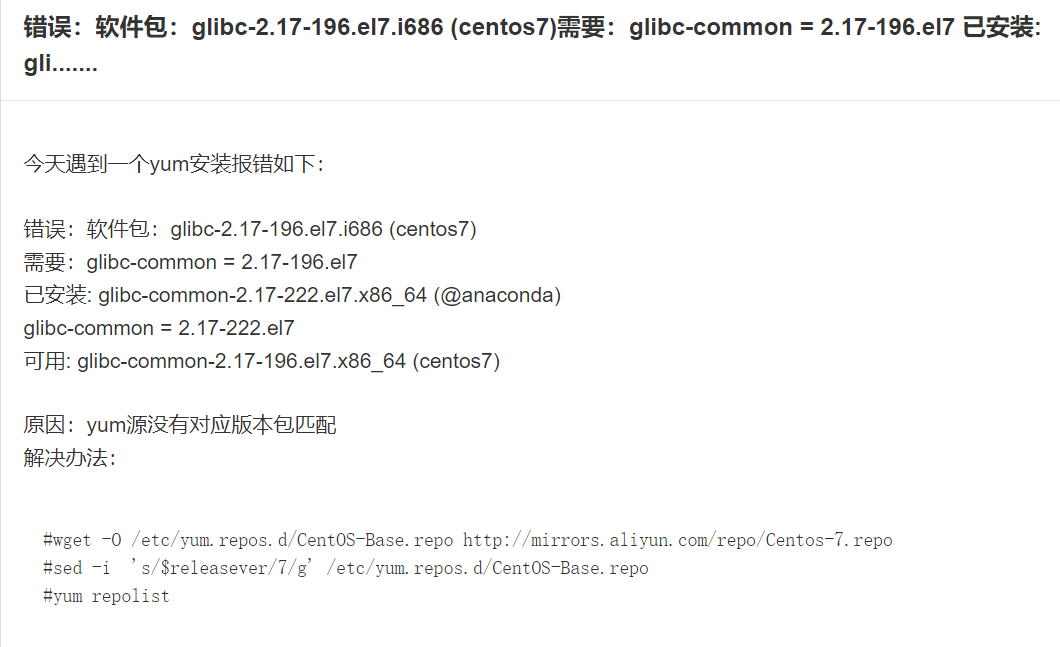
#wget -O /etc/yum.repos.d/CentOS-Base.repo http://mirrors.aliyun.com/repo/Centos-7.repo#sed -i 's/$releasever/7/g' /etc/yum.repos.d/CentOS-Base.repo#yum repolist
#从官网下载源码包http://nginx.org/#安装源码包依赖包[root@localhost ~]# yum -y install gcc pcre-devel openssl-devel zlib#解压源码包并进入源码包路径[root@localhost ~]# tar -xf nginx-1.20.0.tar.gz[root@localhost ~]# cd nginx-1.20.0/[root@localhost nginx-1.20.0]# lsauto CHANGES CHANGES.ru conf configure contrib html LICENSE man README src#使用configure程序检查系统环境并指定安装参数[root@localhost nginx-1.20.0]# ./configure --with-http_ssl_module --with-file-aio --with-http_realip_modulenginx path prefix: "/usr/local/nginx"nginx binary file: "/usr/local/nginx/sbin/nginx"nginx modules path: "/usr/local/nginx/modules"nginx configuration prefix: "/usr/local/nginx/conf"nginx configuration file: "/usr/local/nginx/conf/nginx.conf"nginx pid file: "/usr/local/nginx/logs/nginx.pid"nginx error log file: "/usr/local/nginx/logs/error.log"nginx http access log file: "/usr/local/nginx/logs/access.log"nginx http client request body temporary files: "client_body_temp"nginx http proxy temporary files: "proxy_temp"nginx http fastcgi temporary files: "fastcgi_temp"nginx http uwsgi temporary files: "uwsgi_temp"nginx http scgi temporary files: "scgi_temp"#make将源码包转换成二进制[root@localhost nginx-1.20.0]# make#make install安装源码包[root@localhost nginx-1.20.0]# make install[root@localhost nginx-1.20.0]# cd /usr/local/nginx/[root@localhost nginx]# lsconf html logs sbin
源码包管理方式
#启动nginx服务[root@localhost nginx]# sbin/nginx#netstat|ss命令用于查看系统中启动的端口信息-a 显示所有端口信息-n 以数字格式显示端口号-t 显示TCP连接的端口-u 显示UDP连接的端口-l 显示服务正在监听的端口信息-p 显示监听端口的服务名称是什么(也就是程序名)#查看nginx服务端口信息[root@localhost ~]# ss -anptul | grep nginxtcp LISTEN 0 128 *:80 #Nginx服务默认通过TCP 80 端口监听客户端请求#查看系统所有服务占用的端口虚拟系[root@localhost nginx]# ss -ntlp[root@localhost nginx]# ss -anptul | grep sshd[root@localhost nginx]# ss -anptul | grep vsftpd
systemd管理服务
- systemd是内核加载的第一个进程(PID=1),systemd负责整个Linux系统的运行与服务控制,systemd为用户提供systemctl命令来管理RPM包安装的服务,如:启动服务、重启服务、关闭服务、查看服务状态,服务随机自启
- 服务的启动有两个阶段,一是系统开机时随着系统的启动而启动(随机自启),二是系统启动以后用户手动将服务启动
- 常用命令:
- systemctl start 程序名 #启动服务
- systemctl restart 程序名 #重启服务
- systemctl stop 程序名 #停止服务
- systemctl enable 程序名 #设置服务随机自启
- systemctl disable 程序名 #设置服务不随机自启
- systemctl status 程序名 #查看服务状态
- systemctl is-enabled 程序名 #查看服务是否被设置随机自启
[root@localhost nginx]# yum -y install vsftpd[root@localhost nginx]# rpm -ql vsftpd.../usr/sbin/vsftpd#启动vsftpd服务[root@localhost nginx]# systemctl start vsftpd#查看服务运行状态[root@localhost nginx]# systemctl status vsftpd● vsftpd.service - Vsftpd ftp daemonLoaded: loaded (/usr/lib/systemd/system/vsftpd.service; disabled; vendor preset: disabled)Active: active (running) since 二 2021-05-04 17:58:38 CST; 1min 7s agoProcess: 14028 ExecStart=/usr/sbin/vsftpd /etc/vsftpd/vsftpd.conf (code=exited, status=0/SUCCESS)Main PID: 14030 (vsftpd)#查看端口信息[root@localhost nginx]# ss -anptul | grep vsftpdtcp LISTEN 0 32 :::21 :::* users:(("vsftpd",pid=14030,fd=4))#重启服务(用于对配置发生修改且立即生效时使用)[root@localhost nginx]# systemctl restart vsftpd#停止服务[root@localhost nginx]# systemctl stop vsftpd#启动服务并设置服务随机自启[root@localhost nginx]# systemctl start vsftpd[root@localhost nginx]# systemctl enable vsftpdCreated symlink from /etc/systemd/system/multi-user.target.wants/vsftpd.service to /usr/lib/systemd/system/vsftpd.service.#查看服务是否被设置随机自启[root@localhost nginx]# systemctl is-enabled vsftpdenabled #随机自启#设置服务不随机自启[root@localhost nginx]# systemctl disable vsftpdRemoved symlink /etc/systemd/system/multi-user.target.wants/vsftpd.service.[root@localhost nginx]# systemctl is-enabled vsftpddisabled #不随机自启[root@localhost nginx]# systemctl is-enabled sshdenabled

若有收获,就点个赞吧
0 人点赞


