1、概念
- 一种高吞吐量的分布式、支持分区的(partition)、多副本的(replication),基于zookeeper协调的消息系统。
- LinkedIn贡献给apache开源的流处理平台
- 由Scala和Java编写
自0.10及之后,定位于分布式事件流处理平台,不再是单纯的消息系统
1.x到2.x版本最大的变动是Bug修复+功能优化+Kafka Streams编程大大增强
2、相关特性
- 稳定性高
- 通过O(1)的磁盘数据结构提供消息的持久化,这种结构对于即使数以TB的消息存储也能够保持长时间的稳定性能。
- 高吞吐量
- 即使是非常普通的硬件Kafka也可以支持每秒数百万的消息。
- 它的延迟最低只有几毫秒
- 高并发
- 支持数千个客户端同时读写
- 容错性好
- 消息的负载均衡的存储与消费
- 支持通过Kafka服务器集群来分区存储、分布式消费消息的机制。
良好的支持hadoop并行计算
构造实时流数据管道,它可以在系统或应用之间可靠地获取数据。 (相当于消息队列Message Queue,简称MQ)
- 构建实时流式应用程序,对这些流数据进行转换或者其它操作。 (就是流处理,通过kafka stream topic和topic之间内部进行变化)
4、相关术语
- Message
- 俗称消息,是具体的一个消息数据,类似于信
- 在Kafka中,一切过往数据皆是Message
- Broker
- 是Kafka集群包含的一个或多个服务器,类似于邮局
- Topic
- 每条Message都有一个类别,相当于给一类消息管道起个名字
- 物理上不同的Topic的消息分开存储,逻辑上用户只需要指定消息的Topic即可生产或消费数据,不用关心数据存于何处
- Partition
- Partition是物理上的概念,每个Topic包含一个或多个Partition
- 每个Partition均默认有3个副本,可修改
- Segment
- Partition物理上由多个Segment组成,每个Segment存着message消息
- Partition文件分Segment管理,减小单个大文件太大的问题,并方便更快速定位Message在哪个Segment当中
- 定位Segment后,再根据Segment对应的index索引信息和message log日志文件快速定位和读取具体message消息
- Producer
- 负责发布消息到Broker,类似于寄信人
- Consumer
- 从Broker读取消息到客户端,类似于收信人
- publish
- 发布消息,即为生产消息,将生产出来的消息加入到MQ当中。
- subscribe
- 由消费者主动提前定义要消息的Topic名称,一旦该Topic当中的消息有新增,则会主动通过消费者线程,此时消费者线程进入消息的处理过程。
- Consumer Group
- 每个Consumer属于一个特定的Consumer Group
- 可为每个Consumer指定group name,若不指定group name则属于默认的group
- 每个消费者组共享订阅的topic消息,topic中的每个消息中只会被一个consumer消费。
- Offset
- 即为偏移量,也称位移。分区中的消息都有一个递增的id,我们称之为Offset。它唯一标识了分区中的消息
- 消息系统的一般性语义
- 最多1次(At most once):消息可能丢失,但不会重复投递
- 最少1次(At least once): 消息不会丢失,但可能会重复投递
- 严格1次(Exactly once) : 消息不丢失、不重复,有且只会被分发一次
5、架构设计
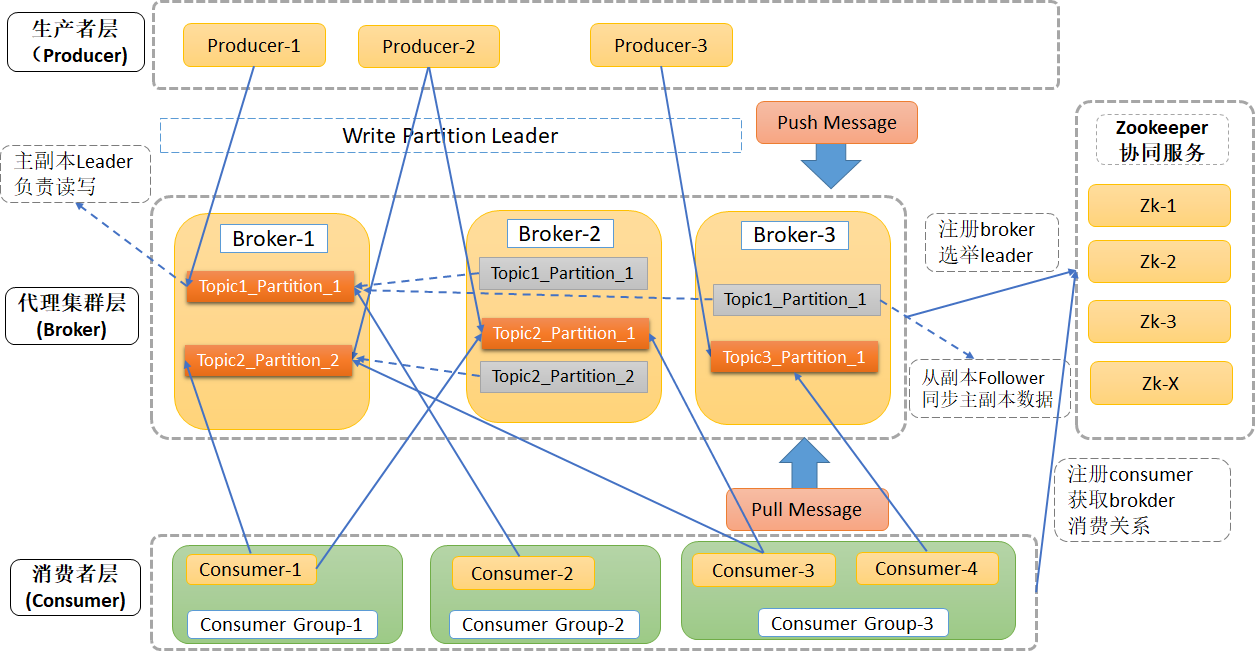
ZooKeeper协同服务管理broker和consumer,协同Broker集群和Consumer之间的通信
6、工作流程
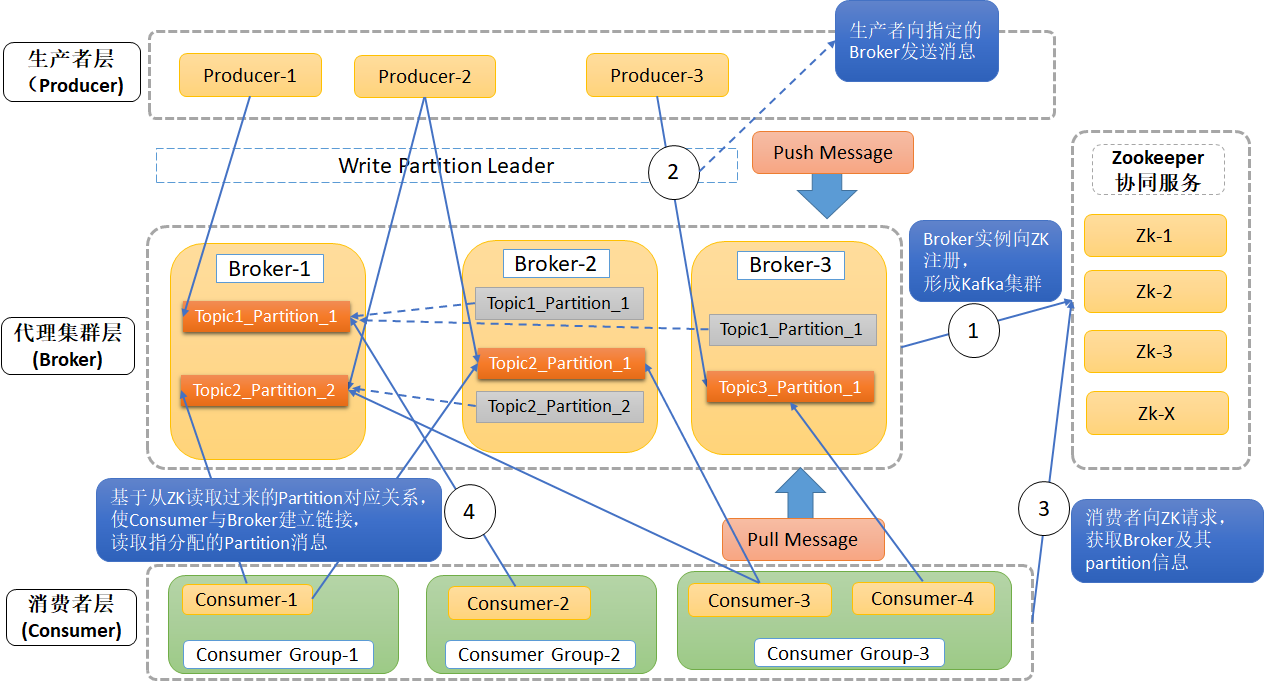
6.1、数据写入
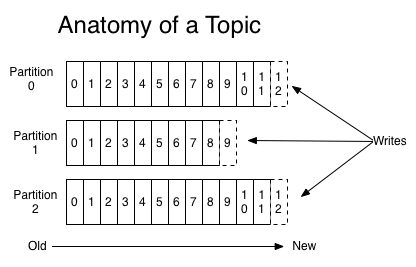
- 1个主题可以有1个或是多个分区
- 每个分区都是有序的,不变的记录序列
- 这些记录连续地追加到结构化的提交日志中
分区中的每个记录均分配有一个称为偏移的顺序ID号,即offset,该ID 唯一地标识分区中的每个记录。
6.2、数据消费(单分区Partition)
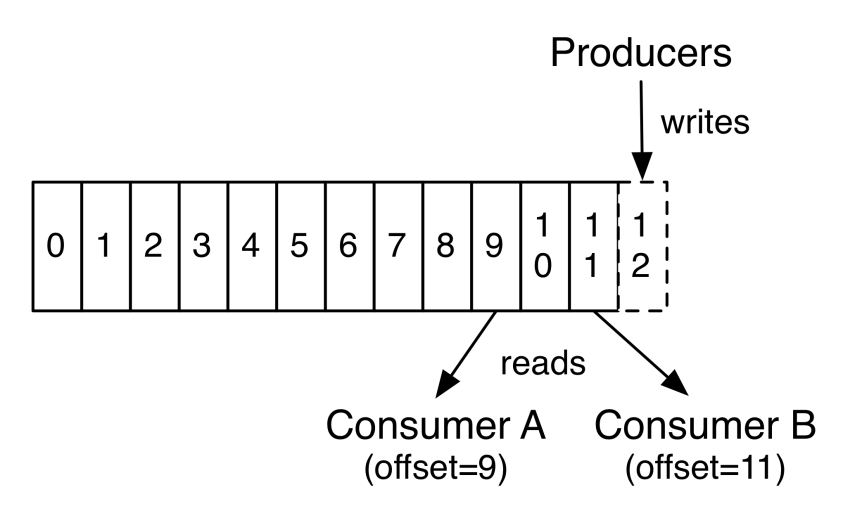
Kafka群集使用可配置的保留期限持久保存所有已发布的记录(无论是否已使用它们),默认是7天,可配置修改。
- Kafka的性能相对于数据大小实际上是恒定的,因此长时间存储数据不是问题。
每个消费者保留的唯一元数据是该消费者在日志中的偏移量offset或位置position。此偏移量由使用者控制,故可以灵活跳转位置,从指定的位置开始消费。
6.3、数据消费(多分区Partition)
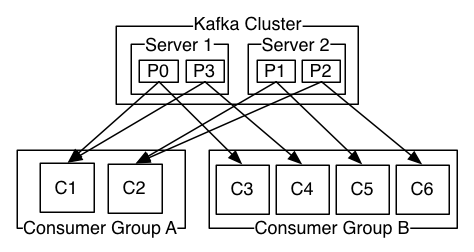
消费者使用消费者组名称标记自己,并且发布到某个主题的每条记录都会传递到每个订阅消费者组中的一个消费者实例。消费者实例可以在单独的进程中或在单独的机器上。
- 如果所有消费者实例都具有相同的使用者组,那么将在这些消费者实例上有效地平衡记录。
如果所有消费者实例具有不同的使用者组,则每条记录将广播到所有使用者进程。
7、shell操作
五大核心API:
Producer API
- 允许应用程序发布流记录到一个或多个kafka主题中。
- Consumer API
- 允许应用程序订阅一个或多个主题,并处理针对这些主题的数据流。
- Connector API
- 实现在Kafka和其他系统之间复制数据的功能,用户创建自定义的从系统中pull数据或push数据到系统的Connector(连接器)。
- Connector有两种形式:SourceConnectors从其他系统导入数据(如:JDBCSourceConnector将导入一个关系型数据库到Kafka)和SinkConnectors导出数据(如:HDFSSinkConnector将kafka主题的内容导出到HDFS文件)
- Streams API
- Streams API允许程序作为一个数据流处理应用,将一个或多个topic中输入的数据进行消费,并生产数据流到一个或多个topics中。
- Admin API
- 支持管理和检查topic,broker,acls和其他Kafka对象。
7.1、创建Topic
sh /usr/hdp/3.1.0.0-78/kafka/bin/kafka-topics.sh --create --zookeeper cluster1.hadoop:2181 --replication-factor 1 --partitions 1 --topic TestKafka
7.2、查看所有Topic
sh /usr/hdp/3.1.0.0-78/kafka/bin/kafka-topics.sh --list --zookeeper cluster1.hadoop:2181
7.3、删除指定Topic
sh /usr/hdp/3.1.0.0-78/kafka/bin/kafka-topics.sh --delete --zookeeper cluster1.hadoop:2181 --topic TestKafka
7.4、发送消息
sh /usr/hdp/3.1.0.0-78/kafka/bin/kafka-console-producer.sh --broker-list cluster1.hadoop:6667 --topic TestKafka
7.5、消费消息
sh /usr/hdp/3.1.0.0-78/kafka/bin/kafka-console-consumer.sh --bootstrap-server cluster1.hadoop:6667 -topic TestKafka -from-beginning
7.6、查看指定Topic状态消息
不添加—topic参数,则为查看所有topic的状态信息sh /usr/hdp/3.1.0.0-78/kafka/bin/kafka-topics.sh --describe --zookeeper cluster1.hadoop:6667 --topic TestKafka
8、Java实现
8.1、添加POM依赖
```xmlorg.apache.kafka kafka-clients 2.0.0 org.slf4j slf4j-simple 1.7.25
- 支持管理和检查topic,broker,acls和其他Kafka对象。
<build><plugins><plugin><artifactId>maven-compiler-plugin</artifactId><version>2.3.2</version><configuration><source>1.8</source><target>1.8</target><encoding>UTF-8</encoding></configuration></plugin><plugin><artifactId>maven-assembly-plugin</artifactId><configuration><descriptorRefs><descriptorRef>jar-with-dependencies</descriptorRef></descriptorRefs></configuration><executions><execution><id>make-assembly</id><phase>package</phase><goals><goal>assembly</goal></goals></execution></executions></plugin></plugins></build>
<a name="PdODt"></a>## 8.2、具体代码**Producer类**```javapackage com.codelx;import org.apache.kafka.clients.consumer.Consumer;import org.apache.kafka.clients.consumer.ConsumerConfig;import org.apache.kafka.clients.producer.KafkaProducer;import org.apache.kafka.clients.producer.Producer;import org.apache.kafka.clients.producer.ProducerConfig;import org.apache.kafka.clients.producer.ProducerRecord;import org.apache.kafka.common.serialization.StringSerializer;import java.util.Properties;/*** @author simple*/public class ProducerUtil {public KafkaProducer<String,String> producer;public ProducerUtil(String brokerList) {// 创建配置文件Properties properties = new Properties();// 加载BrokerListproperties.put(ProducerConfig.BOOTSTRAP_SERVERS_CONFIG,brokerList);// 设置kay value的序列化properties.put(ProducerConfig.KEY_SERIALIZER_CLASS_CONFIG, StringSerializer.class.getName());properties.put(ProducerConfig.VALUE_SERIALIZER_CLASS_CONFIG, StringSerializer.class.getName());// 创建生产者对象producer = new KafkaProducer<>(properties);}public void close(){producer.close();}public static void main(String[] args) {// 创建BrokerListString brokerList = "cluster1.hadoop:6667,cluster0.hadoop:6667";// 创建TopicString topic = "TestKafka4lx";// 初始化Producer工具类ProducerUtil producerUtil = new ProducerUtil(brokerList);// 发送消息producerUtil.producer.send(new ProducerRecord<>(topic, args[0],args[1]));// 关闭生产者producerUtil.close();}}
Consumer类
package com.codelx;

import org.apache.kafka.clients.consumer.ConsumerConfig;
import org.apache.kafka.clients.consumer.ConsumerRecord;
import org.apache.kafka.clients.consumer.ConsumerRecords;
import org.apache.kafka.clients.consumer.KafkaConsumer;
import org.apache.kafka.common.serialization.StringDeserializer;

import java.time.Duration;
import java.util.Collections;
import java.util.Properties;

/**
 * @author simple
 */
public class ConsumerUtil {
    public KafkaConsumer<String, String> consumer;

    public ConsumerUtil(String brokerList, String topic, String groupId) {
        //  创建配置文件
        Properties properties = new Properties();
        //  加载BrokerList
        properties.put(ConsumerConfig.BOOTSTRAP_SERVERS_CONFIG, brokerList);
        //  设置kay value的序列化
        properties.put(ConsumerConfig.KEY_DESERIALIZER_CLASS_CONFIG, StringDeserializer.class.getName());
        properties.put(ConsumerConfig.VALUE_DESERIALIZER_CLASS_CONFIG, StringDeserializer.class.getName());
        //  设置GroupId
        properties.put(ConsumerConfig.GROUP_ID_CONFIG, groupId);
        //  初始化消费者对象
        consumer = new KafkaConsumer<>(properties);
        //  订阅Topic
        consumer.subscribe(Collections.singletonList(topic));
    }

    public static void main(String[] args) {
        //  创建BrokerList
        String brokerList = "cluster1.hadoop:6667,cluster0.hadoop:6667";
        //  创建Topic
        String topic = "TestKafka4lx";
        //  创建GroupId
        String groupId = "testJob020";
        //  初始化消费者工具类
        ConsumerUtil consumerUtil = new ConsumerUtil(brokerList, topic, groupId);
        boolean runnable = true;
        while (runnable) {
            ConsumerRecords<String, String> records = consumerUtil.consumer.poll(Duration.ofSeconds(10));
            for (ConsumerRecord<String, String> record : records) {
                System.out.println("----------------------");
                System.out.println("partition:"+record.partition());
                System.out.println("offset:"+record.offset());
                System.out.println("timestamp:"+record.timestamp());
                System.out.println("headers:"+record.headers());
                System.out.println("key:"+record.key());
                System.out.println("value:"+record.value());
                System.out.println("----------------------");
            }
        }
    }
}
9、Scala实现
9.1、添加POM依赖
<modelVersion>4.0.0</modelVersion>
    <artifactId>kafka_project_scala</artifactId>
    <name>${project.artifactId}</name>
    <description>My wonderfull scala app</description>
    <inceptionYear>2018</inceptionYear>
    <licenses>
        <license>
            <name>My License</name>
            <url>http://....</url>
            <distribution>repo</distribution>
        </license>
    </licenses>

    <properties>
        <maven.compiler.source>1.8</maven.compiler.source>
        <maven.compiler.target>1.8</maven.compiler.target>
        <encoding>UTF-8</encoding>
        <scala.version>2.12.6</scala.version>
        <scala.compat.version>2.12</scala.compat.version>
        <spec2.version>4.2.0</spec2.version>
    </properties>

    <dependencies>
        <dependency>
            <groupId>org.scala-lang</groupId>
            <artifactId>scala-library</artifactId>
            <version>${scala.version}</version>
        </dependency>

        <!--kafka的日志组件依赖包 -->
        <dependency>
            <groupId>org.slf4j</groupId>
            <artifactId>slf4j-simple</artifactId>
            <version>1.7.25</version>
        </dependency>
        <dependency>
            <groupId>org.apache.kafka</groupId>
            <artifactId>kafka_${scala.compat.version}</artifactId>
            <version>2.0.0</version>
        </dependency>

        <!-- Test -->
        <dependency>
            <groupId>junit</groupId>
            <artifactId>junit</artifactId>
            <version>4.12</version>
            <scope>test</scope>
        </dependency>
        <dependency>
            <groupId>org.scalatest</groupId>
            <artifactId>scalatest_${scala.compat.version}</artifactId>
            <version>3.0.5</version>
            <scope>test</scope>
        </dependency>
        <dependency>
            <groupId>org.specs2</groupId>
            <artifactId>specs2-core_${scala.compat.version}</artifactId>
            <version>${spec2.version}</version>
            <scope>test</scope>
        </dependency>
        <dependency>
            <groupId>org.specs2</groupId>
            <artifactId>specs2-junit_${scala.compat.version}</artifactId>
            <version>${spec2.version}</version>
            <scope>test</scope>
        </dependency>
    </dependencies>

    <build>
        <sourceDirectory>src/main/scala</sourceDirectory>
        <plugins>
            <!-- 因为往往是scala和java在一起混合开发,故需要设置多个源文件目录,故需要maven新插件build-helper-maven-plugin来支持设置多个源文件夹,也可以设置多个资源路径 -->
            <plugin>
                <groupId>org.codehaus.mojo</groupId>
                <artifactId>build-helper-maven-plugin</artifactId>
                <version>3.0.0</version>
                <executions>
                    <execution>
                        <id>add-source</id>
                        <phase>generate-sources</phase>
                        <goals>
                            <goal>add-source</goal>
                        </goals>
                        <configuration>
                            <sources>
                                <!-- 我们可以通过在这里添加多个source节点,来添加任意多个源文件夹 -->
                                <source>${basedir}/src/main/java</source>
                                <source>${basedir}/src/main/scala</source>
                            </sources>
                        </configuration>
                    </execution>
                </executions>
            </plugin>

            <plugin>
                <artifactId>maven-assembly-plugin</artifactId>
                <configuration>
                    <descriptorRefs>
                        <descriptorRef>jar-with-dependencies</descriptorRef>
                    </descriptorRefs>
                    <!-- <archive>  <manifest>  <mainClass>com.tl.job017.hdfs.HdfsFileRead</mainClass>
                      </manifest>  </archive> -->
                </configuration>
                <executions>
                    <execution>
                        <id>make-assembly</id>
                        <phase>package</phase>
                        <goals>
                            <goal>assembly</goal>
                        </goals>
                    </execution>
                </executions>
            </plugin>

            <plugin>
                <!-- see http://davidb.github.com/scala-maven-plugin -->
                <groupId>net.alchim31.maven</groupId>
                <artifactId>scala-maven-plugin</artifactId>
                <version>3.3.2</version>
                <executions>
                    <execution>
                        <goals>
                            <goal>compile</goal>
                            <goal>testCompile</goal>
                        </goals>
                        <configuration>
                            <args>
                                <arg>-dependencyfile</arg>
                                <arg>${project.build.directory}/.scala_dependencies</arg>
                            </args>
                        </configuration>
                    </execution>
                </executions>
            </plugin>
            <plugin>
                <groupId>org.apache.maven.plugins</groupId>
                <artifactId>maven-surefire-plugin</artifactId>
                <version>2.21.0</version>
                <configuration>
                    <!-- Tests will be run with scalatest-maven-plugin instead -->
                    <skipTests>true</skipTests>
                </configuration>
            </plugin>
        </plugins>
    </build>
9.2、具体实现
Producer类
package com.codelx

import org.apache.kafka.clients.producer.{KafkaProducer, ProducerConfig, ProducerRecord}
import org.apache.kafka.common.serialization.StringSerializer

import java.util.Properties

case class ProducerUtil() {
  var producer: KafkaProducer[String, String] = null

  def this(brokerList: String){
    this()
    //  创建配置文件
    val properties = new Properties
    //  加载BrokerList
    properties.put(ProducerConfig.BOOTSTRAP_SERVERS_CONFIG, brokerList)
    //  设置kay value的序列化
    properties.put(ProducerConfig.KEY_SERIALIZER_CLASS_CONFIG, classOf[StringSerializer].getName)
    properties.put(ProducerConfig.VALUE_SERIALIZER_CLASS_CONFIG, classOf[StringSerializer].getName)
    //  创建生产者对象
    producer = new KafkaProducer[String, String](properties)
  }

  def close(): Unit = {
    producer.close()
  }
}

object ProducerUtil {
  def main(args: Array[String]): Unit = { //  创建BrokerList
    val brokerList: String = "cluster1.hadoop:6667,cluster0.hadoop:6667"
    //  创建Topic
    val topic: String = "TestKafka4lx"
    // 初始化Producer工具类
    val producerUtil: ProducerUtil = new ProducerUtil(brokerList)
    //  发送消息
    producerUtil.producer.send(new ProducerRecord[String, String](topic, args(0), args(1)))
    //  关闭生产者
    producerUtil.close()
  }
}
Consumer类
package com.codelx

import org.apache.kafka.clients.consumer.{ConsumerConfig, ConsumerRecords, KafkaConsumer}
import org.apache.kafka.common.serialization.StringDeserializer

import java.time.Duration
import java.util.{Collections, Properties}

case class ConsumerUtil() {
  var consumer: KafkaConsumer[String, String] = _

  def this(brokerList: String, topic: String, groupId: String) {
    this()
    //  创建配置文件
    val properties = new Properties
    //  加载BrokerList
    properties.put(ConsumerConfig.BOOTSTRAP_SERVERS_CONFIG, brokerList)
    //  设置kay value的序列化
    properties.put(ConsumerConfig.KEY_DESERIALIZER_CLASS_CONFIG, classOf[StringDeserializer].getName)
    properties.put(ConsumerConfig.VALUE_DESERIALIZER_CLASS_CONFIG, classOf[StringDeserializer].getName)
    //  设置GroupId
    properties.put(ConsumerConfig.GROUP_ID_CONFIG, groupId)
    //  初始化消费者对象
    consumer = new KafkaConsumer[String, String](properties)
    //  订阅Topic
    consumer.subscribe(Collections.singletonList(topic))
  }

  def close(): Unit = {
    consumer.close()
  }
}

object ConsumerUtil {
  def main(args: Array[String]): Unit = { //  创建BrokerList
    val brokerList: String = "cluster1.hadoop:6667,cluster0.hadoop:6667"
    //  创建Topic
    val topic: String = "TestKafka4lx"
    //  创建GroupId
    val groupId: String = "testJob02001"
    //  初始化消费者工具类
    val consumerUtil: ConsumerUtil = new ConsumerUtil(brokerList, topic, groupId)
    val runnable: Boolean = true
    while (runnable) {
      val records: ConsumerRecords[String, String] = consumerUtil.consumer.poll(Duration.ofSeconds(10))
      import scala.collection.JavaConversions._
      for (record <- records) {
        System.out.println("----------------------")
        System.out.println("partition:" + record.partition)
        System.out.println("offset:" + record.offset)
        System.out.println("timestamp:" + record.timestamp)
        System.out.println("headers:" + record.headers)
        System.out.println("key:" + record.key)
        System.out.println("value:" + record.value)
        System.out.println("----------------------")
      }
    }
  }
}
10、Kafka整合Spark Streaming
10.1、基于Receiver方式
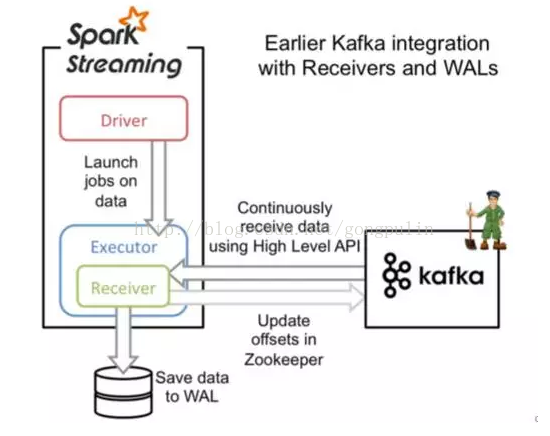
- 最先提供了Receiver的Kafka消费方式
- 存在数据丢失的可能
- 会占用一部分资源
- 会出现重复消费的情况
- 所以现在一般用Direct直接读取的方式
10.2、基于Direct直接获取的方式
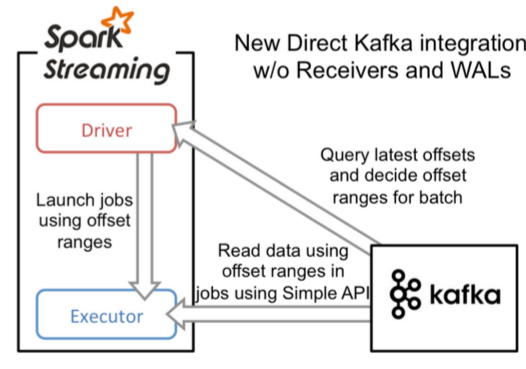
- 直接通过kafka consumer直接消费数据,形成一个Kafka的partition对应一个KafkaRDD的partition
- 具体流程
- 实例化KafkaCluster,根据用户配置的Kafka参数,连接到Kafka集群
- 通过Kafka API读取Topic中每个Partition最后一次读的Offset
- 接收成功的数据,直接转换成KafkaRDD,供后续计算
- 流程图
优点
- 存储效率更高: 不需要receiver中的防数据丢失的wal重复写一份了。
- 简化并行设计: Kafka中的Partition和Spark中的Partition一一对应,而Receiver并不对应,造成若干处理复杂,如流Join问题。
- 降低内存使用量:之前的recevier也占用了内存,必然导致总内存申请量的提高。
- 计算效率更高: 不需receiver后,降低了内存浪费,使更大比例内存用于实际的并行计算。
-
10.3、Java实现
添加POM依赖
<properties>
   <maven.compiler.source>1.8</maven.compiler.source>
   <maven.compiler.target>1.8</maven.compiler.target>
   <encoding>UTF-8</encoding>
   <scala.version>2.11.11</scala.version>
   <scala.compat.version>2.11</scala.compat.version>
   <spec2.version>4.2.0</spec2.version>
</properties>

<dependencies>
   <dependency>
       <groupId>org.scala-lang</groupId>
       <artifactId>scala-library</artifactId>
       <version>${scala.version}</version>
   </dependency>

   <!--kafka的日志组件依赖包 -->
   <dependency>
       <groupId>org.slf4j</groupId>
       <artifactId>slf4j-simple</artifactId>
       <version>1.7.25</version>
   </dependency>
   <dependency>
       <groupId>org.apache.kafka</groupId>
       <artifactId>kafka_${scala.compat.version}</artifactId>
       <version>2.0.0</version>
   </dependency>

   <dependency>
       <groupId>org.apache.spark</groupId>
       <artifactId>spark-core_${scala.compat.version}</artifactId>
       <version>2.3.2</version>
       <scope>provided</scope>
   </dependency>
   <dependency>
       <groupId>org.apache.spark</groupId>
       <artifactId>spark-sql_${scala.compat.version}</artifactId>
       <version>2.3.2</version>
       <scope>provided</scope>
   </dependency>
   <dependency>
       <groupId>org.apache.spark</groupId>
       <artifactId>spark-streaming_${scala.compat.version}</artifactId>
       <version>2.3.2</version>
       <scope>provided</scope>
   </dependency>
   <dependency>
       <groupId>org.apache.spark</groupId>
       <artifactId>spark-streaming-kafka-0-10_${scala.compat.version}</artifactId>
       <version>2.3.2</version>
<!--            <scope>provided</scope>-->
   </dependency>

   <!-- Test -->
   <dependency>
       <groupId>junit</groupId>
       <artifactId>junit</artifactId>
       <version>4.12</version>
       <scope>test</scope>
   </dependency>
   <dependency>
       <groupId>org.scalatest</groupId>
       <artifactId>scalatest_${scala.compat.version}</artifactId>
       <version>3.0.5</version>
       <scope>test</scope>
   </dependency>
   <dependency>
       <groupId>org.specs2</groupId>
       <artifactId>specs2-core_${scala.compat.version}</artifactId>
       <version>${spec2.version}</version>
       <scope>test</scope>
   </dependency>
   <dependency>
       <groupId>org.specs2</groupId>
       <artifactId>specs2-junit_${scala.compat.version}</artifactId>
       <version>${spec2.version}</version>
       <scope>test</scope>
   </dependency>
</dependencies>

<build>
   <sourceDirectory>src/main/scala</sourceDirectory>
   <plugins>
       <!-- 因为往往是scala和java在一起混合开发,故需要设置多个源文件目录,故需要maven新插件build-helper-maven-plugin来支持设置多个源文件夹,也可以设置多个资源路径 -->
       <plugin>
           <groupId>org.codehaus.mojo</groupId>
           <artifactId>build-helper-maven-plugin</artifactId>
           <version>3.0.0</version>
           <executions>
               <execution>
                   <id>add-source</id>
                   <phase>generate-sources</phase>
                   <goals>
                       <goal>add-source</goal>
                   </goals>
                   <configuration>
                       <sources>
                           <!-- 我们可以通过在这里添加多个source节点,来添加任意多个源文件夹 -->
                           <source>${basedir}/src/main/java</source>
                           <source>${basedir}/src/main/scala</source>
                       </sources>
                   </configuration>
               </execution>
           </executions>
       </plugin>

       <plugin>
           <artifactId>maven-assembly-plugin</artifactId>
           <configuration>
               <descriptorRefs>
                   <descriptorRef>jar-with-dependencies</descriptorRef>
               </descriptorRefs>
               <!-- <archive>  <manifest>  <mainClass>com.tl.job017.hdfs.HdfsFileRead</mainClass>
                 </manifest>  </archive> -->
           </configuration>
           <executions>
               <execution>
                   <id>make-assembly</id>
                   <phase>package</phase>
                   <goals>
                       <goal>assembly</goal>
                   </goals>
               </execution>
           </executions>
       </plugin>

       <plugin>
           <!-- see http://davidb.github.com/scala-maven-plugin -->
           <groupId>net.alchim31.maven</groupId>
           <artifactId>scala-maven-plugin</artifactId>
           <version>3.3.2</version>
           <executions>
               <execution>
                   <goals>
                       <goal>compile</goal>
                       <goal>testCompile</goal>
                   </goals>
                   <configuration>
                       <args>
                           <arg>-dependencyfile</arg>
                           <arg>${project.build.directory}/.scala_dependencies</arg>
                       </args>
                   </configuration>
               </execution>
           </executions>
       </plugin>
       <plugin>
           <groupId>org.apache.maven.plugins</groupId>
           <artifactId>maven-surefire-plugin</artifactId>
           <version>2.21.0</version>
           <configuration>
               <!-- Tests will be run with scalatest-maven-plugin instead -->
               <skipTests>true</skipTests>
           </configuration>
       </plugin>
   </plugins>
</build>
具体实现 ```java import org.apache.spark.SparkConf import org.apache.spark.SparkContext import org.apache.spark.streaming.dstream.DStream import org.apache.spark.streaming.StreamingContext import org.apache.spark.streaming.kafka010.LocationStrategies import org.apache.spark.streaming.kafka010.ConsumerStrategies import org.apache.spark.streaming.kafka010.KafkaUtils import org.apache.kafka.clients.consumer.ConsumerConfig import org.apache.kafka.common.serialization.StringDeserializer import org.apache.spark.streaming.Seconds
/**
- streaming集成kafka */ object SparkStreamingReadKafka4Direct { def main(args: Array[String]): Unit = { // 1、构造ssc对象 val parasArray = ArrayString val Array(brokers, topics, groupId, maxPoll) = parasArray
val sparkConf = new SparkConf().setAppName("KafkaDirect4Job011")
//可以代码设置运行模式,也可以在spark-submit当中设置
//sparkConf.setMaster(master)

val sc = new SparkContext(sparkConf)
sc.setLogLevel("WARN")
val ssc = new StreamingContext(sc, Seconds(5))

//2、设置offset的存储目录,此目录一般为hdfs目录
ssc.checkpoint("./kafka_direct")

//3、构造direct stream对象
val topicsSet = topics.split(",").toSet
val kafkaParams = Map(
  ConsumerConfig.BOOTSTRAP_SERVERS_CONFIG -> brokers,
  ConsumerConfig.GROUP_ID_CONFIG -> groupId,
  ConsumerConfig.MAX_POLL_RECORDS_CONFIG -> maxPoll.toString,
  ConsumerConfig.KEY_DESERIALIZER_CLASS_CONFIG -> classOf[StringDeserializer],
  ConsumerConfig.VALUE_DESERIALIZER_CLASS_CONFIG -> classOf[StringDeserializer])


val messages = KafkaUtils.createDirectStream(ssc, LocationStrategies.PreferConsistent,
  ConsumerStrategies.Subscribe[String, String](topicsSet, kafkaParams))


//4、针对DStream的算子操作
val result: DStream[(String, Int)] = messages.map(_.value).flatMap(_.split("\\s+")).map((_, 1)).reduceByKey(_ + _)
//    result.print
result.foreachRDD(x => {
  x.saveAsTextFile("hdfs:///user/lixiang/tmp/")
  x.foreachPartition(part => {
    part.foreach(print)
  })
})


//5、环境变量操作
ssc.start()
ssc.awaitTermination()
} } ``` 打包到集群上运行即可

若有收获,就点个赞吧
0 人点赞


