本文是系列文章, 带你从 0 学习 vue3. 只讲能让你上手做项目的高频知识点, 目的让你快速上手vue, 之后其他内容还请阅读vue官方文档.
vue 是一个 js 框架, 他用 js 封装了 DOM操作, 所以写 vue 不需要直接操作 DOM, 而只要做 2 件事情:
- 建立数据变量, 把DOM 的”样式/属性/内容”等和”变量“进行绑定.
- 操作数据变量, 绑定的DOM 样式/属性/内容等会自动根据数据更新.
引入vue.js
和其他js库一样, 我们可以通过”script”标签引入vue.
<script src="https://unpkg.com/vue@next"></script>
初始化vue
<!DOCTYPE html>
<html lang="en">
<head>
  <meta charset="UTF-8">
  <meta http-equiv="X-UA-Compatible" content="IE=edge">
  <meta name="viewport" content="width=device-width, initial-scale=1.0">
  <script src="https://unpkg.com/vue@next"></script>
  <title>Document</title>
</head>

<body>
  <div id="app"></div>

  <script>
    Vue.createApp().mount('#app');
  </script>
</body>
</html>
Vue.createApp是vue的初始化语法, 通过”mount”指定的元素, 起内部的元素即可支持vue的模板语法, 这里”#app”的意思是id为app的元素. 下面我们分2步实现让页面显示”绿色的hi vue”.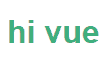
1. 建立数据变量(data)
    Vue.createApp({
      data(){
        return {
          content:'hi vue',
          textColor: 'green'
        };
      }
    }).mount('#app');
2. 绑定变量到DOM
“{{}}”放在html标签中间, 用来渲染变量. “v-bind:”后面跟着style属性, 这样style就可以识别vue的变量.
<div id="app">
  <h1 v-bind:style="{color:textColor}">{{content}}</h1>
</div>
完整代码
<!DOCTYPE html>
<html lang="en">

<head>
  <meta charset="UTF-8" />
  <meta http-equiv="X-UA-Compatible" content="IE=edge" />
  <meta name="viewport" content="width=device-width, initial-scale=1.0" />
  <script src="https://unpkg.com/vue@next"></script>
  <title>Document</title>
</head>

<body>
  <div id="app">
    <h1 v-bind:style="{color:textColor}">{{content}}</h1>
  </div>

  <script>
    Vue.createApp({
      data() {
        return {
          content: "hi vue",
          textColor: "green",
        };
      },
    }).mount('#app');
  </script>
</body>

</html>
操作数据变量(methods).
数据操作我们一般都封装成函数放在methods中, 修改上面的例子, 页面上增加一个”按钮”用来修改”h1”的颜色和内容, 注意: 函数中需要同”this.“来访问data中的变量, 我们分2步实现:
1. 建立函数(methods)
Vue.createApp({
  data() {
    return {
      content: "hi vue",
      textColor: "green",
    };
  },
  methods: {
    changeH1() {
      this.textColor = "red";
      this.content = "hello world";
    }
  }
}).mount('#app');
2. 绑定函数到元素
  <div id="app">
    <h1 v-bind:style="{color:textColor}">{{content}}</h1>
    <button v-on:click="changeH1">change</button>
  </div>
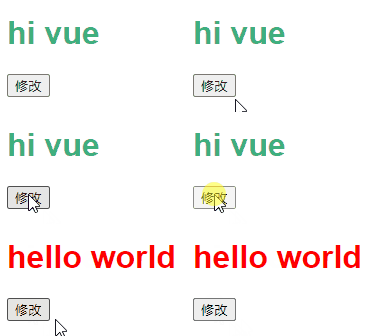
当点击了”修改”, 那么”h1”就变成了红色字:”hello world”.
完整代码
<!DOCTYPE html>
<html lang="en">

<head>
  <meta charset="UTF-8" />
  <meta http-equiv="X-UA-Compatible" content="IE=edge" />
  <meta name="viewport" content="width=device-width, initial-scale=1.0" />
  <script src="https://unpkg.com/vue@next"></script>
  <title>Document</title>
</head>

<body>
  <div id="app">
    <h1 v-bind:style="{color:textColor}">{{content}}</h1>
    <button v-on:click="changeH1">change</button>
  </div>

  <script>
    Vue.createApp({
      data() {
        return {
          content: "hi vue",
          textColor: "green",
        };
      },
      methods: {
        changeH1() {
          this.textColor = "red";
          this.content = "hello world";
        }
      }
    }).mount('#app');
  </script>
</body>

</html>

若有收获,就点个赞吧
0 人点赞


