虽说vue声称不需要操作DOM, 但是如果我们使用第三方JS插件的时候, 还是需要读取DOM, 比如上一节使用echart的例子.
通过在模板中使用”ref”属性, 我们可以轻松获取到元素或组件.
对元素使用ref
在js中使用this.$refs.xx获取元素.
<template><!--标记元素--><input ref="yourInput"/></template><script lang="ts">import { ref, defineComponent } from 'vue'export default defineComponent({mounted(){// 获取元素this.$refs.yourInput.focus();}})</script>
对组件使用ref
这时this.$refs.xx指向组件实例, 假如组件methods存在show方法, 那么可以直接使用show方法.
<template>
  <a-dialog ref="yourDialog"/>
</template>

<script lang="ts">
import { ref, defineComponent } from 'vue'
export default defineComponent({
  mounted(){
      this.$refs.yourDialog.show();
  }
})
</script>
在循环中使用ref
如果想在循环中获取元素我们不可以通过给元素标记名字, 而是给ref赋值一个函数, 通过函数获取每一次循环的元素.
<template>
  <p :ref="getEl" v-for="n in 5" :key="n">{{ n }}</p>
</template>

<script >
import { defineComponent } from "vue";
export default defineComponent({
  data() {
    return { elList: [] };
  },

  mounted(){
    console.log(this.elList); // 输出5个p元素
  },

  methods: {
    getEl(el) {
      this.elList.push(el);
    },
  },
});
</script>
预览效果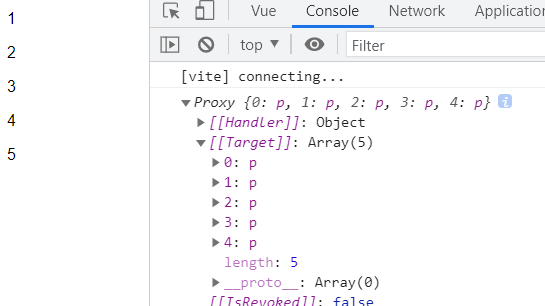
同理循环组件也是这么获取组件的, 我想大家应该能够理解.
⚡ 在线视频

若有收获,就点个赞吧
0 人点赞


