[TOC]
在setup中computed和watch都以函数形式调用, 所以要是用他们就需要单独引入, 引入方法很简单:
import { computed, watch } from "vue";
computed
和”选项API”的语法类似, 同样通过返回值来输出计算结果. 只是注意: 其内部对”ref定义的变量”的计算依然需要通过”.value”来访问.
<template>
  <p>苹果单价: {{ price }}</p>
  <label>数量: <input
    v-model="num"
    type="number"
    style="padding: 8px; border: 1px solid #ccc"
  /></label>
  <p>总价:{{ count }}</p>
</template>

<script lang="ts">
// computed要单独引入
import { computed, defineComponent, ref } from "vue";
export default defineComponent({
  name: "SetupComputed",

  setup() {
    const num = ref(10);
    const price = ref(5);
    // ⭐computed
    const count = computed(() => num.value * price.value);
    return { num, count, price };
  },
});
</script>
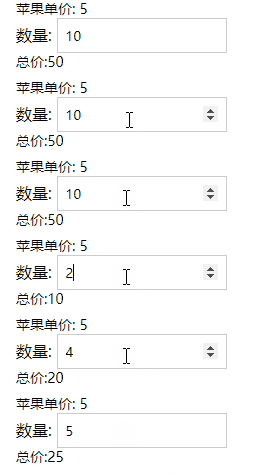
watch
语法: (data, callback, options ):stop;
data: 被监视数据.
callback: 数据变化后触发的函数, 函数有2个参数, 一个是”当前值”, 一个是”变化前的值”.
options: 是个对象, 其中的”immediate”字段可以设置是否在数据变化前执行一次, 还有”deep”字段表示数据是对象时, 进行深度监控. 注意: 这里值列出2个参数, 实际还有其他参数,由于并不常用, 大家可自行官网了解.
stop: 是个函数, 用来停止对数据的监控.
下面还是和computed例子一样的功能, 只是加了一个”stop”按钮来停止”watch”.
<template>
  <p>苹果单价: {{ price }}</p>
  <label
    >数量:
    <input
      v-model="num"
      type="number"
      style="padding: 8px; border: 1px solid #ccc"
  /></label>
  <p>总价:{{ count }}</p>
  <button @click="stop">stop</button>
</template>

<script lang="ts">
import { watch, defineComponent, ref } from "vue";
export default defineComponent({
  name: "SetupWatch",

  setup() {
    const num = ref(10);
    // 此处可以不用ref,
    // 因为值不需要改变(响应式)
    const price = 5;
    const count = ref(0);
    // ⭐watch
    const stop = watch(num, (num) => {
      count.value = price * num;
    },{immediate:true});

    return { num, count, price,stop };
  },
});
</script>
当我点击了”stop“, 那么”总价”就不再根据”数量”变化了.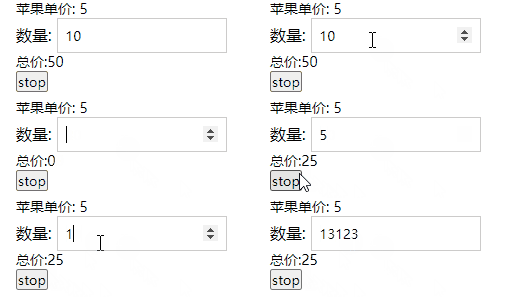
监控多个数据
通过watch函数, 我们现在可以监视多个数据, 只需要吧多个数据组成一个数组.
<template>
  <label
    >苹果单价:
    <input
      v-model="price"
      type="number"
      style="padding: 8px; border: 1px solid #ccc"
  /></label>
  <label
    >数量:
    <input
      v-model="num"
      type="number"
      style="padding: 8px; border: 1px solid #ccc"
  /></label>
  <p>总价:{{ count }}</p>
</template>

<script lang="ts">
import { watch, defineComponent, ref } from "vue";
export default defineComponent({
  name: "SetupWatchMultiple ",

  props: {
    price: {
      type: Number,
    },
  },

  setup() {
    const num = ref(10);
    const price = ref(5);
    const count = ref(0);
    // ⭐watch
    watch(
      [num, price],
      ([num, price]) => {
        // 注意此处的num和price已经是数字值而不是ref对象.
        // 所以不再需要通过.value访问
        count.value = price * num;
      },
      { immediate: true }
    );

    return { num, count, price };
  },
});
</script>

props(用toRef/computed包裹)
如果watch监视的是props定义的数据, 那么要注意了, watch能监控的数据要求是”ref/computed“函数初始化过的, 或者被函数包裹返回的数据. 下图是vue3源码中对watch函数的类型声明:
下面是对被监视数据的类型声明
所以我们如果要监视props返回的数据, 可以有3种办法:
直接用函数返回prop
watch(
   // ⭐
   [() => props.price, num],

       ([price, num]) => {
     count.value = price * num;
   },
 );
使用computed包裹一下
watch(
   // ⭐
  [computed(()=>props.price) , num],

   ([price, num]) => {
     count.value = price * num;
   },

   { immediate: true }
 );
使用toRef把props数据转成ref数据.
watch(
// ⭐
   [toRef(props,'price') , num],

   ([price, num]) => {
     count.value = price * num;
   },

   { immediate: true }
 );
最终效果如下: ```vue
总价:{{ count }}
```

若有收获,就点个赞吧
0 人点赞


