[root@localhost ~]# cat nginx_install.yml
---- name: task control playbook examplehosts: webserverstasks:- name: create tomcat useruser: name=tomcat state=present- name: create www useruser: name=www state=present- name: create mysql useruser: name=mysql state=present- name: yum nginx webserveryum: name=nginx state=present- name: update nginx main configcopy: src=nginx.conf dest=/etc/nginx/- name: add virtualhost configcopy: src=www.qfedu.com.conf dest=/etc/nginx/conf.d/- name: start nginx serverservice: name=nginx state=started
[root@localhost ~]# cat nginx.conf
user www;
worker_processes 2;
error_log /var/log/nginx/error.log;
pid /run/nginx.pid;

# Load dynamic modules. See /usr/share/doc/nginx/README.dynamic.
include /usr/share/nginx/modules/*.conf;

events {
    worker_connections 1024;
}

http {
    log_format  main  '$remote_addr - $remote_user [$time_local] "$request" '
                      '$status $body_bytes_sent "$http_referer" '
                      '"$http_user_agent" "$http_x_forwarded_for"';

    access_log  /var/log/nginx/access.log  main;

    sendfile            on;
    tcp_nopush          on;
    tcp_nodelay         on;
    keepalive_timeout   65;
    types_hash_max_size 4096;

    include             /etc/nginx/mime.types;
    default_type        application/octet-stream;


    include /etc/nginx/conf.d/*.conf;

    server {
        listen       80;
        listen       [::]:80;
        server_name  _;
        root         /usr/share/nginx/html;

        # Load configuration files for the default server block.
        include /etc/nginx/default.d/*.conf;

        error_page 404 /404.html;
        location = /404.html {
        }

        error_page 500 502 503 504 /50x.html;
        location = /50x.html {
        }
    }

}
[root@localhost ~]# cat www.qfedu.com.conf
server {
        listen       80;
        server_name  www.qfedu.com;
        root         /usr/share/nginx/html;
        access_log /var/log/nginx/www.qfedu.com-access_log main;
        error_log /var/log/nginx/www.qfedu.com-error_log;
        add_header Access-Control-Allow-Origin *;
        location ~ .*\.(gif|jpg|jpeg|png|bmp|swf)$ {expires 1d;}
           location ~ .*\.(js|css)?$ {expires 1d;}
}
以上PlayBook中,创建了 tomcat、www 和 mysql 三个用户。 安装了Nginx 软件包、同时更新了 Nginx 主配置文件件和虚拟主机配置文件,最后让Nginx 服务处于启动状态。
以上整个PlayBook从语法上没有任何问题,但从逻辑和写法上仍然有 ⼀些地方需要优化:
1) Nginx启动逻辑欠缺考虑
若Nginx配置文件语法错误导致Nginx启动失败,从而导致PlayBook执行失败。
2)批量创建用户过于死板
如果再创建若干个用户,以至于重复工作较多,将难以收场
一、条件判断
解决的问题:Nginx启动逻辑欠缺考虑。若Nginx配置文件语法错误导致启动Nginx失败,以至于PlayBook执行失败。
如果在启动之前去对Nginx的配置文件语法做正确性的校验,只有当校验通过的时候才去启动或者重启Nginx;否则跳过Nginx启动过程。这样将会避免Ngin因配置文件语法问题而导致的无法启动的风险。
Nginx 语法校验:
- name: check nginx syntax
  shell: /usr/sbin/nginx -t
获取Task任务结果:
- name: check nginx syntax
  shell: /usr/sbin/nginx -t
  register: nginxsyntax
通过debug模块返回结果的数据结构:
- name: print nginx syntax result
  debug: var=nginxsyntax
备注: 通过debug 模块,打印出来的返回结果。 当nginxsyntax.rc 为 0 时语法校验正确
改进后的PlayBook:
[root@localhost ~]# vim nginx_site.yml
---
- name: task control playbook example
  hosts: webservers
  gather_facts: no
  tasks:
    - name: create tomcat user
     user: name=tomcat state=present

    - name: create www user
      user: name=www state=present

    - name: create mysql user
      user: name=mysql state=present

    - name: yum nginx webserver
      yum: name=nginx state=present

    - name: update nginx main config
      copy: src=nginx.conf dest=/etc/nginx/

    - name: add virtualhost config
      copy: src=www.qfedu.com.conf dest=/etc/nginx/conf.d/

    - name: check nginx syntax
      shell: /usr/sbin/nginx -t
      register: nginxsyntax

    - name: print nginx syntax
      debug: var=nginxsyntax

    - name: start nginx server
      service: name=nginx state=started
      when: nginxsyntax.rc == 0
[root@localhost ~]# ansible-playbook -i hosts nginx_site.yml<br />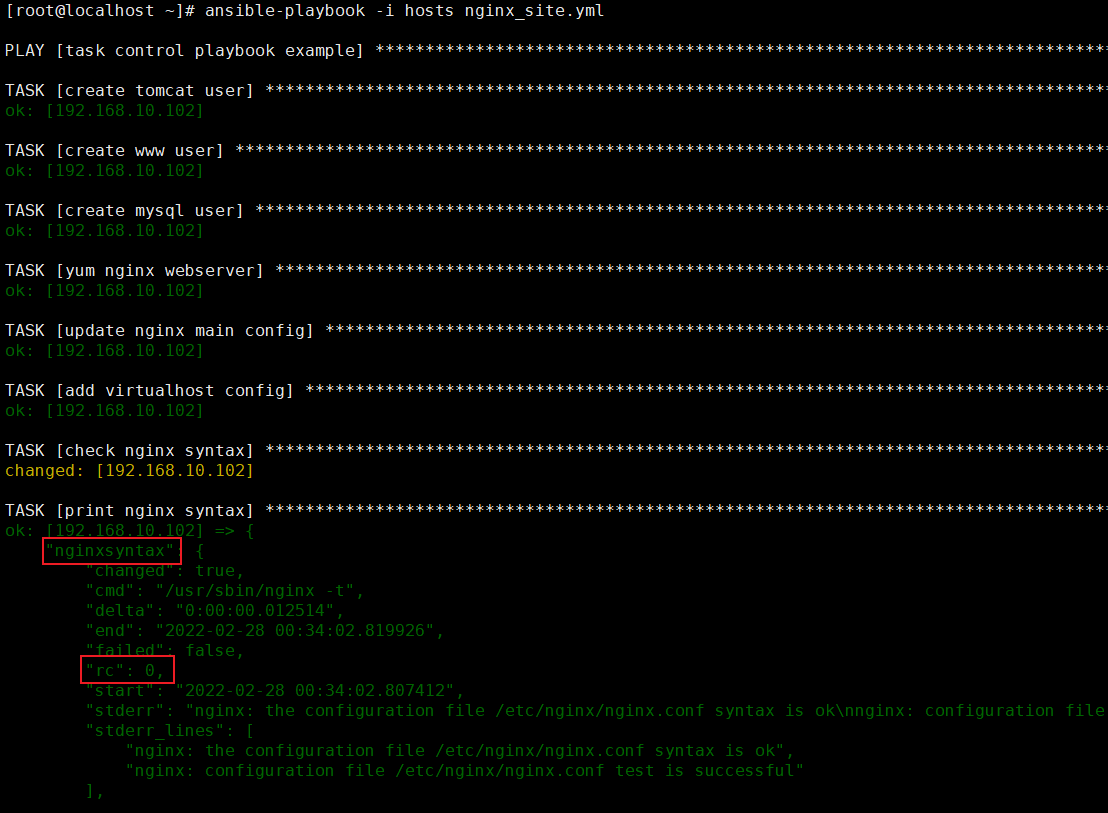<br />备注:when条件判断支持如下运算符
==
!=
> >=
< <=
is defined
is not defined
true
false
⽀持逻辑运算符: and or
二、循环控制
解决的问题:批量创建用户过于死板,如果再创建若干个用户,以至于重复工作较多,将难以收场
在PlayBook中使用with_items实现循环控制,循环时的中间变量只能是关键字 item,不能随意自定义。
改进nginx_site.yml:
[root@localhost ~]# vim nginx_site.yml
---
- name: task control playbook example
  hosts: webservers
  gather_facts: no
  vars:
    createuser:
      - tomcat
      - www
      - mysql

  tasks:
    - name: create user
      user: name={{ item }} state=present
      with_items: "{{ createuser }}"

    - name: yum nginx webserver
      yum: name=nginx state=present

    - name: update nginx main config
      copy: src=nginx.conf dest=/etc/nginx/

    - name: add virtualhost config
      copy: src=www.qfedu.com.conf dest=/etc/nginx/conf.d/

    - name: check nginx syntax
      shell: /usr/sbin/nginx -t
      register: nginxsyntax

    - name: print nginx syntax
      debug: var=nginxsyntax

    - name: start nginx server
      service: name=nginx state=started
      when: nginxsyntax.rc == 0
[root@localhost ~]# ansible-playbook -i hosts nginx_site.yml
新版本的循环控制:
[root@localhost ~]# vim loop.yml
- name: loop item
  hosts: all
  gather_facts: no
  vars:
    some_list:
      - "a"
      - "b"
      - "c"
    num_list:
      - 1
      - 2
      - 3
      - 5
  tasks:
    - name: show item
      debug:
        var: "{{ item }}"
      loop: "{{ some_list }}"

    - name: show item when item > 3
      debug:
        var: "{{ item }}"
      loop: "{{ num_list }}"
      when: item > 3
[root@localhost ~]# ansible-playbook -i hosts loop.yml
三、Tages 属性
当更新了Nginx 的配置文件后,我们需要通过PlayBook将新的配置发布到生产服务器上,然后再重新加载Nginx 服务。但以现在 的PlayBook来说,每次更改Nginx 配置文件后虽然可以通过它发布到生产服务器,但整个PlayBook都要执行⼀次,这样无形中扩大了变更范围和变更风险。<br /> <br /> 通过Play中的tags 属性,去解决PlayBook变更而导致的扩大变更范围和变更风险的问题
四、Handlers 属性

若有收获,就点个赞吧
0 人点赞


