1. command & shell 模块
在远程服务器上去执行命令
command是ad-hoc的默认模块,在执行ad-hoc时,若不指定模块的名字则默认使用此模块
[root@hadoop102 ~]# cat /etc/ansible/hosts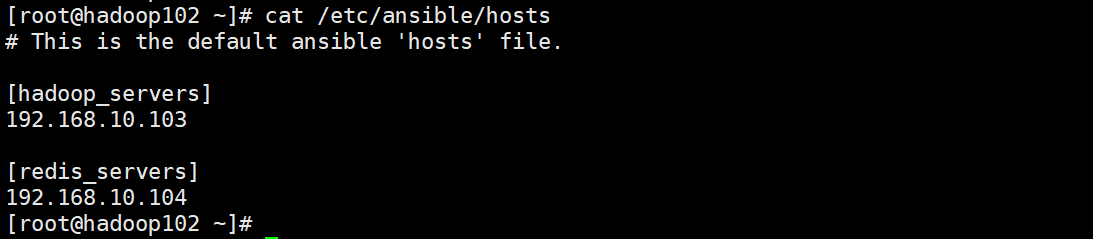
[root@hadoop102 ~]# ansible all -i /etc/ansible/hosts -a “echo ‘hello’”
[root@hadoop102 ~]# ansible all -i /etc/ansible/hosts -m shell -a “echo ‘hello’”
两个模块的差异:
shell 模块可以执行SHELL 的内置命令和特性(比如:管道符)
command 模块无法执行SHELL 的内置命令和特性
比如:
[root@hadoop102 ~]# ansible all -i /etc/ansible/hosts -m shell -a “echo ‘hello’|grep -o ‘e’”
[root@hadoop102 ~]# ansible all -i /etc/ansible/hosts -a “echo ‘hello’|grep -o ‘e’”
2. script 模块
将管理节点上的脚本传递到被管理节点(远程服务器)上执行。
[root@hadoop102 ~]# cat /opt/shell/test.sh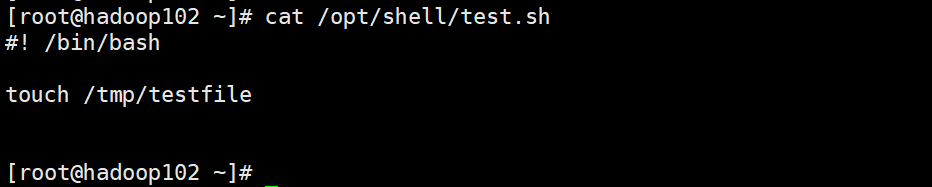
[root@hadoop102 ~]# ansible redis_servers -i /etc/ansible/hosts -m script -a “/opt/shell/test.sh”
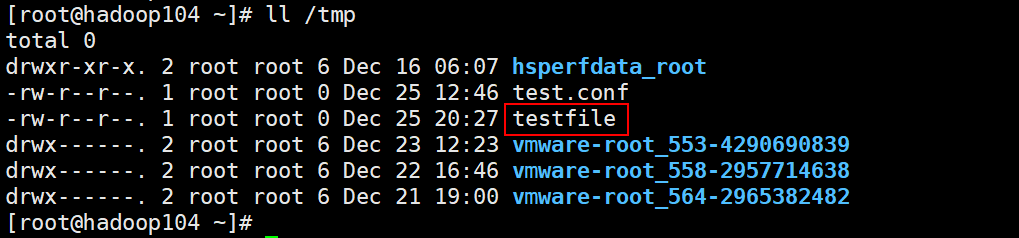
验证执行结果:
[root@hadoop102 ~]# ansible redis_servers -i /etc/ansible/hosts -m shell -a “ls -l /tmp/testfile”
3. copy 模块
copy 模块的主要用于管理节点和被管理节点之间的文件拷贝。
常用参数:
src:指定拷贝文件的源地址
dest:指定拷贝文件的目标地址
backup:拷贝文件前,若原目标文件发生了变化,则对目标文件进行备份
woner:指定新拷贝文件的所有者
group:指定拷贝文件的所有组
mode:指定新拷贝文件的权限
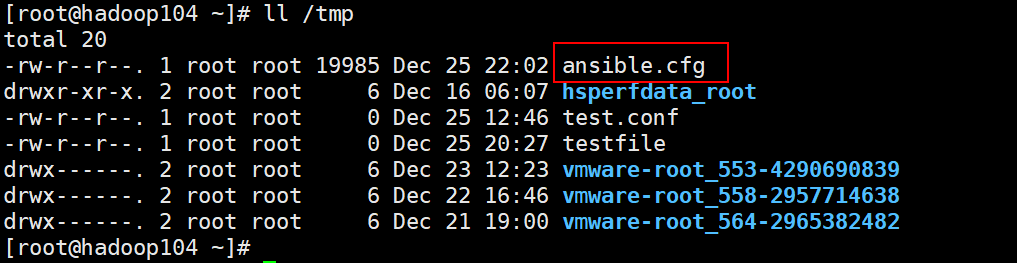
1)copy 管理节点上的/etc/ansible/ansible.cfg 配置文件到被管理节点上
[root@hadoop102 ~]# ansible all -i /etc/ansible/hosts -m copy -a “src=/etc/ansible/ansible.cfg dest=/tmp/ansible.cfg”
2)copy 前, 在被管理节点上对原文件进行备份
[root@hadoop102 ~]# ansible all -i /etc/ansible/hosts -m copy -a “src=/etc/ansible/ansible.cfg dest=/tmp/ansible.cfg backup=yes”
在被管理节点上查看拷贝情况: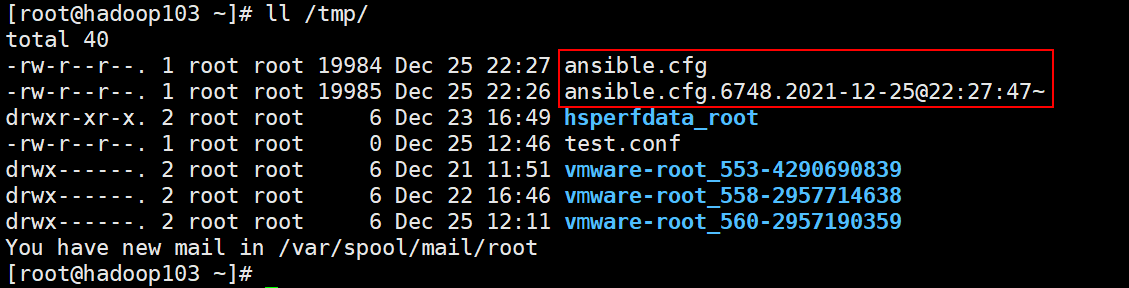
3)copy 文件的同时对文件进行用户及用户组设置
[root@hadoop102 ~]# ll /etc/ansible/ansible.cfg
[root@hadoop102 ~]# ansible all -i /etc/ansible/hosts -m copy -a “src=/etc/ansible/ansible.cfg dest=/tmp/ansible.cfg owner=nobody group=nobody”
[root@hadoop102 ~]# ansible all -i /etc/ansible/hosts -m shell -a “ls -l /tmp”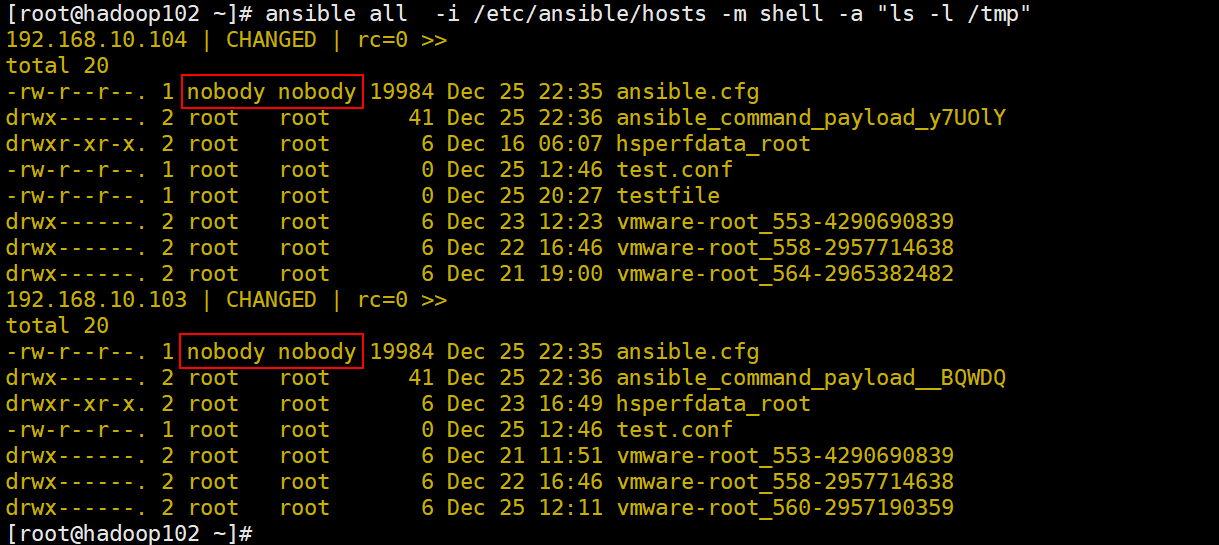
4)copy 文件的同时对文件进行权限设置
[root@hadoop102 ~]# ansible all -i /etc/ansible/hosts -m shell -a “ls -l /tmp”
[root@hadoop102 ~]# ansible all -i /etc/ansible/hosts -m copy -a “src=/etc/ansible/ansible.cfg dest=/tmp/ansible.cfg mode=0755”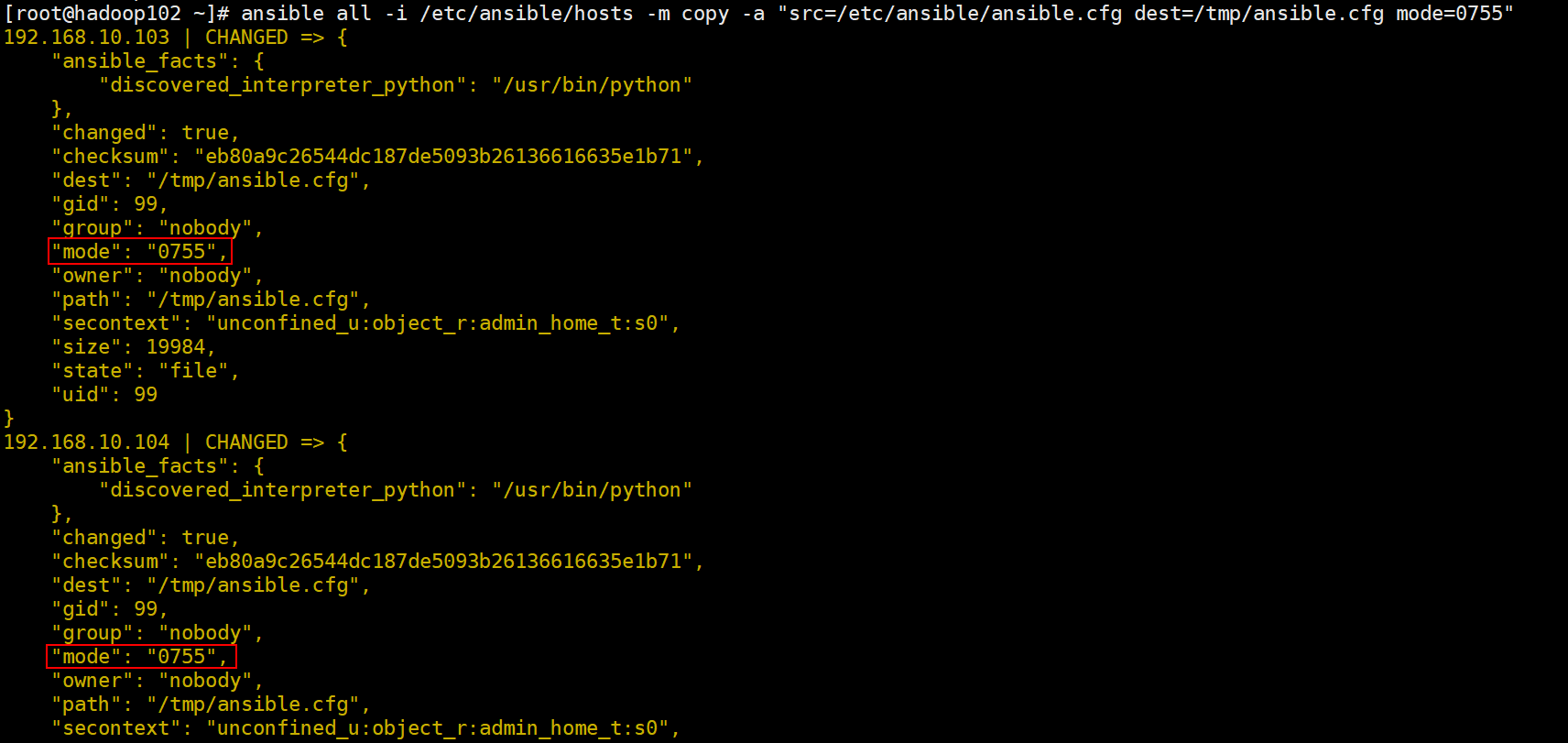
[root@hadoop102 ~]# ansible all -i /etc/ansible/hosts -m shell -a “ls -l /tmp”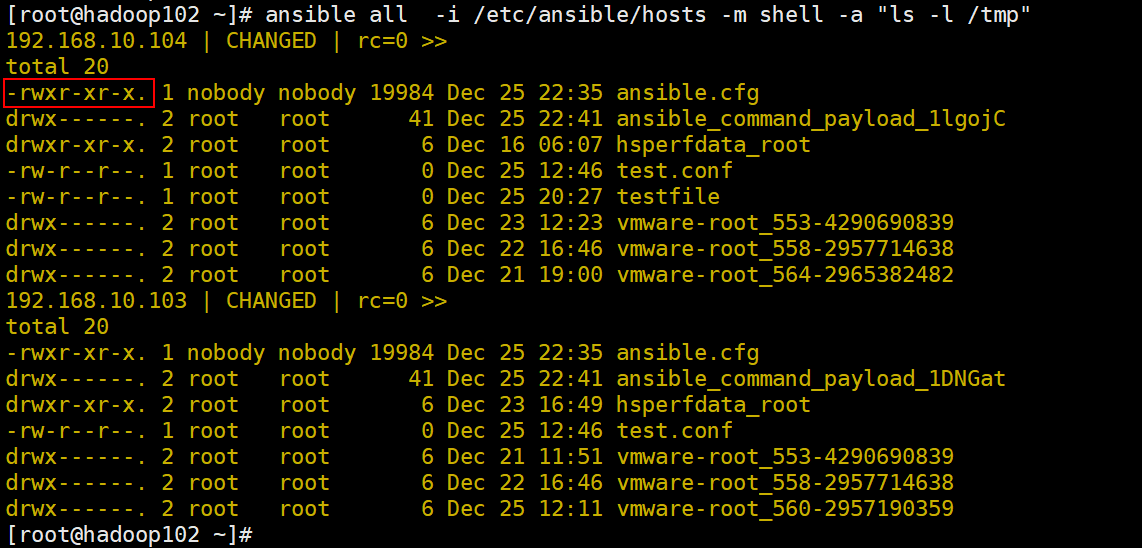
4. yum_repsitory
添加 YUM 仓库
常用参数:
name:仓库名称,就是仓库文件中第一行的中括号中名称,必须有的参数
description:仓库描述信息,添加时必须有的参数
baseurl:yum存储库“repodata”目录所在目录的URL,添加时必须有的参数。
它也可以是多个URL的列表。
file:仓库文件保存到被管理节点的文件名,不包含 .repo。默认是 name 的值。
state:preset 确认添加仓库文件,absent 确认删除仓库文件。
gpgcheck:是否检查 GPG yes|no, 没有默认值,使用/etc/yum.conf 中的配置
1) 添加epel 源
[root@hadoop102 ~]# ansible redis_servers -i /etc/ansible/hosts -m yum_repository -a “name=epel baseurl=’https://download.fedoraproject.org/pub/epel/$releasever/$basearch/‘ description=’EPEL YUM repo’”
[root@hadoop102 ~]# ansible redis_servers -i /etc/ansible/hosts -m shell -a “ls -l /etc/yum.repos.d/“
2)删除 epel 源
[root@hadoop102 ~]# ansible redis_servers -i /etc/ansible/hosts -m yum_repository -a “name=epel state=absent”
[root@hadoop102 ~]# ansible redis_servers -i /etc/ansible/hosts -m shell -a “ls -l /etc/yum.repos.d/“
5. yum 模块
等同于Linux上的YUM 命令,对远程服务器上RPM包进行管理
常用参数:
name:要安装的软件包名,多个软件包以英文逗号(,)隔开
state:对当前指定的软件安装、移除操作
支持的参数:
- present:确认已经安装,但不升级
- installed:确认已经安装
- latest:确保安装,且升级为最新
- absent 和 removed 确认已移除
1)安装一个软件包
[root@hadoop102 ~]# ansible hadoop_servers -i /etc/ansible/hosts -m yum -a “name=telnet state=present”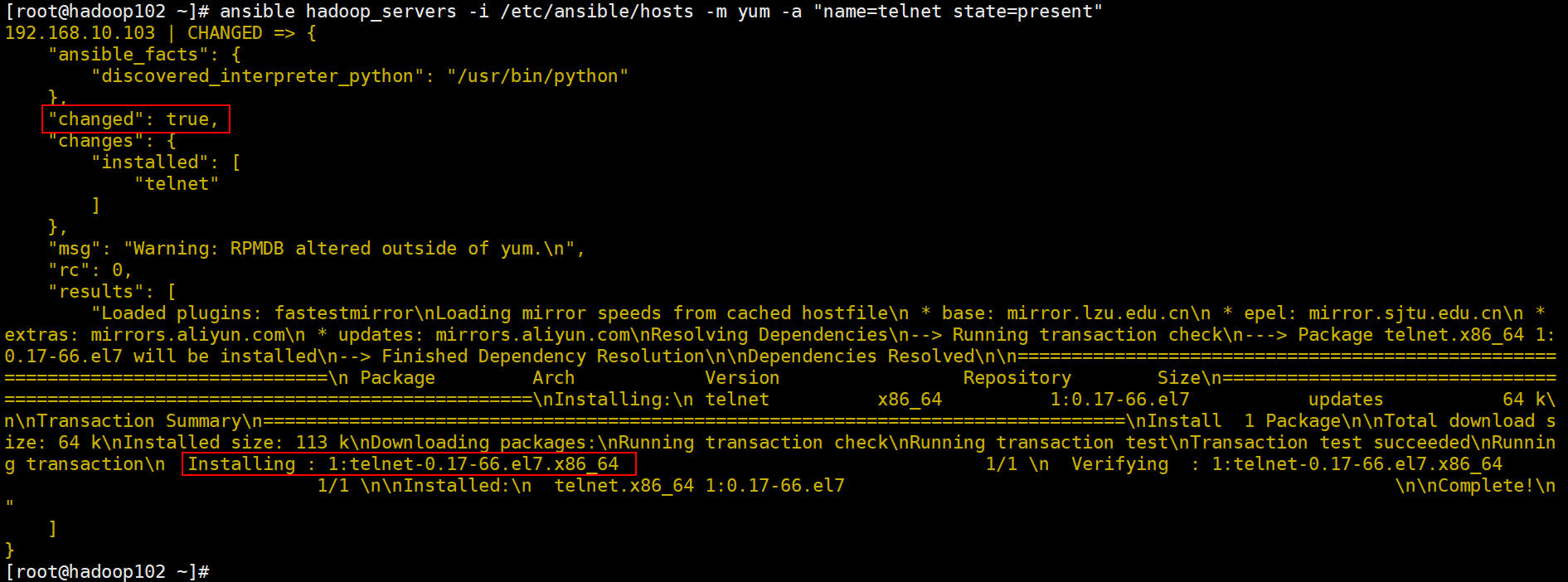
[root@hadoop102 ~]# ansible hadoop_servers -i /etc/ansible/hosts -m yum -a “name=telnet state=latest”
[root@hadoop102 ~]# ansible hadoop_servers -i /etc/ansible/hosts -m yum -a “name=telnet state=installed”
2)移除一个软件包
[root@hadoop102 ~]# ansible hadoop_servers -i /etc/ansible/hosts -m yum -a “name=telnet state=absent”
[root@hadoop102 ~]# ansible hadoop_servers -i /etc/ansible/hosts -m yum -a “name=telnet state=removed”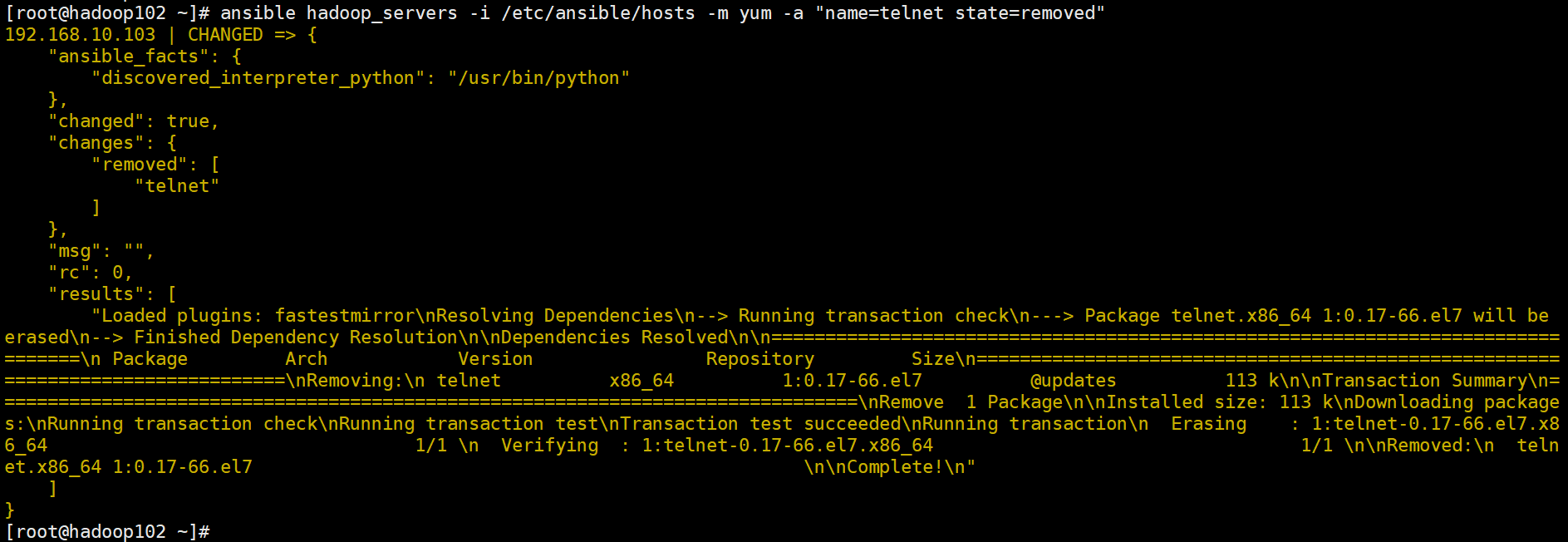
6. systemd 模块
Centos6 之前的版本使用service 模块 (ansible-doc service 命令查看帮助信息)
管理远程节点上的systemd 服务,就是由systemd 所管理的服务。
常用参数:
daemon_reload:重新载入 systemd,扫描新的或有变动的单元
enabled:是否开机自启动 yes|no
name:必选项,服务名称 ,比如 httpd vsftpd
state:对当前服务执行启动,停止、重启、重新加载等操作
(started、stopped、restarted、reloaded)
1)重新加载 systemd
[root@hadoop102 ~]# ansible redis_servers -i /etc/ansible/hosts -m systemd -a “daemon_reload=yes”
2)启动 Nginx
[root@hadoop102 ~]# ansible redis_servers -i /etc/ansible/hosts -m yum -a “name=nginx state=present”
[root@hadoop102 ~]# ansible redis_servers -i /etc/ansible/hosts -m systemd -a “name=nginx state=started”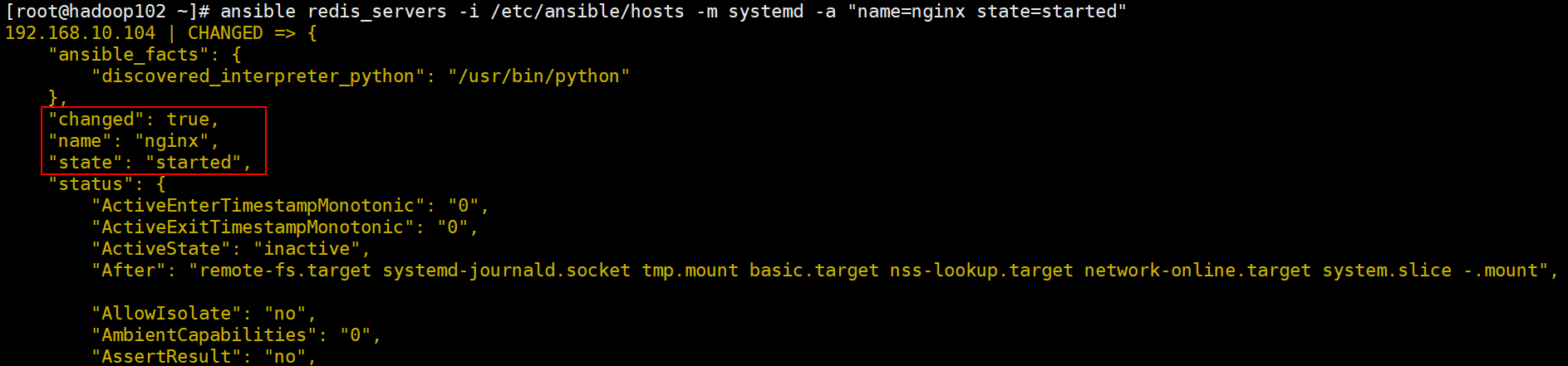
[root@hadoop102 ~]# ansible redis_servers -i /etc/ansible/hosts -m shell -a “systemctl status nginx”
3)关闭 Nginx 服务
[root@hadoop102 ~]# ansible redis_servers -i /etc/ansible/hosts -m systemd -a “name=nginx state=stopped”
[root@hadoop102 ~]# ansible redis_servers -i /etc/ansible/hosts -m shell -a “systemctl status nginx”
4)重启 Nginx 服务
[root@hadoop102 ~]# ansible redis_servers -i /etc/ansible/hosts -m systemd -a “name=nginx state=restarted”
[root@hadoop102 ~]# ansible redis_servers -i /etc/ansible/hosts -m shell -a “systemctl status nginx”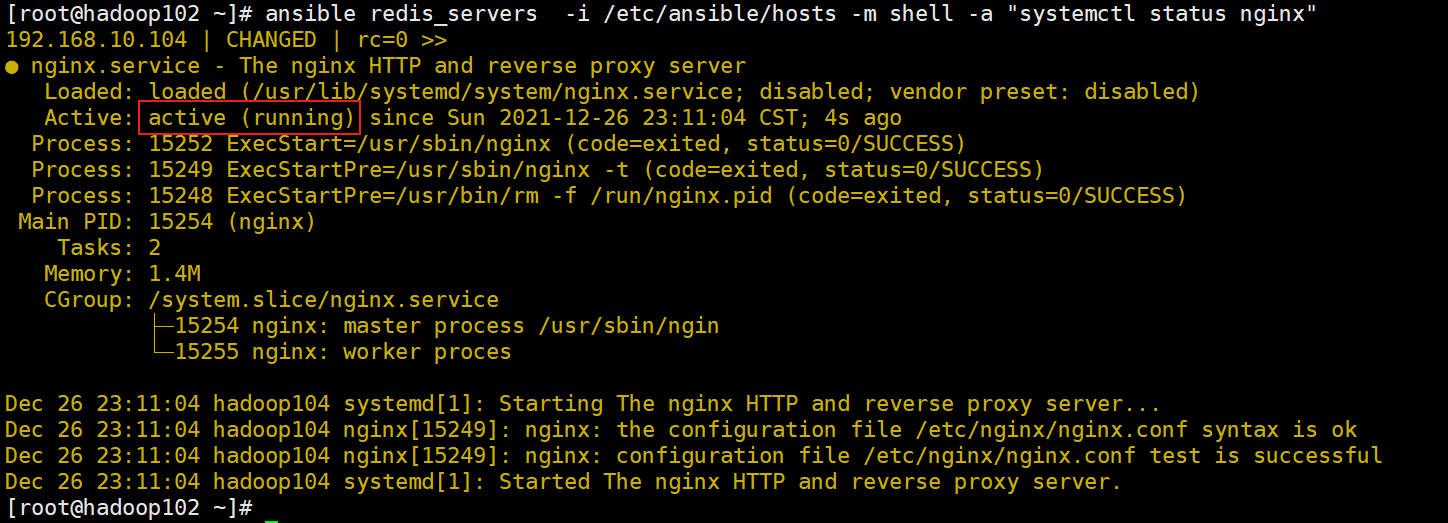
5)重新加载 Nginx 服务
[root@hadoop102 ~]# ansible redis_servers -i /etc/ansible/hosts -m systemd -a “name=nginx state=reloaded”
6)将 Nginx 服务设置开机⾃启动
[root@hadoop102 ~]# ansible redis_servers -i /etc/ansible/hosts -m systemd -a “name=nginx enabled=yes”
7. group 模块
在被管理节点上,对组进行管理。
常用参数:
name 组名称, 必须的
system 是否为系统组, yes/no ,默认是 no
state 删除或创建,present/absent ,默认是present
创建普通组 redis_admin:
[root@hadoop102 ~]# ansible redis_servers -i /etc/ansible/hosts -m group -a “name=redis_admin”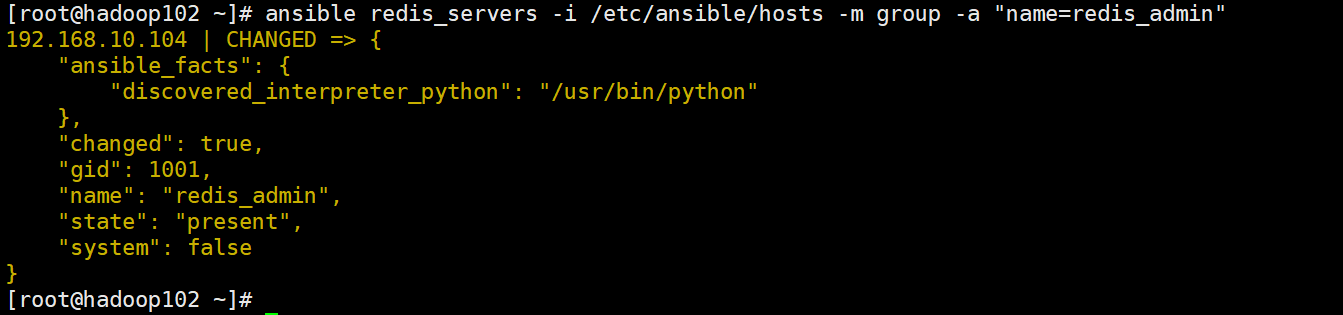
[root@hadoop102 ~]# ansible redis_servers -i /etc/ansible/hosts -m shell -a “tail /etc/group”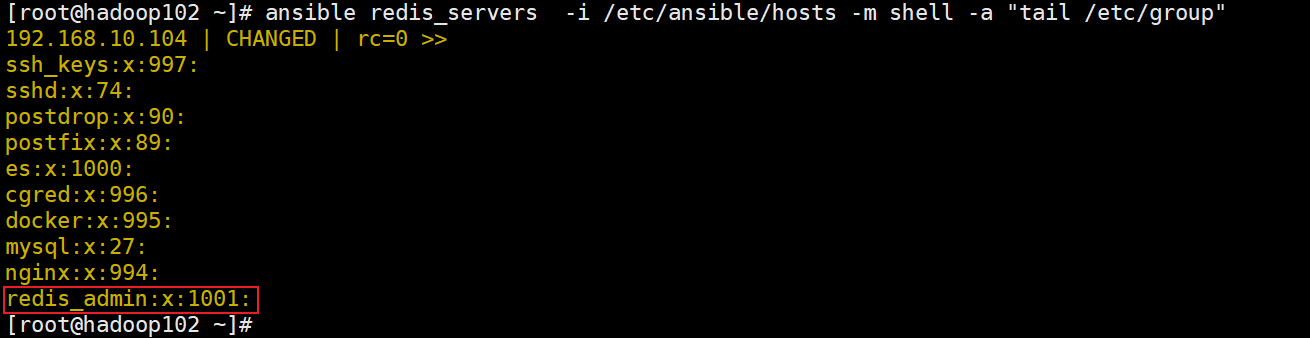
8. user 模块
用于在被管理节点上对用户进行管理
常用参数:
name:必须的参数, 指定用户名
password:设置用户的密码,这里接受的是一个加密的值,因为会直接存到 shadow
默认不设置密码
update_password:假如设置的密码不同于原密码,则会更新密码,在 1.3版本中中被加入
home:指定用户的家目录
shell:设置用户的 shell
comment:用户的描述信息
create_home:在创建用户时,是否创建其家目录。默认创建,假如不创建,设置为no
2.5版本之前使用createhome 参数
group:设置用户的主组
groups:将用户加入到多个其他组,多个用逗号隔开
默认会把用户从其他已经加入的组中删除。
append yes|no:和 groups 配合使用,yes 时,不会把用户从其他已经加入的组中删除
system:设置为 yes 时,将会创建一个系统账号
expires:设置用户的过期时间,值为时间戳,会转为天数后,放在shadow 的第8个字段里
generate_ssh_key:设置为yes 将会为用户生成密钥,这不会覆盖原来的密钥
ssh_key_type:指定用户的密钥类型,默认 rsa, 具体的类型取决于被管理节点
state:删除或添加用户, present 为添加,absent 为删除;默认值为 present
remove:当与 state=absent 一起使用时,删除一个用户及关联的目录,可选的值为: yes/no
比如家目录,邮箱目录
1)创建用户并设置密码
生成加密密码:
[root@hadoop102 ~]# pass=$(echo “123456” | openssl passwd -1 -stdin)
创建用户muyaobin并设置密码:
[root@hadoop102 ~]# ansible all -i /etc/ansible/hosts -m user -a “name=muyb password=${pass}”
[root@hadoop102 ~]# ansible all -i /etc/ansible/hosts -m shell -a “tail /etc/passwd”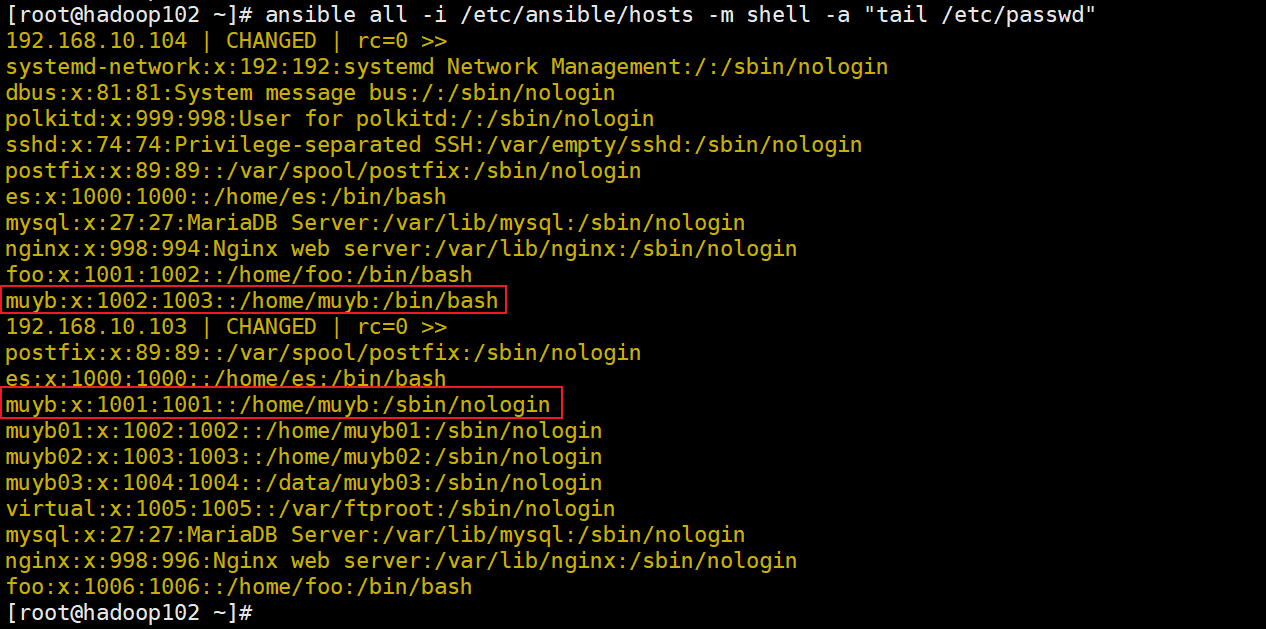
2)创建用户muyaobin,为其创建密钥对,且密钥类型为:ecdsa
[root@hadoop102 ~]# ansible all -i /etc/ansible/hosts -m user -a “name=muyaobin generate_ssh_key=yes ssh_key_type=ecdsa”
3)创建用户tom,有效期至 2021年12月28日, 加入到组redis_admin,不改变用户原有加入的组
[root@hadoop102 ~]# ansible redis_servers -i /etc/ansible/hosts -m user -a “name=tom expires=$(date -d 2021-12-28 +%s) groups=redis_admin append=yes”
备注:date命令的使用
计算三小时后是几点:
[root@hadoop102 ~]# date +%T -d ‘3 hours’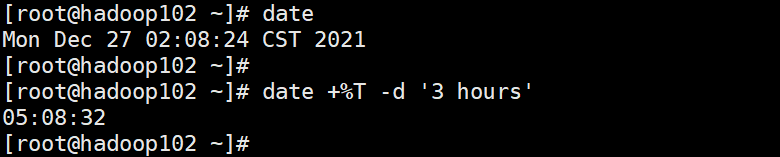
任意日期的前N 天,后N 天:
[root@hadoop102 ~]# date +%F -d “20211227 1 day”
[root@hadoop102 ~]# date +%F -d “20211227 -1 day”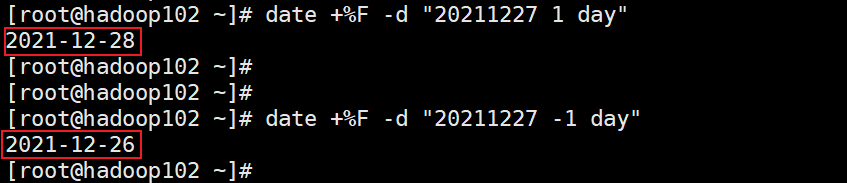
计算两个日期相差天数:
[root@hadoop102 ~]# d1=$(date +%s -d 20211227)
[root@hadoop102 ~]# d2=$(date +%s -d 20211220)
[root@hadoop102 ~]# echo $(((d1-d2)/86400))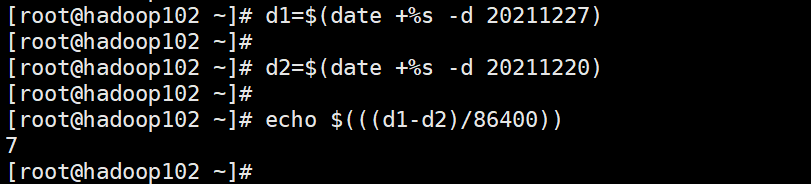
9. file 模块
file 模块主要用于远程主机上的文件操作
owner:定义文件/目录的属主
group:定义文件/目录的属组
mode:定义文件/目录的权限
path:必选项,定义文件/目录的路径
recurse:递归的设置文件的属性,只对目录有效
src:链接(软/硬)文件的源文件路径,只应用于state=link的情况
dest:链接文件的路径,只应用于state=link的情况
state:
directory:如果目录不存在,创建目录
file:文件不存在,则不会被创建;文件存在则返回文件的信息(常用于检查文件是否存在)
link:创建软链接
hard:创建硬链接
touch:文件不存在,则会创建一个新的文件;文件或目录已存在,则更新其最后修改时间
absent:删除目录、文件或者取消链接文件
1)创建一个文件
[root@hadoop102 ~]# ansible all -i /etc/ansible/hosts -m file -a “path=/tmp/tom.conf state=touch”
[root@hadoop102 ~]# ansible all -i /etc/ansible/hosts -m shell -a “ls -l /tmp “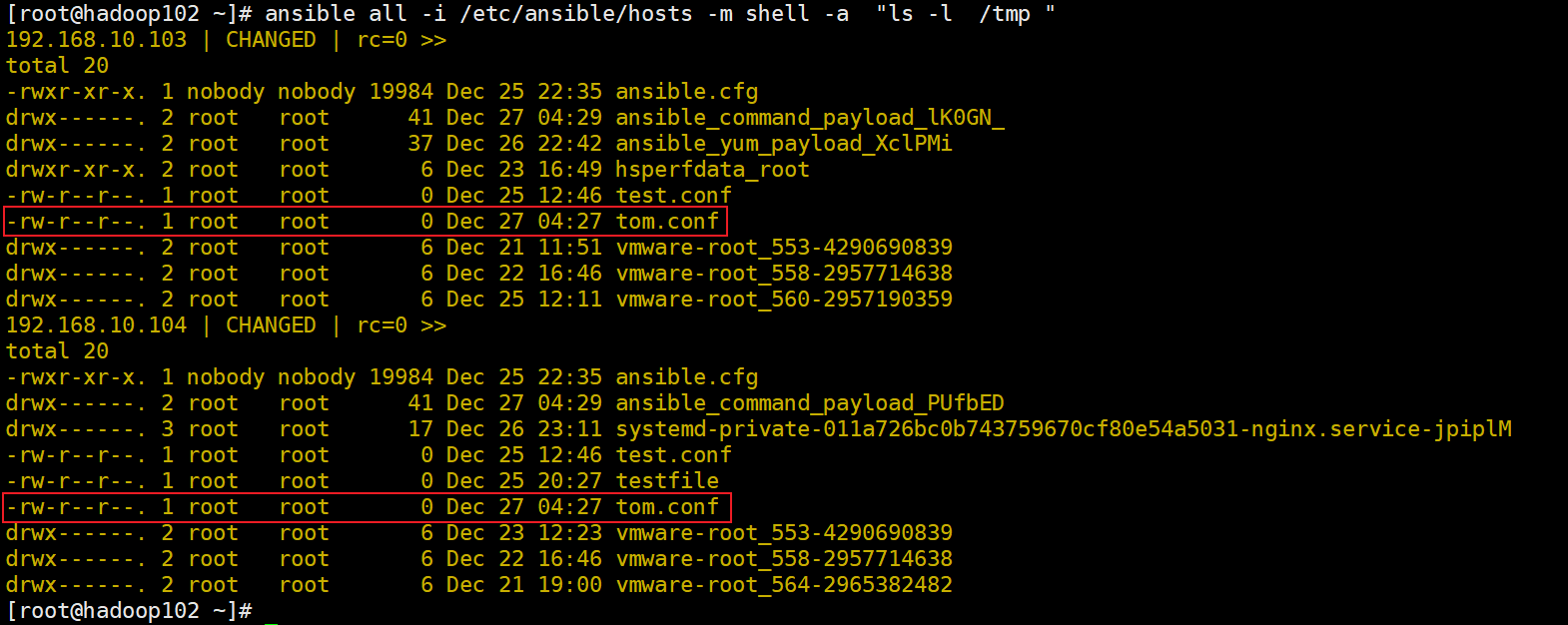
2)改变文件所有者及权限
[root@hadoop102 ~]# ansible all -i /etc/ansible/hosts -m file -a “path=/tmp/tom.conf owner=nobody group=nobody mode=0644”
[root@hadoop102 ~]# ansible all -i /etc/ansible/hosts -m shell -a “ls -l /tmp “
3)创建一个软连接
[root@hadoop102 ~]# ansible all -i /etc/ansible/hosts -m file -a “src=/tmp/tom.conf dest=/tmp/link.conf state=link”
[root@hadoop102 ~]# ansible all -i /etc/ansible/hosts -m shell -a “ls -l /tmp “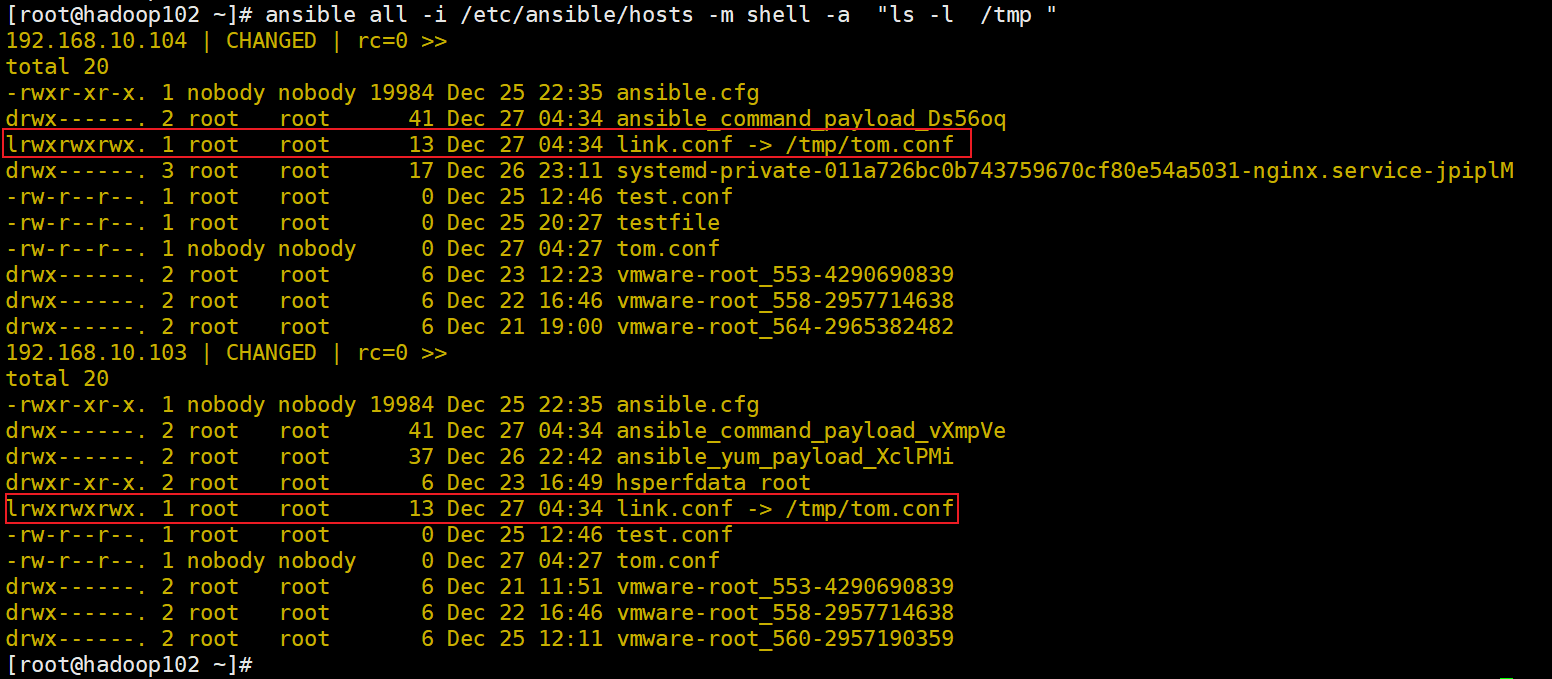
4)创建一个目录
[root@hadoop102 ~]# ansible all -i /etc/ansible/hosts -m shell -a “ls -l /tmp”
5)取消一个连接
[root@hadoop102 ~]# ansible all -i /etc/ansible/hosts -m file -a “path=/tmp/link.conf state=absent”
6)删除一个文件
[root@hadoop102 ~]# ansible all -i /etc/ansible/hosts -m file -a “path=/tmp/tom.conf state=absent”
10. cron 模块
管理远程节点的CRON 服务,等同于Linux 中的定时计划任务。
注意:使用Ansible 创建的计划任务,不要用crontab -e去编辑,否则Ansible 无法再次操作此任务。
使用参数:
name:指定一个cron job 的名字。
(注意:一定要指定,便于之后删除操作)
minute:指定分钟,可以设置成(0-59, , /2 等)格式
默认是 ,也就是每分钟
hour:指定小时,可以设置成(0-23, , /2 等)格式
默认是 ,也就是每⼩时
day:指定天,可以设置成(1-31, , /2 等)格式
默认是 ,也就是每天
month:指定月份,可以设置成(1-12, , /2 等)格式。
默认是 , 也就是每周
weekday:指定星期,可以设置成(0-6 for Sunday-Saturday, 等)格式
默认是 ,也就是每星期
job:指定要执行的内容,通常可以写个脚本,或者是一段内容
state:指定这个job的状态,可以是新增(present)或者是删除(absent)
默认为新增(present)
1)新建一个CRON JOB 任务
[root@hadoop102 ~]# ansible all -i /etc/ansible/hosts -m cron -a “name=’create new job’ minute=’0’ job=’ls -alh > /dev/null’”
[root@hadoop102 ~]# ansible all -i /etc/ansible/hosts -m shell -a “crontab -l “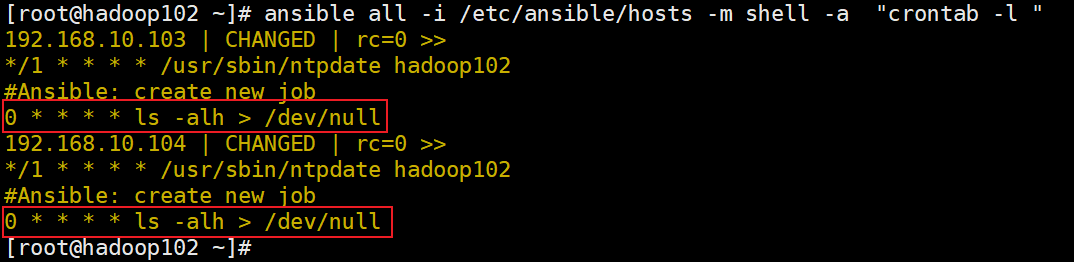
2)新建一个CRON JOB 任务
[root@hadoop102 ~]# ansible all -i /etc/ansible/hosts -m cron -a “name=’create new job’ state=absent”
注意:删除时,一定要正确指定job 的name 参数,以免误删除
11. debug 模块
debug 模块主要用于调试时使用,通常的作用是将一个变量的值给打印出来
常用参数:
var:直接打印一个指定的变量值
msg:打印一段可以格式化的字符串
[root@hadoop102 ~]# ansible all -i /etc/ansible/hosts -m debug -a “var=role” -e “role=web”
[root@hadoop102 ~]# ansible all -i hosts -m debug -a “msg=’role is {{role}} ‘“ -e “role=web”
12. template 模块
template 模块使用了Jinjia2格式作为文件模版,可以进行文档内变量的替换。文件以.j2 结尾
常用参数:
src:指定Ansible 控制端的文件路径
dest:指定Ansible 被控端的文件路径
owner:指定文件的属主
group:指定文件的属组
mode:指定文件的权限
backup:yes/no 是否创建一个包含时间戳信息的备份文件
(如果以某种方式错误地破坏了原始文件,使用备份文件就可以将其恢复原状)
template 模块的使用:
1)建立以个template 文件, 名为 hello_world.j2
[root@hadoop102 ~]# cat hello_world.j2
2)执行命令,并且设置变量 var 的值为 world
[root@hadoop102 ~]# ansible all -i /etc/ansible/hosts -m template -a “src=hello_world.j2 dest=/tmp/hello_world.world” -e “var=world”
[root@hadoop102 ~]# ansible all -i /etc/ansible/hosts -m shell -a “cat /tmp/hello_world.world”
13. lineinfifile 模块
在被管理节点上,用正则匹配的方式对目标文件的一行内容修改、删除等操作。
如果是在一个文件中把所有匹配到的多行都进行统一处理,请参考replace 模块
如果想对一个文件进行一次性添加/更新/删除多行内容等操作,参考blockinfile模块
常用参数:
path:被管理节点的目标文件路径, 必须有的参数。
state:可选值
absent:删除
present:替换(默认值)
regexp:在文件的每一行中查找的正则表达式
对于 state=present ,仅找到的最后一行将被替换
line:要在文件中插入/替换的行,需要先设置 state=present
create:文件不存在时,是否要创建文件并添加内容。yes/no
1)删除被控节点里的某条内容
[root@hadoop102 ~]# ansible all -i /etc/ansible/hosts -m lineinfile -a “path=/tmp/hello_world.world regexp=’^Hello’ state=absent” (删除以Hello开头的行)
[root@hadoop102 ~]# ansible all -i /etc/ansible/hosts -m shell -a “cat /tmp/hello_world.world”
2)替换某一行
[root@hadoop102 ~]# ansible all -i /etc/ansible/hosts -m lineinfile -a “path=/etc/sysconfig/selinux regexp=’^SELINUX=’ line=’SELINUX=disabled’ state=present”
[root@hadoop102 ~]# ansible all -i /etc/ansible/hosts -m shell -a “cat /etc/sysconfig/selinux”
14. blockinfifile 模块
对目标文件进行多行的添加、更新、删除操作
常用参数:
path:目标文件路径
block:文件中被操作的块内容
state:块内容如何处理,absent 删除, present 添加/更新(默认值)
1)向文件/etc/ssh/sshd_config的最后添加如下内容
Match User ansible-agentPasswordAuthentication no
[root@hadoop102 ~]# ansible redis_servers -i /etc/ansible/hosts -m blockinfile -a "path=/etc/ssh/sshd_config block='Match User ansible-agent\nPasswordAuthentication no'"<br />[root@hadoop102 ~]# ansible redis_servers -i /etc/ansible/hosts -m shell -a "tail /etc/ssh/sshd_config"<br />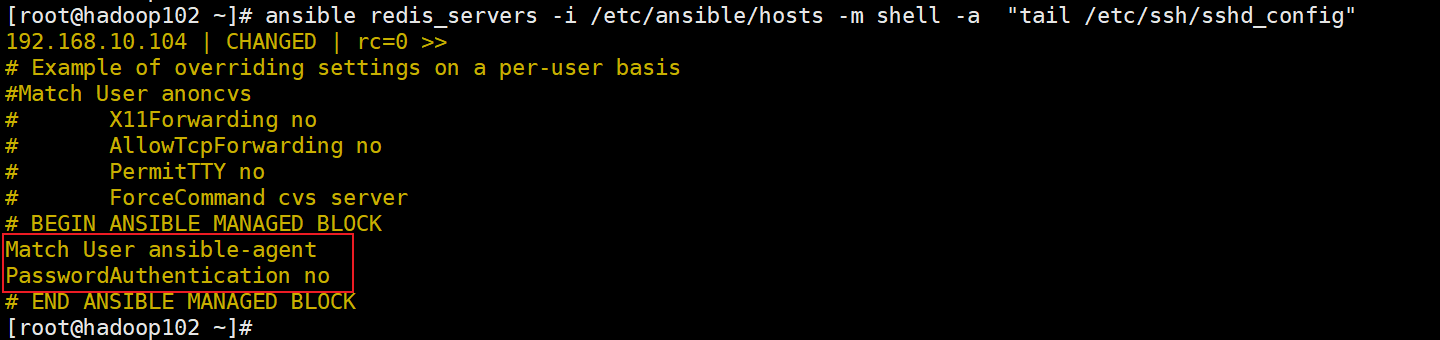<br />注意:\n 是换行符的意思<br />2)更新之前的内容<br />[root@hadoop102 ~]# ansible redis_servers -i /etc/ansible/hosts -m blockinfile -a "path=/etc/ssh/sshd_config block='Match User ansible-agent\nPasswordAuthentication yes'"<br />3)删除文件中的连续出现几行内容<br />[root@hadoop102 ~]# ansible redis_servers -i /etc/ansible/hosts -m blockinfile -a "path=/etc/ssh/sshd_config block='Match User ansible-agent\nPasswordAuthentication yes' state=absent"<br />[root@hadoop102 ~]# ansible redis_servers -i /etc/ansible/hosts -m shell -a "tail /etc/ssh/sshd_config"<br />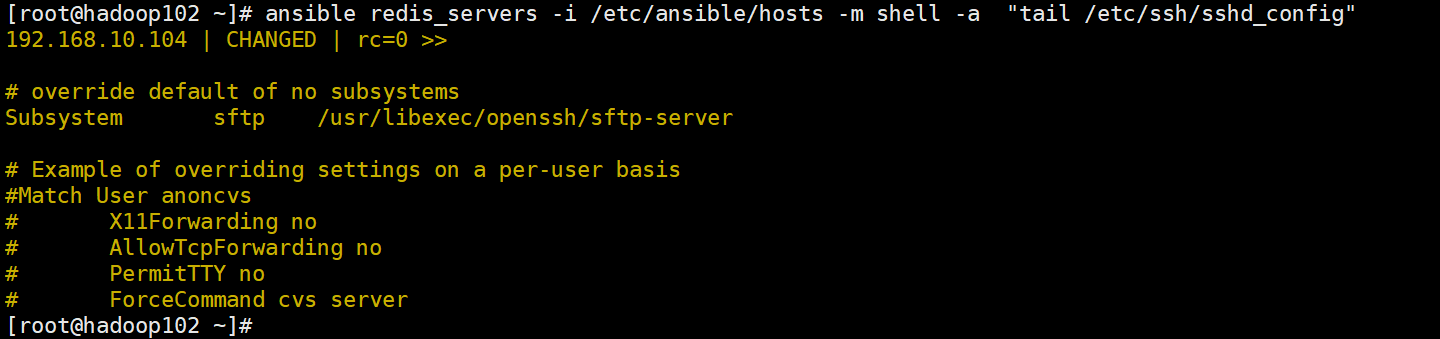
15. 更多模块
https://docs.ansible.com/ansible/latest/collections/ansible/builtin/

若有收获,就点个赞吧
0 人点赞


