asyncio模块
- 包含了各种特定系统实现的事件循环模块(比如
select,epoll) - 对传输方式和通信协议进行了很好的封装,方便使用
- 对
TCP、UDP、SSL、子进程、延时调用等功能的支持 - 有和
futures模块中类似的Future类(这个在concurrent线程池里讲过) - 基于
yield from的协议和任务,可以采用顺序逻辑去编写并发代码 - 当遇到设计I/O操作的调用时,可以将这个任务转移到线程池,不单单地只支持协程,融合了前面的多线程工具,一起解决异步I/O问题
- 是
Python用于解决异步I/O编程的一整套解决方案
事件循环
引言
在计算系统中,可以产生事件的实体叫做事件源,能处理事件的实体叫做事件处理者。此外,还有一些第三方实体叫做事件循环。它的作用是管理所有的事件,在整个程序运行过程中不断循环执行,追踪事件发生的顺序将它们放到队列中,当主线程空闲的时候,调用相应的事件处理者处理事件。
所有的事件都在事件循环中被捕捉,然后经过事件事件处理者的处理,前面Python socket编程中的例子就是采用的这种处理方式。
协程+事件循环
import asyncioimport timeasync def deal_html(url):print("start dealing with url")await asyncio.sleep(2) # 模拟耗时操作print("Done!")if __name__ == '__main__':start_time = time.time()loop = asyncio.get_event_loop() # 得到一个事件循环loop.run_until_complete(deal_html("https://www.google.com")) # 把协程放入时间循环end_time = time.time()print(end_time - start_time)# result# start dealing with url# Done!# 2.0022695064544678
在协程函数中,不能使用time.sleep(2),time模块提供的休眠方法是针对整个线程、整个程序的,用这种方式休眠,事件循环也被终止了,对单个协程任务还好,如果有多个协程任务,显然是不符合我们的逻辑的。于是asyncio模块提供了一个休眠方法,针对每个协程休眠,可以保证事件循环还在进行。
下面的这个例子中,一次提交了3个同样的协程任务,可以看出,最后的运行时间还是 2s 左右。
import asyncioimport timeasync def deal_html(url):print("start dealing with url")await asyncio.sleep(2) # 模拟耗时操作# time.sleep(2) # 如果采用这种方式休眠,大家可以试一下结果如何print("Done!")if __name__ == '__main__':start_time = time.time()loop = asyncio.get_event_loop() # 得到一个事件循环tasks = [deal_html("https://www.google.com") for i in range(3)]loop.run_until_complete(asyncio.wait(tasks)) # 把协程放入事件循环,等待它们全部结束end_time = time.time()print(end_time - start_time)# result# start dealing with url# start dealing with url# start dealing with url# Done!# Done!# Done!# 2.0020759105682373
也可以参考 这篇文章(科学上网)
获得协程的返回值
前面介绍过,asyncio有和concurrent.futures模块相似的Future对象(其实就是它的子类),通过它我们就可以获得协程执行的状态和结果。从代码中可以看出,这种使用方式和前面使用线程池的语法和逻辑是非常相似的。
import asyncioimport timeasync def deal_html(url):print("start dealing with url")await asyncio.sleep(2) # 模拟耗时操作return "task finished"if __name__ == '__main__':start_time = time.time()loop = asyncio.get_event_loop() # 得到一个事件循环task = loop.create_task(deal_html("https://www.google.com")) # 提交一个协程任务,返回一个对象loop.run_until_complete(task) # 把协程放入事件循环print(task.result()) # 拿到返回结果end_time = time.time()print(end_time - start_time)# result:# start dealing with url# task finished# 2.00205659866333
说道事件循环,就想到了回调。如果一个协程任务完后,需要给相关人员发送通知。比如,我们在 12306 上购票成功后都会收到短信提醒,这就可以用回调来解决.
import asyncioimport timefrom functools import partialasync def deal_html(url):print("start dealing with url")await asyncio.sleep(2)return "task finished""""这里就是回调函数,它必须接收 Future 对象作为参数,便于我们获取相关信息如果函数还接收其他参数,这个 Future 参数要放到列表的最后,调用的时候回自动传递进来"""def send_email(name, future):print("Sending email to {whom}".format(whom=name))if __name__ == '__main__':start_time = time.time()loop = asyncio.get_event_loop() # 得到一个事件循环task = loop.create_task(deal_html("https://www.google.com"))task.add_done_callback(partial(send_email, "MetaTian")) # 把 MetaTian 先传递进去,封装成新的函数,就不用考虑参数问题了loop.run_until_complete(task) # 把协程放入事件循环print(task.result()) # 拿到返回结果end_time = time.time()print(end_time - start_time)# result:# start dealing with url# Sending email to MetaTian# task finished# 2.0017893314361572
在task.add_done_callback()中,只接受一个函数名称,Future对象会自动传递进去作为参数,如果你熟悉PyQt的 信号与槽机制,这种调用方式会很眼熟。但是,我们的回调函数是带参数的,怎么办呢?我们用到了很早很早以前讲过的 偏函数,它将回调函数进行了二次封装,成为了一个新的函数。
gather and wait
简化前面的一个例子,使用asyncio.wait()可以等待协程任务队列的执行,它的功能是比较单一的。
import asyncioimport timeasync def deal_html(url):print("start dealing with {0}".format(url))await asyncio.sleep(2) # 模拟耗时操作print("Done!")if __name__ == '__main__':loop = asyncio.get_event_loop() # 得到一个事件循环tasks = [deal_html("https://www.google.com") for i in range(3)]loop.run_until_complete(asyncio.wait(tasks)) # 等待任务完成# loop.run_until_complete() 参数要求:A Future, a coroutine or an awaitable is required
看看asyncio.gather()能做什么。
import asyncioimport timeasync def deal_html(url):print("start dealing with {0}".format(url))await asyncio.sleep(2) # 模拟耗时操作print("Done!")if __name__ == '__main__':loop = asyncio.get_event_loop() # 得到一个事件循环tasks = [deal_html("https://www.google.com") for i in range(3)]# 协程任务分组group1 = asyncio.gather(*[deal_html("https://www.google.com") for i in range(3)])group2 = asyncio.gather(*[deal_html("https://www.yuque.com") for i in range(2)])# 批量取消任务group1.cancel()try:loop.run_until_complete(asyncio.gather(group2, group1))except Exeption:pass# result:# start dealing with https://www.yuque.com# start dealing with https://www.yuque.com
Asyncio.gather vs asyncio.wait
task的取消和子协程调用
如何取消task
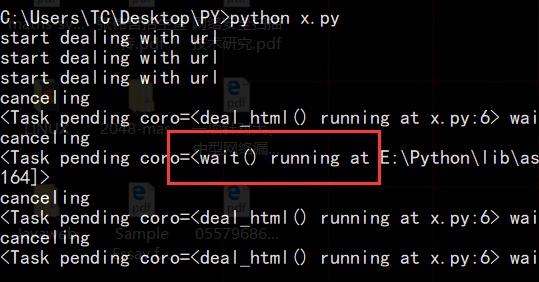
import asyncioimport timeasync def deal_html(times):print("start dealing with url")await asyncio.sleep(times) # 模拟耗时操作print("Done!")if __name__ == '__main__':loop = asyncio.get_event_loop()tasks = [deal_html(i) for i in range(2,5)]try:loop.run_until_complete(asyncio.wait(tasks))except KeyboardInterrupt as e: # 键盘按下 Ctrl + call_tasks = asyncio.Task.all_tasks() # 获得所有的任务,比我们提交的要多一个for task in all_tasks:print("canceling")task.cancel()loop.stop()loop.run_forever()finally:loop.close()# result:# start dealing with url# start dealing with url# start dealing with url# canceling# canceling# canceling# canceling
和事件循环相关的api:官方文档,
除了我们提交的三个协程任务deal_html(),还有一个wait()协程,它是为了协助任务完成自动加进去的。
子协程调用
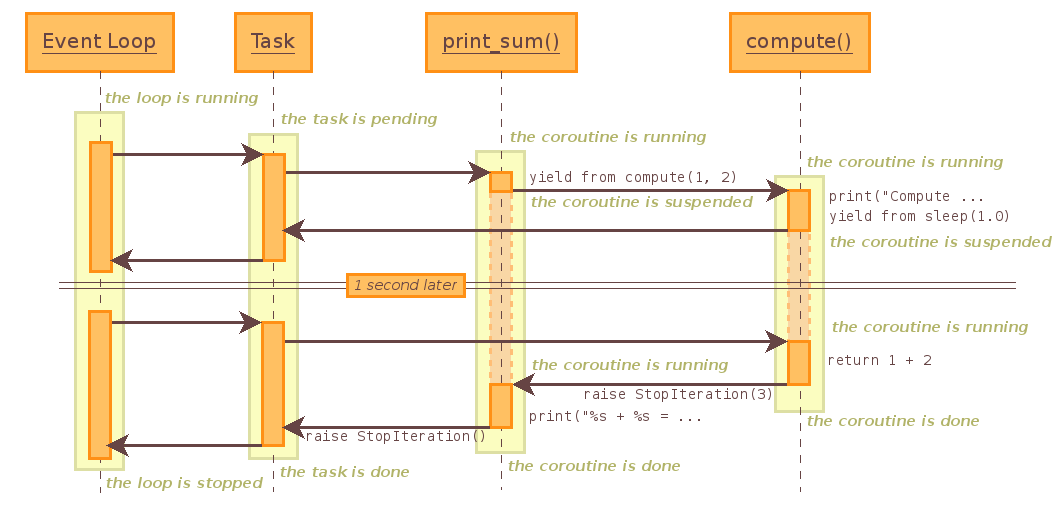
import asyncioasync def compute(x, y):print("Computing {n1} + {n2}...".format(n1=x, n2=y))await asyncio.sleep(1)return x + yasync def print_sum(x, y):res = await compute(x, y)print("{n1} + {n2} is {result}".format(n1=x, n2=y, result=res))if __name__ == '__main__':loop = asyncio.get_event_loop()loop.run_until_complete(print_sum(1, 2))# result:# Computing 1 + 2...# 1 + 2 is 3
整个调用过程的时序图如下:
计划回调
在asyncio提供的事件循环中,我们不仅可以向里面提交协程任务,还可以直接传递相关的任务函数,等到条件满足后进行回调。
参考:Scheduling callbacks 和 Scheduling delayed callbacks
call_soon(callback, *args)
向事件循环中添加一个函数,等到下一次循环的时候进行回调,如果有多个函数进行了注册,则按顺序调用,且只调用一次。
import asynciodef learn(lan):print("Learning {0}...".format(lan))def stop_loop(loop):loop.stop()if __name__ == '__main__':loop = asyncio.get_event_loop()loop.call_soon(learn, "Python")loop.call_soon(stop_loop, loop) # 用来结束事件循环,注册时的先后顺序很重要"""不能调用 run_until_complete(),这个方法只针对协程任务而且协程任务完成后,事件循环结束,run_forever()会让事件循环一直进行下去要通过其他的方式来结束掉任务循环"""loop.run_forever()# result:# Learning Python...
call_later(delay, callback, *args)
向事件循环中添加任务函数,经过给定的时间参数后开始调用,函数调用的顺序按照delay参数(单位是秒)进行排序。
import asynciodef learn(lan):print("Learning {0}...".format(lan))if __name__ == '__main__':loop = asyncio.get_event_loop()"""这里的时间调用顺序是相对的,如果 learn(Python) 非常耗时当 learn 结束后,再过1s, 调用learn(Ruby), 再过3s, 调用learn(Java)"""loop.call_later(3, learn, "Java") # 3s后调用loop.call_later(1, learn, "Ruby") # 1s后调用loop.call_soon(learn, "Python") # 立刻调用loop.run_forever()# result:# Learning Python...# Learning Ruby...# Learning Java...
call_at(when, callback, *args)
向事件循环中添加任务函数,它们严格地按照规定的绝对时间进行调用。通过loop.time()我们可以看到这个绝对时间。
import asynciodef learn(lan, when):print("Learning {0}... at {1}".format(lan, when))if __name__ == '__main__':loop = asyncio.get_event_loop()now = loop.time()print("Now at: {}".format(now))loop.call_at(now+4, learn, "Java", now+4)loop.call_at(now+2, learn, "Ruby", now+2)loop.run_forever()# result:# Now at: 3692.0# Learning Ruby... at 3694.0# Learning Java... at 3696.0
call_soon_threadsafe(callback, *args)
call_soon_threadsafe()的线程安全版本,虽然协程是单线程的,但是如果一个任务中使用了其他线程也需要的变量,就要考虑线程安全的问题,这种调用就是为了解决这个问题的。
使用asynio模拟http请求
原始的方式
import socketfrom urllib.parse import urlparsedef get_url(url):# 通过 socket 请求 htmlurl = urlparse(url)host = url.netlocpath = "/" if not url.path else url.pathclient = socket.socket(socket.AF_INET, socket.SOCK_STREAM)client.connect((host, 80))client.send("GET {0} HTTP/1.1\r\nHost:{1}\r\nConnection:close\r\n\r\n".format(path, host).encode("utf8"))data = b""while True:d = client.recv(1024) # 内容会很多,多次接收if d:data += delse:breakdata = data.decode("utf8")html_data = data.split("\r\n\r\n")[1] # 去响应头,保留页面数据# print(html_data) # 可以打印出来看下结果,就是 html 代码,这里只关注时间client.close()if __name__ == '__main__':import timestart_time = time.time()get_url("https://www.baidu.com")end_time = time.time()print(end_time-start_time)# result:# 0.7720680236816406
使用asyncio模块
import socketimport asynciofrom urllib.parse import urlparseasync def get_url(url):# 通过 socket 请求 htmlurl = urlparse(url)host = url.netlocpath = "/" if not url.path else url.path"""用协程的方式控制 socket底层还是使用了 select, 通过读写状态进行操作因为这个模块封装了很多细节,使用起来会简洁许多"""reader, writer = await asyncio.open_connection(host, 80)writer.write("GET {0} HTTP/1.1\r\nHost:{1}\r\nConnection:close\r\n\r\n".format(path, host).encode("utf8"))html_lines = []async for line in reader:data = line.decode("utf8")html_lines.append(data)html_data = "\n".join(html_lines)return html_dataif __name__ == '__main__':import timestart_time = time.time()loop = asyncio.get_event_loop()tasks = [get_url("https://www.baidu.com") for i in range(10)] # 10个请求协程loop.run_until_complete(asyncio.wait(tasks))end_time = time.time()print(end_time-start_time)# result:# 0.11810922622680664
和concurrent线程池工具很类似,这里也提供了一个as_completed()函数,只要有一个协程任务完成了,就返回,然后可以每次只处理一个协程任务。
import socketimport asynciofrom urllib.parse import urlparseasync def get_url(url):# 通过 socket 请求 htmlurl = urlparse(url)host = url.netlocpath = "/" if not url.path else url.path"""用协程的方式控制 socket底层还是使用了 select, 通过读写状态进行操作为了这个模块封装了很多细节"""reader, writer = await asyncio.open_connection(host, 80)writer.write("GET {0} HTTP/1.1\r\nHost:{1}\r\nConnection:close\r\n\r\n".format(path, host).encode("utf8"))html_lines = []async for line in reader:data = line.decode("utf8")html_lines.append(data)html_data = "\n".join(html_lines)return html_data# 再创建一个协程,封装一部分协程任务async def main():tasks = [get_url("https://www.baidu.com") for i in range(5)]for task in asyncio.as_completed(tasks):result = await task # result: html_dataprint("done")if __name__ == '__main__':import timestart_time = time.time()loop = asyncio.get_event_loop()loop.run_until_complete(main())end_time = time.time()print(end_time-start_time)# result:# done# done# done# done# done
结束
协程算是Python中比较复杂的一个部分,对它的理解和使用都比多线程和多进程要复杂的多。初学编程,我们都是采用同步的方式来编写代码,事件循环、回调、异步这些编程思路的转换需要一定的时间,通过使用asyncio模块,我们能够比较简单地去使用协程,但弄清楚协程的设计思想和相关的小知识点是很有必要的,比如:
- async
- await
- yield
- yield from
这些关键字的含义和作用要理解的很清楚才行。附上几篇参考资料,便于巩固:

若有收获,就点个赞吧
0 人点赞


