1.1 课程介绍
为什么要用多线程
- 任务分解
耗时的操作,任务分解,实时响应 - 数据分解
充分利用多核CPU处理数据 - 数据流分解
读写分离,解耦合设计
第一个示例
- 子线程与主线程线程id不同
- 在子线程调用
this_thread::sleep_for睡眠等待 ```cpp
include
include
// linux下 -lpthread
using namespace std;
void ThreadMain() { cout << “begin thread main” << endl; for (int i = 0; i < 10; i++) { cout << “ in thread “ << i << endl; this_thread::sleep_for(10ms); // 10s 有些版本不支持 // this_thread::sleep_for(chrono::seconds(1)); } }
int main(int argc, char* argv[]) { thread th(ThreadMain); cout << “子线程和主线程的线程id是不一样的: “ << endl; cout << “ main thread id: “ << this_thread::get_id() << endl; cout << “ sub thread id: “ << th.get_id() << endl << endl;
cout << "begin wait sub thread " << endl;// 阻塞等待子线程退出cout << "每10ms执行一次:" << endl;th.join();cout << "end wait sub thread " << endl;return 0;
}
/ 子线程和主线程的线程id是不一样的: main thread id: 10476 sub thread id: 21996 begin wait sub thread 每10ms执行一次: begin thread main in thread 0 in thread 1 in thread 2 in thread 3 in thread 4 in thread 5 in thread 6 in thread 7 in thread 8 in thread 9 end wait sub thread /
- `#include <thread>` 包括标准库中对多线程支持的声明,管理线程的函数和类在`<thread>`中声明(保护共享数据的函数和类在其他头文件中声明)
- 因为每个线程都必须一个执行单元,新线程的执行从这里开始。对于应用程序来说,初始线程是`main()`,但是对于其他线程,可以在`std::thread`对象的构造函数中指定——本例中命名为th的`std::thread`对象拥有新函数`ThreadMain()`作为其执行函数。

- 与直接写入标准输出或是从`main()`调用`ThreadMain()`不同,该程序启动了一个全新的线程来实现,将线程数量一分为二--初始线程始于`main()`,而新线程始于`ThreadMain()`。
- 新的线程启动之后,初始线程继续执行。如果它不等待新线程结束,就运行到main()函数结束——有可能发生在新线程运行之前。这就是为什么调用`join()`的原因,这会让创建线程等待`std::thread`对象创建的线程。
<a name="PUXKq"></a>
# 1.2 thread 对象生命周期和线程等待和分离
```cpp
#include <iostream>
#include <thread>

using namespace std;

bool is_exit = false;

void ThreadMain()
{
    cout << "begin thread main" << endl;

    for (int i = 0; i < 10; i++) {
        cout << "  in thread " << i << endl;
        if (is_exit) {
            break;
        }
        this_thread::sleep_for(1000ms);
    }
    cout << "end thread main" << endl;
}

int main()
{
    // 情景一
    {
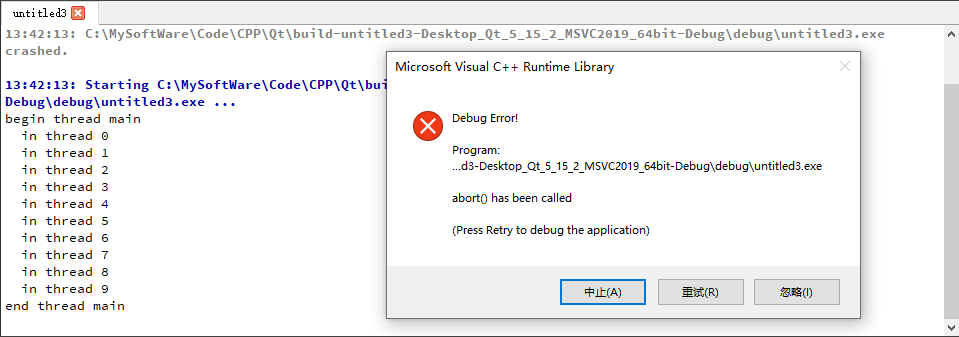
        // thread th(ThreadMain);  // 出错,thread对象被销毁可子线程还在执行
    }

    // 情景二
    {
        // thread th(ThreadMain);
        // th.detach();  // 子线程与主线程分离,守护线程
        // 坑, 主线程退出后, 子线程不一定会退出.
    }

    // 情景三
    {
        // thread th(ThreadMain);
        // th.join();  // 主线程堵塞,等待子线程退出0
    }

    // 情景四
    {
        // 改进,添加全局变量 is_exit
        thread th(ThreadMain);

        this_thread::sleep_for(800ms); // 模拟业务逻辑

        is_exit = true; // 通知子线程退出
        th.join();
        cout << "子线程已经退出..." << endl;
    }
    cout << "main quit..." << endl;
    return 0;
}
- 情景一,thread对象被销毁时,子线程依旧在执行
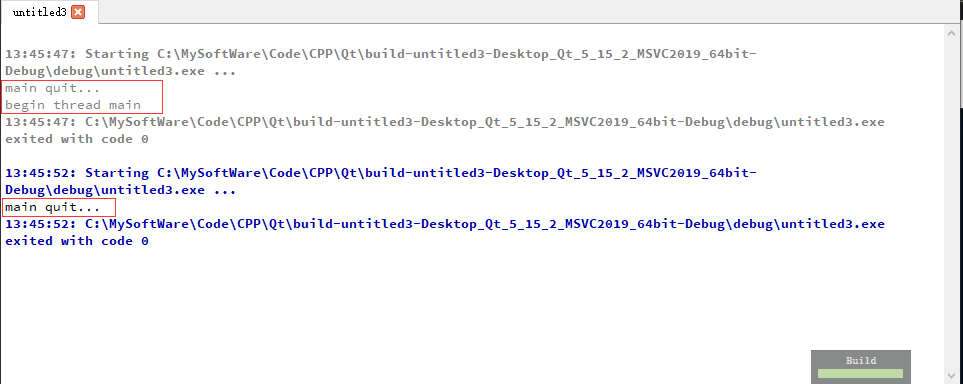
- 情景二,子线程与主线程分离,守护线程。
上面的红框:主线程退出了,可子线程开始执行了也就是并没退出
下面的红框:看不出来子线程有没有执行结束
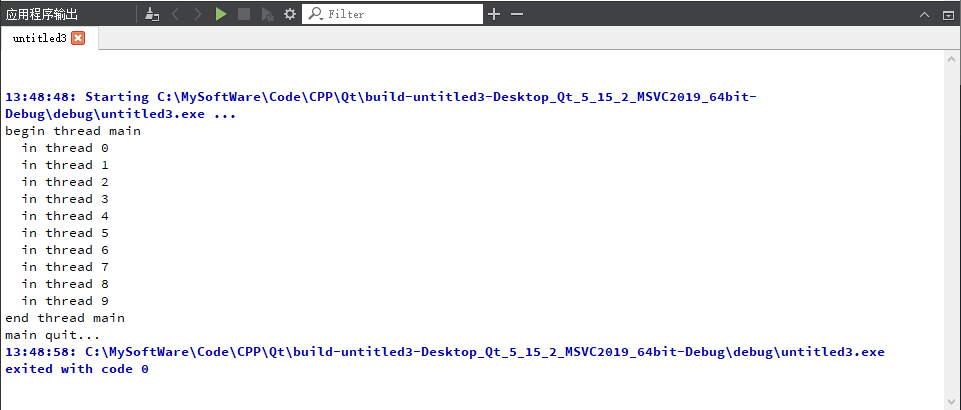
- 情景三,主线程会堵塞,一直等待子线程退出
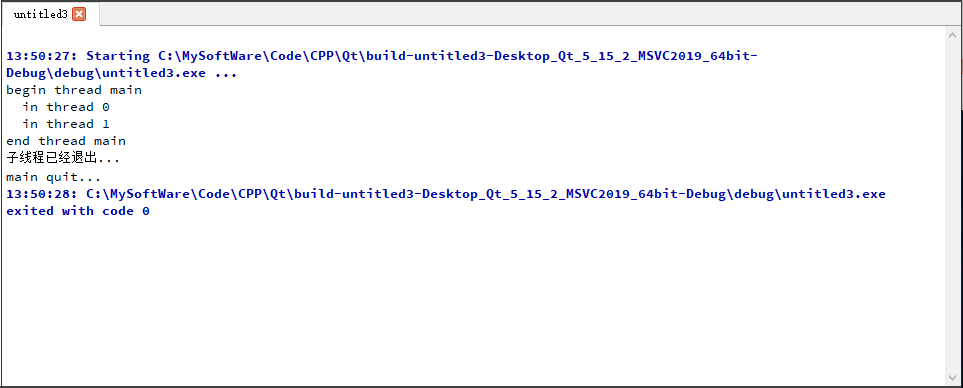
- 情景四,通过设置全局变量通知子线程退出
子线程循环里的sleep的时间为100ms,主线程中sleep的时间为800ms。运行后,子线程的for循环i=8的时候主线程就结束了,然后子线程也结束了。
1.3 C++11线程创建的多种方式
1.3.1 全局函数作为线程入口
如何传递参数
- C++11 内部如何实现参数传递
- C++11 thread源码分析
```cpp
template
, thread>, int> = 0> explicit thread(_Fn&& _Fx, _Args&&… _Ax) { using _Tuple = tuple<decay_t<_Fn>, decay_t<_Args>...>; auto _Decay_copied = _STD make_unique<_Tuple>(_STD forward<_Fn>(_Fx), _STD forward<_Args>(_Ax)...); constexpr auto _Invoker_proc = _Get_invoke<_Tuple>(make_index_sequence<1 + sizeof...(_Args)>{});
pragma warning(push)
pragma warning(disable : 5039) // pointer or reference to potentially throwing function passed to
                            // extern C function under -EHc. Undefined behavior may occur
                            // if this function throws an exception. (/Wall)
    _Thr._Hnd =
        reinterpret_cast<void*>(_CSTD _beginthreadex(nullptr, 0, _Invoker_proc, _Decay_copied.get(), 0, &_Thr._Id));
pragma warning(pop)
    if (_Thr._Hnd) { // ownership transferred to the thread
        (void) _Decay_copied.release();
    } else { // failed to start thread
        _Thr._Id = 0;
        _Throw_Cpp_error(_RESOURCE_UNAVAILABLE_TRY_AGAIN);
    }
}
基于模板函数,可以让任意函数都可以传递,不会限制类型。所有参数都拷贝到列表中,然后扔到线程句柄中。
```cpp
#include <thread>
#include <iostream>
#include <string>

using namespace std;

void ThreadMain(int p1, float p2, string str)
{
    this_thread::sleep_for(100ms);
    cout << "ThreadMain " << p1 << " " << p2 << " " << str << endl;
}

int main()
{
    thread th;
    {
        float f1 = 12.1f;
        // 所有的参数做赋值
        th = thread(ThreadMain, 101, f1, "test string para");
    }
    th.join();
    return 0;
}
// 输出: ThreadMain 101 12.1 test string para
如果将类传递给线程:
#include <iostream>
#include <string>
#include <thread>

using namespace std;

class Para {
public:
    Para()
    {
        cout << "default Para" << endl;
    }

    Para(const Para& p)
    {
        cout << "Copy Para" << endl;
    }

    ~Para()
    {
        cout << "Drop Para" << endl;
    }
    string name;
};

void ThreadMain(Para para)
{
    this_thread::sleep_for(100ms);
    cout << "ThreadMain " << para.name << endl;
}

int main()
{
    thread th;
    {
        Para p;
        p.name = "test para class";

        // 所有的参数做赋值
        th = thread(ThreadMain, p);
    }
    th.join();
    return 0;
}
运行可见,类的析构函数被调用三次: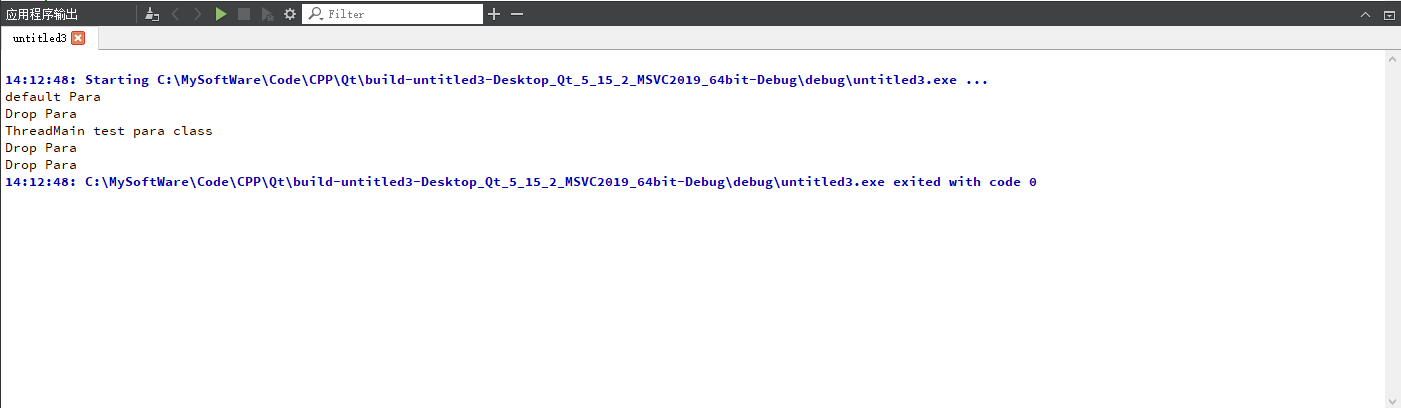
- main函数调用一次
- thread函数拷贝时调用一次(通过拷贝构造函数查看)
- thread里的回调函数又调用了一次
使用拷贝构造函数时,可直观看到默认构造函数调用一次,拷贝构造函数调用两次,析构函数调用三次: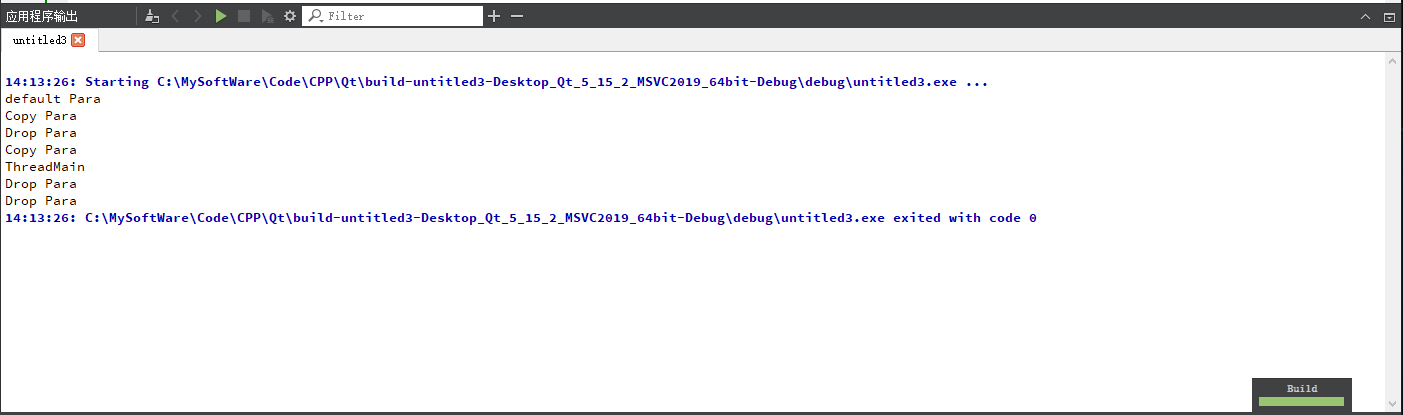
参数传递的一些坑
传递空间已经销毁 多线程共享访问一块空间 传递的指针变量的生命周期小于线程
#include <iostream>
#include <string>
#include <thread>

using namespace std;

class Para {
public:
    Para()
    {
        cout << "Create Para" << endl;
    }

    Para(const Para& p)
    {
        cout << "Copy Para" << endl;
    }

    ~Para()
    {
        cout << "Drop Para" << endl;
    }
    string name;
};

void ThreadMainRef(Para& para)
{
    this_thread::sleep_for(10ms);
    cout << "ThreadMain para->name: " << para.name << endl;
}

void ThreadMainPtr(Para* para)
{
    this_thread::sleep_for(10ms);
    cout << "ThreadMain para->name: " << para->name << endl;
}

int main()
{
    // 指针
    // 情景一: 使用 join
    {
        Para p;
        p.name = "test para class";
        this_thread::sleep_for(5ms);
        thread th(ThreadMainPtr, &p);
        th.join();
    }

    // 情景二: 使用 detach
    {
        //        Para p;
        //        p.name = "test para class";
        //        thread th(ThreadMainPtr, &p);
        //        th.detach();
    }

    // 引用
    // 情景三
    {
        //        Para p;
        //        p.name = "test para class";
        //        thread th(ThreadMainRef, ref(p));
        //        th.join();
    }
    return 0;
}
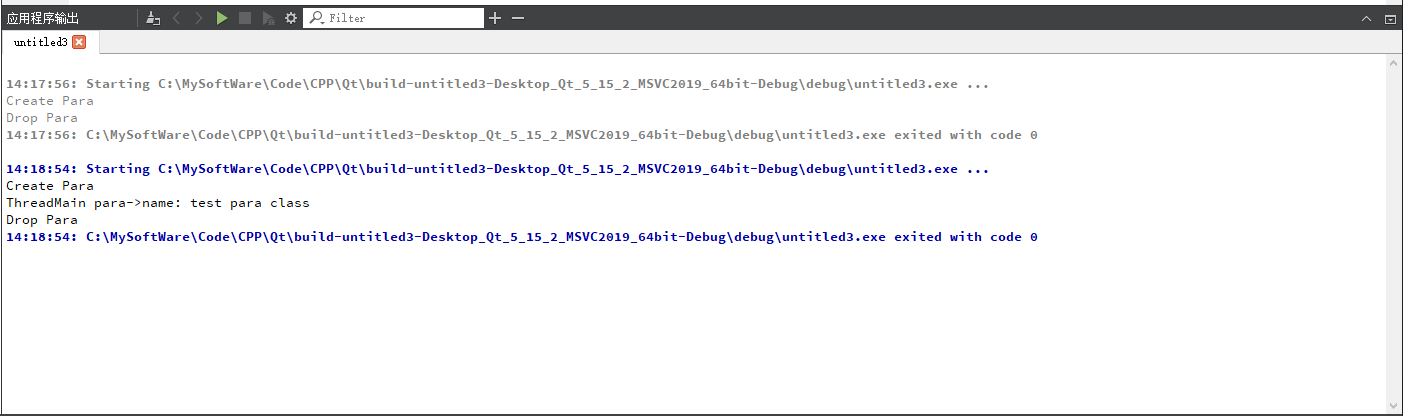
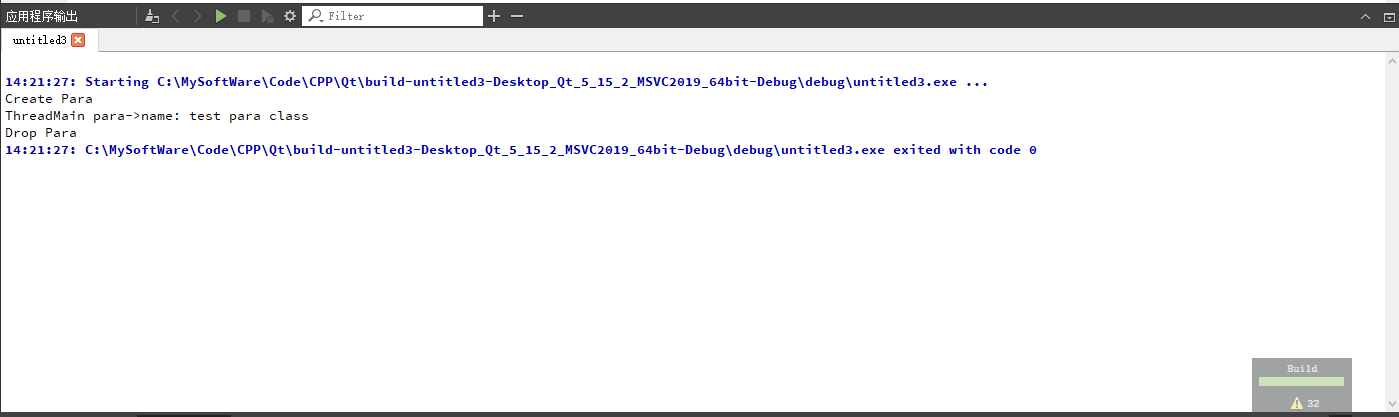
- 情景一:
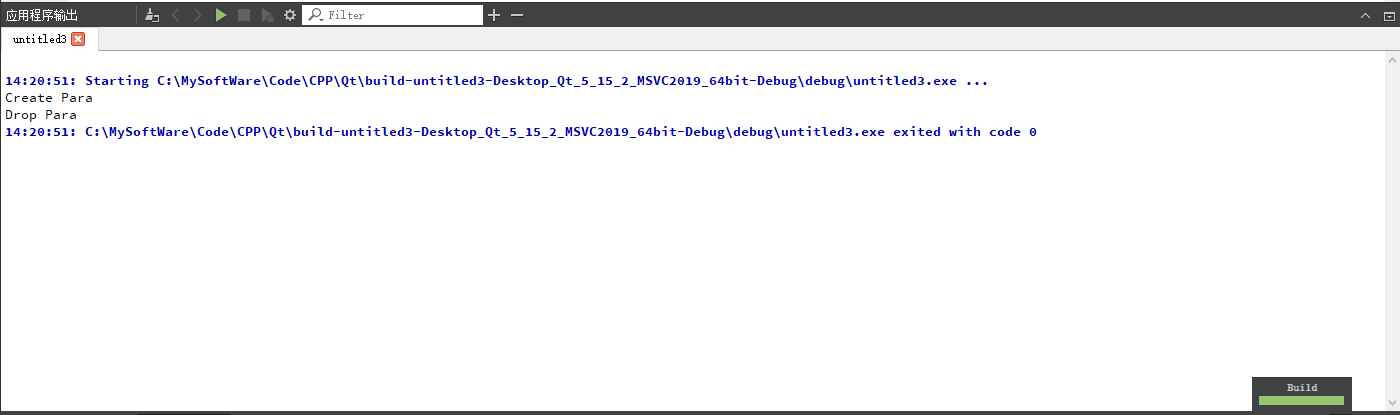
- 情景二 线程访问的p空间会提前释放
- 情景三 引用 注意传递给线程的参数加上
ref(),告诉线程这个是引用
1.3.2 成员函数作为线程入口
接口调用和参数传递
#include <iostream>
#include <thread>

using namespace std;

class MyThread {
public:
    // 入口线程函数
    void Main()
    {
        cout << "MyThread Main " << name << ": " << age << endl;
    }

    string name = "";
    int age = 100;
};
int main()
{
    MyThread myTh;
    myTh.name = "Test name 001";
    myTh.age = 20;
    // 参数一: 成员函数的地址; 参数二: 类对象的地址
    thread th(&MyThread::Main, &myTh);
    th.join();
}

// 输出:MyThread Main Test name 001: 20
线程基类封装
#include <iostream>
#include <thread>

using namespace std;

class XThread {
public:
    virtual void Start()
    {
        is_exit_ = false;
        th_ = std::thread(&XThread::Main, this);
    }

    virtual void Stop()
    {
        is_exit_ = true;
        Wait();
    }

    virtual void Wait()
    {
        if (th_.joinable()) {
            th_.join();
        }
    }

    bool is_exit()
    {
        return is_exit_;
    }

private:
    virtual void Main() = 0;

    bool is_exit_; // 退出条件, start时设为true

    std::thread th_;
};

class TestXThread : public XThread {
public:
    void Main() override
    {
        cout << "MyThread Main begin" << endl;
        while (!is_exit()) {
            this_thread::sleep_for(100ms);
            cout << "." << flush;
        }
        cout << endl
             << "MyThread Main end" << endl;
    }
    string name;
};

int main()
{
    TestXThread testTh;
    testTh.name = "Test name 001";
    testTh.Start();
    this_thread::sleep_for(3000ms);
    testTh.Stop();
}
1.4 lambad临时函数作为线程入口函数
lambda函数,其基本格式如下 [捕捉列表] ( 参数 ) mutable -> 返回值类型 { 函数体 }
lambda线程示例
thread t( [](){
    cout << "hello world from lambda thread.";
} )
普通全局函数的lambda表达式
#include <iostream>
#include <thread>

using namespace std;

int main()
{
    thread th(
        [](int i) {
            cout << "test lmbda " << i << endl;
        },
        123);
    th.join();
}
类成员的lambda表达式
#include <iostream>
#include <thread>

using namespace std;

class TestLambda {
public:
    void Start()
    {
        thread th([this /* = */]() { // 注意 this传导
            cout << "name = " << name << endl;
        });
        th.join();
    }

    string name = "test lambad";
};

int main()
{
    TestLambda test;
    test.Start();
}

若有收获,就点个赞吧
0 人点赞


