1.第一个makefile编译C++多文件项目示例
1.1 代码准备
xdata.h
#ifndef XDATA_H#define XDATA_Hclass XData {public:XData();};#endif
xdata.cpp
#include "xdata.h"#include <iostream>using namespace std;XData::XData(){cout << "create xdata" << endl;}
make_file.cpp
#include "xdata.h"#include <iostream>#include <thread>using namespace std;void MyThread(){cout << "thread main" << endl;}int main(){thread th(MyThread);cout << "main hello world" << endl;th.join();XData x;}
1.2 makefile文件编写
first_make: first_make.cpp xdata.cppg++ first_make.cpp xdata.cpp -o first_make -lpthread
Makefile 目标规则的一般语法形式:
target [target...] : [dependent ....][ command ...]
- first_make为目标文件
- first_make.cpp xdata.cpp为目标所依赖的文件
- g++ first_make.cpp xdata.cpp -o first_make -lpthread中-lpthread是引入的C++11的线程库
1.3 执行
在终端中输入:
执行后会看到输出:make
g++ first_make.cpp xdata.cpp -o first_make -lpthread
2.g++分步编译演示从源码到执行程序的四步
3.makefile运行流程分析并使用变量改写项目
3.1 makefile运行流程分析
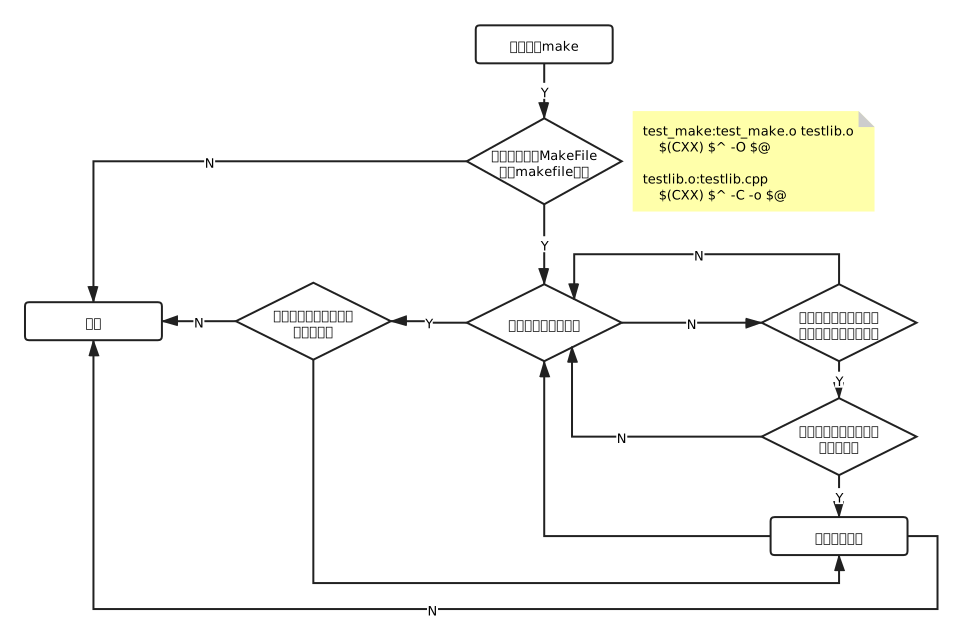
3.2 makefile文件主要包含的五部分内容
- 显式规则。说明了如何生成一个或多个目标文件。由makefile文件的创作者指出,包括要生成的文件、文件的依赖文件、生成的命令。
- 隐式规则。由于make有自动推导的功能,所以隐式的规则可以比较粗糙地简略书写makefile文件,这是由make所支持的。
- 变量定义。在makefile文件中要定义一系列的变量,变量一般都是字符串, 这与C语言中的宏有些类似。当makefile文件执行时,其中的变量都会扩展到相应的引用位置上。
- 文件指示。其包括3个部分,一个是在一个makefile文件中引用另一个 makefile文件;另一个是指根据某些情况指定makefile文件中的有效部分;还有就是定义一个多行的命令。
- 注释。makefile文件中只有行注释,其注释用“#”字符。如果要在makefile文件中使用“#”字符,可以用反斜框进行转义,如:“#”。
3.3 变量
3.3.1 makefile中常见的预定义变量
作为程序名称的宏(如CC)
| 命令格式 | 含义 |
|---|---|
| AR | 档案保存程序,默认是ar |
| AS | 汇编程序的名称,默认为as |
| CC | C编译器的名称,默认为cc |
| CPP | C预编译器的名称,默认值为$(CC) -E |
| CXX | C++编译器的名称,默认值为g++ |
| FC | FORTRAN编译器的名称,默认值为f77 |
| RM | 删除文件的命令,默认是 rm -f |
包含程序参数的宏(如CFLAGS)
| 命令格式 | 含义 |
|---|---|
| ARFLAGS | 库文件维护程序的选项,无默认值 |
| ASFLAGS | 汇编程序的选项,无默认值 |
| CFLAGS | C编译器的选项,无默认值 |
| CPPFLAGS | C预编译器的选项,无默认值 |
| CXXFLAGS | C编译器的选项,无默认值 |
| FFLAGS | FORTRAN编译器的选项,无默认值 |
3.3.2 makefile变量的使用
first_make: first_make.cpp xdata.cppg++ first_make.cpp xdata.cpp -o first_make -lpthread
将上面的makefile文件改写:
# $^ 依赖 不重复# $@ 目标# @ 不显示命令执行 -失败不停止TARGET=first_makeLIBS=-lpthread$(TARGET):first_make.cpp xdata.cppecho "begin build $(TARGET)"$(CXX) $^ -o $@ $(LIBS)echo "$(TARGET) build success!"
执行后会输出:
echo "begin build first_make"
begin build first_make
g++ first_make.cpp xdata.cpp -o first_make -lpthread
echo "first_make build success!"
first_make build success!
若要不输出command,则需要在command前加@符号,如:
TARGET=first_make
LIBS=-lpthread

$(TARGET):first_make.cpp xdata.cpp
    @echo "begin build $(TARGET)"
    @$(CXX) $^ -o $@ $(LIBS)
    @echo "$(TARGET) build success!"
这样执行后输出的内容为:
begin build first_make
first_make build success!
4.makefile自动推导目标代码配置和伪目标clean清理
4.1 makefile自动推导目标代码配置
讲makefile文件中的first_make.cpp xdata.cpp更改为first_make.o xdata.o后执行:
├── first_make
├── first_make.cpp
├── first_make.o
├── makefile
├── xdata.cpp
├── xdata.h
└── xdata.o
会生成.o文件
>>>>>>>>>>>>>>>>>>>>>>>>>>>>>>>>>>>>>>>>>>>>>>>>>>>>>>>>>>>>>>>
新建头文件 test.h:
//test_gcc
#define CONF_PATH "/usr/local/xcj/"
目录结构为:
.
├── first_make
│   ├── first_make.cpp
│   ├── makefile
│   ├── xdata.cpp
│   └── xdata.h
└── test_gcc
    └── test.h
然后在first_make.cpp文件中导入test.h头文件,最后执行make,会看到如下报错信息:
begin build first_make
first_make.cpp:4:10: fatal error: test.h: No such file or directory
    4 | #include "test.h"
      |          ^~~~~~~~
compilation terminated.
make: *** [makefile:6: first_make] Error
原因是没有找到该文件,故修改makefile文件,增加CXXFLAGS选项,即:
TARGET=first_make
LIBS=-lpthread
OBJS=first_make.o xdata.o

CXXFLAGS=-I../test_gcc

$(TARGET):$(OBJS)
    @echo "begin build $(TARGET)"
    @$(CXX) $^ -o $@ $(LIBS)
    @echo "$(TARGET) build success!"
4.2 伪目标clean清理
在makefile文件中增加:
TARGET=first_make
LIBS=-lpthread
OBJS=first_make.o xdata.o
CXXFLAGS=-I../test_gcc
$(TARGET):$(OBJS)
    @echo "begin build $(TARGET)"
    @$(CXX) $^ -o $@ $(LIBS)
    @echo "$(TARGET) build success!"

clean:
    $(RM) $(OBJS) $(TARGET)
.PHONY: clean *clean
然后 make,生成.o文件和目标文件
最后 make clean 将生成的.o文件和目标文件删除
5.使用make编译动态链接库并编写测试项目
5.1 动态链接库
-fPIC 编译选项
-fPIC if supported for the target machine, emit position-independant code, suitable for dynamic linking, even if branches need large displacements.
产生位置无关代码(PIC),一般创建共享库时用到。
在x86上,PIC的代码的符号引用都是通过ebx进行操作的。
-shared
- g++ -shared -fPIC mylib.cpp -o libmylib.so
- g++ test.cpp -lmylib -L/root/cpp
!/bin/sh
- LD_LIBRARY_PATH=./;
- export LD_LIBRARY_PATH
- ./testjin’t
5.2 静态链接库
- 静态库 ar -crv libmylib.a mylib.o
- [c] - do not warn if the library had to be created 不显示创建
- [v] - be verbose 显示过程
- r - replace existing or insert new file(s) into the archive 创建静态库
5.3 示例代码(动态库和静态库)
5.3.1 代码目录层级
.
├── xcom
│   ├── xcom.cpp
│   └── xcom.h
├── xserver
│   ├── makefile
│   └── xserver.cpp
└── xthread
    ├── makefile
    ├── xthread.cpp
    └── xthread.h
5.3.2 xthread目录(动态库)
xthread.h
#ifndef XTHREAD_H
#define XTHREAD_H
#include <thread>

class XThread {
public:
    virtual void start();
    virtual void wait();

private:
    virtual void main() = 0;
    std::thread th_;
};

#endif
xthread.cpp
#include "xthread.h"
#include <iostream>

using namespace std;

void XThread::start()
{
    cout << "start thread." << endl;
    th_ = thread(&XThread::main, this);
}

void XThread::wait()
{
    cout << "begin wait thread" << endl;
    th_.join();
    cout << "end wait thread" << endl;
}
makefile
TARGET=libxthread.so
OBJS=xthread.o
LDFLAGS=-shared
CXXFLAGS=-fPIC
$(TARGET): $(OBJS)
    $(CXX) $(LDFLAGS)  $^ -o $@

clean:
    $(RM) $(TARGET) $(OBJS)
.PHONY: clean
执行 make,生成 libxthread.so 动态库
5.3.3 xserver目录(添加动态库)
xserver.cpp
#include "xthread.h"
#include <iostream>
using namespace std;

class XTask : public XThread {
public:
    void main() override
    {
        cout << "XTask main" << endl;
    }
};
int main(int argc, char* argv[])
{
    cout << "XServer" << endl;
    XTask task;
    task.start();
    task.wait();
    return 0;
}
makefile
TARGET=xserver
OBJS=xserver.o
CXXFLAGS=-I../xthread
LDFLAGS=-L../xthread
LIBS=-lxthread -lpthread
$(TARGET):$(OBJS)
    $(CXX) $^ -o $@ $(LDFLAGS) $(LIBS)

clean:
    $(RM) $(OBJS) $(TARGET)
.PHONY: clean
执行make,生成 xserver 目标文件。
如直接./xserver,则会抛错误,找不到 libxthread.so 动态库
./xserver: error while loading shared libraries: libxthread.so: cannot open shared object file: No such file or directory
则需要在终端设置:
LD_LIBRARY_PATH=./;
export LD_LIBRARY_PATH
然后运行,输出结果:
XServer
start thread.
begin wait thread
XTask main
end wait thread
5.3.4 xcom目录(静态库)
xcom.h
#ifndef XCOM_H
#define XCOM_H

class XCOM {
public:
    XCOM();
};
#endif
xcom.cpp
#include "xcom.h"
#include <iostream>

using namespace std;

XCOM::XCOM()
{
    cout << "create xcom" << endl;
}
makefile
TARGET=libxcom.a
OBJS=xcom.o
$(TARGET): $(OBJS)
    $(AR) -cvr $@ $^

clean:
    $(RM) $(OBJS) $(TARGET)
.PHONY: clean
5.3.5 xserver(添加静态库)
修改xserver.cpp
#include "xcom.h"
#include "xthread.h"
#include <iostream>

using namespace std;

class XTask : public XThread {
public:
    void main() override
    {
        cout << "XTask main" << endl;
    }
};

int main(int argc, char* argv[])
{
    cout << "XServer" << endl;
    XCom xcom;
    XTask task;
    task.start();
    task.wait();
    return 0;
}
修改makefile
TARGET=xserver
OBJS=xserver.o
CXXFLAGS=-I../xthread -I../xcom
LDFLAGS=-L../xthread -L../xcom
LIBS=-lxthread -lpthread -lxcom

$(TARGET):$(OBJS)
    $(CXX) $^ -o $@ $(LDFLAGS) $(LIBS)

clean:
    $(RM) $(OBJS) $(TARGET)
.PHONY: clean
5.3.6 最终的目录结构
.
├── xcom
│   ├── libxcom.a
│   ├── makefile
│   ├── xcom.cpp
│   ├── xcom.h
│   └── xcom.o
├── xserver
│   ├── libxcom.a
│   ├── libxthread.so
│   ├── makefile
│   ├── xserver
│   ├── xserver.cpp
│   └── xserver.o
└── xthread
    ├── libxthread.so
    ├── makefile
    ├── xthread.cpp
    ├── xthread.h
    └── xthread.o
5.3.7 通过ifeq语句实现静态和动态切换
修改xcom目录下的makefile文件
TARGET=libxcom
OBJS=xcom.o

# dynamic library or static library
ifeq ($(STATIC), 1)

# static library
TARGET:=$(TARGET).a
$(TARGET): $(OBJS)
    $(AR) -cvr $@ $^

else

# dynamic library
TARGET:=$(TARGET).so
LDFLAGS=-shared
CXXFLAGS=-fPIC
$(TARGET): $(OBJS)
    $(CXX) $(LDFLAGS) $^ -o $@
endif

clean:
    $(RM) $(OBJS) $(TARGET)
.PHONY: clean *clean
if else endif 中间的指令前不能有缩进
6. makefile函数使用wildcard自动添加目录下源码生成.o
6.1 makefile函数
6.1.1 wildcard
展开为已经存在的、使用空格分开的、匹配此模式的所有文件列表
SRC=$(wildcart .cpp .h)
6.1.2 patsubst
格式:$(patsubst)
名称:模式字符串替换函数 —patsubst
TMP=$(patsubst %.cpp, %.o, $(SRC))
6.2 示例
test.cpp
#include <iostream>
void Test()
{
    std::cout << "Test\n";
}
main.cpp
#include "xdata.h"
#include <iostream>
using namespace std;
int main(int argc, char* argv[])
{
    extern void Test();
    Test();
    XData d;
    cout << "test make function" << endl;
    return 0;
}
xdata.h
class XData {
public:
    XData();
};
xdata.cpp
#include "xdata.h"
#include <iostream>
XData::XData()
{
    std::cout << "Create XData\n";
}
makefile
TARGET=test_make_func
SRC:=$(wildcard *.cpp)
OBJS=$(patsubst %.cpp,%.o,$(SRC))
$(TARGET):$(OBJS)
    $(CXX) $^ -o $@
执行makefile,终端输出如下:
g++    -c -o xdata.o xdata.cpp
g++    -c -o main.o main.cpp
g++    -c -o test.o test.cpp
g++ xdata.o main.o test.o -o test_make_fun
当前目录文件如下:
.
├── main.cpp
├── main.o
├── makefile
├── test.cpp
├── test_make_fun
├── test.o
├── xdata.cpp
├── xdata.h
└── xdata.o

若有收获,就点个赞吧
0 人点赞


