nodejs
-
npm
npm:node.js随同的第三方package包管理工具。
nvm
nvm(Node Version Manager 版本管理)。管理 node.js和 npm版本。
常用命令
list
作用描述
1s-MacBook-Air-5:~ a1$ nvm listv6.11.3-> v8.5.0systemdefault -> 8.5.0 (-> v8.5.0)node -> stable (-> v8.5.0) (default)stable -> 8.5 (-> v8.5.0) (default)iojs -> N/A (default)lts/* -> lts/boron (-> v6.11.3)lts/argon -> v4.8.4 (-> N/A)lts/boron -> v6.11.3
—help
Node Version ManagerNote: <version> refers to any version-like string nvm understands. This includes:- full or partial version numbers, starting with an optional "v" (0.10, v0.1.2, v1)- default (built-in) aliases: node, stable, unstable, iojs, system- custom aliases you define with `nvm alias foo`Any options that produce colorized output should respect the `--no-colors` option.Usage:nvm --help Show this messagenvm --version Print out the installed version of nvmnvm install [-s] <version> Download and install a <version>, [-s] from source. Uses .nvmrc if available--reinstall-packages-from=<version> When installing, reinstall packages installed in <node|iojs|node version number>--lts When installing, only select from LTS (long-term support) versions--lts=<LTS name> When installing, only select from versions for a specific LTS line--skip-default-packages When installing, skip the default-packages file if it exists--latest-npm After installing, attempt to upgrade to the latest working npm on the given node versionnvm uninstall <version> Uninstall a versionnvm uninstall --lts Uninstall using automatic LTS (long-term support) alias `lts/*`, if available.nvm uninstall --lts=<LTS name> Uninstall using automatic alias for provided LTS line, if available.nvm use [--silent] <version> Modify PATH to use <version>. Uses .nvmrc if available--lts Uses automatic LTS (long-term support) alias `lts/*`, if available.--lts=<LTS name> Uses automatic alias for provided LTS line, if available.nvm exec [--silent] <version> [<command>] Run <command> on <version>. Uses .nvmrc if available--lts Uses automatic LTS (long-term support) alias `lts/*`, if available.--lts=<LTS name> Uses automatic alias for provided LTS line, if available.nvm run [--silent] <version> [<args>] Run `node` on <version> with <args> as arguments. Uses .nvmrc if available--lts Uses automatic LTS (long-term support) alias `lts/*`, if available.--lts=<LTS name> Uses automatic alias for provided LTS line, if available.nvm current Display currently activated versionnvm ls List installed versionsnvm ls <version> List versions matching a given <version>nvm ls-remote List remote versions available for install--lts When listing, only show LTS (long-term support) versionsnvm ls-remote <version> List remote versions available for install, matching a given <version>--lts When listing, only show LTS (long-term support) versions--lts=<LTS name> When listing, only show versions for a specific LTS linenvm version <version> Resolve the given description to a single local versionnvm version-remote <version> Resolve the given description to a single remote version--lts When listing, only select from LTS (long-term support) versions--lts=<LTS name> When listing, only select from versions for a specific LTS linenvm deactivate Undo effects of `nvm` on current shellnvm alias [<pattern>] Show all aliases beginning with <pattern>nvm alias <name> <version> Set an alias named <name> pointing to <version>nvm unalias <name> Deletes the alias named <name>nvm install-latest-npm Attempt to upgrade to the latest working `npm` on the current node versionnvm reinstall-packages <version> Reinstall global `npm` packages contained in <version> to current versionnvm unload Unload `nvm` from shellnvm which [<version>] Display path to installed node version. Uses .nvmrc if availablenvm cache dir Display path to the cache directory for nvmnvm cache clear Empty cache directory for nvmExample:nvm install 8.0.0 Install a specific version numbernvm use 8.0 Use the latest available 8.0.x releasenvm run 6.10.3 app.js Run app.js using node 6.10.3nvm exec 4.8.3 node app.js Run `node app.js` with the PATH pointing to node 4.8.3nvm alias default 8.1.0 Set default node version on a shellnvm alias default node Always default to the latest available node version on a shellNote:to remove, delete, or uninstall nvm - just remove the `$NVM_DIR` folder (usually `~/.nvm`)
- package.json.package.json是npm内的一个包。包括了文件的配置信息,具体包括:元数据(名称,版本),所需模块(执行依赖和开发依赖)。
package.lock.json.是npm的一个包。作用:
(1)安装之后锁定包的版本,手动更改package.json文件安装将不会更新包,想更新只能使用npm install xxx@1.0.0 — save 方式更新 package.lock.json才可以。
(2)加快了 npm install速度,因为package.lock.json文件已经记录了整个 node_modules文件夹的树状结构,甚至记录模块的下载地址,重新安装的时候直接下载文件就可以。
综上。意义在于锁定了包的版本,确保能够避免包版本不同产生的问题。package.lock.json(A)和package.json(B)的区别:B主要用来定义项目所需要的包,A在 npm install时生成一份文件,用来记录当前安装的npm package的具体来源和版本号。
注: ‘^’ :
放在版本号之前,表示向后兼容依赖,说白了就是在大版本号不变的情况下,下载最新版的包
项目中引入的包版本号之前经常会加^号,每次在执行npm install之后,下载的包都会发生变化,为了系统的稳定性考虑,每次执行完npm install之后会对应生成package-lock文件,该文件记录了上一次安装的具体的版本号,相当于是提供了一个参考,在出现版本兼容性问题的时候,就可以参考这个文件来修改版本号即可。node,nvm,npm
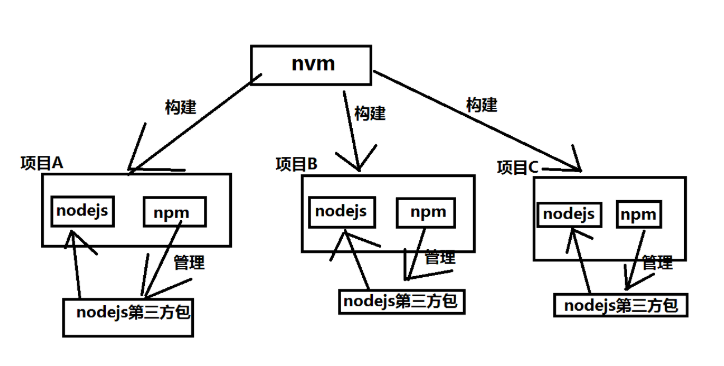
联系二: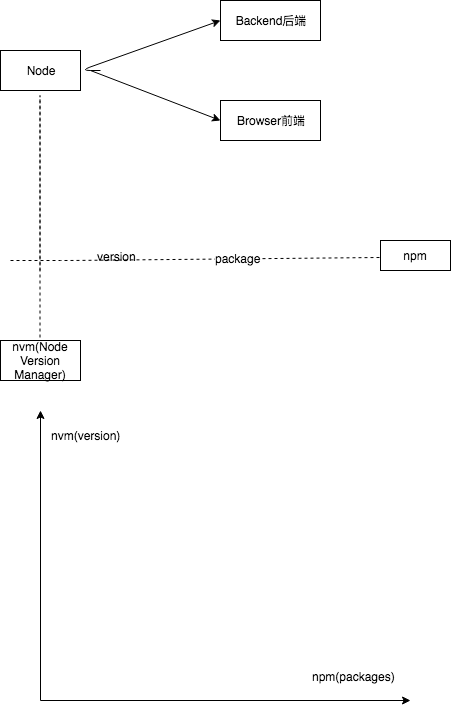

若有收获,就点个赞吧
0 人点赞


