由于在日历引用的时候出现了未发现的错误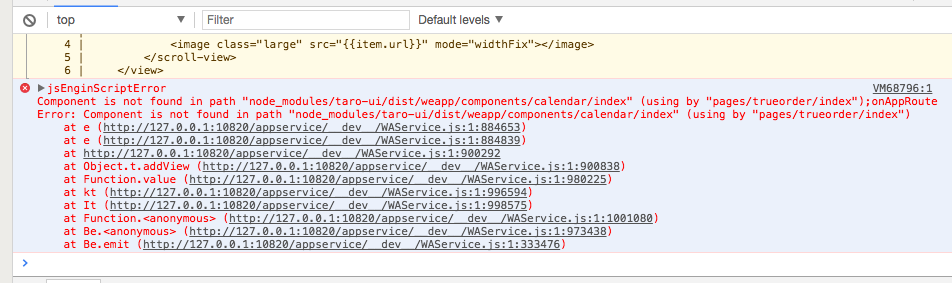
Example:nvm install 8.0.0 Install a specific version numbernvm use 8.0 Use the latest available 8.0.x releasenvm run 6.10.3 app.js Run app.js using node 6.10.3nvm exec 4.8.3 node app.js Run `node app.js` with the PATH pointing to node 4.8.3nvm alias default 8.1.0 Set default node version on a shellnvm alias default node Always default to the latest available node version on a shellNote:to remove, delete, or uninstall nvm - just remove the `$NVM_DIR` folder (usually `~/.nvm`)1s-MacBook-Air-5:samplate a1$ nvm install --lts v10.15.3Downloading and installing node v10.15.3...Downloading https://nodejs.org/dist/v10.15.3/node-v10.15.3-darwin-x64.tar.xz...######################################################################## 100.0%Computing checksum with shasum -a 256Checksums matched!Now using node v10.15.3 (npm v6.4.1)1s-MacBook-Air-5:samplate a1$ . ~/.bash_profileNow using node v10.15.3 (npm v6.4.1)1s-MacBook-Air-5:samplate a1$ node -vv10.15.31s-MacBook-Air-5:samplate a1$1s-MacBook-Air-5:samplate a1$ npm -v6.4.11s-MacBook-Air-5:samplate a1$1s-MacBook-Air-5:samplate a1$1s-MacBook-Air-5:samplate a1$1s-MacBook-Air-5:samplate a1$1s-MacBook-Air-5:samplate a1$ rm -rf node_modules1s-MacBook-Air-5:samplate a1$ npm i
版本4.8.3->6.4.1/8.1.0->10.15.3
未安装 taro-ui ,后来安装了以后缺少了 promise typefill 包,安装后失效。从头开始安装,发现还是不行。后来发现是原来引用了 cnpm , 后来使用了 cnpm i ,后来又出现了新的问题,watch的时候缺失 modules ,添加以后发现最后缺失一个包,无法安装,后来去网站查看了一下,是由于版本低的缘故,需要安装新版本,为了避免新旧版本不兼容的问题,需要卸载旧版本的依赖
1s-MacBook-Air-5:samplate a1$ rm -rf node_modules1s-MacBook-Air-5:samplate a1$ npm inpm WARN deprecated kleur@2.0.2: Please upgrade to kleur@3 or migrate to 'ansi-colors' if you prefer the old syntax. Visit <https://github.com/lukeed/kleur/releases/tag/v3.0.0\> for migration path(s).npm WARN deprecated circular-json@0.3.3: CircularJSON is in maintenance only, flatted is its successor.⸨ ░░░░░░⸩ ⠼ extract:core-js: sill extract array-flatten@2.1.2
之后再进行 taro build —type weapp —watch 就可以了。
细节
ls -la node_modules/ 是查看当前 node_modules/的所有文件,包括隐藏目录
再次执行 npm i 前面一次是安装,这次显示已经装完
执行watch ,发现不存在。是因为换了新版本,原来的 taro-cli 不存在的,
再次安装taro-cli npm install -g @tarojs/cli
再次watch,成功了。
1s-MacBook-Air-5:samplate a1$ ls -la node_modules/total 0drwxr-xr-x 833 a1 staff 26656 3 28 09:25 .drwxr-xr-x 14 a1 staff 448 3 28 09:24 ..drwxr-xr-x 48 a1 staff 1536 3 28 09:22 .bindrwxr-xr-x 11 a1 staff 352 3 28 09:22 @babeldrwxr-xr-x 19 a1 staff 608 3 28 09:22 @tarojs......drwxr-xr-x 9 a1 staff 288 3 28 09:22 yargs-parser1s-MacBook-Air-5:samplate a1$ npm iaudited 13974 packages in 9.479sfound 0 vulnerabilities1s-MacBook-Air-5:samplate a1$ taro build --type weapp --watch-bash: taro: command not found1s-MacBook-Air-5:samplate a1$ taro build --type weapp --watch-bash: taro: command not found1s-MacBook-Air-5:samplate a1$ npm i taro-ui -S+ taro-ui@2.0.2updated 1 package and audited 13974 packages in 12.765sfound 0 vulnerabilities1s-MacBook-Air-5:samplate a1$ taro build --type weapp --watch-bash: taro: command not found1s-MacBook-Air-5:samplate a1$ taro build --type weapp --watch-bash: taro: command not found1s-MacBook-Air-5:samplate a1$ cd ~/github/1s-MacBook-Air-5:github a1$ cd samplate1s-MacBook-Air-5:samplate a1$ taro build --type weapp --watch-bash: taro: command not found1s-MacBook-Air-5:samplate a1$ npm install -g @tarojs/clinpm WARN deprecated babel-plugin-remove-dead-code@1.3.2: use babel-plugin-minify-dead-code-elimination and babel-plugin-minify-guarded-expressions/Users/a1/.nvm/versions/node/v10.15.3/bin/taro -> /Users/a1/.nvm/versions/node/v10.15.3/lib/node_modules/@tarojs/cli/bin/taro> fsevents@1.2.7 install /Users/a1/.nvm/versions/node/v10.15.3/lib/node_modules/@tarojs/cli/node_modules/fsevents> node installnode-pre-gyp WARN Using needle for node-pre-gyp https download[fsevents] Success: "/Users/a1/.nvm/versions/node/v10.15.3/lib/node_modules/@tarojs/cli/node_modules/fsevents/lib/binding/Release/node-v64-darwin-x64/fse.node" is installed via remote+ @tarojs/cli@1.2.22added 852 packages from 725 contributors in 41.618s1s-MacBook-Air-5:samplate a1$ taro build --type weapp --watch👽 Taro v1.2.22开始编译项目 samplate生成 工具配置 dist/project.config.json编译 入口文件 src/app.js

若有收获,就点个赞吧
0 人点赞


