解决方法
比如在执行一篇指南的代码:相同的功能可以通过使用一个适当的事件处理程序,如onBlur和聚焦事件
class BlurExample extends React.Component {constructor(props) {super(props);this.state = { isOpen: false };this.timeOutId = null;this.onClickHandler = this.onClickHandler.bind(this);this.onBlurHandler = this.onBlurHandler.bind(this);this.onFocusHandler = this.onFocusHandler.bind(this);}onClickHandler() {this.setState(currentState => ({isOpen: !currentState.isOpen}));}// We close the popover on the next tick by using setTimeout.// This is necessary because we need to first check if// another child of the element has received focus as// the blur event fires prior to the new focus event.onBlurHandler() {this.timeOutId = setTimeout(() => {this.setState({isOpen: false});});}// If a child receives focus, do not close the popover.onFocusHandler() {clearTimeout(this.timeOutId);}render() {// React assists us by bubbling the blur and// focus events to the parent.return (<div onBlur={this.onBlurHandler}onFocus={this.onFocusHandler}><button onClick={this.onClickHandler}aria-haspopup="true"aria-expanded={this.state.isOpen}>Select an option</button>{this.state.isOpen ? (<ul><li>Option 1</li><li>Option 2</li><li>Option 3</li></ul>) : null}</div>);}}
代码执行结果为空。原因:我定义了class,却没有输出它。寻找了一个有输出的,并做了相对应的修改。
ReactDOM.render(<BlurExample />, document.getElementById('root'))
发现还是为空,对比了 html模块,发现没有显示 div 模块,添加了 div 模块 ,发现还是没有执行。发现是 JS 包 没有引入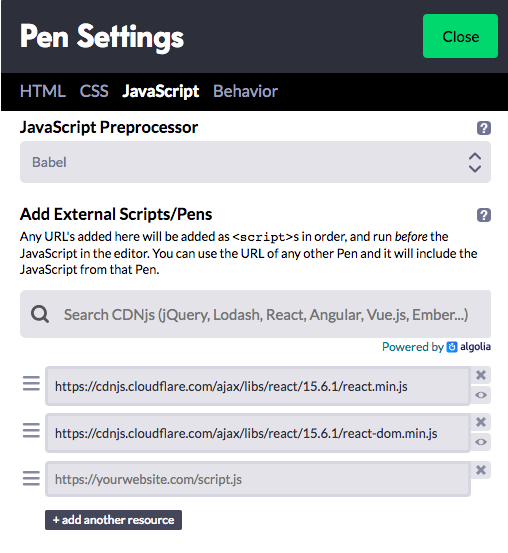
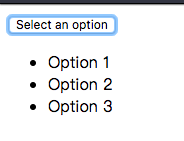
引入后,输出了正确的结果。
总结
- 如果JS 包能够在原来的项目中能够找到,直接引用就好,如果找不到,需要去 react 文档 寻找 相关的 JS 包。
- 当定义一个类或者对象的时候,需要做一个输出以及显示模块才能看到结果。

若有收获,就点个赞吧
0 人点赞


