多层div中时间实时更新的实现
state 通过渲染修改 UI,UI 通过事件修改数据流,数据流再次渲染来修改 state
class Clock extends React.Component {constructor(props) {super(props);this.state = {date: new Date()};}componentDidMount() { this.timerID = setInterval(() => this.tick(),1000);}componentWillUnmount() { clearInterval(this.timerID);}tick() {this.setState({date: new Date()});}render() {return(//如果 hello的 greeting-left-left写成greeting-left,蓝色的部分会分成左右两部分,//hello在左边,猫图片在右边<div className="greeting"><div className="greeting-left"><imgsrc="http://placekitten.com/g/64/64" /><div className="greeting-left-left">hello</div><p>{this.state.date.toLocaleString()}</p></div> <div className="greeting-right"><p>hi</p> </div> </div>);}}ReactDOM.render( <Clock />,document.getElementById('root'));
执行结果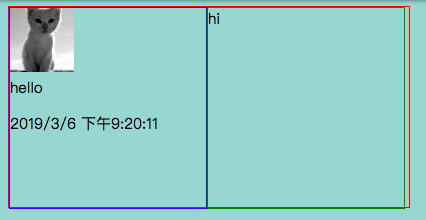
多层div的组合
class Clock extends React.Component {constructor(props) {super(props);this.state = {date: new Date()};}//当删除componentWillunmount函数或者函数内不写方法的时候的时候,函数处于安装状态,时间会实时更新。//当删除componentDidmount函数或者函数内不写方法的时候,函数处于卸载状态,实时更新没有意义,//时间会停在某个时刻。//注意不能删除tick函数,否则安装和卸载函数都不能调用时间,该时间没有意义,不会实时刷新,会停在某个时刻。// 安装和删除函数都显示的时候,默认调用安装函数。componentDidMount() { this.timerID = setInterval(() => this.tick(),1000);}componentWillUnmount() { clearInterval(this.timerID);}tick() {this.setState({date: new Date()});}render() {return (<div><h2>It is {this.state.date.toLocaleTimeString()}.</h2></div>);}}//<p>{this.state.date.toLocaleString()}</p>function Comment(props){const date = new Date();return(//如果 hello的 greeting-left-left写成greeting-left,蓝色的部分会分成左右两部分,//hello在左边,猫图片在右边/date.toLocaleString()加不加 +“”都可以,在 const date后,这个已经是字符串<div className="greeting"><div className="greeting-left"><imgsrc="http://placekitten.com/g/64/64"/><div className="greeting-left-left">hello</div> <p>{date.toLocaleString()+""}</p></div> <div className="greeting-right">hi</div></div>);}ReactDOM.render(<Comment />, document.getElementById('root'));
注意
class是 通过组件的渲染来实现 时间的实时更新的,function函数没有组件的方法,所以实时更新不能通过第二个案例来实现。

若有收获,就点个赞吧
0 人点赞


