HashMap 是一个散列表,它存储的内容是键值对(key-value)映射。 HashMap 实现了 Map 接口,根据键的 HashCode 值存储数据(底层是哈希表),具有很快的访问速度 HashMap 最多允许一条记录的键为 null HashMap 是一个线程不安全的集合,是多线程的集合,速度快、不支持线程同步。 HashMap 是无序的,即不会记录插入的顺序。 HashMap 继承于AbstractMap,实现了 Map、Cloneable、java.io.Serializable 接口 JDK1.8之前:数组+单向链表 JDK1.8之后:数组+单向链表|红黑树(链表的长度超过8):提高查询的速度
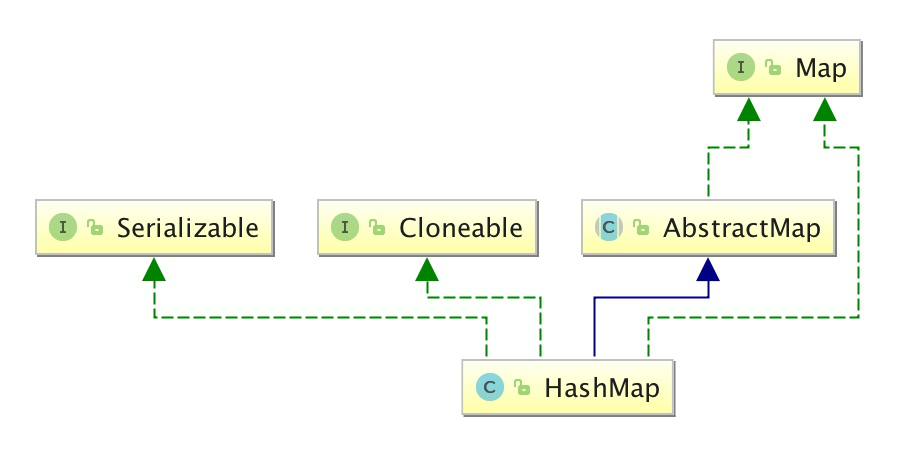
HashMap 的 key 与 value 类型可以相同也可以不同,可以是字符串(String)类型的 key 和 value,也可以是整型(Integer)的 key 和字符串(String)类型的 value。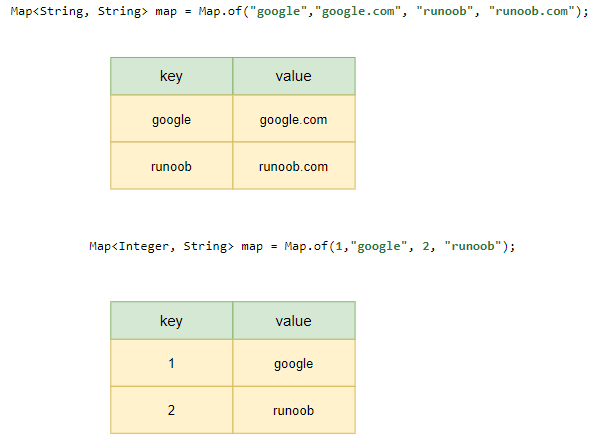
HashMap 中的元素实际上是对象,一些常见的基本类型可以使用它的包装类
基本类型对应的包装类表如下:
| 基本类型 | 引用类型 |
|---|---|
| boolean | Boolean |
| byte | Byte |
| short | Short |
| int | Integer |
| long | Long |
| float | Float |
| double | Double |
| char | Character |
HashMap 类位于 java.util 包中,使用前需要引入它,语法格式如下:import java.util.HashMap; // 引入 HashMap 类以下实例我们创建一个 HashMap 对象 Sites, 整型(Integer)的 key 和字符串(String)类型的 value:HashMap<Integer, String> Sites = new HashMap<Integer, String>();
添加元素
HashMap 类提供类很多有用的方法,添加键值对(key-value)可以使用 put() 方法:
import java.util.HashMap;public class Test {public static void main(String[] args) {// 创建 HashMap 对象 SitesHashMap<Integer, String> Sites = new HashMap<Integer, String>();// 添加键值对Sites.put(1, "Google");Sites.put(2, "Apple");Sites.put(3, "MicroSoft");System.out.println(Sites); // {1=Google, 2=Apple, 3=MicroSoft}}}
以下实例创建一个整型(String)的 key 和 整型(String)的 value:
import java.util.HashMap;

public class Test {
    public static void main(String[] args) {
        // 创建 HashMap 对象 Sites
        HashMap<String, String> Sites = new HashMap<String, String>();
        // 添加键值对
        Sites.put("one", "Google");
        Sites.put("two", "Apple");
        Sites.put("three", "MicroSoft");
        System.out.println(Sites); // {one=Google, two=Apple, three=MicroSoft}
    }
}
以下实例创建一个任意引用类型的 key 和 整型(String)的 value:
import java.util.HashMap;

public class Test {
  public static void main(String[] args) {
    // 创建 HashMap 对象 Sites
    HashMap<Object, String> Sites = new HashMap<Object, String>();
    // 添加键值对
    Sites.put(1, "Google");
    Sites.put("two", "Apple");
    Sites.put(3, "MicroSoft");
    System.out.println(Sites); // {1=Google, 2=Apple, 3=MicroSoft}
  }
}
访问元素
我们可以使用 get(key) 方法来获取 key 对应的 value:
import java.util.HashMap;

public class Test {
    public static void main(String[] args) {
        // 创建 HashMap 对象 Sites
        HashMap<Integer, String> Sites = new HashMap<Integer, String>();
        // 添加键值对
        Sites.put(1, "Google");
        Sites.put(2, "Apple");
        Sites.put(3, "MicroSoft");
        System.out.println(Sites.get(2)); // Apple
    }
}
删除元素
我们可以使用 remove(key) 方法来删除 key 对应的键值对(key-value):
import java.util.HashMap;

public class Test {
    public static void main(String[] args) {
        // 创建 HashMap 对象 Sites
        HashMap<Integer, String> Sites = new HashMap<Integer, String>();
        // 添加键值对
        Sites.put(10, "Google");
        Sites.put(20, "Apple");
        Sites.put(30, "MicroSoft");
        Sites.remove(10);
        System.out.println(Sites); // {20=Apple, 30=MicroSoft}
    }
}
删除所有键值对(key-value)可以使用 clear 方法:
import java.util.HashMap;

public class Test {
    public static void main(String[] args) {
        // 创建 HashMap 对象 Sites
        HashMap<Integer, String> Sites = new HashMap<Integer, String>();
        // 添加键值对
        Sites.put(10, "Google");
        Sites.put(20, "Apple");
        Sites.put(30, "MicroSoft");
        Sites.clear();
        System.out.println(Sites); // {}
    }
}
计算大小
如果要计算 HashMap 中的元素数量可以使用 size() 方法:
import java.util.HashMap;

public class Test {
    public static void main(String[] args) {
        // 创建 HashMap 对象 Sites
        HashMap<Integer, String> Sites = new HashMap<Integer, String>();
        // 添加键值对
        Sites.put(1, "Google");
        Sites.put(2, "Apple");
        Sites.put(3, "MicroSoft");
        System.out.println(Sites.size()); //3
    }
}
迭代 HashMap
可以使用 for-each 来迭代 HashMap 中的元素。
如果你只想获取 key,可以使用 keySet() 方法,然后可以通过 get(key) 获取对应的 value,如果你只想获取 value,可以使用 values() 方法
import java.util.HashMap;

public class Test {
    public static void main(String[] args) {
        // 创建 HashMap 对象 Sites
        HashMap<Integer, String> Sites = new HashMap<Integer, String>();
        // 添加键值对
        Sites.put(1, "Google");
        Sites.put(2, "Apple");
        Sites.put(3, "MicroSoft");

        // 输出 key 和 value
        for (Integer i : Sites.keySet()) {
            System.out.println("key: " + i + " value: " + Sites.get(i));
        }

        // 返回所有 value 值
        for (String value : Sites.values()) {
            System.out.print(value + ", "); // 输出每一个value
        }
    }
}

/*
key: 1 value: Google
key: 2 value: Apple
key: 3 value: MicroSoft
Google, Apple, MicroSoft
*/
Java HashMap 方法
Java HashMap 常用方法列表如下:
| 方法 | 描述 |
|---|---|
| clear() | 删除 hashMap 中的所有键/值对 |
| clone() | 复制一份 hashMap |
| isEmpty() | 判断 hashMap 是否为空 |
| size() | 计算 hashMap 中键/值对的数量 |
| put() | 将键/值对添加到 hashMap 中 |
| putAll() | 将所有键/值对添加到 hashMap 中 |
| putIfAbsent() | 如果 hashMap 中不存在指定的键,则将指定的键/值对插入到 hashMap 中。 |
| remove() | 删除 hashMap 中指定键 key 的映射关系 |
| containsKey() | 检查 hashMap 中是否存在指定的 key 对应的映射关系。 |
| containsValue() | 检查 hashMap 中是否存在指定的 value 对应的映射关系。 |
| replace() | 替换 hashMap 中是指定的 key 对应的 value。 |
| replaceAll() | 将 hashMap 中的所有映射关系替换成给定的函数所执行的结果。 |
| get() | 获取指定 key 对应对 value |
| getOrDefault() | 获取指定 key 对应对 value,如果找不到 key ,则返回设置的默认值 |
| forEach() | 对 hashMap 中的每个映射执行指定的操作。 |
| entrySet() | 返回 hashMap 中所有映射项的集合集合视图。 |
| keySet() | 返回 hashMap 中所有 key 组成的集合视图。 |
| values() | 返回 hashMap 中存在的所有 value 值。 |
| merge() | 添加键值对到 hashMap 中 |
| compute() | 对 hashMap 中指定 key 的值进行重新计算 |
| computeIfAbsent() | 对 hashMap 中指定 key 的值进行重新计算,如果不存在这个 key,则添加到 hasMap 中 |
| computeIfPresent() | 对 hashMap 中指定 key 的值进行重新计算,前提是该 key 存在于 hashMap 中。 |
更多 API 方法可以查看:https://www.runoob.com/manual/jdk11api/java.base/java/util/HashMap.html
模拟斗地主洗牌发牌
import java.util.ArrayList;
import java.util.Collections;
import java.util.HashMap;
import java.util.Set;

public class Poker {
    public static void main(String[] args) {

        // 1组装54张扑克牌
        // 1.1 创建Map集合存储
        HashMap<Integer, String> pokerMap = new HashMap<Integer, String>();
        // 1.2 创建 花色集合 与 数字集合
        ArrayList<String> colors = new ArrayList<String>();
        ArrayList<String> numbers = new ArrayList<String>();
        // 1.3 存储 花色 与数字
        Collections.addAll(colors, "♠", "♥", "♣", "♦");
        Collections.addAll(numbers, "2", "A", "K", "Q", "J", "10", "9", "8", "7", "6", "5", "4", "3");
        // 设置 存储编号变量
        int count = 1;
        pokerMap.put(count++, "大王");
        pokerMap.put(count++, "小王");
        // 1.4 创建牌 存储到map集合中
        for (String number : numbers) {
            for (String color : colors) {
                pokerMap.put(count++, color + number);
            }
        }


        // 2 将54张牌顺序打乱
        // 取出编号 集合
        Set<Integer> numberSet = pokerMap.keySet();
        // 因为要将编号打乱顺序 所以 应该先进行转换到 list集合中
        ArrayList<Integer> numberList = new ArrayList<Integer>();
        numberList.addAll(numberSet);
        Collections.shuffle(numberList);  // 打乱顺序

        // ArrayList<Integer> numberList = new ArrayList<>();
        // for (int i = 1; i <= 54; i++) { numberList.add(i); }
        // Collections.shuffle(numberList);


        // 3 完成三个玩家交替摸牌,每人17张牌,最后三张留作底牌
        // 3.1 发牌的编号
        // 创建三个玩家编号集合 和一个 底牌编号集合
        ArrayList<Integer> noP1 = new ArrayList<Integer>();
        ArrayList<Integer> noP2 = new ArrayList<Integer>();
        ArrayList<Integer> noP3 = new ArrayList<Integer>();
        ArrayList<Integer> dipaiNo = new ArrayList<Integer>();
        // 3.2发牌的编号
        for (int i = 0; i < numberList.size(); i++) {
            // 获取该编号
            Integer no = numberList.get(i);
            // 发牌
            // 留出底牌
            if (i >= 51) {
                dipaiNo.add(no);
            } else {
                if (i % 3 == 0) {
                    noP1.add(no);
                } else if (i % 3 == 1) {
                    noP2.add(no);
                } else {
                    noP3.add(no);
                }
            }
        }


        // 4 查看三人各自手中的牌(按照牌的大小排序)、底牌
        // 4.1 对手中编号进行排序
        Collections.sort(noP1);
        Collections.sort(noP2);
        Collections.sort(noP3);
        Collections.sort(dipaiNo);
        // 4.2 进行牌面的转换
        // 创建三个玩家牌面集合 以及底牌牌面集合
        ArrayList<String> player1 = new ArrayList<String>();
        ArrayList<String> player2 = new ArrayList<String>();
        ArrayList<String> player3 = new ArrayList<String>();
        ArrayList<String> dipai = new ArrayList<String>();
        // 4.3转换,根据编号找到 牌面 pokerMap 添加到对应的 牌面集合中
        for (Integer i : noP1) { player1.add(pokerMap.get(i)); }
        for (Integer i : noP2) { player2.add(pokerMap.get(i)); }
        for (Integer i : noP3) { player3.add(pokerMap.get(i)); }
        for (Integer i : dipaiNo) { dipai.add(pokerMap.get(i)); }
        // 4.5 查看
        System.out.println("令狐冲:" + player1);
        System.out.println("石破天:" + player2);
        System.out.println("鸠摩智:" + player3);
        System.out.println("底牌:" + dipai);
    }
}
计算一个字符串中每个字符出现次数
import java.util.*;

public class CalculationStringCount extends Object {
  public static void main(String[] args) {
    System.out.println("请输入字符串:www.ken.com");
    Scanner sc = new Scanner(System.in);
    String str = sc.next();

    HashMap<Object, Integer> map = new HashMap<>();

    for (char c : str.toCharArray()) {
      if (map.containsKey(c)) {
        Integer count = map.get(c);
        map.put(c, ++count);
      } else {
        map.put(c, 1);
      }
    }

    for (Map.Entry<Object, Integer> kv : map.entrySet()) {
      System.out.println(kv);
      // c=1
      // e=1
      // w=3
      // k=1
      // m=1
      // .=2
      // n=1
      // o=1
    }

    for (Integer v : map.values()) {
      System.out.println(v);
      // 1
      // 3
      // 1
      // 1
      // 2
      // 1
      // 1
    }

    for (Object o : map.keySet()) {
      System.out.println("{key:" + o + "," + "value:" + map.get(o) + "}");
      // {key:e,value:1}
      // {key:w,value:3}
      // {key:k,value:1}
      // {key:m,value:1}
      // {key:.,value:2}
      // {key:n,value:1}
      // {key:o,value:1}
    }

    sc.close();
  }
}

若有收获,就点个赞吧
0 人点赞


