一般地,当需要使用数字的时候,我们通常使用内置数据类型,如:byte、int、long、double 等
int a = 5000;float b = 13.65f;byte c = 0x4a;
然而,在实际开发过程中,我们经常会遇到需要使用对象,而不是内置数据类型的情形。为了解决这个问题,Java 语言为每一个内置数据类型提供了对应的包装类
所有的包装类(Byte、Short、Integer、Long、Float、Double)都是抽象类 Number 的子类
| 基本数据类型 | 包装类 |
|---|---|
| byte | Byte |
| short | Short |
| int | Integer |
| long | Long |
| float | Float |
| double | Double |
| boolean | Boolean |
| char | Character |
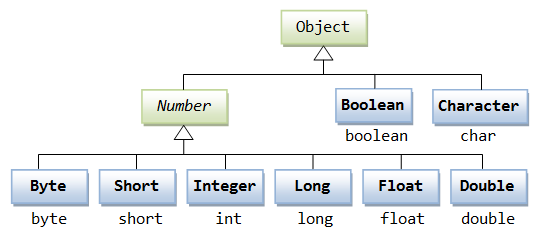
这种由编译器特别支持的包装称为装箱,所以当内置数据类型被当作对象使用的时候,编译器会把内置类型装箱为包装类。相似的,编译器也可以把一个对象拆箱为内置类型。Number 类属于 java.lang 包
装箱 从基本类型转换为对应的包装类对象 (基本数值->包装对象)
拆箱 从包装类对象转换为对应的基本类型 (包装对象->基本数值)
public class Test {
  public static void main(String[] args) {
      Integer i = new Integer(4);
      System.out.println(i);
      System.out.println(i.intValue());
      System.out.println(i.valueOf('a'));
  }
}

/*
4
4
97
*/
下面是一个使用 Integer 对象自动装箱拆箱的实例:
public class Test{
  public static void main(String args[]){
     Integer x = 5;
     x =  x + 10;
     System.out.println(x);
  }
}
/*
以上实例编译运行结果如下:
15
*/
当 x 被赋为整型值时,由于x是一个对象,所以编译器要对x进行装箱。然后,为了使x能进行加运算,所以要对x进行拆箱
Java Math 类
Java 的 Math 包含了用于执行基本数学运算的属性和方法,如初等指数、对数、平方根和三角函数
Math 的方法都被定义为 static 形式,通过 Math 类可以在主函数中直接调用
public class Test {
   public static void main(String[] args) {
      System.out.println("90 度的正弦值:" + Math.sin(Math.PI / 2));
      System.out.println("0度的余弦值:" + Math.cos(0));
      System.out.println("60度的正切值:" + Math.tan(Math.PI / 3));
      System.out.println("1的反正切值: " + Math.atan(1));
      System.out.println("π/2的角度值:" + Math.toDegrees(Math.PI / 2));
      System.out.println(Math.PI);
   }
}

/*
90 度的正弦值:1.0
0度的余弦值:1.0
60度的正切值:1.7320508075688767
1的反正切值: 0.7853981633974483
π/2的角度值:90.0
3.141592653589793
*/
Number & Math 类方法
java.lang.Math 类包含用于执行基本数学运算的方法,如初等指数、对数、平方根和三角函数。类似这样的工具 类,其所有方法均为静态方法,并且不会创建对象,调用起来非常简单
下面的表中列出的是 Number & Math 类常用的一些方法:
| xxxValue() | 将 Number 对象转换为xxx数据类型的值并返回 |
|---|---|
| compareTo() | 将number对象与参数比较 |
| equals() | 判断number对象是否与参数相等 |
| valueOf() | 返回一个 Number 对象指定的内置数据类型 |
| toString() | 以字符串形式返回值 |
| parseInt() | 将字符串解析为int类型 |
| abs() | 返回参数的绝对值 |
| ceil() | 返回大于等于( >= )给定参数的的最小整数,类型为双精度浮点型 |
| floor() | 返回小于等于(<=)给定参数的最大整数 |
| rint() | 返回与参数最接近的整数。返回类型为double |
| round() | 它表示四舍五入,算法为 Math.floor(x+0.5),即将原来的数字加上 0.5 后再向下取整,所以,Math.round(11.5) 的结果为12,Math.round(-11.5) 的结果为-11 |
| min() | 返回两个参数中的最小值 |
| max() | 返回两个参数中的最大值 |
| exp() | 返回自然数底数e的参数次方 |
| log() | 返回参数的自然数底数的对数值 |
| pow() | 返回第一个参数的第二个参数次方 |
| sqrt() | 求参数的算术平方根 |
| sin() | 求指定double类型参数的正弦值 |
| cos() | 求指定double类型参数的余弦值 |
| tan() | 求指定double类型参数的正切值 |
| asin() | 求指定double类型参数的反正弦值 |
| acos() | 求指定double类型参数的反余弦值 |
| atan() | 求指定double类型参数的反正切值 |
| atan2() | 将笛卡尔坐标转换为极坐标,并返回极坐标的角度值 |
| toDegrees() | 将参数转化为角度 |
| toRadians() | 将角度转换为弧度 |
| random() | 返回一个随机数 |
Math的floor、ceil、round 方法比较
| 参数 | Math.floor | Math.round | Math.ceil |
|---|---|---|---|
| 1.4 | 1 | 1 | 2 |
| 1.5 | 1 | 2 | 2 |
| 1.6 | 1 | 2 | 2 |
| -1.4 | -2 | -1 | -1 |
| -1.5 | -2 | -1 | -1 |
| -1.6 | -2 | -2 | -1 |
public class Main {
   public static void main(String[] args) {
      double[] nums = { 1.4, 1.5, 1.6, -1.4, -1.5, -1.6 };
      for (double num : nums) {
         test(num);
      }
   }

   private static void test(double num) {
      System.out.println("Math.floor(" + num + ")=" + Math.floor(num));
      System.out.println("Math.round(" + num + ")=" + Math.round(num));
      System.out.println("Math.ceil(" + num + ")=" + Math.ceil(num));
   }
}

/*
Math.floor(1.4)=1.0
Math.round(1.4)=1
Math.ceil(1.4)=2.0
Math.floor(1.5)=1.0
Math.round(1.5)=2
Math.ceil(1.5)=2.0
Math.floor(1.6)=1.0
Math.round(1.6)=2
Math.ceil(1.6)=2.0
Math.floor(-1.4)=-2.0
Math.round(-1.4)=-1
Math.ceil(-1.4)=-1.0
Math.floor(-1.5)=-2.0
Math.round(-1.5)=-1
Math.ceil(-1.5)=-1.0
Math.floor(-1.6)=-2.0
Math.round(-1.6)=-2
Math.ceil(-1.6)=-1.0
*/

若有收获,就点个赞吧
0 人点赞


