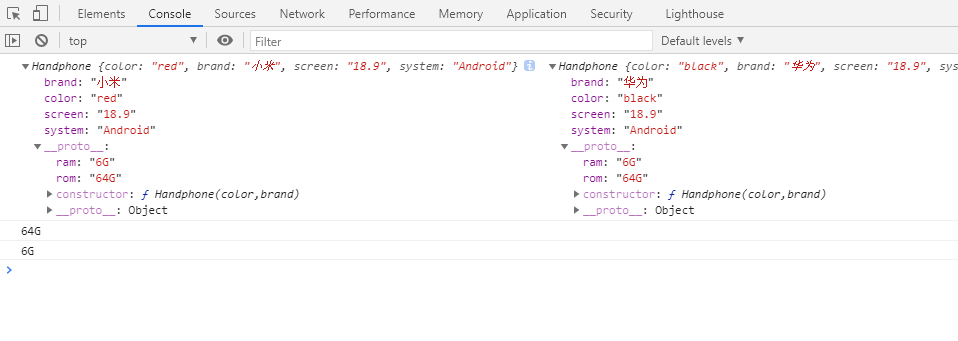
function Handphone(color,brand) {this.color = color;this.brand = brand;this.screen = '18.9';this.system = 'Android';}Handphone.prototype.rom = '64G';Handphone.prototype.ram = '6G';var hp1 = new Handphone('red','小米');var hp2 = new Handphone('black','华为');console.log(hp1,hp2);console.log(hp1.rom);console.log(hp2.ram);// 这个prototype是定义构造函数构造出的每个对象的公告祖先;
    function Handphone(color,brand) {
        this.color = color;
        this.brand = brand;
        this.screen = '18.9';
        this.system = 'Android';
    }
    Handphone.prototype.rom = '64G';
    Handphone.prototype.ram = '6G';
    Handphone.prototype.screen = '16:9';


    var hp1 = new Handphone('red','小米');
    var hp2 = new Handphone('black','华为');

    console.log(hp1.screen);
    console.log(hp2.screen);
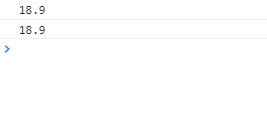
      //自身有的不会去公共祖先上找
    function Handphone(color,brand) {
        this.color = color; //需要传参配置的写到构造函数里
        this.brand = brand;
    }
    Handphone.prototype.rom = '64G';
    Handphone.prototype.ram = '6G';
    Handphone.prototype.screen = '16:9';  //其他写到原型里
    Handphone.prototype.system = 'Android';
    Handphone.prototype.call = function () {
        console.log('I am call')
    }

    var hp1 = new Handphone('red','小米');
    var hp2 = new Handphone('black','华为');

    console.log(hp1.screen);
    console.log(hp2.screen);
    hp2.call();

    function Person() {}
    Person.prototype.name = '张三';
    var p1 = {
        name: '李四'
    }
    var person = new Person();
    console.log(person.name);
    person.__proto__= p1;
    console.log(person.name);

    function Car() {}
        Car.prototype.name = 'Mazda';
        var car = new Car();
        Car.prototype.name = 'Benc';
        Car.prototype = {
            name:'Mazda'
        }
        console.log(car.name);

    function Car() {}
        Car.prototype.name = 'Mazda';
        Car.prototype = {
            name:'Benc'
        }
        var car = new Car();

        console.log(car.name);

        Professor.prototype.tSkill = 'JAVA';
        function Professor() {}
        var professor = new Professor();
        // var professor = {__proto__:Profressor.prototype}
        Teacher.prototype = professor;//{__proto__:Profressor.prototype}
        function Teacher() {
            this.mSkill = 'js/jq';
            this.success = {
                alibaba: '28',
                tencent: '30'
            }
        }
        var teacher = new Teacher();
        // var teacher = {__proto__:{__proto__:Profressor.prototype},mkill:'js/jq'}
        Student.prototype = teacher;
        function Student() {
            this.Skill = 'html';
        }
        var student = new Student();
        console.log(student)
        console.log(student.tSkill)

插件写法
        function test() {
            var a = 1;
            function plus1() {
                a++;
                console.log(a);
            }
            return plus1;
        }
        var plus = test();
        plus();
        plus();
        plus();

        function abc() {
            window.a=3;
        }
        abc();
        console.log(a);
        function test() {
            var a = 1;
            function add() {
                a++;
                console.log(a);
            }
            window.add = add;
        }
        test();
        add();
        add();
        add();

        var add = (function () {
          var a = 1;
           function add() {
               a++;
               console.log(a);
           }
           return add;
        })();
        add();
        add();
        add();

        (function () {
          var a = 1;
           function add() {
               a++;
               console.log(a);
           }
           window.add = add;
        })();
        add();
        add();
        add();
课后作业
        // 写一个插件,任意传两个数字,调用插件内部方法可进行加减乘除功能
        ;(function() {
          var Compute = function(opt){
            // this.x = opt.firstNum;
            // this.y = opt.secondNum;

          }
          Compute.prototype = {
            plus:function(opt){
              // console.log(this.x+this.y);
              return opt.firstNum+opt.secondNum;
            },
            minus:function(opt){
              // console.log(this.x-this.y);
              return opt.firstNum-opt.secondNum;
            },
            mul:function(opt){
              // console.log(this.x*this.y);
              return opt.firstNum*opt.secondNum;
            },
            div:function(opt){
              // console.log(this.x/this.y);
              return opt.firstNum/opt.secondNum;
            }
          }
          window.Compute = Compute;
        })();
        var  compute = new Compute({

        })
        console.log(compute.plus({firstNum:1,secondNum:2}))
        console.log(compute.minus({firstNum:1,secondNum:2}))
        console.log(compute.mul({firstNum:1,secondNum:2}))
        console.log(compute.div({firstNum:1,secondNum:2}))
课时10 - 原型、原型链、闭包立即执行函数、插件开发
(1) 原型 prototype
- 原型 prototype 其实是 function对象的一个属性,打印出来也是对象
2. 原型 prototype 是定义 构造函数 构造出来的 每个对象的公共祖先
3. 所有被该构造函数构造出来的对象都可以继承原型 prototype 上的属性和方法
4. 自己 this 上有的属性和方法是不会往原型上去查找
5. 当需要参数进行传值的时候一般写在 this中,写死的属性和方法写在原型 prototype上 // 经验
6. 原型中有个默认有个 constructor构造器,指向构造函数本身function Handphone(color, brand, system){ this.color = color; this.brand = brand; this.system = system; } Handphone.prototype = { rom: "64G", ram: '6G', screen: '18:9', call: function(){ console.log('I am calling somebody') } } var hp1 = new Handphone() console.log(hp1);// -> 指向一个对象 - constructor 原型上的 constructor 指向构造函数本身 constructor 是可以通过 Handphone.constructor 进
行修改的
8. proto
proto 属于每一个实例化对象
每个实例化对象的原型的容器,通过proto访问 prototype
9. 当构造函数被实例化new的时候,产生了this 对象,this对象中默认有一个 proto 里面装了原型
prototype(2) 插件开发
;(function(){
语句
})()

若有收获,就点个赞吧
0 人点赞


