1.封装获取元素节点(DOM节点)方法
写法一 数组写法
<body><div class="box" id="box" style="background-color: green;">我是文本节点<!-- 我是注释君 --><h1>我是标题标签</h1><a href="">我是超链接</a><p>我是段落标签</p></div></body><script src="./index.js"></script><script>var div = document.getElementsByTagName('div')[0]; //// 1.元素节点 = 1// 2.属性节点 = 2// 3.文本节点 text = 3// 4.注释节点 comment = 8// 5.document = 9// 6.DocumentFragement = 11// nodeName -> 元素节点的nodeName 大写 只读// nodeValue 可写 属性、注释、文本可用// nodeType 只读function elemChildren(node){var arr = [],children = node.childNodes;for(var i = 0;i<children.length;i++){var childItem = children[i];if(childItem.nodeType===1){arr.push(childItem);}}return arr;}console.log(elemChildren(div));</script>
写法二 类数组
var div = document.getElementsByTagName('div')[0];function elemChildren(node){var temp = {'length': 0,'push': Array.prototype.push,'splice': Array.prototype.splice},len = node.childNodes.length;for(var i = 0;i<len;i++){var childItem = node.childNodes[i];if(childItem.nodeType === 1){temp[temp['length']] = childItem;temp['length']++;// temp.push(childItem); push方法}}return temp;}console.log(elemChildren(div));
2.document的继承出处
document 构造函数 -> HTMLDocument 构造函数 -> Document
HTMLDocument 构造出来的对象里面有proto::Document.prototype
document.proto= HTMLDocument.prototype
HTMLDocument.prototype = Document.prototype
3.DOM结构树
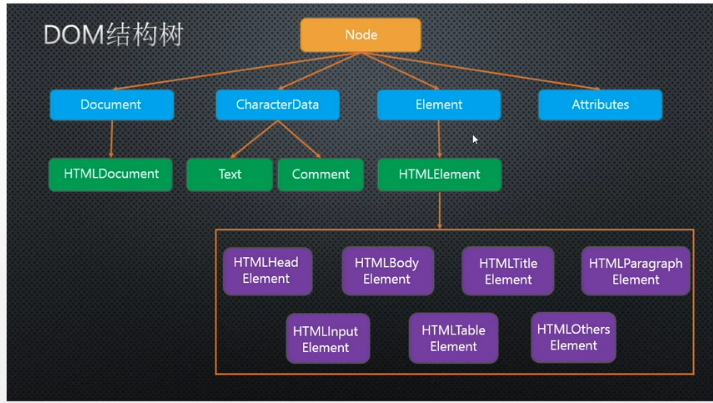
getElementById()
<body>
        <div>
        <p>123</p>
    </div>
</body>
<script src="./index.js"></script>
<script>
    // DOM操作深入
    //1 getElementById()
    //来自于Document.prototype

    //2. Element.prototype HTMLElement.prototype 没有
      var div = document.getElementById('div')[0];

    var p = div.getElementById('p')[0];
    console.log(p);

 </script>
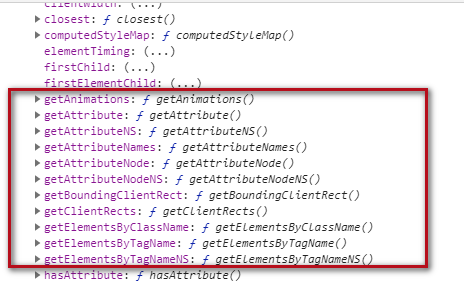

大意可以通过document获取元素a 但是无法通过元素a再获取子元素
dom div形成原理
        //div形成原理
        var div = document.getElementsByTagName('div')[0];
    <div>
        <p>123</p>
    </div> -> function HTMLDivElement() {
        div = new HTMLDivElement
    }
HTMLDivElement 继承于 HTMLElement
getElementByName()
Document.prototype 有<br />Element.prototype 没有
getElementsByTagName getElementsByClassName querySelector querySelectorAll
Document.prototype 有
Element.prototype 有
    var div = document.getElementsByTagName('div')[0];
    var p = div.getElementsByTagName('p')[0];
    console.log(p);

获取HTML head body 的原型方法
body:document.body
head:document.head
html:document.documentElment

作业

若有收获,就点个赞吧
0 人点赞


