绑定事件处理函数on
写法一
obj.onclick = functin(){}
写法二
obj.onclick = fn;function fn(){内容}
写法三 :当函数fn有参数的情况下使用匿名函数来传参
obj.onclick = function(){fn(param)};function fn(param){//内容}
行内事件监听器
<button onclick="test()">加载更多</button>
缺点:无法在同一个元素上绑定多个处理函数 后面的绑定函数会覆盖前面的绑定函数
    <style>
        .loading{
            background-color: cadetblue;
        }
    </style>
</head>
<body>
    <button>加载更多</button>
</body>
<script>
    var oBtn = document.getElementsByTagName('button')[0];

    oBtn.onclick = function(){
        this.innerHTML = '加载中....';
        this.className = 'loading';

        var self = this;
        setTimeout(function(){
            console.log(1);
            self.innerHTML = '加载更多';
            self.className = '';
        },2000);
    }
    oBtn.onclick = function(){
        console.log('加载更多数据');  //只会打印此处函数
    }
</script>
addEventListener
事件 函数名 是否捕获
addEventListener(event,funtionName,useCapture)
**
写法一
obj.addEventListener("click",function(){

//do something

}));
写法二 没参数可以直接写函数名
obj.addEventListener("click",fn,fasle));

function fn(){

//do something..

}
写法三 函数有参数时需要使用匿名函数来传递参数
obj.addEventListener("click",function(){fn(parm)},false);
优点:可以绑定多个事件处理函数 W3C规范
缺点:IE9不兼容,
<!DOCTYPE html>
<html lang="en">
<head>
    <meta charset="UTF-8">
    <meta http-equiv="X-UA-Compatible" content="IE=edge">
    <meta name="viewport" content="width=device-width, initial-scale=1.0">
    <title>Document</title>
    <style>
        .loading{
            background-color: cadetblue;
        }
    </style>
</head>
<body>
    <button>加载更多</button>
</body>
<script>
    var oBtn = document.getElementsByTagName('button')[0];
    oBtn.addEventListener('click',function(){
        this.innerHTML = '加载中....';
        this.className = 'loading';
        var self = this;
        setTimeout(function(){
            self.innerHTML = '加载更多';
            self.className = '';
        },2000);
    },false)

    oBtn.addEventListener('click',function () {
        console.log('加载更多数据');
    },false)

</script>
</html>

IE8及以下的绑定方法
attachEvent(事件类型,事件处理函数)
此函数的内部的this指向window
<!DOCTYPE html>
<html lang="en">
<head>
    <meta charset="UTF-8">
    <meta http-equiv="X-UA-Compatible" content="IE=edge">
    <meta name="viewport" content="width=device-width, initial-scale=1.0">
    <title>Document</title>
    <style>
        .loading{
            background-color: cadetblue;
        }
    </style>
</head>
<body>
    <button>加载更多</button>
</body>
<script>
    var oBtn = document.getElementsByTagName('button')[0];

    oBtn.attachEvent('click',function(){
        this.innerHTML = '加载中....';
        this.className = 'loading';
        var self = this;
        setTimeout(function(){
            self.innerHTML = '加载更多';
            self.className = '';
        },2000);
    })
    oBtn.attachEvent('click',function () {
        console.log('加载更多数据');
    })
</script>
</html>
解决闭包点击问题
<!DOCTYPE html>
<html lang="en">
<head>
    <meta charset="UTF-8">
    <meta http-equiv="X-UA-Compatible" content="IE=edge">
    <meta name="viewport" content="width=device-width, initial-scale=1.0">
    <title>Document</title>
    <style>
        .loading{
            background-color: cadetblue;
        }
    </style>
</head>
<body>
    <ul>
        <li>1</li>
        <li>2</li>
        <li>3</li>
        <li>4</li>
        <li>5</li>
    </ul>
</body>
<script>
    var  oLi = document.getElementsByTagName('li'),
        len = oLi.length,
        item;

    for(var i= 0;i<len;i++){
        (function (i) {
            item = oLi[i];
            item.addEventListener('click',function(){
                console.log(i)
            },false)
        }(i));
    }
</script>
</html>
封装addEvent方法(兼容IE的绑定事件方法)
    var oBtn = document.getElementsByTagName('button')[0];
    addEvent(oBtn,'click',function(){
        console.log(1);
    });
    function addEvent(el,type,fn){
        console.log(el);
        if(el.addEventListener){
            el.addEventListener(type,fn,false);
        }else if(el.attachEvent){
            el.attachEvent('on'+type,function(){
                fn.call(el);  //将this指向改为调用的本身
            });
        }else{
            el['on'+type] = fn;
        }
    }
demo
<!DOCTYPE html>
<html lang="en">
<head>
    <meta charset="UTF-8">
    <meta http-equiv="X-UA-Compatible" content="IE=edge">
    <meta name="viewport" content="width=device-width, initial-scale=1.0">
    <title>Document</title>
    <style>
        .loading{
            background-color: cadetblue;
        }
    </style>
</head>
<body>
    <ul>
        <li>1</li>
        <li>2</li>
        <li>3</li>
        <li>4</li>
        <li>5</li>
    </ul>
    <button>加载更多</button>
</body>
<script>
    var oBtn = document.getElementsByTagName('button')[0];
    addEvent(oBtn,'click',function(){
        console.log(1);
    });
    function addEvent(el,type,fn){
        console.log(el);
        if(el.addEventListener){
            el.addEventListener(type,fn,false);
        }else if(el.attachEvent){
            el.attachEvent('on'+type,function(){
                fn.call(el);  //将this指向改为调用的本身
            });
        }else{
            el['on'+type] = fn;
        }
    }
</script>
</html>
移除事件处理函数的方法
element.onclick = null/fasle;
element.addEventListener('click',test,false);  //参数与下方remove一一对应
element.removeEventListener('click',test,false);
IE的方法
elment.attachEvent('onclick',test);
elment.detachEvent('onclick',test);
封装removeEvent删除事件处理函数
function removeEvent(elem,type,fn){
    if(elem.addEventListener){
        elem.removeEventListener(type,fn,false);
    }else if(elem.attachEvent){
        elem.detachEvent('on'+type,fn);
    }else{
        elem['on'+'type'] = null
    }
}
使用场景 优惠券领取后不可再领取 this.onclick = null;
demo
//写法一:
    var oBtn = document.getElementsByTagName('button')[0];
    oBtn.onclick = function(){
        this.className = 'got';
        this.innerHTML = '已领取';

        this.onclick = null;  //**********
    }
//写法二:
    var oBtn = document.getElementsByTagName('button')[0];
    oBtn.addEventListener('click',test,false);

    function test(){
        this.className = 'got';
        this.innerHTML = '已领取';
        this.removeEventListener('click',test,false);
    }
//写法三
    var oBtn = document.getElementsByTagName('button')[0];
    oBtn.addEventListener('click',function test(){
        this.className = 'got';
        this.innerHTML = '已领取';
        this.removeEventListener('click',test,false);
    },false);
//写法四非严格模式下 arguments.callee
    var oBtn = document.getElementsByTagName('button')[0];
    oBtn.addEventListener('click',function(){
        this.className = 'got';
        this.innerHTML = '已领取';
        this.removeEventListener('click',arguments.callee,false);
    },false);
HTML 小记
a标签不能嵌套a标签 嵌套了会自动分开
事件冒泡与捕获
事件冒泡
addEventListener(‘click’,function(){},false); false:冒泡
从事件源开始触发的事件会传递触发父元素的同一事件 此例中为click
<!DOCTYPE html>
<html lang="en">
<head>
    <meta charset="UTF-8">
    <meta http-equiv="X-UA-Compatible" content="IE=edge">
    <meta name="viewport" content="width=device-width, initial-scale=1.0">
    <title>Document</title>
    <style>
        .wrapper{
            display: block;
            width: 300px;
            height: 300px;
            background-color: red;
        }
        .outer{
            display: block;
            width: 200px;
            height: 200px;
            background-color: green;
        }
        .inner{
            display: block;
            width: 100px;
            height: 100px;
            background-color: blue;
        }
    </style>
</head>
<body>
    <div class="wrapper">
        <div class="outer">
            <div class="inner"></div>
        </div>
    </div>
</body>
<script>
        var wrapper = document.getElementsByClassName('wrapper')[0],
            outer = wrapper.getElementsByClassName('outer')[0],
            inner = outer.getElementsByClassName('inner')[0];
        wrapper.addEventListener('click',function(){
            console.log('wrapper');
        },false);
        outer.addEventListener('click',function(){
            console.log('outer');
        },false);
        inner.addEventListener('click',function(){
            console.log('inner');
        },false);
</script>
</html>
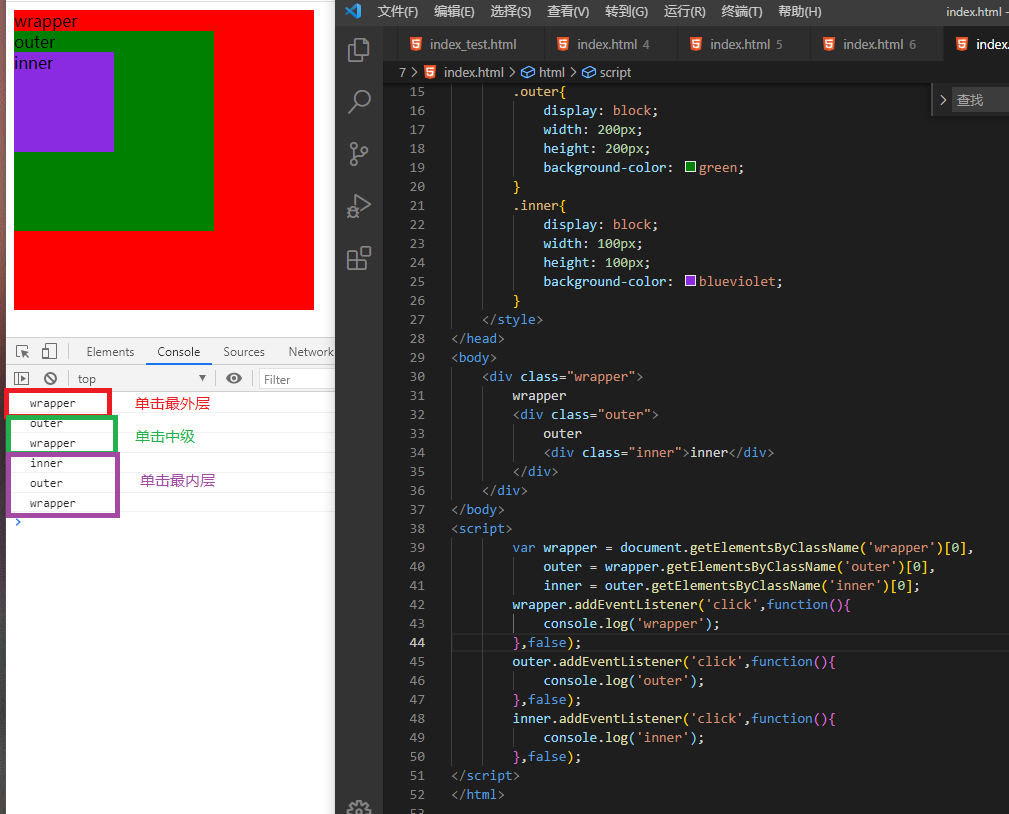
事件捕获
addEventListener(‘click’,function(){},true); true:冒泡
从事件源的最顶层父元素开始触发并依次触发其子元素 直至事件源 此例中为click
事件源:触发事件的对象
<!DOCTYPE html>
<html lang="en">
<head>
    <meta charset="UTF-8">
    <meta http-equiv="X-UA-Compatible" content="IE=edge">
    <meta name="viewport" content="width=device-width, initial-scale=1.0">
    <title>Document</title>
    <style>
        .wrapper{
            display: block;
            width: 300px;
            height: 300px;
            background-color: red;
        }
        .outer{
            display: block;
            width: 200px;
            height: 200px;
            background-color: green;
        }
        .inner{
            display: block;
            width: 100px;
            height: 100px;
            background-color: blueviolet;
        }
    </style>
</head>
<body>
    <div class="wrapper">
        wrapper
        <div class="outer">
            outer
            <div class="inner">inner</div>
        </div>
    </div>
</body>
<script>
        var wrapper = document.getElementsByClassName('wrapper')[0],
            outer = wrapper.getElementsByClassName('outer')[0],
            inner = outer.getElementsByClassName('inner')[0];

        wrapper.addEventListener('click',function(){
            console.log('wrapper');
        },true);
        outer.addEventListener('click',function(){
            console.log('outer');
        },true);
        inner.addEventListener('click',function(){
            console.log('inner');
        },true);

</script>
</html>

事件源不存在捕获或冒泡 按照代码顺序执行

没有冒泡与捕获的事件
focus blur change submit reset select
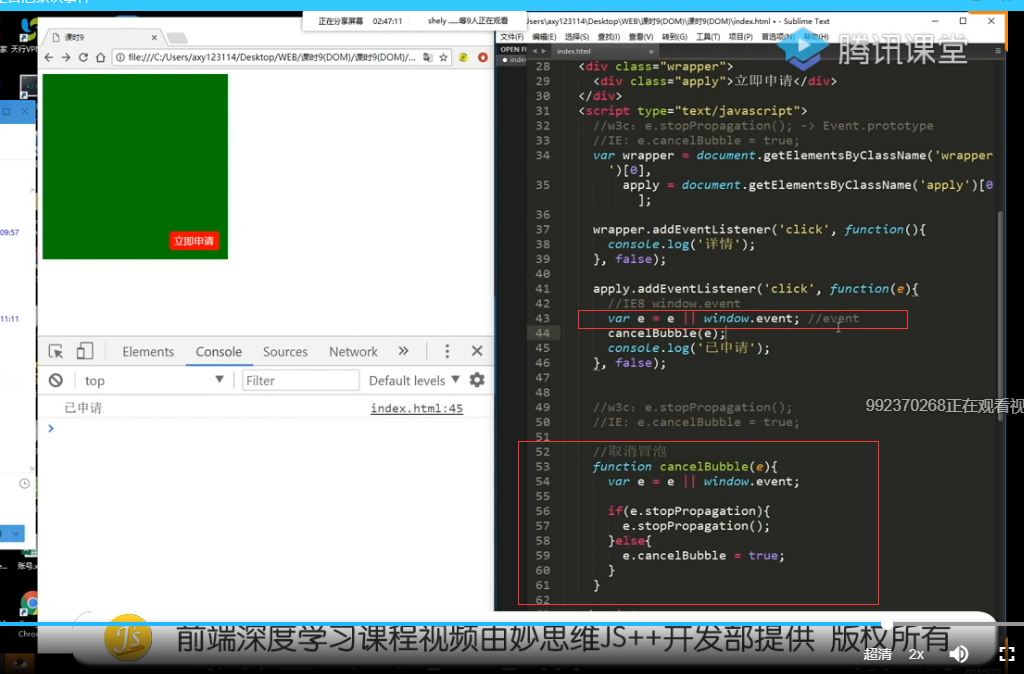
阻止冒泡与捕获
w3c: e.stopPropagation()
IE:e.cancelBubble = true
_
封装cancelBubble阻止冒泡与捕获方法
        function cancelBubble(e){
            var e = e || window.event;
            if(e.stopPropagation){
                e.stopPropagation();
            }else{
                e.cancelBubble = true
            }
        }
阻止默认事件
1.return false //仅支持句柄事件中使用
2.e.preventDefault() //IE9不兼容
3.e.returnValue = false; //IE9以下
封装preventDefaultEvent阻止默认行为函数
function preventDefaultEvent(e){
    var e = e || window.event;
    if(e.preventDefault){
        e.preventDefault();
    }else{
        e.returnValue = false;
    }
}
应用场景
1.允许a标签之外的元素进行页面跳转 点击icon
<body>
    <a href="http://www.baidu.com" class="link" target="_blank">
        <div class="inner">点击</div>
    </a>
</body>
<script>
    var inner = document.getElementsByClassName('inner')[0];

    inner.onclick = function(e){
        var e = e || window.event;
        e.preventDefault();
        console.log('我点击了');
    }
</script>
2.表单的跳转的刷新
<body>
    <form action="">
        <input type="text" name="content"/>
        <input type="submit" id="submit" value="提交"/>
    </form>
</body>
<script>
    var submit = document.getElementById('submit');

    submit.onclick = function(e){
        var e = e || window.event;

         e.preventDefault();
        console.log('提交了');
    }
</script>
阻止前
阻止后
HTML小知识 :点击提交会将url上带上其他input name的参数
    <form action="">
        <input type="text" name="content"/>
        <input type="submit" id="submit" value="提交"/>
    </form>

若有收获,就点个赞吧
0 人点赞


