1.HTMLElement.style
可读可写
小驼峰写法 例如:backgroundColor
值 :字符串
复合值一定拆解赋值
例如 element.style.border = ‘1px solid red’ => element.style.borderWidth = ‘1px’ + element.style.borderStyle = ‘solid’ + element.style.borderColor = ‘red’
保留字前面加css 例如 cssFloat
2.window.getComputedStyle() 查看属性的css属性集合
查看计算样式
window.getComputedStyle(elem,null)[prop]; prop变量或是没有确定的属性值查询
window.getComputedStyle(elem,null).prop; 有确定的属性值查询时
IE8及以下不支持
//elem.currentStyle
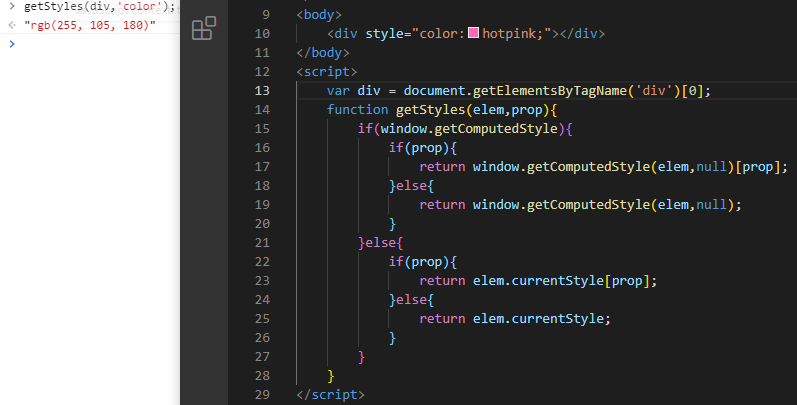
封装获取属性的方法(兼容IE)
<body><div style="color:hotpink;"></div></body><script>var div = document.getElementsByTagName('div')[0];function getStyles(elem,prop){if(window.getComputedStyle){if(prop){return window.getComputedStyle(elem,null)[prop];}else{return window.getComputedStyle(elem,null);}}else{if(prop){return elem.currentStyle[prop];}else{return elem.currentStyle;}}}</script>
注 遇到需直接数字类型值时 需加二重判断将其转换为数值 例如偏移量 parseInt()
function getStyles(elem,prop){
    if(window.getComputedStyle){
        if(prop){
            if(prop==='left'||prop==='top'){
                return parseInt(window.getComputedStyle(elem,null)[prop]);
            }
            return window.getComputedStyle(elem,null)[prop];
        }else{
            return window.getComputedStyle(elem,null);
        }

    }else{
        if(prop){
            if(prop==='left'||prop==='top'){
                return parseInt(elem.currentStyle[prop]);
            }
            return elem.currentStyle[prop];
        }else{
            return elem.currentStyle;
        }
    }
}
3.offsetWidth、offsetHeight
缺陷:会包含padding等内边距**HTMLElement.offsetWidth** 是一个只读属性,返回一个元素的布局宽度。一个典型的(译者注:各浏览器的offsetWidth可能有所不同)offsetWidth是测量包含元素的边框(border)、水平线上的内边距(padding)、竖直方向滚动条(scrollbar)(如果存在的话)、以及CSS设置的宽
字符串加数字 转换成数字技巧 例如’100px’ =>parseInt(‘100px’);
4.操作伪元素(更改伪元素样式)技巧
    <style>
        *{
            margin: 0px;
            padding: 0px;

        }
        .box{
            width: 100px;
            height: 100px;
            background-color: hotpink;
        }
        .box::after{
            content: "";
            display: block;
            width: 50px;
            height: 50px;
            background-color: greenyellow; //绿色
        }
        .box.active::after{
            background-color: blueviolet; //紫色
        }
    </style>
</head>
<body>
    <div class="box active"></div>
</body>

总结:在同一个元素上面设置不同的__class类名+伪元素 要更改替换的样式写在后面
5.JS操作dom样式style 技巧
    <style>
        *{
            margin: 0px;
            padding: 0px;

        }
        .box{
            width: 100px;
            height: 100px;
            background-color: hotpink;
        }
        .box::after{
            content: "";
            display: block;
            width: 50px;
            height: 50px;
            background-color: greenyellow;
        }
        .box.active::after{
            background-color: blueviolet;
            width: 100px;
            height: 100px;
            border-radius: 50%;
        }
    </style>

<body>
    <div class="box"></div>
</body>
<script>
    var div = document.getElementsByTagName('div')[0];
    div.onclick = function(){
        this.className +=' active';
    }

总结:把要设置的样式写在css里 然后通过 this.className+= ‘ 类名’ 的方式添加样式
课内作业未做:下拉菜单
课内作业未做:轮播图

若有收获,就点个赞吧
0 人点赞


