重定向到外部 ip 和 port.
5.2.1 介绍服务 endpoint
service 并不和 pod 直接相连, 中间是 endpoint.

$ kubectl describe svc hello-svcName: hello-svcNamespace: defaultLabels: <none>Annotations: <none>Selector: app2=svcType: ClusterIPIP Families: <none>IP: 10.100.55.166IPs: 10.100.55.166Port: <unset> 80/TCPTargetPort: 8080/TCPEndpoints: 172.17.0.6:8080,172.17.0.7:8080,172.17.0.8:8080Session Affinity: NoneEvents: <none>
Endpoint 资源就是暴露一个服务的 IP 和端口的列表.
$ kubectl get endpoints hello-svcNAME ENDPOINTS AGEhello-svc 172.17.0.6:8080,172.17.0.7:8080,172.17.0.8:8080 77m
5.2.2 手动配置服务的 endpoint
service 使用 endpoint 来知道有那些 pod.
创建没有选择器的服务
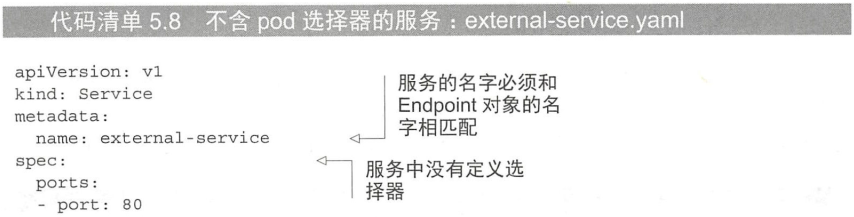
- 也没有 targetPort
为没有选择器的服务创建 Endpoint 资源
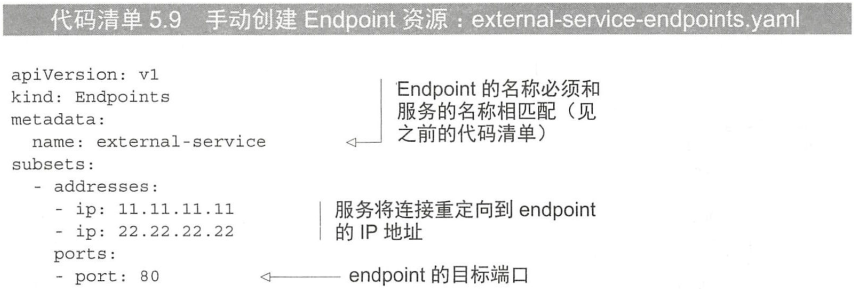
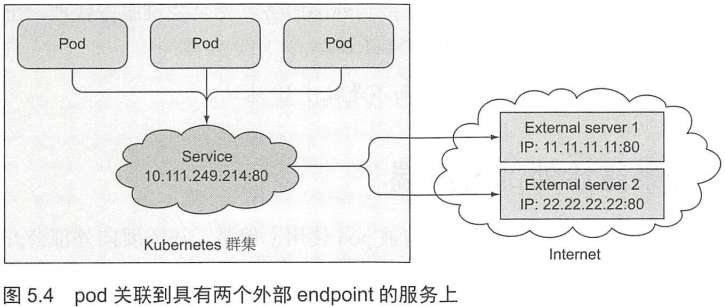
最初介绍创建 service 的方法使用了标签选择器, 但是外部 server 不在集群中, 所以选不了, 这时需要手动创建关系.
5.2.3 为外部服务创建别名
创建 ExternalName 类型的服务
像是重命名, CNAME
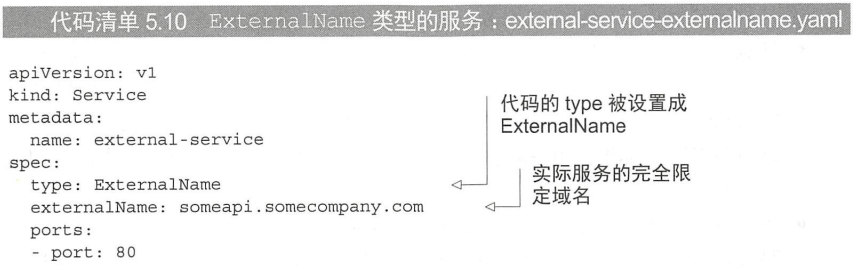
创建完成后使用 external-service 访问服务.

若有收获,就点个赞吧
0 人点赞


