ReplicationController 会维护指定的 pod 数量.

4.2.1 ReplicationController 的操作
介绍控制器的协调流程

了解 ReplicationController 的三部分

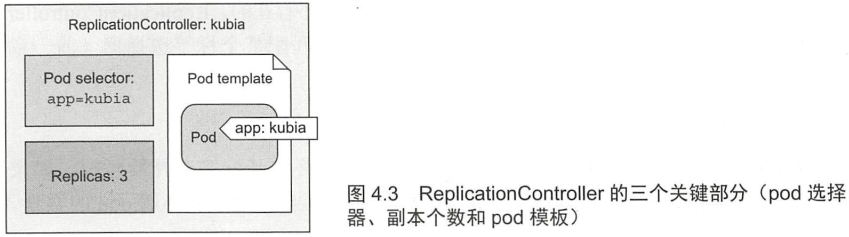
更改控制器的标签选择器或 pod 模板的效果
没啥影响.
- 更改标签选择器会使现有的 pod 脱离 ReplicationController 的范围
- ReplicationController 不关心 pod 的实际内容. 曲奇切模 (cookie cutter)
使用 ReplicationController 的好处
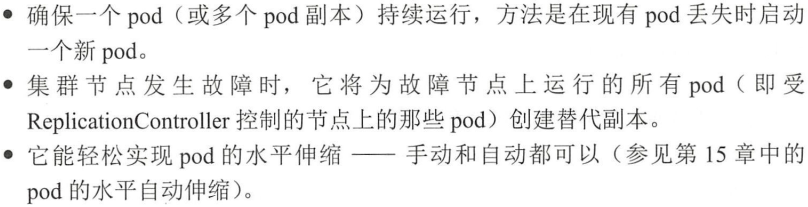
4.2.2 创建一个 ReplicationController
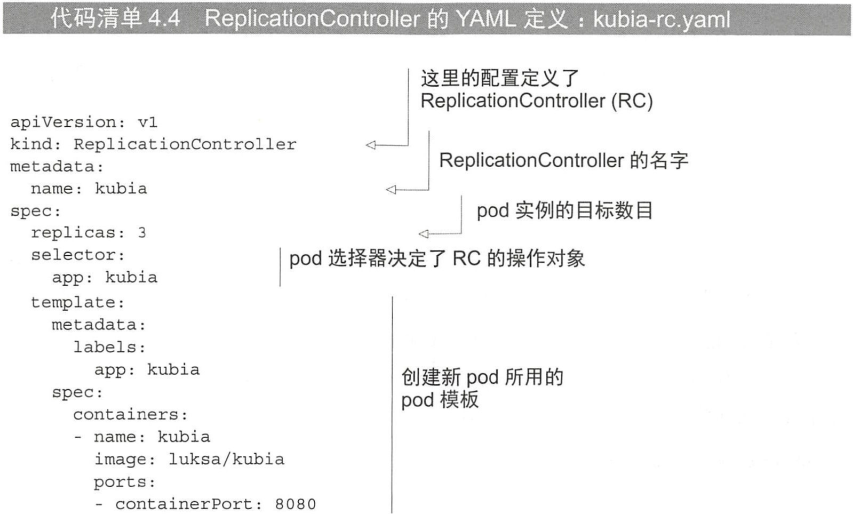
模拟:
apiVersion: v1kind: ReplicationControllermetadata:name: hello-rcspec:replicas: 3selector:app: rctemplate:metadata:labels:app: rcspec:containers:- image: jdxj/study_kubernetes:v0.3.0name: test-study-k8sports:- containerPort: 8080protocol: TCP
注意:
- 模板中的 pod 标签必须和 ReplicationController 的标签选择器匹配, 否则会无休止的创建 pod
- 不指定标签选择器时, 会自动使用模板中的标签
创建:
$ kubectl create -f hello-rc.yamlreplicationcontroller/hello-rc created
4.2.3 使用 ReplicationController
查看已有 pod:
$ kubectl get podsNAME READY STATUS RESTARTS AGEhello-rc-7hj7n 1/1 Running 0 71shello-rc-fk87h 1/1 Running 0 71shello-rc-sq66l 1/1 Running 0 71s
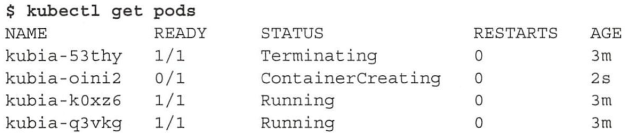
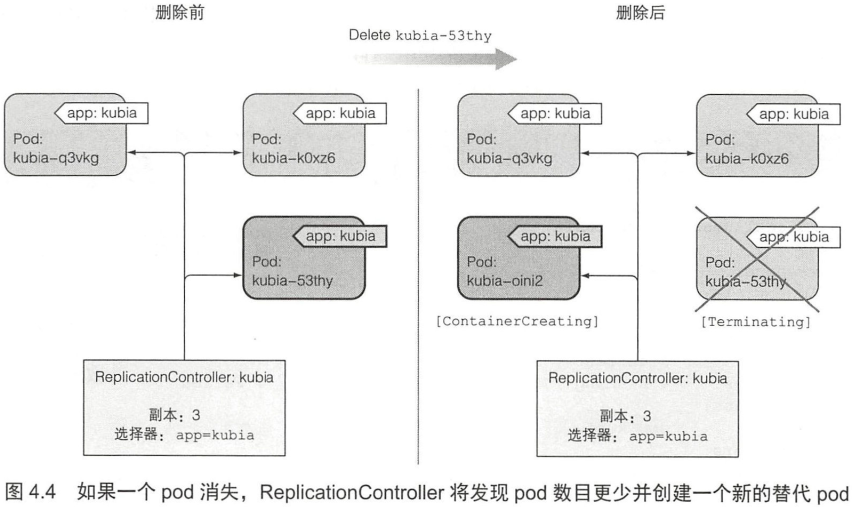
查看 ReplicationController 对已删除的 pod 的响应
手动删除一个 pod
$ kubectl delete pod hello-rc-fk87h
新看终端查看:
$ kubectl get podsNAME READY STATUS RESTARTS AGEhello-rc-fk87h 0/1 Terminating 0 3m57shello-rc-lb48h 1/1 Running 0 9shello-rc-qjh6q 1/1 Running 0 47shello-rc-sq66l 1/1 Running 0 3m57s
获取有关 ReplicationController 的信息
$ kubectl get rc
NAME       DESIRED   CURRENT   READY   AGE
hello-rc   3         3         3       6m22s
查看附加信息:

$ kubectl describe rc hello-rc
Name:         hello-rc
Namespace:    default
Selector:     app=rc
Labels:       app=rc
Annotations:  <none>
Replicas:     3 current / 3 desired
Pods Status:  3 Running / 0 Waiting / 0 Succeeded / 0 Failed
Pod Template:
  Labels:  app=rc
  Containers:
   test-study-k8s:
    Image:        jdxj/study_kubernetes:v0.3.0
    Port:         8080/TCP
    Host Port:    0/TCP
    Environment:  <none>
    Mounts:       <none>
  Volumes:        <none>
Events:
  Type    Reason            Age    From                    Message
  ----    ------            ----   ----                    -------
  Normal  SuccessfulCreate  7m45s  replication-controller  Created pod: hello-rc-7hj7n
  Normal  SuccessfulCreate  7m45s  replication-controller  Created pod: hello-rc-fk87h
  Normal  SuccessfulCreate  7m45s  replication-controller  Created pod: hello-rc-sq66l
  Normal  SuccessfulCreate  4m35s  replication-controller  Created pod: hello-rc-qjh6q
  Normal  SuccessfulCreate  3m57s  replication-controller  Created pod: hello-rc-lb48h
控制器如何创建新的 pod
注意:

应对节点故障
- 通过关闭网络接口来模拟节点故障
- NotReady

- 等待一段时间后: Unknown

- Unknown 状态的 pod 在节点恢复后被删除
4.2.4 将 pod 移入或移出 ReplicationController 的作用域
方法是通过标签控制.
可以通过 pod 的 metadata.ownerReferences 字段找到其所属的 ReplicationController.
给 ReplicationController 管理的 pod 加标签
没有什么影响.
更改已托管的 pod 的标签
更改受 ReplicationController 管理的标签:
- 当前标签
$ kubectl get pods --show-labels
NAME             READY   STATUS    RESTARTS   AGE   LABELS
hello-rc-lb48h   1/1     Running   0          32m   app=rc
hello-rc-qjh6q   1/1     Running   0          33m   app=rc
hello-rc-sq66l   1/1     Running   0          36m   app=rc
- 更改
$ kubectl label pod hello-rc-lb48h app=foo --overwrite
pod/hello-rc-lb48h labeled
- 再次查看
$ kubectl get pods --show-labels
NAME             READY   STATUS    RESTARTS   AGE   LABELS
hello-rc-6hzl2   1/1     Running   0          3s    app=rc
hello-rc-lb48h   1/1     Running   0          34m   app=foo
hello-rc-qjh6q   1/1     Running   0          35m   app=rc
hello-rc-sq66l   1/1     Running   0          38m   app=rc
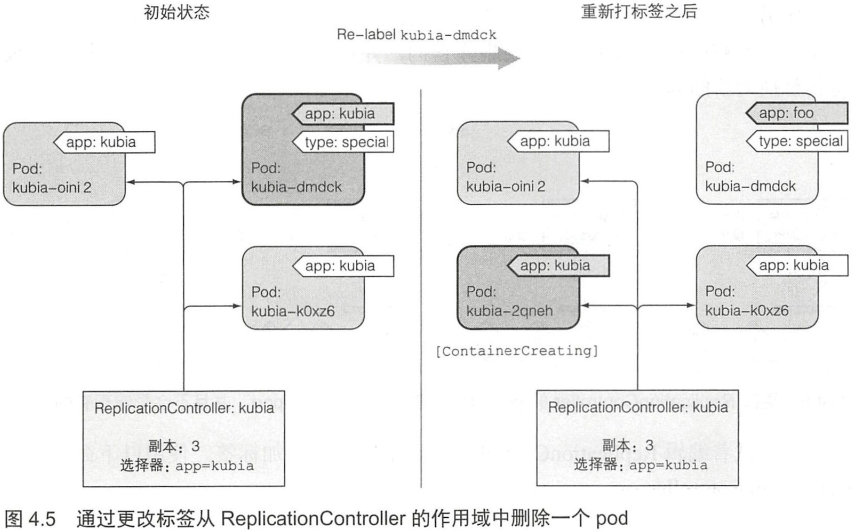
从控制器删除 pod
更改 ReplicationController 的标签选择器
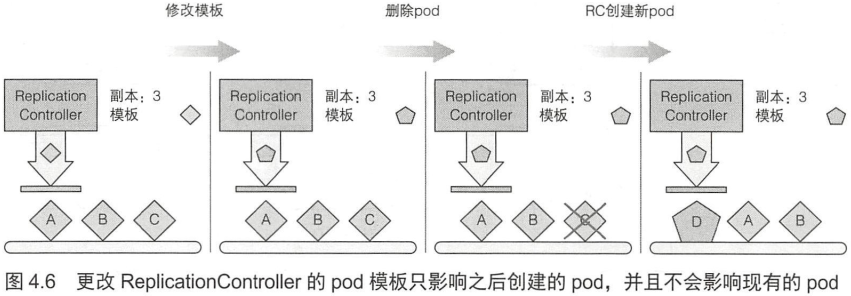
4.2.5 修改 pod 模板
只会影响之后的 pod.
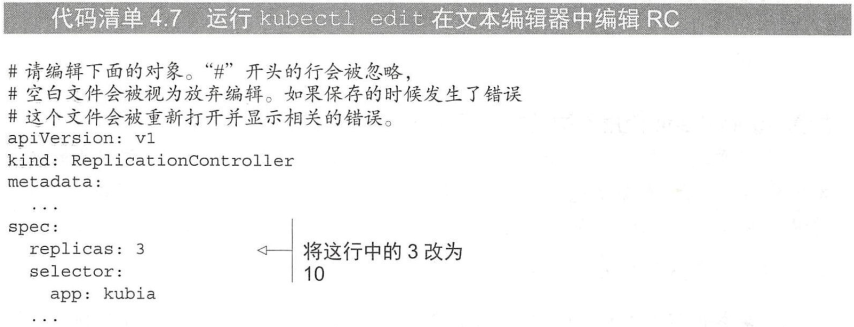
编辑 ReplicationController:
- 会自动进入到编辑器
$ kubectl edit rc hello-rc
- 编辑器环境变量:
KUBE_EDITOR="/usr/bin/nano"
4.2.6 水平缩放 pod
replicas 字段.
ReplicationController 扩容
$ kubectl scale rc kubia --replicas=10
通过编辑定义来缩放 ReplicationController
$ kubectl get pods
NAME             READY   STATUS              RESTARTS   AGE
hello-rc-6hzl2   1/1     Running             0          60m
hello-rc-6q6pb   0/1     ContainerCreating   0          3s
hello-rc-bcf4x   0/1     ContainerCreating   0          3s
hello-rc-c4gdt   0/1     ContainerCreating   0          3s
hello-rc-dtb46   0/1     ContainerCreating   0          3s
hello-rc-hcww6   0/1     ContainerCreating   0          3s
hello-rc-hncbx   0/1     ContainerCreating   0          3s
hello-rc-lb48h   1/1     Running             0          94m
hello-rc-qjh6q   1/1     Running             0          95m
hello-rc-s8zkn   1/1     Running             0          3s
hello-rc-sq66l   1/1     Running             0          98m
用 kubectl scale 命名缩容
$ kubectl scale rc hello-rc --replicas=3
伸缩集群的声明式方法
声明式的方法使得与 Kubernetes 集群的交互变得容易.
4.2.7 删除一个 ReplicationController
删除 ReplicationController 时也会删除 pod.
- 也可以只删除 ReplicationController
--cascade=false
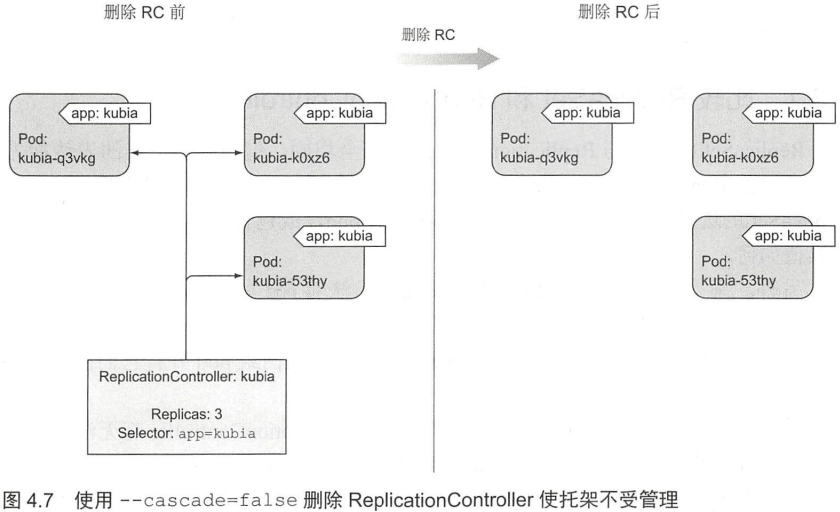
$ kubectl delete rc hello-rc --cascade=false

若有收获,就点个赞吧
0 人点赞


