环境和版本
- Mac M1
- IDEA 2021
-
概述
ArrayList实现了List接口,是顺序容器,即元素存存放的数据与放进去的顺序相同,允许放进入 null 元素。底层通过 数组 实现,ArrayList除了没有实现同步之外,其他与Vector大致相同。
- 每个ArrayList都有一个容量(capacity),表示底层数组的实际大小,容器存储元素的个数不能多于当前的容量。当向容器中添加元素的时候,如果容量不足,容器会自动进行增大。
- 集合框架的泛型,只是编译器提供的语法糖,所以这里的数组是一个Object数组,能够容纳任何类型的对象。
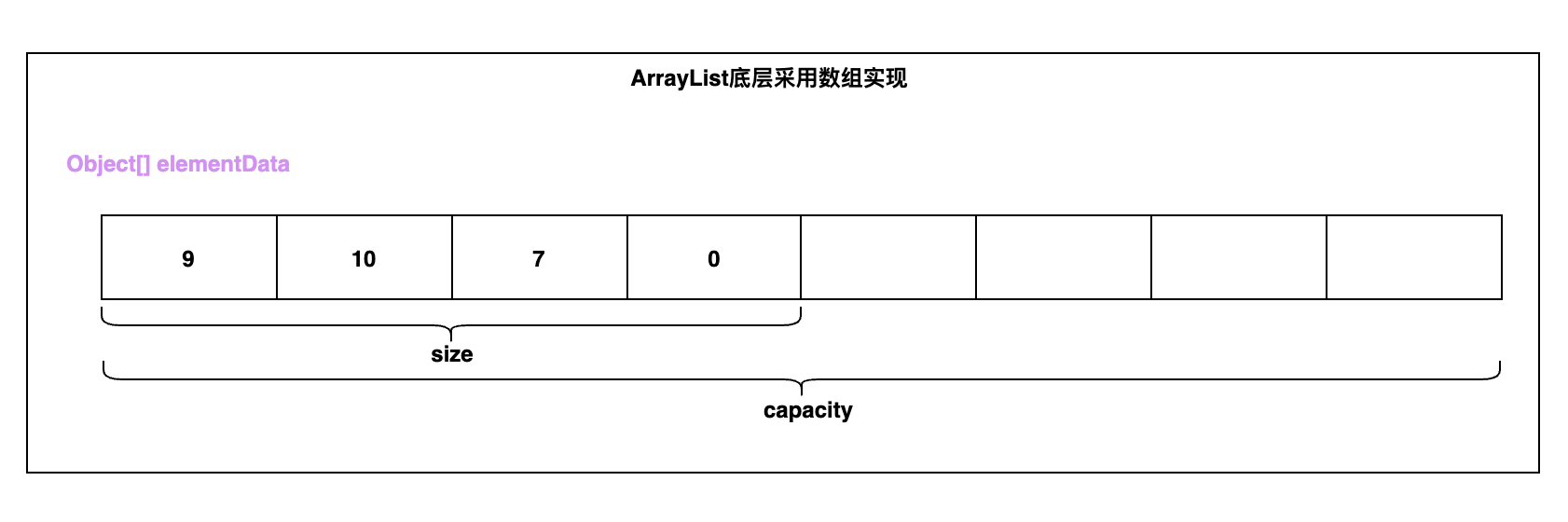
size(), isEmpty(), get(), set()方法均能在常数时间内完成,add()方法的时间开销跟插入位置有关,addAll()方法的时间开销跟添加元素的个数成正比。其余方法大都是线性时间。为追求效率,ArrayList没有实现同步(synchronized),如果需要多个线程并发访问,用户可以手动同步,也可使用Vector替代。
ArrayList的实现
底层数据结构如下 ```java /**
- The array buffer into which the elements of the ArrayList are stored.
- The capacity of the ArrayList is the length of this array buffer. Any
- empty ArrayList with elementData == DEFAULTCAPACITY_EMPTY_ELEMENTDATA
- will be expanded to DEFAULT_CAPACITY when the first element is added. */ transient Object[] elementData; // non-private to simplify nested class access
/**
- The size of the ArrayList (the number of elements it contains). *
- @serial
*/
private int size;
```
类图
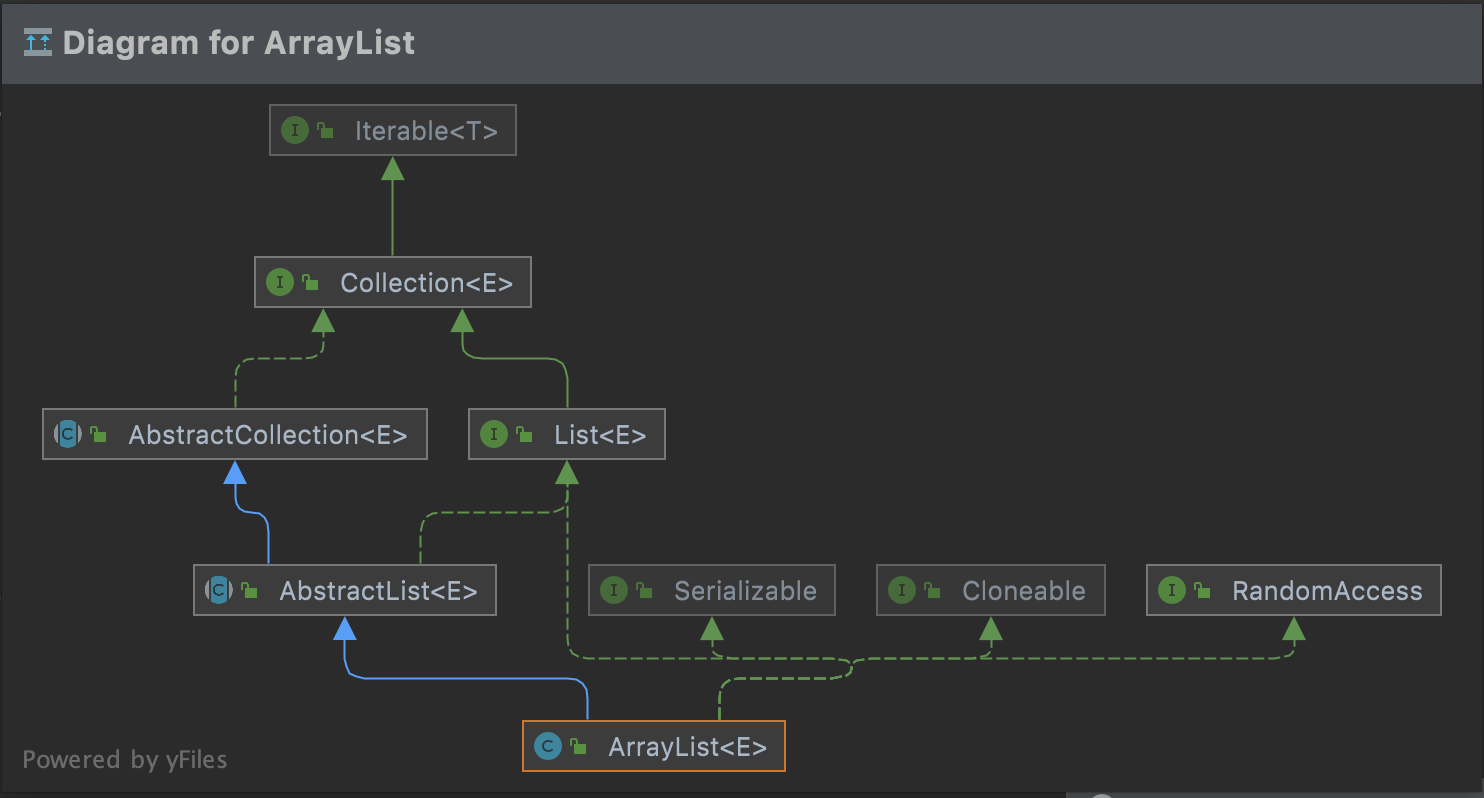
- ArrayList实现了四个接口
- List:提供数组的增加、删除、修改、迭代遍历等操作
- Serializable
- Cloneable
- RandomAccess
- 继承了 AbstractList抽象类,而AbstractList提供了List接口的骨架实现,大幅度减少了迭代遍历操作的相关代码。举例代码如下
```java
// AbstractList
public boolean addAll(int index, Collection<? extends E> c) {
rangeCheckForAdd(index);
boolean modified = false;
for (E e : c) {
} return modified; }add(index++, e);modified = true;
public int indexOf(Object o) {
ListIterator
public int lastIndexOf(Object o) {
ListIterator
- 由以上代码我们可以看出, AbstractList为其他继承它的子类,实现了一套查找遍历的方案,是使用迭代器实现的,所以,如果子类正好适用于此种方式迭代或者查找,就直接使用AbstractList实现的,而不用自己造轮子。
- 这种迭代方式,不适合ArrayList,在上文我们已经提到过,所以这种方式适合LinkedList等其他链表形式的集合遍历。
<a name="sPmlK"></a>
# 属性
- ArrayList的属性很少,只有2个,如下图所示
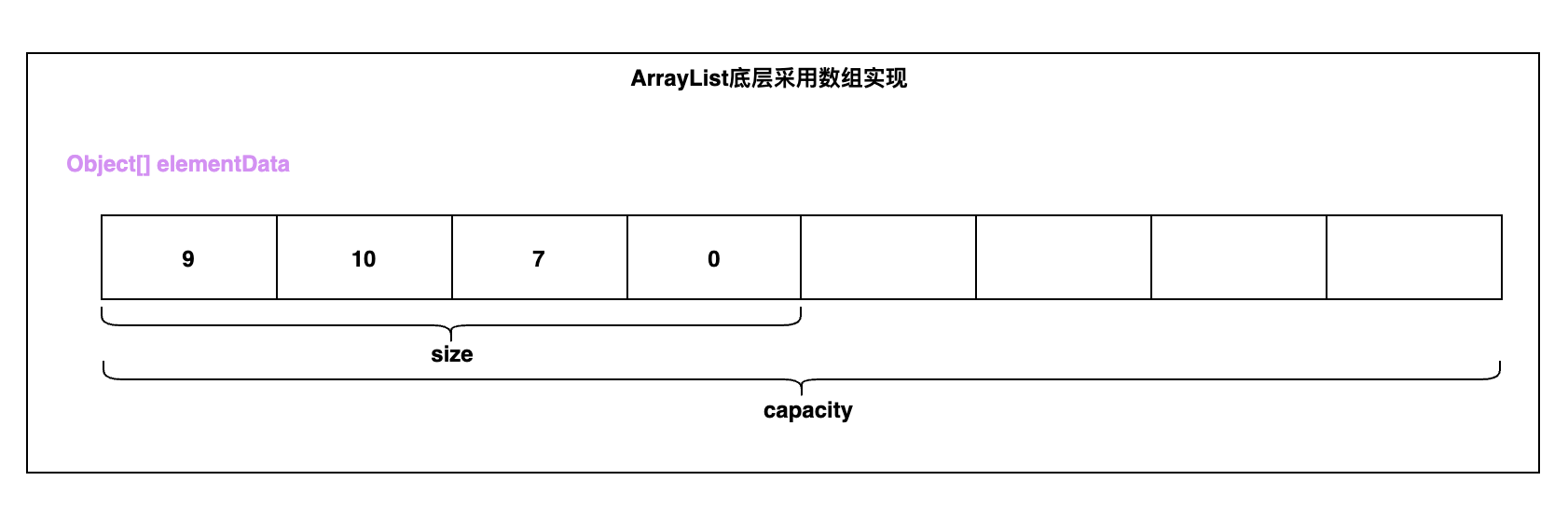
- elementData属性:元素数组,其中size部分代表我们已经添加的元素,capacity部分代表我们还没有添加的元素。
- size属性:数组大小。注意:size 代表的是ArrayList已经使用的 elementData的元素的个数,对于开发者看到的 size() 大小也是该大小,并且我们添加元素的时候,恰好就是元素添加到 elementData 的位置(下标)。当然了,我们知道ArrayList真正的大小是 elementData的大小
- 代码如下
```java
// 元素数组
transient Object[] elementData; // non-private to simplify nested class access
// size
private int size;
构造方法
- ArrayList一共有3个构造方法,如下
```java
// 有初始化大小的
// 如果初始化大小大于0,则创建此大小的集合
// 如果等于0,则将 EMPTY_ELEMENTDATA 赋值给elementData
// 小于0则抛出异常
public ArrayList(int initialCapacity) {
if (initialCapacity > 0) {
this.elementData = new Object[initialCapacity];
} else if (initialCapacity == 0) {
this.elementData = EMPTY_ELEMENTDATA;
} else {
throw new IllegalArgumentException(“Illegal Capacity: “+
} }initialCapacity);
// 默认无参构造函数 // 将 DEFAULTCAPACITY_EMPTY_ELEMENTDATA 赋值给elementData // 为什么这里使用 DEFAULTCAPACITY_EMPTY_ELEMENTDATA 赋值 // 因为在add的时候,需要进行扩容,因为初始化容量size=0 // 那么在第一次add的时候,会判断 elementData == DEFAULTCAPACITY_EMPTY_ELEMENTDATA // 如果相等,则直接返回计算的 minCapacity 和 DEFAULT_CAPACITY 默认大小的最大值 // 所以只会第一次用,因为初始化大小为0,然后必然会扩容一次到10,然后经过数组的拷贝, // elementData 为一个新的对象 public ArrayList() { this.elementData = DEFAULTCAPACITY_EMPTY_ELEMENTDATA; }
// 传入集合 // 先把集合转化为数组 判断长度是否为0 // 不为0 // 如果是 ArrayList 类型,则直接进行赋值 elementData = a,否则进行数组拷贝 // 为0 // elementData = EMPTY_ELEMENTDATA; // 不理解,不懂就问 // 这个地方赋值为 EMPTY_ELEMENTDATA 而不是 DEFAULTCAPACITY_EMPTY_ELEMENTDATA,这样前几次 // [10以内的]添加元素需要多扩容好几次 // 先入为主了,其实ArrayList并不知道你需要add多少次,如果只add很少的次数,那么一次扩容到10,会浪费很多空间 public ArrayList(Collection<? extends E> c) { Object[] a = c.toArray(); if ((size = a.length) != 0) { if (c.getClass() == ArrayList.class) { elementData = a; } else { elementData = Arrays.copyOf(a, size, Object[].class); } } else { // replace with empty array. elementData = EMPTY_ELEMENTDATA; } }
- 在学习ArrayList的时候,一直就被灌输了一个概念,在未设置初始化容量的时候,ArrayList的默认大小是10,但是此处,我们可以看到 初始化为 DEFAULTCAPACITY_EMPTY_ELEMENTDATA 这个空数组,为什么呢?这是为了考虑节省内存,因为有的时候一些场景仅仅是创建了ArrayList,但是却没有使用。所以ArrayList优化为一个空数组,在首次添加元素的时候,才真正初始化为10 的数组
- 那么为什么单独整一个 DEFAULTCAPACITY_EMPTY_ELEMENTDATA 空数组,而不直接使用 EMPTY_ELEMENTDATA 呢?在下文中,我们会看到 DEFAULTCAPACITY_EMPTY_ELEMENTDATA 首次扩容为10,而EMPTY_ELEMENTDATA 按照1.5倍从0开始而不是10,二者的起点不同
<a name="VVUwp"></a>
# 添加元素

- add 有2个方法,一个是一个参数的,传入参数E,另外一个树传入下标和参数E
```java
// 添加元素
public boolean add(E e) {
    ensureCapacityInternal(size + 1);  // Increments modCount!!
    elementData[size++] = e;
    return true;
}

// 确保能够添加元素
private void ensureCapacityInternal(int minCapacity) {
    ensureExplicitCapacity(calculateCapacity(elementData, minCapacity));
}

// 计算容量
private static int calculateCapacity(Object[] elementData, int minCapacity) {
    if (elementData == DEFAULTCAPACITY_EMPTY_ELEMENTDATA) {
        return Math.max(DEFAULT_CAPACITY, minCapacity);
    }
    return minCapacity;
}

// 确保可以添加元素
private void ensureExplicitCapacity(int minCapacity) {
    // 修改次数增加
    modCount++;

    // overflow-conscious code
    // 如果计算出来最小的容量大于现有数组的容量,则需要扩容
    if (minCapacity - elementData.length > 0)
        // 扩容方法
        grow(minCapacity);
}

// 扩容方法
// 传参:计算出来最小的容量
// 其实 minCapacity 只有2种情况
// 第一种:无参构造函数的时候传的是10
// 第二种:除了第一种之外,都是传递 size + 1
private void grow(int minCapacity) {
    // overflow-conscious code
    int oldCapacity = elementData.length;
    // 计算老的大小,扩容接近1.5倍
    int newCapacity = oldCapacity + (oldCapacity >> 1);
    // 如果计算出来新的大小[1.5倍] 小于 计算出来最小的容量,那么就使用minCapacity
    // 这种情况只有无参构造函数的时候传的是10或者数组的容量很大的时候,才会命中
    // 因为数组容量很大的时候,计算出来的1.5倍,可能是负值了
    if (newCapacity - minCapacity < 0)
        newCapacity = minCapacity;
    // 如果 newCapacity 大于 MAX_ARRAY_SIZE Integer.MAX_VALUE - 8;
    if (newCapacity - MAX_ARRAY_SIZE > 0)
        // 计算超大容量
        newCapacity = hugeCapacity(minCapacity);
    // minCapacity is usually close to size, so this is a win:
    // 数组拷贝
    elementData = Arrays.copyOf(elementData, newCapacity);
}

// 大容量计算
private static int hugeCapacity(int minCapacity) {
    // 如果 minCapacity < 0 说明已经溢出了
    if (minCapacity < 0) // overflow
        throw new OutOfMemoryError();
    // 计算新的容量,如果大于 MAX_ARRAY_SIZE 则直接使用 Integer.MAX_VALUE
    // 否则使用 MAX_ARRAY_SIZE
    return (minCapacity > MAX_ARRAY_SIZE) ?
        Integer.MAX_VALUE :
    MAX_ARRAY_SIZE;
}

// 在指定位置添加元素
public void add(int index, E element) {
    // 检查下标是否越界
    rangeCheckForAdd(index);

    // 扩容计算,参见上面
    ensureCapacityInternal(size + 1);  // Increments modCount!!
    // 计算完容量之后,将index到size的部分,拷贝出去
    // 腾出index的位置
    System.arraycopy(elementData, index, elementData, index + 1,
                     size - index);
    // index 的位置赋值新元素
    elementData[index] = element;
    size++;
}

// 检查下标是否越界
private void rangeCheckForAdd(int index) {
    if (index > size || index < 0)
        throw new IndexOutOfBoundsException(outOfBoundsMsg(index));
}
主动缩扩容
// 缩容方法 [主动缩容] 使用方调用
public void trimToSize() {
    // 次数+1
    modCount++;
    // size < elementData的大小
    if (size < elementData.length) {
        // 将数组缩容到 size == elementData.length
        elementData = (size == 0)
            ? EMPTY_ELEMENTDATA
            : Arrays.copyOf(elementData, size);
    }
}

// 主动扩容
// 保证 elementData 数组容量至少有 minCapacity
public void ensureCapacity(int minCapacity) {
    int minExpand = (elementData != DEFAULTCAPACITY_EMPTY_ELEMENTDATA)
        // any size if not default element table
        ? 0
        // larger than default for default empty table. It's already
        // supposed to be at default size.
        : DEFAULT_CAPACITY;

    if (minCapacity > minExpand) {
        ensureExplicitCapacity(minCapacity);
    }
}
添加多个元素
// 添加集合元素
public boolean addAll(Collection<? extends E> c) {
    Object[] a = c.toArray();
    int numNew = a.length;
    // 进行扩容
    ensureCapacityInternal(size + numNew);  // Increments modCount
    // 数组拷贝
    System.arraycopy(a, 0, elementData, size, numNew);
    size += numNew;
    return numNew != 0;
}

// 指定位置添加集合
public boolean addAll(int index, Collection<? extends E> c) {
    // 判断下标
    rangeCheckForAdd(index);

    Object[] a = c.toArray();
    int numNew = a.length;
    // 容量计算
    ensureCapacityInternal(size + numNew);  // Increments modCount

    // 计算插入点十分有元素,有则需要进行移动在扩容
    int numMoved = size - index;
    if (numMoved > 0)
        System.arraycopy(elementData, index, elementData, index + numNew,
                         numMoved);
    // 扩容拷贝
    System.arraycopy(a, 0, elementData, index, numNew);
    size += numNew;
    return numNew != 0;
}
移除单个元素
// 移除指定下标
public E remove(int index) {
    // 检查下标
    rangeCheck(index);

    // 修改次数自增
    modCount++;
    // 取出老元素
    E oldValue = elementData(index);

    // 计算需要移动的大小
    int numMoved = size - index - 1;
    // 移动
    if (numMoved > 0)
        System.arraycopy(elementData, index+1, elementData, index,
                         numMoved);
    // 最后一个元素赋值为null
    elementData[--size] = null; // clear to let GC do its work

    return oldValue;
}

// 移除对象
public boolean remove(Object o) {
    // 为空
    if (o == null) {
        for (int index = 0; index < size; index++)
            if (elementData[index] == null) {
                fastRemove(index);
                return true;
            }
    } else {
        // 不为空
        for (int index = 0; index < size; index++)
            if (o.equals(elementData[index])) {
                fastRemove(index);
                return true;
            }
    }
    return false;
}

// 快速移除
private void fastRemove(int index) {
    // 修改次数
    modCount++;
    // // 计算移动的个数
    int numMoved = size - index - 1;
    if (numMoved > 0)
        System.arraycopy(elementData, index+1, elementData, index,
                         numMoved);
    elementData[--size] = null; // clear to let GC do its work
}
移除多个元素
// 移除多个元素
protected void removeRange(int fromIndex, int toIndex) {
    // 修改次数
    modCount++;
    int numMoved = size - toIndex;
    // 数组拷贝
    // 将toIndex之后的元素,覆盖到 fromIndex 之后 numMoved 的个数
    System.arraycopy(elementData, toIndex, elementData, fromIndex,
                     numMoved);

    // clear to let GC do its work
    // 将新大小之后的元素进行赋值为null
    int newSize = size - (toIndex-fromIndex);
    for (int i = newSize; i < size; i++) {
        elementData[i] = null;
    }
    size = newSize;
}
查找单个元素
// 是否包含某个元素
public boolean contains(Object o) {
    return indexOf(o) >= 0;
}

// 计算元素的下标
public int indexOf(Object o) {
    if (o == null) {
        for (int i = 0; i < size; i++)
            if (elementData[i]==null)
                return i;
    } else {
        for (int i = 0; i < size; i++)
            if (o.equals(elementData[i]))
                return i;
    }
    return -1;
}

// 反向计算下标
public int lastIndexOf(Object o) {
    if (o == null) {
        for (int i = size-1; i >= 0; i--)
            if (elementData[i]==null)
                return i;
    } else {
        for (int i = size-1; i >= 0; i--)
            if (o.equals(elementData[i]))
                return i;
    }
    return -1;
}
获取/设置指定位置的元素
// get
public E get(int index) {
    rangeCheck(index);

    return elementData(index);
}

// set
// 注意:set的时候没有更新 修改次数
public E set(int index, E element) {
    rangeCheck(index);

    E oldValue = elementData(index);
    elementData[index] = element;
    return oldValue;
}
转换为数组
// 转数组拷贝
public Object[] toArray() {
    return Arrays.copyOf(elementData, size);
}

// 实际场景下,我们可能想要指定 T 泛型的数组,那么我们就需要使用到如下方法
public <T> T[] toArray(T[] a) {
    // 如果a的大小,小于size
    if (a.length < size)
        // Make a new array of a's runtime type, but my contents:
        // 直接复制一个新的数组返回
        return (T[]) Arrays.copyOf(elementData, size, a.getClass());
    // 把 elementData 赋值到a中
    System.arraycopy(elementData, 0, a, 0, size);
    // 如果传入的数组大于 size 大小,则将 size 赋值为 null
    if (a.length > size)
        // 这玩意搞啥用的?
        a[size] = null;
    return a;
}
求哈希值
// 在 AbstractList 里
public int hashCode() {
    int hashCode = 1;
    for (E e : this)
        // 为什么选择31
        hashCode = 31*hashCode + (e==null ? 0 : e.hashCode());
    return hashCode;
}
- 问题来了,为啥选择31
先看下String 的 hashCode 方法的实现
public int hashCode() {
  int h = hash;
  if (h == 0 && value.length > 0) {
      char val[] = value;

      for (int i = 0; i < value.length; i++) {
          h = 31 * h + val[i];
      }
      hash = h;
  }
  return h;
}
上面的代码就是 String hashCode 方法的实现,是不是很简单。实际上 hashCode 方法核心的计算逻辑只有三行,也就是代码中的 for 循环。我们可以由上面的 for 循环推导出一个计算公式,hashCode 方法注释中已经给出。如下:
s[0]*31^(n-1) + s[1]*31^(n-2) + ... + s[n-1]这里说明一下,上面的 s 数组即源码中的 val 数组,是 String 内部维护的一个 char 类型数组。这里来简单推导一下这个公式
假设 n=3
i=0 -> h = 31 * 0 + val[0]
i=1 -> h = 31 * (31 * 0 + val[0]) + val[1]
i=2 -> h = 31 * (31 * (31 * 0 + val[0]) + val[1]) + val[2]
     h = 31*31*31*0 + 31*31*val[0] + 31*val[1] + val[2]
     h = 31^(n-1)*val[0] + 31^(n-2)*val[1] + val[2]
接下来来说说本文的重点,即选择31的理由。从网上的资料来看,一般有如下两个原因
- 31是一个不大不小的质数,是作为 hashCode 乘子的优选质数之一。另外一些相近的质数,比如37、41、43等等,也都是不错的选择。那么为啥偏偏选中了31呢?
- 31可以被 JVM 优化,31 * i = (i << 5) - i
- 一般在设计哈希算法时,会选择一个特殊的质数。至于为啥选择质数,我想应该是可以降低哈希算法的冲突率
上面说到,31是一个不大不小的质数,是优选乘子。那为啥同是质数的2和101(或者更大的质数)就不是优选乘子呢,分析如下
- 这里先分析质数2。首先,假设 n = 6,然后把质数2和 n 带入上面的计算公式。并仅计算公式中次数最高的那一项,结果是2^5 = 32,是不是很小。所以这里可以断定,当字符串长度不是很长时,用质数2做为乘子算出的哈希值,数值不会很大。也就是说,哈希值会分布在一个较小的数值区间内,分布性不佳,最终可能会导致冲突率上升
- 上面说了,质数2做为乘子会导致哈希值分布在一个较小区间内,那么如果用一个较大的大质数101会产生什么样的结果呢?根据上面的分析,我想大家应该可以猜出结果了。就是不用再担心哈希值会分布在一个小的区间内了,因为101^5 = 10,510,100,501。但是要注意的是,这个计算结果太大了。如果用 int 类型表示哈希值,结果会溢出,最终导致数值信息丢失。尽管数值信息丢失并不一定会导致冲突率上升,但是我们暂且先认为质数101(或者更大的质数)也不是很好的选择。最后,我们再来看看质数31的计算结果:31^5 = 28629151,结果值相对于32和10,510,100,501来说。是不是很nice,不大不小
- 选择数字31是因为它是一个奇质数,如果选择一个偶数会在乘法运算中产生溢出,导致数值信息丢失,因为乘二相当于移位运算。选择质数的优势并不是特别的明显,但这是一个传统。同时,数字31有一个很好的特性,即乘法运算可以被移位和减法运算取代,来获取更好的性能:31 * i == (i << 5) - i,现代的 Java 虚拟机可以自动的完成这个优化
- 正如 Goodrich 和 Tamassia 指出的那样,如果你对超过 50,000 个英文单词(由两个不同版本的 Unix 字典合并而成)进行 hash code 运算,并使用常数 31, 33, 37, 39 和 41 作为乘子,每个常数算出的哈希值冲突数都小于7个,所以在上面几个常数中,常数 31 被 Java 实现所选用也就不足为奇了
根本原因,则是为了减少hash冲突,具体的测试数据参见文末参考文章:科普:String hashCode 方法为什么选择数字31作为乘子
判断相等
public boolean equals(Object o) {
if (o == this)
   return true;
if (!(o instanceof List))
   return false;

ListIterator<E> e1 = listIterator();
ListIterator<?> e2 = ((List<?>) o).listIterator();
while (e1.hasNext() && e2.hasNext()) {
   E o1 = e1.next();
   Object o2 = e2.next();
   if (!(o1==null ? o2==null : o1.equals(o2)))
       return false;
}
return !(e1.hasNext() || e2.hasNext());
}
清空数组
public void clear() {
modCount++;

// clear to let GC do its work
for (int i = 0; i < size; i++)
   elementData[i] = null;

size = 0;
}
序列化和反序列化
ArrayList中elementData为什么被transient修饰
Java的ArrayList中,定义了一个数组elementData用来装载对象的,具体定义如下:
/**
* The array buffer into which the elements of the ArrayList are stored.
* The capacity of the ArrayList is the length of this array buffer. Any
* empty ArrayList with elementData == DEFAULTCAPACITY_EMPTY_ELEMENTDATA
* will be expanded to DEFAULT_CAPACITY when the first element is added.
*/
transient Object[] elementData; // non-private to simplify nested class access
transient用来表示一个域不是该对象序行化的一部分,当一个对象被序行化的时候,transient修饰的变量的值是不包括在序行化的表示中的。但是ArrayList又是可序行化的类,elementData是ArrayList具体存放元素的成员,用transient来修饰elementData,岂不是反序列化后的ArrayList丢失了原先的元素?
其玄机在于ArrayList中的2个方法 ```java /**
- Save the state of the ArrayList instance to a stream (that
- is, serialize it). *
- @serialData The length of the array backing the ArrayList
- instance is emitted (int), followed by all of its elements
(each an Object) in the proper order. */ private void writeObject(java.io.ObjectOutputStream s) throws java.io.IOException{ // Write out element count, and any hidden stuff // 获取修改次数 int expectedModCount = modCount; s.defaultWriteObject();
// Write out size as capacity for behavioural compatibility with clone() // 写入size s.writeInt(size);
// Write out all elements in the proper order. // 逐个写入 elementData 数组的元素 for (int i=0; i<size; i++) { s.writeObject(elementData[i]); }
// 如果 other 修改次数发生改变,则抛出 ConcurrentModificationException 异常 if (modCount != expectedModCount) { throw new ConcurrentModificationException(); } }
/**
- Reconstitute the ArrayList instance from a stream (that is,
deserialize it). */ private void readObject(java.io.ObjectInputStream s) throws java.io.IOException, ClassNotFoundException { elementData = EMPTY_ELEMENTDATA;
// Read in size, and any hidden stuff s.defaultReadObject();
// Read in capacity // 这个不用,是为了和老版本的兼容 s.readInt(); // ignored
if (size > 0) {
 // be like clone(), allocate array based upon size not capacity
 int capacity = calculateCapacity(elementData, size);
 SharedSecrets.getJavaOISAccess().checkArray(s, Object[].class, capacity);
 ensureCapacityInternal(size);

 Object[] a = elementData;
 // Read in all elements in the proper order.
 for (int i=0; i<size; i++) {
     a[i] = s.readObject();
 }
} }
-  ArrayList在序列化的时候会调用writeObject,直接将size和element写入ObjectOutputStream;反序列化时调用readObject,从ObjectInputStream获取size和element,再恢复到elementData。
- 为什么不直接用elementData来序列化,而采用上诉的方式来实现序列化呢?原因在于elementData是一个缓存数组,它通常会预留一些容量,等容量不足时再扩充容量,那么有些空间可能就没有实际存储元素,采用上诉的方式来实现序列化时,就可以保证只序列化实际存储的那些元素,而不是整个数组,从而节省空间和时间。**假如:我的元素的capacity是10000个,但是只存了1个元素。但是要把整个数组反序列化,那会浪费很多空间,所以其实只需要存储真实容量就好了。**
<a name="Wxsb8"></a>
# 创建子数组
```java
public List<E> subList(int fromIndex, int toIndex) {
    subListRangeCheck(fromIndex, toIndex, size);
    return new SubList(this, 0, fromIndex, toIndex);
}

static void subListRangeCheck(int fromIndex, int toIndex, int size) {
    if (fromIndex < 0)
        throw new IndexOutOfBoundsException("fromIndex = " + fromIndex);
    if (toIndex > size)
        throw new IndexOutOfBoundsException("toIndex = " + toIndex);
    if (fromIndex > toIndex)
        throw new IllegalArgumentException("fromIndex(" + fromIndex +
                                           ") > toIndex(" + toIndex + ")");
}

// 内部类
private class SubList extends AbstractList<E> implements RandomAccess {
    // 根 ArrayList
    private final AbstractList<E> parent;
    // 父 SubList
    private final int parentOffset;
    // 起始位置
    private final int offset;
    // 大小
    int size;

    SubList(AbstractList<E> parent,
            int offset, int fromIndex, int toIndex) {
        this.parent = parent;
        this.parentOffset = fromIndex;
        this.offset = offset + fromIndex;
        this.size = toIndex - fromIndex;
        this.modCount = ArrayList.this.modCount;
    }
}
- 实际使用时,一定要注意,SubList 不是一个只读数组,而是和根数组 root 共享相同的 elementData 数组,只是说限制了 [fromIndex, toIndex) 的范围
克隆
public Object clone() {
  try {
      ArrayList<?> v = (ArrayList<?>) super.clone();
      v.elementData = Arrays.copyOf(elementData, size);
      v.modCount = 0;
      return v;
  } catch (CloneNotSupportedException e) {
      // this shouldn't happen, since we are Cloneable
      throw new InternalError(e);
  }
}
创建 Iterator 迭代器
```java public Iteratoriterator() { return new Itr(); }
// 内部迭代器
private class Itr implements Iterator
Itr() {}

// 判断是否可以继续迭代
public boolean hasNext() {
    return cursor != size;
}

@SuppressWarnings("unchecked")
public E next() {
    // 校验数组是否发生了变化
    checkForComodification();
    int i = cursor;
    if (i >= size)
        throw new NoSuchElementException();
    Object[] elementData = ArrayList.this.elementData;
    if (i >= elementData.length)
        throw new ConcurrentModificationException();
    cursor = i + 1;
    return (E) elementData[lastRet = i];
}

public void remove() {
    if (lastRet < 0)
        throw new IllegalStateException();
    checkForComodification();

    try {
        ArrayList.this.remove(lastRet);
        cursor = lastRet;
        lastRet = -1;
        // 刷新修改次数
        expectedModCount = modCount;
    } catch (IndexOutOfBoundsException ex) {
        throw new ConcurrentModificationException();
    }
}

@Override
@SuppressWarnings("unchecked")
public void forEachRemaining(Consumer<? super E> consumer) {
    Objects.requireNonNull(consumer);
    final int size = ArrayList.this.size;
    int i = cursor;
    if (i >= size) {
        return;
    }
    final Object[] elementData = ArrayList.this.elementData;
    if (i >= elementData.length) {
        throw new ConcurrentModificationException();
    }
    while (i != size && modCount == expectedModCount) {
        consumer.accept((E) elementData[i++]);
    }
    // update once at end of iteration to reduce heap write traffic
    cursor = i;
    lastRet = i - 1;
    checkForComodification();
}

final void checkForComodification() {
    if (modCount != expectedModCount)
        throw new ConcurrentModificationException();
}
}
<a name="U7WMf"></a>
# 创建 ListIterator 迭代器
```java
public ListIterator<E> listIterator(int index) {
    if (index < 0 || index > size)
        throw new IndexOutOfBoundsException("Index: "+index);
    // 创建迭代器
    return new ListItr(index);
}

private class ListItr extends Itr implements ListIterator<E> {
    ListItr(int index) {
        super();
        cursor = index;
    }

    // 是否有前一个
    public boolean hasPrevious() {
        return cursor != 0;
    }

    // 是否有下一个
    public int nextIndex() {
        return cursor;
    }

    // 前一个位置
    public int previousIndex() {
        return cursor - 1;
    }

    // 前一个元素
    @SuppressWarnings("unchecked")
    public E previous() {
        // 检查数组是否发生变化
        checkForComodification();
        int i = cursor - 1;
        // 判断如果小于 0 ,抛出 NoSuchElementException 异常
        if (i < 0)
            throw new NoSuchElementException();
        Object[] elementData = ArrayList.this.elementData;
        // 判断如果超过 elementData 大小,说明可能被修改了,抛出 ConcurrentModificationException 异常
        if (i >= elementData.length)
            throw new ConcurrentModificationException();
        // // cursor 指向上一个位置
        cursor = i;
        // 返回当前位置的元素
        return (E) elementData[lastRet = i];
    }

    public void set(E e) {
        if (lastRet < 0)
            throw new IllegalStateException();
        checkForComodification();

        try {
            ArrayList.this.set(lastRet, e);
        } catch (IndexOutOfBoundsException ex) {
            throw new ConcurrentModificationException();
        }
    }

    public void add(E e) {
        // 校验是否数组发生了变化
        checkForComodification();

        try {
            // 添加元素到当前位置
            int i = cursor;
            ArrayList.this.add(i, e);
            // cursor 指向下一个位置,因为当前位置添加了新的元素,所以需要后挪
            cursor = i + 1;
            // lastRet 标记为 -1 ,因为当前元素并未访问
            lastRet = -1;
            // 记录新的数组的修改次数
            expectedModCount = modCount;
        } catch (IndexOutOfBoundsException ex) {
            throw new ConcurrentModificationException();
        }
    }
}
参考文章
- 科普:String hashCode 方法为什么选择数字31作为乘子:https://www.cnblogs.com/nullllun/p/8350178.html
- 源码分析:ArrayList的writeObject方法:https://www.zhihu.com/question/41512382

若有收获,就点个赞吧
0 人点赞


