RabbitMQ 是基于 Erlang 语言开发的开源消息通信中间件,官网地址:https://www.rabbitmq.com/
安装 RabbitMQ
在 Centos 7 虚拟机中使用 Docker 来安装
docker pull rabbitmq:3-management
执行下面的命令来运行 MQ 容器:
docker run \-e RABBITMQ_DEFAULT_USER=halo \-e RABBITMQ_DEFAULT_PASS=halo \--name halo-rabbitmq-1 \--hostname halo-rabbitmq-1 \-p 15672:15672 \-p 5672:5672 \-d \rabbitmq:3-management
访问 http://localhost:15672/ 查看是否启动成功,账号密码默认是:guest/guest
RabbitMQ 的基本结构
RabbitMQ 的基本结构: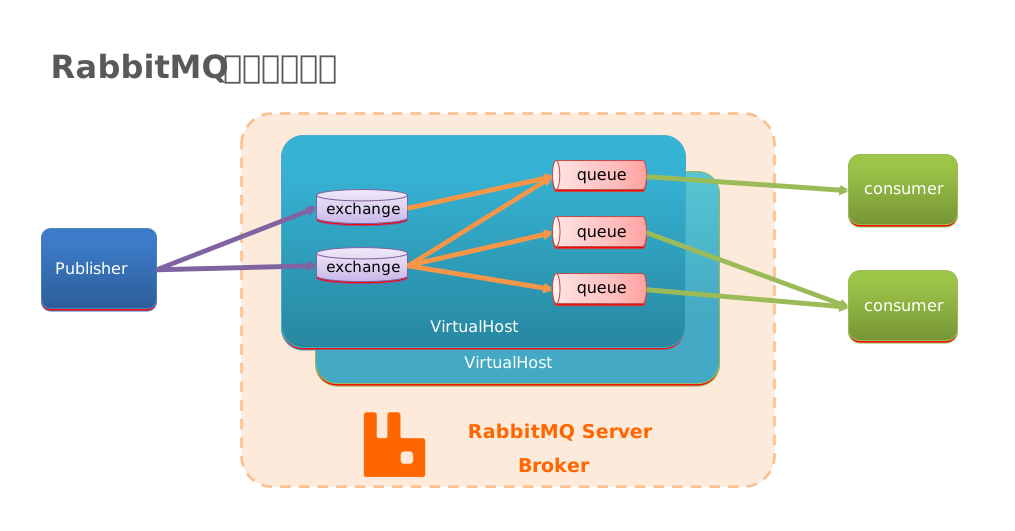
RabbitMQ 中的一些角色:
- publisher:生产者
- consumer:消费者
- exchange:交换机,负责消息路由
- queue:队列,存储消息
virtualHost:虚拟主机,隔离不同租户的 exchange、queue、消息的隔离
RabbitMQ 消息模型
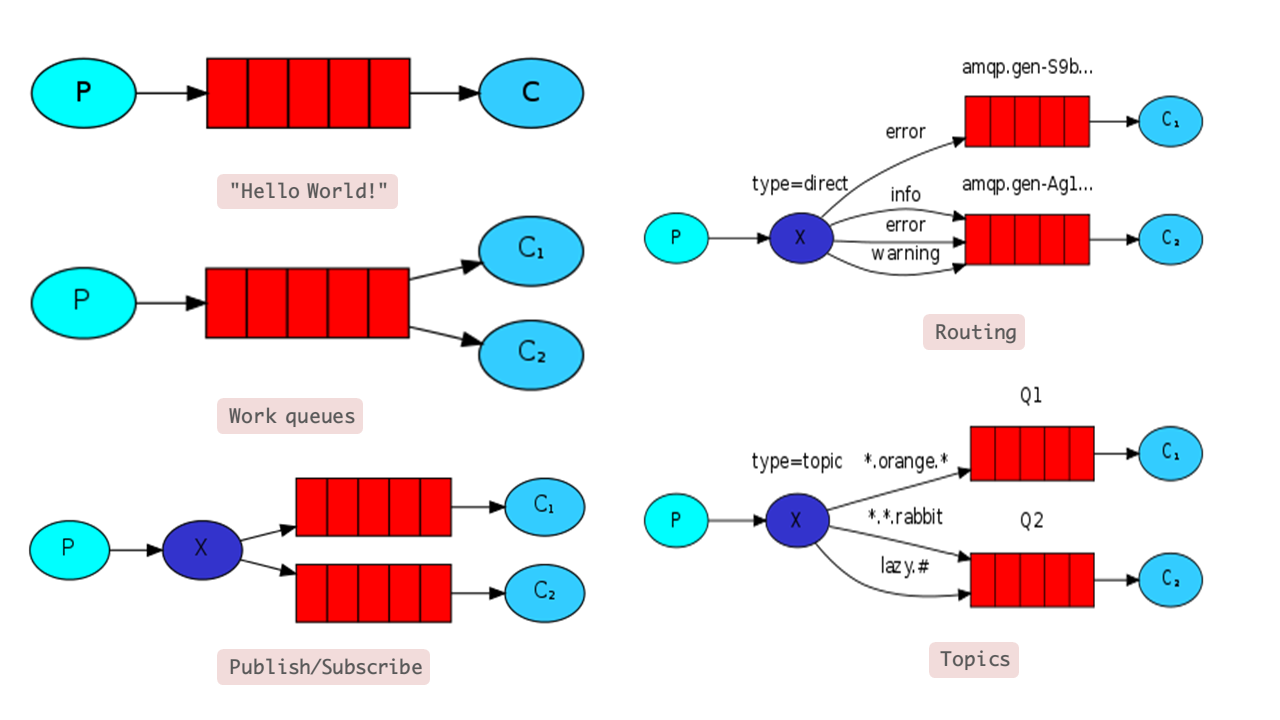
RabbitMQ 官方 提供了 5 个不同的 Demo 示例,对应了不同的消息模型:
基本消息队列(Basic Queue)
- 工作消息队列(Work Queue)
- 发布订阅(Publish、Subscribe),又根据交换机类型不同分为三种:
- Fanout Exchange:广播
- Direct Exchange:路由
- Topic Exchange:主题
Hello World 案例
官方的 HelloWorld 是基于最基础的消息队列模型来实现的,只包括三个角色:
- publisher:消息发布者,将消息发送到队列 queue
- queue:消息队列,负责接受并缓存消息
- consumer:订阅队列,处理队列中的消息

publisher 实现思路:
- 建立连接
- 创建 Channel
- 声明队列
- 发送消息
- 关闭连接和 Channel
代码实现:
package cn.itcast.mq.helloworld;

import com.rabbitmq.client.Channel;
import com.rabbitmq.client.Connection;
import com.rabbitmq.client.ConnectionFactory;
import org.junit.Test;

import java.io.IOException;
import java.util.concurrent.TimeoutException;

public class PublisherTest {
    @Test
    public void testSendMessage() throws IOException, TimeoutException {
        // 1.建立连接
        ConnectionFactory factory = new ConnectionFactory();
        // 1.1.设置连接参数,分别是:主机名、端口号、vhost、用户名、密码
        factory.setHost("halo");
        factory.setPort(5672);
        factory.setVirtualHost("/");
        factory.setUsername("halo");
        factory.setPassword("halo");
        // 1.2.建立连接
        Connection connection = factory.newConnection();

        // 2.创建通道Channel
        Channel channel = connection.createChannel();

        // 3.创建队列
        String queueName = "simple.queue";
        channel.queueDeclare(queueName, false, false, false, null);

        // 4.发送消息
        String message = "hello, rabbitmq!";
        channel.basicPublish("", queueName, null, message.getBytes());
        System.out.println("发送消息成功:【" + message + "】");

        // 5.关闭通道和连接
        channel.close();
        connection.close();

    }
}
consumer 实现思路:
- 建立连接
- 创建 Channel
- 声明队列
- 订阅消息
代码实现:
package cn.itcast.mq.helloworld;

import com.rabbitmq.client.*;

import java.io.IOException;
import java.util.concurrent.TimeoutException;

public class ConsumerTest {

    public static void main(String[] args) throws IOException, TimeoutException {
        // 1.建立连接
        ConnectionFactory factory = new ConnectionFactory();
        // 1.1.设置连接参数,分别是:主机名、端口号、vhost、用户名、密码
        factory.setHost("halo");
        factory.setPort(5672);
        factory.setVirtualHost("/");
        factory.setUsername("halo");
        factory.setPassword("halo");
        // 1.2.建立连接
        Connection connection = factory.newConnection();

        // 2.创建通道Channel
        Channel channel = connection.createChannel();

        // 3.创建队列
        String queueName = "simple.queue";
        channel.queueDeclare(queueName, false, false, false, null);

        // 4.订阅消息
        channel.basicConsume(queueName, true, new DefaultConsumer(channel) {
            @Override
            public void handleDelivery(String consumerTag, Envelope envelope,
                                       AMQP.BasicProperties properties, byte[] body) throws IOException {
                // 5.处理消息
                String message = new String(body);
                System.out.println("接收到消息:【" + message + "】");
            }
        });
        System.out.println("等待接收消息。。。。");
    }
}
基本消息队列的消息发送流程:
- 建立 connection
- 创建 channel
- 利用 channel 声明队列
- 利用 channel 向队列发送消息
基本消息队列的消息接收流程:
- 建立 connection
- 创建 channel
- 利用 channel 声明队列
- 定义 consumer 的消费行为
handleDelivery() - 利用 channel 将消费者与队列绑定

若有收获,就点个赞吧
0 人点赞


