<scroll-view>
[[toc]]
<scroll-view>是一个列表容器。(android端使用recyler具有回收和复用的能力,可以大幅优化内存占用和渲染性能)
子组件
支持包括
<div>在内的任何组件作为自己的子组件。因此,在写一个组件时,推荐外层使用<div>作为根容器。<scroll-header>:当 <scroll-header> 到达屏幕顶部时,吸附在屏幕顶部。
预览效果
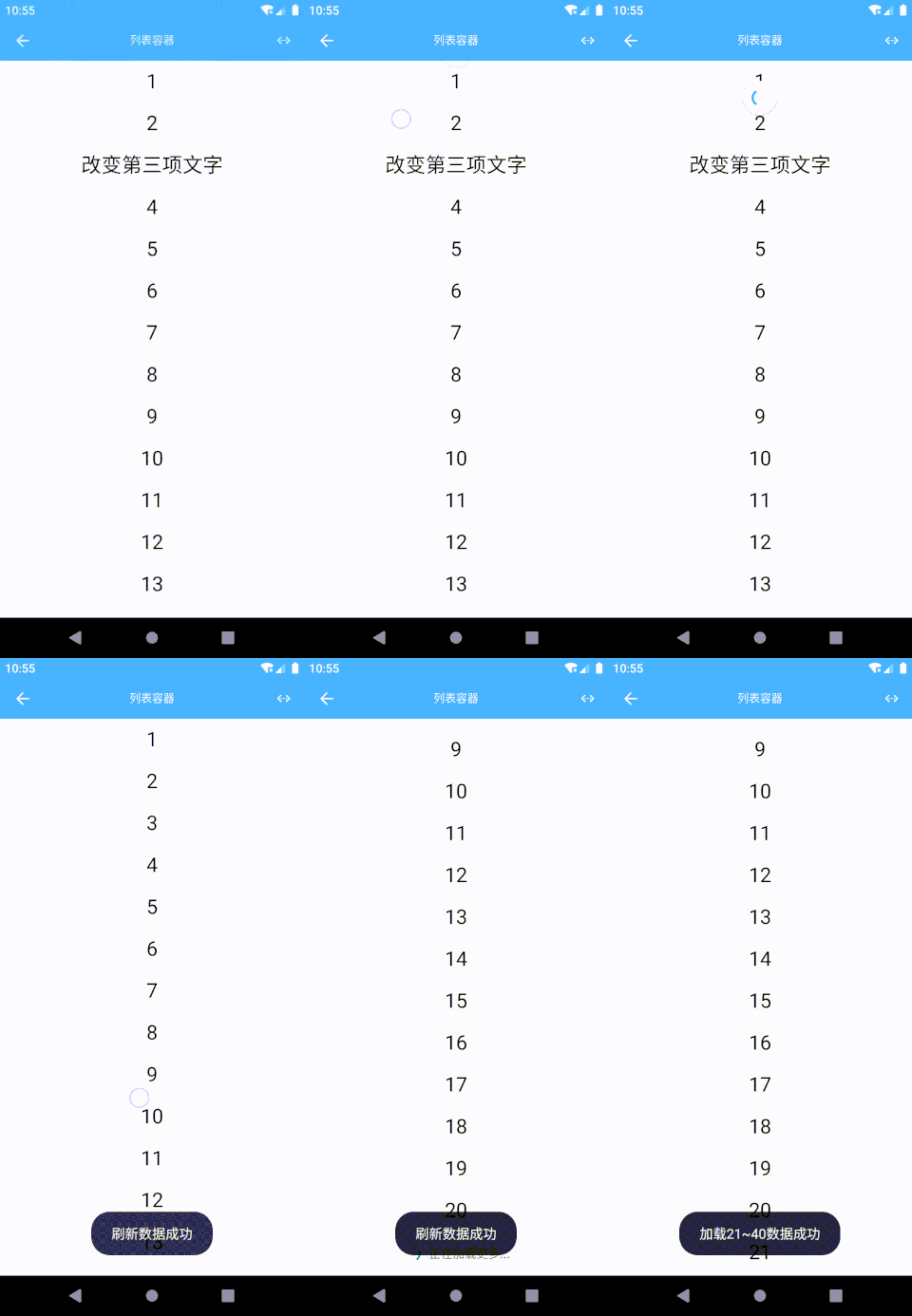
示例代码
<template><div class="box"><scroll-viewref="reflectName"class="list"pullTips="true"@itemClick="itemClick"@pullLoadListener="pullLoadListener"@refreshListener="refreshListener"><div class="panel" v-for="num in lists"><div class="panel-item"><text class="panel-text">{{num}}</text></div></div></scroll-view></div></template><style scoped>.box {width="750px;"flex: 1}.list {width: 750px;flex: 1}.panel {width: 750px;height: 100px;}.panel-item {width: 750px;height: 100px;background-color: #ff9e14;flex-direction: column;justify-content: center;}.panel-text {font-size: 50px;text-align: center;}</style><script>const eeui = app.requireModule('eeui');export default {data() {return {lists: [],}},mounted() {for (let i = 1; i <= 20; i++) {this.lists.push(i);}this.$refs.reflectName.setHasMore(true);//setTimeout(() => {this.lists.splice(2, 1, "改变第三项文字")// splice 详细用法http://www.w3school.com.cn/jsref/jsref_splice.asp}, 1000);},methods: {itemClick(params) {eeui.toast("点击了" + (params.position + 1) + "项");},pullLoadListener() {let count = this.lists.length;if (count >= 100) {this.$refs.reflectName.setHasMore(false);return;}setTimeout(() => {for (let i = 1; i <= 20; i++) {this.lists.push(count + i);}this.$refs.reflectName.pullloaded();eeui.toast("加载" + (count + 1) + "~" + this.lists.length + "数据成功");}, 1000);},refreshListener() {let newList = [];for (let i = 1; i <= 20; i++) {newList.push(i);}setTimeout(() => {this.lists = newList;this.$refs.reflectName.setHasMore(true);this.$refs.reflectName.refreshed();eeui.toast("刷新数据成功");}, 1000);},}};</script>
配置参数
| 属性名 | 类型 | 描述 | 默认值 |
|---|---|---|---|
| refreshAuto | Boolean |
初始化自动加载下拉刷新 | false |
| pullTips | Boolean |
是否显示上拉加载更多的提示 | true |
| pullTipsDefault | String |
上拉加载默认的提示语 | 正在加载数据… |
| pullTipsLoad | String |
上拉加载正在加载的提示语 | 正在加载更多… |
| pullTipsNo | String |
上拉加载没有更多的提示语 | 没有更多数据了 |
| itemDefaultAnimator | Boolean |
打开关闭局部刷新默认动画 |
false |
| scrollBarEnabled |
Boolean |
是否显示滚动条 | false |
例如:
<scroll-viewref="reflectName"pullTips: true,></scroll-view>
事件回调 callback
/*** 组件加载完成*/@ready = function() { ... }/*** 项目点击事件* 返回参数:data = {position: 1}*/@itemClick = function(data) { ... }/*** 项目长按事件* 返回参数:data = {position: 1}*/@itemLongClick = function(data) { ... }/*** 下拉刷新事件* 返回参数:data = {realLastPosition: 1, lastVisibleItem: 0}*/@refreshListener = function(data) { ... }/*** 上拉加载更多事件* 返回参数:data = {realLastPosition: 1, lastVisibleItem: 0}*/@pullLoadListener = function(data) { ... }/*** 视图滚动事件* 返回参数:data = {x: 0, y: 100, dx: 0, dy: 3}*/@scrolled = function(data) { ... }/*** 视图滚动状态发生变化(滚动完成后调用)* 返回参数:data = {x: 0, y: 100}*/@scrollStateChanged = function(data) { ... }
调用方法 methods
/*** 设置下拉刷新状态* 参数一:true|false*/this.$refs.reflectName.setRefreshing(true);/*** 下拉刷新结束标记*/this.$refs.reflectName.refreshed();/*** 设置下拉刷新是否可用【新】* 参数一:true|false*/this.$refs.reflectName.refreshEnabled(true);/*** 设置是否有上拉加载更多的数据* 参数一:true|false*/this.$refs.reflectName.setHasMore(true);/*** 上拉加载结束标记*/this.$refs.reflectName.pullloaded();/*** 打开关闭局部刷新默认动画* 参数一:true|false*/this.$refs.reflectName.itemDefaultAnimator(true);/*** 滚动到指定位置* 参数一:滚动到的位置,0:顶部、-1:底部*/this.$refs.reflectName.scrollToPosition(99);/*** 平滑滚动到指定位置* 参数一:滚动到的位置,0:顶部、-1:底部*/this.$refs.reflectName.smoothScrollToPosition(99);
scroll-header
当
<scroll-header>到达屏幕顶部时,吸附在屏幕顶部。
scroll-header 示例代码
<template><div class="app"><scroll-view><div class="item"><text style="font-size:24px">占位1</text></div><scroll-header class="layer"><text style="font-size:24px">浮动层1</text></scroll-header><div class="item"><text style="font-size:24px">占位2</text></div><scroll-header class="layer"><text style="font-size:24px">浮动层2</text></scroll-header><div class="item"><text style="font-size:24px">占位3</text></div><div class="item"><text style="font-size:24px">占位4</text></div><div class="item"><text style="font-size:24px">占位5</text></div></scroll-view></div></template><style scoped>.app {width: 750px;flex: 1}.item {width: 750px;height: 500px;background-color: #29B5FF;justify-content: center;align-items: center;border-bottom-width: 1px;border-bottom-style: solid;border-bottom-color: #cccccc;}.layer {width: 750px;height: 90px;background-color: #E78948;justify-content: center;align-items: center;}</style>
scroll-header 回调事件
/*** 状态变更* 返回参数:data = {status: 'static|float'}*/@stateChanged = function(data) { ... }

若有收获,就点个赞吧
0 人点赞


