Amazon recently added a “Request a Review” button to the Order Details page in Seller Central, raising many questions for sellers. A clarification to the Amazon Communication Guidelines was also posted this week. In this article, we’ll discuss both updates and what they mean for third-party sellers.
How Does Amazon’s Request a Review Button Work?
To send a review request with the Request a Review button, log into your Seller Central account. Go to the Manage Orders page and select the order that you would like to request a review for. Click the order to go to the Order Details page, and you should see the button on the top right side of the page.

When you click the button, Amazon will send a seller feedback and product review request (in the same message) to the buyer for your order. The message will be automatically translated into the buyer’s chosen language. You cannot send a follow up message to the same customer after the initial request has been sent. Requests can only be sent from 4-30 days after the order is delivered. It’s worth noting that this is a manual process in which the seller is unable to customize the message that is sent to the buyer.
Here is a closer look at the language Amazon uses in the request:
And here is an example of what the message looks like in a buyer’s inbox:
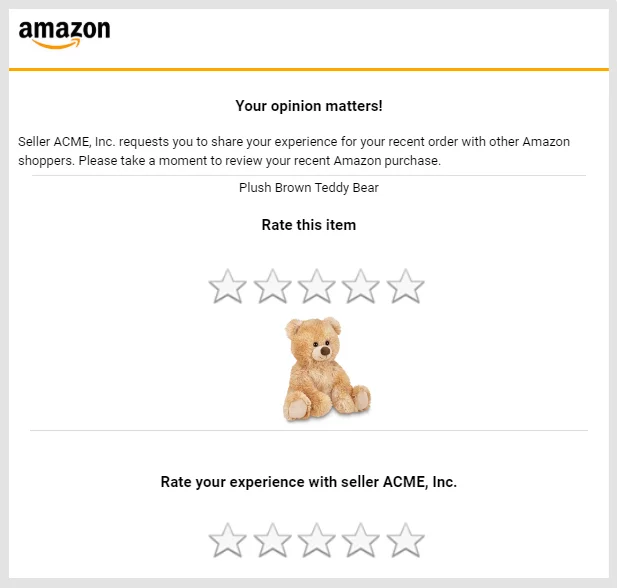
Although the message in Seller Central recommends requesting Amazon ratings with this method, asking for feedback and reviews through the Amazon Buyer-Seller Messaging service is still allowed. However, it is very important to follow Amazon’s Communication Guidelines when communicating with buyers.
Amazon Communication Guidelines
**Amazon recently offered some clarification for Communication Guidelines, although a peek at the Seller Central thread on the topic reveals that many sellers still have a lot of questions.
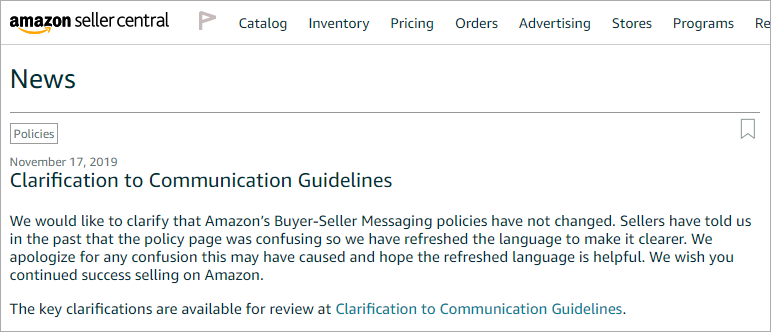
The Communication Guidelines state that you can only contact a buyer who has purchased from you on Amazon to complete an order or respond to a customer service inquiry. You cannot contact buyers for marketing or promotional purposes in any format.
Here’s what you need to know if you are sending a permitted message to a buyer, based on Amazon’s most recent Communication Guidelines. Your message cannot include any of the following:
- More than one request for a review or seller feedback.
- Language that incentivizes or manipulates product reviews or seller feedback.
- Language requesting a removal or update of an existing product review.
- Marketing or promotional messaging.
- “[Important]” in the subject line when the message is not necessary to complete the order.
- A link to opt-out of messaging.
- Links or attachments that are not needed to complete the order.
- Logos that display your URL or link to your website.
- Any content that is different from the contact reason selected on the Contact Buyer page if you are sending the message directly from Seller Central.
Amazon also emphasizes that you cannot ask buyers to leave a positive product review in any format, including product inserts. You also cannot only ask customers who had a positive experience with your product to leave a review. Finally, you absolutely cannot offer any type of compensation for a customer review. This includes money, gift cards, free/discounted products, refunds, reimbursements and more.
Be sure that any ratings requests include neutral language. Seemingly innocent phrases such as “Every time someone leaves us a review…” can be seen as problematic. Take the time to review your messaging to buyers and look out for any if/then statements or mentions of customer support. If you have questions about what language is considered acceptable, you can always contact our Customer Success team for assistance.
It’s worth noting that areas of communication policy that were not previously being extensively enforced are receiving attention. Even if your feedback request message previously passed muster, it may be past time for an update.
Customizable Feedback and Review Requests
While the option to request a review from Seller Central is very helpful, there are still many benefits to using a service like EarData to communicate with buyers. EarData sends messages directly through Amazon’s Buyer-Seller Messaging system. By creating your own message, you can include your branding (again, be sure that your logo does not include your URL) and customize the message by product or business need. You can also access detailed analytics data and test subject lines to see what’s working best for your business.

若有收获,就点个赞吧
0 人点赞


