00 实验环境
# 发行版信息[root@localhost ~]# cat /etc/redhat-releaseCentOS Linux release 7.6.1810 (Core)# 内核[root@localhost ~]# uname -r3.10.0-957.el7.x86_64# 时间[root@localhost ~]# dateTue Jan 8 23:27:19 CST 2019
01 实验目的
在本机上通过编译安装的方式安装mysql多实例并配置
02 实验软件选择
020 mysql选择版本
mysql-5.6.41.tar.gz 源码编译
软件地址: https://downloads.mysql.com/archives/get/file/mysql-5.6.41.tar.gz
国内源:地址
http://mirrors.ustc.edu.cn/mysql-ftp/Downloads/MySQL-5.6/mysql-5.6.41.tar.gz
03 准备安装
030 准备安装环境目录(也可以在安装好后配置)
[root@localhost ~]# tree /data
/data
├── 3306
│   ├── data   # 数据文件
│   ├── my.cnf  # 配置文件
│   └── mysql  # 启动文件
└── 3307
    ├── data
    ├── my.cnf
    └── mysql

4 directories, 4 files
mkdir -p /data/{3306,3307}/data
touch /data/3306/my.cnf
touch /data/3306/mysql
touch /data/3307/mysql
touch /data/3307/my.cnf
031 首先获取mysql的源代码
[root@localhost ~]# wget https://downloads.mysql.com/archives/get/file/mysql-5.6.41.tar.gz
# 也可以下载国内源
[root@db01 tools]# wget http://mirrors.ustc.edu.cn/mysql-ftp/Downloads/MySQL-5.6/mysql-5.6.41.tar.gz
[root@localhost ~]# ls
anaconda-ks.cfg  mysql-5.6.41.tar.gz  onepiece
032 解压
[root@db01 ~]# mkdir -p /root/tools
[root@chery tools]# ls
mysql-5.6.41.tar.gz
[root@chery tools]# tar xf mysql-5.6.41.tar.gz
[root@db01 tools]# cd mysql-5.6.41
033 安装依赖包和工具包
[root@chery mysql-5.6.41]# yum install -y ncurses-devel libaio-devel
[root@chery mysql-5.6.41]# yum install gcc gcc-c++
[root@chery mysql-5.6.41]# yum install ncurses-devel
[root@chery mysql-5.6.41]# yum install bison
[root@chery mysql-5.6.41]# yum install cmake -y
[root@chery mysql-5.6.41]# yum install autoconf -y
yum install libaio-devel gcc gcc-c++ ncurses-devel bison cmake autoconf -y
如果不安装autoconf就在初始化数据库的时候,就报错了
例如:
[root@chery scripts]# ./mysql_install_db —basedir=/application/mysql/ —datadir=/data/3306/data —user=mysql
FATAL ERROR: please install the following Perl modules before executing ./mysql_install_db:
Data::Dumper
034 创建用户
[root@chery ~]# useradd mysql -s /sbin/nologin -M
[root@chery ~]# id mysql
uid=1001(mysql) gid=1001(mysql) groups=1001(mysql)
[root@chery ~]#
yum install  libaio-devel gcc gcc-c++  ncurses-devel bison cmake autoconf -y
mkdir -p /root/tools
cd /root/tools
wget http://mirrors.ustc.edu.cn/mysql-ftp/Downloads/MySQL-5.6/mysql-5.6.41.tar.gz
tar xf mysql-5.6.41.tar.gz
useradd mysql -s /sbin/nologin -M
id mysql
cd mysql-5.6.41
cmake  .  -DCMAKE_INSTALL_PREFIX=/opt/mysql-5.6 \
-DMYSQL_DATADIR=/opt/mysql-5.6/data \
-DMYSQL_UNIX_ADDR=/opt/mysql-5.6/tmp/mysql.sock \
-DDEFAULT_CHARSET=utf8 \
-DDEFAULT_COLLATION=utf8_general_ci \
-DEXTRA_CHARSETS=gbk,gb2312,utf8,ascii \
-DENABLED_LOCAL_INFILE=ON \
-DWITH_INNOBASE_STORAGE_ENGINE=1 \
-DWITH_FEDERATED_STORAGE_ENGINE=1 \
-DWITH_BLACKHOLE_STORAGE_ENGINE=1 \
-DWITHOUT_EXAMPLE_STORAGE_ENGINE=1 \
-DWITHOUT_PARTITION_STORAGE_ENGINE=0 \
-DWITH_FAST_MUTEXES=1 \
-DWITH_ZLIB=bundled \
-DENABLED_LOCAL_INFILE=1 \
-DWITH_READLINE=1 \
-DWITH_EMBEDDED_SERVER=1 \
-DWITH_DEBUG=0

make && make install
ln -s /opt/mysql-5.6/  /opt/mysql
04 开始安装
041 cmake初始化参数
cmake  .  -DCMAKE_INSTALL_PREFIX=/opt/mysql-5.6 \
-DMYSQL_DATADIR=/opt/mysql-5.6/data \
-DMYSQL_UNIX_ADDR=/opt/mysql-5.6/tmp/mysql.sock \
-DDEFAULT_CHARSET=utf8 \
-DDEFAULT_COLLATION=utf8_general_ci \
-DEXTRA_CHARSETS=gbk,gb2312,utf8,ascii \
-DENABLED_LOCAL_INFILE=ON \
-DWITH_INNOBASE_STORAGE_ENGINE=1 \
-DWITH_FEDERATED_STORAGE_ENGINE=1 \
-DWITH_BLACKHOLE_STORAGE_ENGINE=1 \
-DWITHOUT_EXAMPLE_STORAGE_ENGINE=1 \
-DWITHOUT_PARTITION_STORAGE_ENGINE=0 \
-DWITH_FAST_MUTEXES=1 \
-DWITH_ZLIB=bundled \
-DENABLED_LOCAL_INFILE=1 \
-DWITH_READLINE=1 \
-DWITH_EMBEDDED_SERVER=1 \
-DWITH_DEBUG=0
关于配置参数: https://dev.mysql.com/doc/refman/5.6/en/source-configuration-options.html
042 make和make install
[root@chery mysql-5.6.41]# make
过程很慢 如果没有报错就是最好的结果
如果编译成功 就可以 编译安装
[root@chery mysql-5.6.41]# make install
043 查看安装目录并创建软连接
[root@chery mysql-5.6.41]# ln -s /opt/mysql-5.6/  /opt/mysql
[root@chery mysql-5.6.41]# ls -l /opt/mysql
lrwxrwxrwx. 1 root root 23 Jan  8 20:42 /opt/mysql -> /opt/mysql-5.6/
[root@chery mysql-5.6.41]#
[root@chery mysql-5.6.41]# ls -l /opt/mysql/
total 48
drwxr-xr-x.  2 root root  4096 Jan  8 20:36 bin
-rw-r--r--.  1 root root 17987 Jun 15  2018 COPYING
drwxr-xr-x.  3 root root    18 Jan  8 20:36 data
drwxr-xr-x.  2 root root    55 Jan  8 20:36 docs
drwxr-xr-x.  3 root root  4096 Jan  8 20:36 include
drwxr-xr-x.  3 root root  4096 Jan  8 20:36 lib
drwxr-xr-x.  4 root root    30 Jan  8 20:36 man
drwxr-xr-x. 10 root root  4096 Jan  8 20:36 mysql-test
-rw-r--r--.  1 root root  2496 Jun 15  2018 README
drwxr-xr-x.  2 root root    30 Jan  8 20:36 scripts
drwxr-xr-x. 28 root root  4096 Jan  8 20:36 share
drwxr-xr-x.  4 root root  4096 Jan  8 20:36 sql-bench
drwxr-xr-x.  2 root root   136 Jan  8 20:36 support-files
[root@chery mysql-5.6.41]#
044 查看配置文件
[root@chery mysql-5.6.41]# ls support-files/my*.cnf
support-files/my-default.cnf
[root@chery mysql-5.6.41]#
05 制作mysql配置文件和启动脚本
050 mysql配置文件
一共是包含两种文件 3306端口和3307端口的配置和启动脚本,多实例的启动方式与往常不同。不是通过统一的mysqld启动,只能启动端口内的mysql
0501 3306的配置文件my.cnf
my.cnf
# 直接通过输出重定向的方式直接写入到my.cnf文件
cat>/data/3306/my.cnf<<EOF
[client]
port            = 3306
socket          = /data/3306/mysql.sock

[mysql]
no-auto-rehash

[mysqld]
user    = mysql
port    = 3306
socket  = /data/3306/mysql.sock
basedir = /opt/mysql
datadir = /data/3306/data
open_files_limit    = 1024
back_log = 600
max_connections = 800
max_connect_errors = 3000
external-locking = FALSE
max_allowed_packet =8M
sort_buffer_size = 1M
join_buffer_size = 1M
thread_cache_size = 100
thread_concurrency = 2
query_cache_size = 2M
query_cache_limit = 1M
query_cache_min_res_unit = 2k
#default_table_type = InnoDB
thread_stack = 192K
#transaction_isolation = READ-COMMITTED
tmp_table_size = 2M
max_heap_table_size = 2M
long_query_time = 1
#log_long_format
#log-error = /data/3306/error.log
#log-slow-queries = /data/3306/slow.log
pid-file = /data/3306/mysql.pid
log-bin = /data/3306/mysql-bin
relay-log = /data/3306/relay-bin
relay-log-info-file = /data/3306/relay-log.info
binlog_cache_size = 1M
max_binlog_cache_size = 1M
max_binlog_size = 2M
expire_logs_days = 7
key_buffer_size = 16M
read_buffer_size = 1M
read_rnd_buffer_size = 1M
bulk_insert_buffer_size = 1M
#myisam_sort_buffer_size = 1M
#myisam_max_sort_file_size = 10G
#myisam_max_extra_sort_file_size = 10G
#myisam_repair_threads = 1
#myisam_recover
lower_case_table_names = 1
skip-name-resolve
slave-skip-errors = 1032,1062
replicate-ignore-db=mysql

server-id = 1

innodb_additional_mem_pool_size = 4M
innodb_buffer_pool_size = 32M
innodb_data_file_path = ibdata1:10M:autoextend
innodb_file_io_threads = 4
innodb_thread_concurrency = 8
innodb_flush_log_at_trx_commit = 2
innodb_log_buffer_size = 2M
innodb_log_file_size = 4M
innodb_log_files_in_group = 3
innodb_max_dirty_pages_pct = 90
innodb_lock_wait_timeout = 120
innodb_file_per_table = 0
[mysqldump]
quick
max_allowed_packet = 2M

[mysqld_safe]
log-error=/data/3306/mysql3306.err
pid-file=/data/3306/mysqld.pid
EOF
3307/my.cnf
# 直接通过输出重定向的方式直接写入到my.cnf文件
cat>/data/3307/my.cnf<<EOF
[client]
port            = 3307
socket          = /data/3307/mysql.sock

[mysql]
no-auto-rehash

[mysqld]
user    = mysql
port    = 3307
socket  = /data/3307/mysql.sock
basedir = /opt/mysql
datadir = /data/3307/data
open_files_limit    = 1024
back_log = 600
max_connections = 800
max_connect_errors = 3000
external-locking = FALSE
max_allowed_packet =8M
sort_buffer_size = 1M
join_buffer_size = 1M
thread_cache_size = 100
thread_concurrency = 2
query_cache_size = 2M
query_cache_limit = 1M
query_cache_min_res_unit = 2k
#default_table_type = InnoDB
thread_stack = 192K
#transaction_isolation = READ-COMMITTED
tmp_table_size = 2M
max_heap_table_size = 2M
long_query_time = 1
#log_long_format
#log-error = /data/3307/error.log
#log-slow-queries = /data/3307/slow.log
pid-file = /data/3307/mysql.pid
log-bin = /data/3307/mysql-bin
relay-log = /data/3307/relay-bin
relay-log-info-file = /data/3307/relay-log.info
binlog_cache_size = 1M
max_binlog_cache_size = 1M
max_binlog_size = 2M
expire_logs_days = 7
key_buffer_size = 16M
read_buffer_size = 1M
read_rnd_buffer_size = 1M
bulk_insert_buffer_size = 1M
#myisam_sort_buffer_size = 1M
#myisam_max_sort_file_size = 10G
#myisam_max_extra_sort_file_size = 10G
#myisam_repair_threads = 1
#myisam_recover
lower_case_table_names = 1
skip-name-resolve
slave-skip-errors = 1032,1062
replicate-ignore-db=mysql

server-id = 1

innodb_additional_mem_pool_size = 4M
innodb_buffer_pool_size = 32M
innodb_data_file_path = ibdata1:10M:autoextend
innodb_file_io_threads = 4
innodb_thread_concurrency = 8
innodb_flush_log_at_trx_commit = 2
innodb_log_buffer_size = 2M
innodb_log_file_size = 4M
innodb_log_files_in_group = 3
innodb_max_dirty_pages_pct = 90
innodb_lock_wait_timeout = 120
innodb_file_per_table = 0
[mysqldump]
quick
max_allowed_packet = 2M

[mysqld_safe]
log-error=/data/3307/mysql3307.err
pid-file=/data/3307/mysqld.pid
EOF
[可用的参考资料]
https://www.centos.bz/2017/08/change-innodb-system-tablespace/#增大InnoDB system tablespace
调整InnoDB系统表空间大小
0502 3306启动脚本代码
mysql
#!/bin/sh
#chery
#email:pusichina@163.com
#blog:http://8-8.date


#init
port=3306
mysql_user="root"
mysql_pwd="root1234"
CmdPath="/opt/mysql/bin"
mysql_sock="/data/${port}/mysql.sock"
#startup function
function_start_mysql()
{
    if [ ! -e "$mysql_sock" ];then
      printf "Starting MySQL...\n"
      /bin/sh ${CmdPath}/mysqld_safe --defaults-file=/data/${port}/my.cnf 2>&1 > /dev/null &
    else
      printf "MySQL is running...\n"
      exit
    fi
}

#stop function
function_stop_mysql()
{
    if [ ! -e "$mysql_sock" ];then
       printf "MySQL is stopped...\n"
       exit
    else
       printf "Stoping MySQL...\n"
       ${CmdPath}/mysqladmin -u ${mysql_user} -p${mysql_pwd} -S /data/${port}/mysql.sock shutdown
   fi
}

#restart function
function_restart_mysql()
{
    printf "Restarting MySQL...\n"
    function_stop_mysql
    sleep 2
    function_start_mysql
}

case $1 in
start)
    function_start_mysql
;;
stop)
    function_stop_mysql
;;
restart)
    function_restart_mysql
;;
*)
    printf "Usage: /data/${port}/mysql {start|stop|restart}\n"
esac
3307 mysql
#!/bin/sh
#chery
#email:pusichina@163.com
#blog:http://8-8.date


#init
port=3307
mysql_user="root"
mysql_pwd="root1234"
CmdPath="/opt/mysql/bin"
mysql_sock="/data/${port}/mysql.sock"
#startup function
function_start_mysql()
{
    if [ ! -e "$mysql_sock" ];then
      printf "Starting MySQL...\n"
      /bin/sh ${CmdPath}/mysqld_safe --defaults-file=/data/${port}/my.cnf 2>&1 > /dev/null &
    else
      printf "MySQL is running...\n"
      exit
    fi
}

#stop function
function_stop_mysql()
{
    if [ ! -e "$mysql_sock" ];then
       printf "MySQL is stopped...\n"
       exit
    else
       printf "Stoping MySQL...\n"
       ${CmdPath}/mysqladmin -u ${mysql_user} -p${mysql_pwd} -S /data/${port}/mysql.sock shutdown
   fi
}

#restart function
function_restart_mysql()
{
    printf "Restarting MySQL...\n"
    function_stop_mysql
    sleep 2
    function_start_mysql
}

case $1 in
start)
    function_start_mysql
;;
stop)
    function_stop_mysql
;;
restart)
    function_restart_mysql
;;
*)
    printf "Usage: /data/${port}/mysql {start|stop|restart}\n"
esac
0503 授予权限
[root@chery 3306]# find /data -type f -name "mysql"|xargs chmod 755
[root@chery 3306]# find /data -type f -name "mysql"|ls -l
total 8
drwxr-xr-x. 2 root root    6 Jan  8  2019 data
-rw-r--r--. 1 root root 1891 Jan  8 21:04 my.cnf
-rwxr-xr-x. 1 root root 1091 Jan  8 21:06 mysql
[root@chery 3306]# chown -R mysql.mysql /data/
[root@chery bin]# ls -l /data
total 0
drwxr-xr-x. 3 mysql mysql 169 Jan  8 21:46 3306
drwxr-xr-x. 3 mysql mysql  45 Jan  8  2019 3307
051 初始化数据库
0510 初始化3306数据库
[root@chery 3306]# cd /opt/mysql/scripts/
[root@chery scripts]# ls
mysql_install_db

[root@chery scripts]# ./mysql_install_db --basedir=/opt/mysql/ --datadir=/data/3306/data --user=mysql
05101 初始化3307数据库
[root@chery scripts]# ./mysql_install_db --basedir=/opt/mysql/ --datadir=/data/3307/data --user=mysql
最后的打印的内容
2019-01-08 21:13:43 34616 [Note] InnoDB: Shutdown completed; log sequence number 1625987
OK

To start mysqld at boot time you have to copy
support-files/mysql.server to the right place for your system

PLEASE REMEMBER TO SET A PASSWORD FOR THE MySQL root USER !
To do so, start the server, then issue the following commands:

  /application/mysql//bin/mysqladmin -u root password 'new-password'
  /application/mysql//bin/mysqladmin -u root -h chery password 'new-password'

Alternatively you can run:

  /application/mysql//bin/mysql_secure_installation

which will also give you the option of removing the test
databases and anonymous user created by default.  This is
strongly recommended for production servers.

See the manual for more instructions.

You can start the MySQL daemon with:

  cd . ; /application/mysql//bin/mysqld_safe &

You can test the MySQL daemon with mysql-test-run.pl

  cd mysql-test ; perl mysql-test-run.pl

Please report any problems at http://bugs.mysql.com/

The latest information about MySQL is available on the web at

  http://www.mysql.com

Support MySQL by buying support/licenses at http://shop.mysql.com

New default config file was created as /application/mysql//my.cnf and
will be used by default by the server when you start it.
You may edit this file to change server settings

WARNING: Default config file /etc/my.cnf exists on the system
This file will be read by default by the MySQL server
If you do not want to use this, either remove it, or use the
--defaults-file argument to mysqld_safe when starting the server
0511 初始化3307数据库
[root@chery scripts]# ./mysql_install_db --basedir=/opt/mysql/ --datadir=/data/3307/data --user=mysql
打印的内容
OK

To start mysqld at boot time you have to copy
support-files/mysql.server to the right place for your system

PLEASE REMEMBER TO SET A PASSWORD FOR THE MySQL root USER !
To do so, start the server, then issue the following commands:

  /application/mysql//bin/mysqladmin -u root password 'new-password'
  /application/mysql//bin/mysqladmin -u root -h chery password 'new-password'

Alternatively you can run:

  /application/mysql//bin/mysql_secure_installation

which will also give you the option of removing the test
databases and anonymous user created by default.  This is
strongly recommended for production servers.

See the manual for more instructions.

You can start the MySQL daemon with:

  cd . ; /application/mysql//bin/mysqld_safe &

You can test the MySQL daemon with mysql-test-run.pl

  cd mysql-test ; perl mysql-test-run.pl

Please report any problems at http://bugs.mysql.com/

The latest information about MySQL is available on the web at

  http://www.mysql.com

Support MySQL by buying support/licenses at http://shop.mysql.com

WARNING: Found existing config file /application/mysql//my.cnf on the system.
Because this file might be in use, it was not replaced,
but was used in bootstrap (unless you used --defaults-file)
and when you later start the server.
The new default config file was created as /application/mysql//my-new.cnf,
please compare it with your file and take the changes you need.

WARNING: Default config file /etc/my.cnf exists on the system
This file will be read by default by the MySQL server
If you do not want to use this, either remove it, or use the
--defaults-file argument to mysqld_safe when starting the server
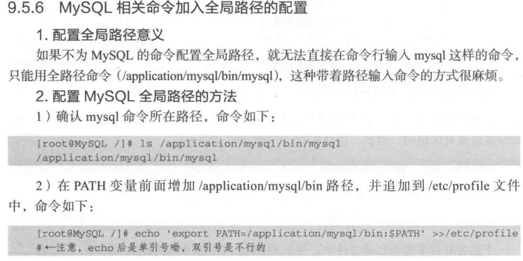
0512 创建环境变量
方式一 拷贝
方式二 软连接
[root@chery scripts]# ln -s /opt/mysql/bin/* /usr/local/sbin/
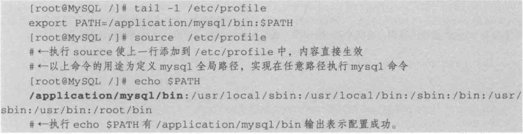
方式三 加入全局路径
echo 'export PATH=/opt/mysql/bin:$PATH' >> /etc/profile
tail -1 /etc/profile
source /etc/profile
echo $PATH
0513 创建错误日志
echo ""> /data/3306/mysql3306.err
echo ""> /data/3307/mysql3307.err
chown -R mysql.mysql /data/3306/mysql3306.err
chown -R mysql.mysql /data/3307/mysql3307.err
echo ""> /data/3308/mysql3308.err
chown -R mysql.mysql /data/3308/mysql3308.err
06启动3306实例
060启动服务
[root@chery bin]# /data/3306/mysql start
[root@chery bin]# netstat -lntup|grep 3306
tcp6       0      0 :::3306                 :::*                    LISTEN      41647/mysqld
061 进入mysql
[root@chery bin]# mysql -uroot -p -S /data/3306/mysql.sock
Enter password: # 密码为空
Welcome to the MySQL monitor. Commands end with ; or \g.
Your MySQL connection id is 3
Server version: 5.6.41-log Source distribution

Copyright (c) 2000, 2018, Oracle and/or its affiliates. All rights reserved.

Oracle is a registered trademark of Oracle Corporation and/or its
affiliates. Other names may be trademarks of their respective
owners.

Type 'help;' or '\h' for help. Type '\c' to clear the current input statement.

mysql>
处理报错
主要是查看 报错
如果内有
首先要赋予 /data的mysql 用户和用户组
2019-01-08 21:38:58 39419 [ERROR] InnoDB: auto-extending data file ./ibdata1 is of a different size 768 pages (rounded down to MB) than specified in the .cnf file: initial 8192 pages, max 0 (relevant if non-zero) pages!
2019-01-08 21:38:58 39419 [ERROR] InnoDB: Could not open or create the system tablespace. If you tried to add new data files to the system tablespace, and it failed here, you should now edit innodb_data_file_path in my.cnf back to what it was, and remove the new ibdata files InnoDB created in this failed attempt. InnoDB only wrote those files full of zeros, but did not yet use them in any way. But be careful: do not remove old data files which contain your precious data!
2019-01-08 21:38:58 39419 [ERROR] Plugin ‘InnoDB’ init function returned error.
2019-01-08 21:38:58 39419 [ERROR] Plugin ‘InnoDB’ registration as a STORAGE ENGINE failed.
2019-01-08 21:38:58 39419 [ERROR] /application/mysql/bin/mysqld: unknown variable ‘table_cache=614’
2019-01-08 21:38:58 39419 [ERROR] Aborting
InnoDB: auto-extending data file ./ibdata1 is of a different size 768 pages (rounded down to MB) than specified in the .cnf file: initial 8192 pages, max 0 (relevant if non-zero) pages!
修改cnf
[root@chery ~]# cat /data/3306/my.cnf |grep ‘table*’ -n
18:table_cache = 614
28:#default_table_type = InnoDB
31:tmp_table_size = 2M
32:max_heap_table_size = 2M
54:lower_case_table_names = 1
72:innodb_file_per_table = 0
修改配置
创建普通版一键安装mysql多实例脚本
fast_install_mysql.sh
#!/bin/sh
mkdir /root/tools -p
cd /root/tools/ &&
wget https://downloads.mysql.com/archives/get/file/mysql-5.6.41.tar.gz &&
tar xf mysql-5.6.41.tar.gz &&
cd mysql-5.6.41 &&
yum install -y ncurses-devel libaio-devel gcc gcc-c++ ncurses-devel cmake autoconf &&
useradd mysql -s /sbin/nologin -M &&
id mysql &&

cmake  .  -DCMAKE_INSTALL_PREFIX=/opt/mysql-5.6 -DMYSQL_DATADIR=/opt/mysql-5.6/data -DMYSQL_UNIX_ADDR=/opt/mysql-5.6/tmp/mysql.sock -DDEFAULT_CHARSET=utf8 -DDEFAULT_COLLATION=utf8_general_ci -DEXTRA_CHARSETS=gbk,gb2312,utf8,ascii -DENABLED_LOCAL_INFILE=ON -DWITH_INNOBASE_STORAGE_ENGINE=1 -DWITH_FEDERATED_STORAGE_ENGINE=1 -DWITH_BLACKHOLE_STORAGE_ENGINE=1 -DWITHOUT_EXAMPLE_STORAGE_ENGINE=1 -DWITHOUT_PARTITION_STORAGE_ENGINE=0 -DWITH_FAST_MUTEXES=1 -DWITH_ZLIB=bundled -DENABLED_LOCAL_INFILE=1 -DWITH_READLINE=1 -DWITH_EMBEDDED_SERVER=1 -DWITH_DEBUG=0  &&

make && make install  &&

ln -s /opt/mysql-5.6/  /opt/mysql &&
cat>/data/3306/my.cnf<<EOF
[client]
port            = 3306
socket          = /data/3306/mysql.sock

[mysql]
no-auto-rehash

[mysqld]
user    = mysql
port    = 3306
socket  = /data/3306/mysql.sock
basedir = /opt/mysql
datadir = /data/3306/data
open_files_limit    = 1024
back_log = 600
max_connections = 800
max_connect_errors = 3000
external-locking = FALSE
max_allowed_packet =8M
sort_buffer_size = 1M
join_buffer_size = 1M
thread_cache_size = 100
thread_concurrency = 2
query_cache_size = 2M
query_cache_limit = 1M
query_cache_min_res_unit = 2k
#default_table_type = InnoDB
thread_stack = 192K
#transaction_isolation = READ-COMMITTED
tmp_table_size = 2M
max_heap_table_size = 2M
long_query_time = 1
#log_long_format
#log-error = /data/3306/error.log
#log-slow-queries = /data/3306/slow.log
pid-file = /data/3306/mysql.pid
log-bin = /data/3306/mysql-bin
relay-log = /data/3306/relay-bin
relay-log-info-file = /data/3306/relay-log.info
binlog_cache_size = 1M
max_binlog_cache_size = 1M
max_binlog_size = 2M
expire_logs_days = 7
key_buffer_size = 16M
read_buffer_size = 1M
read_rnd_buffer_size = 1M
bulk_insert_buffer_size = 1M
#myisam_sort_buffer_size = 1M
#myisam_max_sort_file_size = 10G
#myisam_max_extra_sort_file_size = 10G
#myisam_repair_threads = 1
#myisam_recover
lower_case_table_names = 1
skip-name-resolve
slave-skip-errors = 1032,1062
replicate-ignore-db=mysql

server-id = 1

innodb_additional_mem_pool_size = 4M
innodb_buffer_pool_size = 32M
innodb_data_file_path = ibdata1:10M:autoextend
innodb_file_io_threads = 4
innodb_thread_concurrency = 8
innodb_flush_log_at_trx_commit = 2
innodb_log_buffer_size = 2M
innodb_log_file_size = 4M
innodb_log_files_in_group = 3
innodb_max_dirty_pages_pct = 90
innodb_lock_wait_timeout = 120
innodb_file_per_table = 0
[mysqldump]
quick
max_allowed_packet = 2M

[mysqld_safe]
log-error=/data/3306/mysql3306.err
pid-file=/data/3306/mysqld.pid
EOF &&

mkdir ./data/{3306,3307}/data -p &&
cat>/data/3306/mysql<<EOF
#!/bin/sh
#chery
#email:pusichina@163.com
#blog:http://www.cnblogs.com/lemonblue/


#init
port=3306
mysql_user="root"
mysql_pwd="root1234"
CmdPath="/opt/mysql/bin"
mysql_sock="/data/${port}/mysql.sock"
#startup function
function_start_mysql()
{
    if [ ! -e "$mysql_sock" ];then
      printf "Starting MySQL...\n"
      /bin/sh ${CmdPath}/mysqld_safe --defaults-file=/data/${port}/my.cnf 2>&1 > /dev/null &
    else
      printf "MySQL is running...\n"
      exit
    fi
}

#stop function
function_stop_mysql()
{
    if [ ! -e "$mysql_sock" ];then
       printf "MySQL is stopped...\n"
       exit
    else
       printf "Stoping MySQL...\n"
       ${CmdPath}/mysqladmin -u ${mysql_user} -p${mysql_pwd} -S /data/${port}/mysql.sock shutdown
   fi
}

#restart function
function_restart_mysql()
{
    printf "Restarting MySQL...\n"
    function_stop_mysql
    sleep 2
    function_start_mysql
}

case $1 in
start)
    function_start_mysql
;;
stop)
    function_stop_mysql
;;
restart)
    function_restart_mysql
;;
*)
    printf "Usage: /data/${port}/mysql {start|stop|restart}\n"
esac
EOF &&

find /data -type f -name "mysql"|xargs chmod 755 &&
find /data -type f -name "mysql"|ls -l &&

chown -R mysql.mysql /data/ &&
cd /opt/mysql/scripts/ &&
./mysql_install_db --basedir=/opt/mysql/ --datadir=/data/3306/data --user=mysql &&

ln -s /opt/mysql/bin/* /usr/local/sbin/ &&
echo ""> /data/3306/mysql3306.err &&
chown -R mysql.mysql /data/3306/mysql3306.err &&
/data/3306/mysql start  &&
netstat -lntup|grep 3306 &&
mysql -uroot -p -S /data/3306/mysql.sock
创建一个别名: 便于使用
echo "alias mysql36='mysql -uroot -p -S /data/3306/mysql.sock'">>~/.bashrc echo "alias mysql37='mysql -uroot -p -S /data/3307/mysql.sock'">>~/.bashrc

若有收获,就点个赞吧
0 人点赞


